
Question: How do I combine a date and a time in SQL Server? Build one datetime value from the date’s calendar parts and the time’s clock parts. The required result type and precision determine which method to use.

This is a small, practical question. The original example used July 12, 2020 and 07:01:01. Both of its methods work for that value, but they return the older datetime type. That matters when the real input carries finer fractional seconds or a date before 1753.
The two original methods
DECLARE @dt date = '20200712';
DECLARE @tm time(7) = '07:01:01.0000000';
SELECT CAST(@dt AS datetime) + CAST(@tm AS datetime) AS LegacyAddition;
SELECT DATEADD(day, DATEDIFF(day, 0, @dt),
               CAST(@tm AS datetime)) AS LegacyDateAdd;
Both return 2020-07-12 07:01:01.000. The casts are important: this is legacy datetime arithmetic, not permission to add arbitrary date and time types. The DATETIME conversion rounds fractional seconds to its supported increments.
Preserve time(7) precision
On SQL Server 2012 and later, DATETIME2FROMPARTS makes the intended type explicit:
DECLARE @dt date = '20200712';
DECLARE @tm time(7) = '07:01:01.1234567';
SELECT DATETIME2FROMPARTS
(
    YEAR(@dt), MONTH(@dt), DAY(@dt),
    DATEPART(hour, @tm), DATEPART(minute, @tm), DATEPART(second, @tm),
    DATEPART(nanosecond, @tm) / 100, 7
) AS CombinedDateTime;

-- The CONCAT answer uses explicit ISO-style conversions.
SELECT CONVERT(datetime2(7),
    CONCAT(CONVERT(char(10), @dt, 23), 'T',
           CONVERT(varchar(16), @tm)), 126) AS CombinedWithConcat;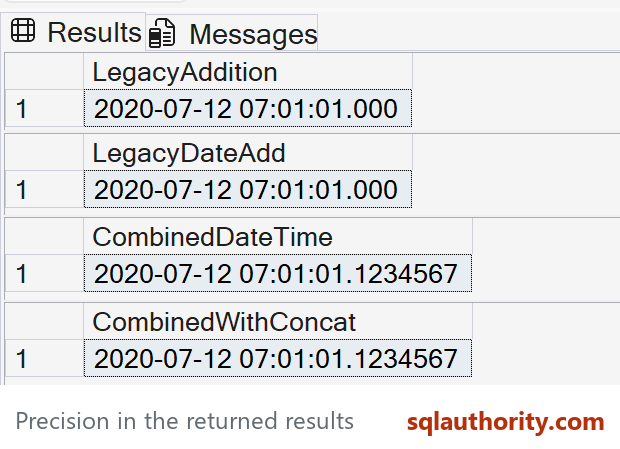
Both modern examples return 2020-07-12 07:01:01.1234567. With precision 7, the fractions argument counts 100-nanosecond units; DATEPART(nanosecond, @tm) / 100 converts to those units without losing the supported time(7) precision.
I originally asked readers to contribute a CONCAT solution. The second modern statement is that answer. It explicitly formats the date, puts the ISO T separator between date and time, and converts to datetime2. Implicit language-dependent string conversions would make this simple task unnecessarily fragile.
Nulls and time zones
Decide what a missing date or time should mean. The FROMPARTS approach with either input NULL returns NULL here. CONCAT treats NULL as an empty string, so don’t assume it has the same missing-value behavior; validate inputs or return NULL explicitly before concatenating.
A date plus a local time doesn’t identify a time zone or resolve daylight-saving ambiguity. Use the application’s known zone and an appropriate datetimeoffset conversion when you need an actual moment in time.
Published by Pinal Dave on SQLAuthority. More of my work at pinaldave.com.
Discover more from SQL Authority with Pinal Dave
Subscribe to get the latest posts sent to your email.




4 Comments. Leave new
DECLARE @dt DATE = ‘2020-07-12′
DECLARE @tm TIME = ’07:01:01.000′
SELECT concat(@dt,’ ‘, @tm) AS [CombineDateTime]
DECLARE @dt DATE = ‘2020-07-12′
DECLARE @tm TIME = ’07:01:01.000’
SELECT CAST(concat(@dt, ‘ ‘, @tm) as datetime2(0) /* my preference */) CombineDateTime
Ah… be careful now. A TIME column defaults to TIME(7). Any reduction in precision, like converting to DATETIME, will cause rounding. While you might be able to put up with 1 or 2 milliseconds of rounding, ask yourself what happens when that rounding bumps things up to the next second, minute, hour, day, week, month, or ever year. Don’t use anything that involves an implicit or explicit conversion to DATETIME for this.
Also, don’t use the concatenation methods that involve a string conversion. It’ll make your code about twice as slow and will become a part of the “Death by a 1000 small performance issues” that our servers frequently suffer from.
One of the correct ways to do this is with the following formula. Of course, the DECLARE is to just setup the test data.
DECLARE @dt DATE = ‘2020-12-31′
,@tm TIME = ’23:59:59.9991234′
;
SELECT Combined = DATEADD(dd,DATEDIFF(dd,’1900’,@dt),CONVERT(DATETIME2,@tm))
;
That returns a DATETIME2 value of 2020-12-31 23:59:59.9991234.
If you do the same thing with the originally posted formula, you get a nasty surprise both for resolution and the fact the every date part in the entire date was bumped up to the beginning of the next year.
DECLARE @dt DATE = ‘2020-12-31′
,@tm TIME = ’23:59:59.9991234’
;
SELECT DATEADD(DAY,DATEDIFF(DAY, 0, @dt),CAST(@tm AS DATETIME)) AS [CombineDateTime]
And that returns something that looks nothing like the original …
2021-01-01 00:00:00.000
Try it and see.
p.s. If you use the same data as the example I posted for the first method, you find that the second method in this article has an identical issue because of the use of DATETIME. The second method will work correctly if you change DATETIME to DATETIME2.