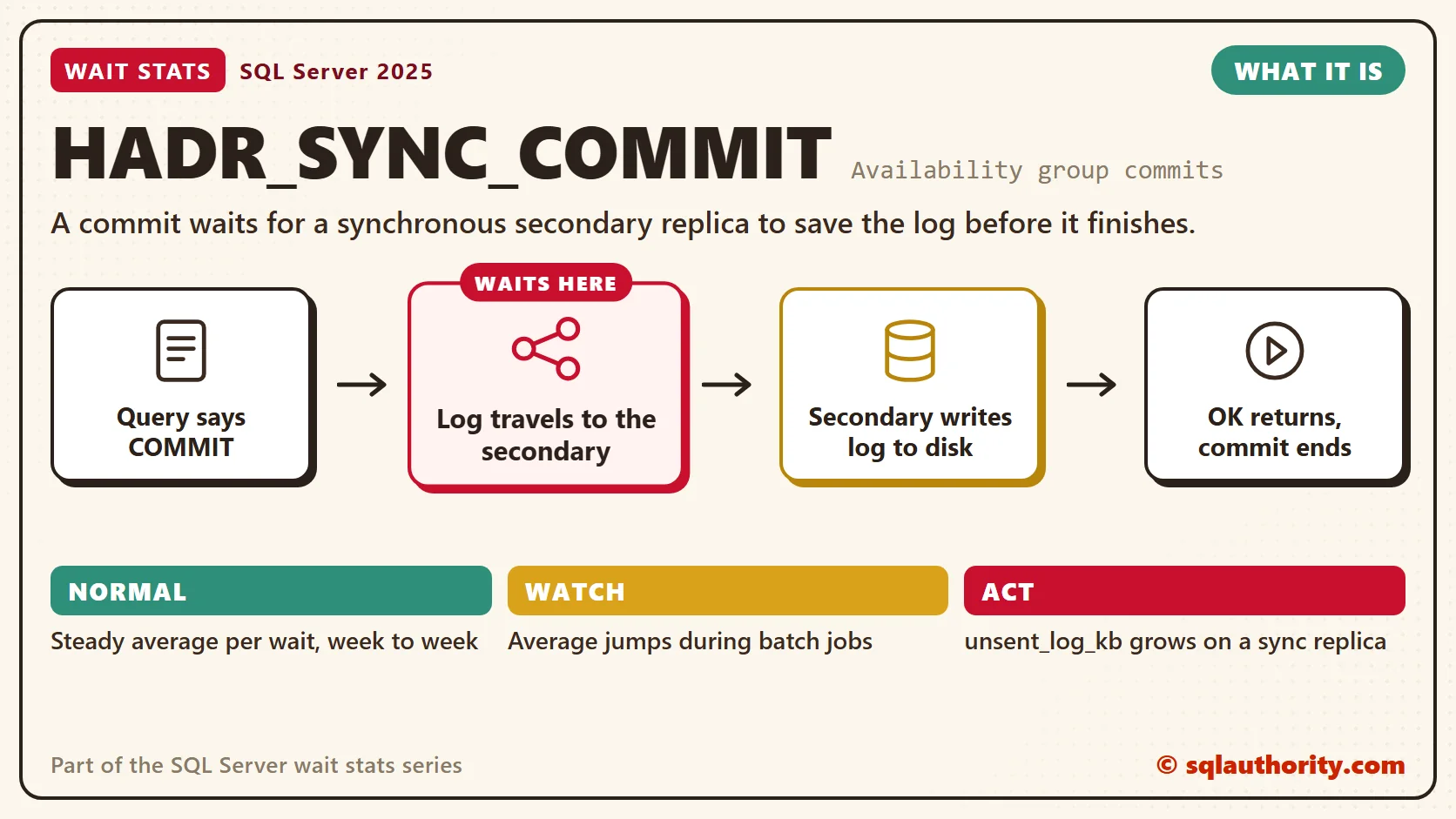
HADR_SYNC_COMMIT wait stats measure how long a commit waits for a synchronous secondary replica to save the log. You only see it in availability groups that use synchronous commit. Some of it is the fair price of a second safe copy. The real question is whether you’re paying more than you should.

This post is part of my wait stats series, told as one story at the Clipboard Diner. Every post is listed in the series guide.
Night 22 at the Clipboard Diner
Quinn had gone back to carrying two plates at a time, and the pass stayed clear all evening. So Casey took on something bigger. The Clipboard Diner now had a sister diner across town, on Elm Street. If a storm ever closed the highway, Elm Street could open with every order still on the books.
That safety came with a rule, written on a card above the wall phone: Call every sale to Elm St. Pat wrote each sale in the order book, then phoned it across town. The clerk at Elm Street wrote the same sale in their own book. Then the clerk said, “Got it,” and only then could the plate leave the pass.
Most nights the call took a second. Tonight rain crackled on the line, and the clerk across town was writing with a dull pencil. At 6:45 PM the Wednesday bridge club came in together, eight small checks in a row. Pat wrote each one in a second. Each phone call took four. Finished plates lined up at the pass, waiting for “Got it.”
Across town, the clerk also copied each sale onto the Elm Street menu board. That part ran late tonight, but no plate waited for it. Casey timed both, then wrote: Pat’s pen: 1 second. The phone call: 4.
What HADR_SYNC_COMMIT Means
That’s what SQL Server does in an availability group with synchronous commit. An availability group keeps copies of a database on other servers, called secondary replicas. In synchronous-commit mode, a commit on the primary can’t finish until each synchronized secondary has hardened the log. Hardened means written to the secondary’s own log file on disk.
So the commit pays for a round trip. The log blocks travel over the network, the secondary writes them to its log disk, and the acknowledgment comes back. The primary writes its own log at the same time. That local part is Pat’s pen in the story. It shows up as WRITELOG, covered in WRITELOG Wait Stats.
Redo is a separate step. The secondary replays the hardened log into its data files afterward, like the clerk copying sales onto the menu board. A big redo queue makes a readable secondary fall behind and slows a failover. It doesn’t hold up commits on the primary.
If a synchronous secondary stops answering, the primary drops it after a timeout and commits without it. The REQUIRED_SYNCHRONIZED_SECONDARIES_TO_COMMIT setting makes the primary refuse commits without a set number of synchronized copies.
HADR_SYNC_COMMIT is the HADR_ wait to read first. Several other HADR_ waits belong to background tasks. Six of them sit in the series list of 87 harmless waits, from the sys.dm_os_wait_stats post. Harmless Wait Stats explains why they’re safe to skip.
Normal or a Problem?
| Situation | What it means | What to do |
|---|---|---|
| HADR_SYNC_COMMIT is in your top waits, and its average per wait is steady week to week | The normal price of a synchronous copy. | Record it as your baseline. Watch the average, not the total. |
| The wait count and total jump during batch jobs | Many tiny commits, each paying the round trip. | Commit in batches. |
| The average per wait jumps during batch jobs | The job sends more log than the network or the secondary’s log disk can handle. | Check both while the job runs. |
| unsent_log_kb grows for a synchronous replica | The network or the secondary can’t keep up. | Check the network and the secondary’s log disk. |
| A synchronous replica sits in a distant data center | Every commit pays for the distance. | Switch that replica to asynchronous commit. |
| unreplayed_log_kb grows, but commits are fine | The secondary hardens fast and replays slowly. | Look at the secondary’s data disk and read workload. |
See It on Your Server
The first query puts the remote wait next to the local one. Run it on the primary.
-- Average HADR_SYNC_COMMIT and WRITELOG per wait since the last restart
SELECT wait_type,
       waiting_tasks_count,
       wait_time_ms,
       CAST(1.0 * wait_time_ms / NULLIF(waiting_tasks_count, 0) AS decimal(18, 2)) AS avg_wait_ms
FROM sys.dm_os_wait_stats
WHERE wait_type IN (N'HADR_SYNC_COMMIT', N'WRITELOG');
Compare the two averages. When HADR_SYNC_COMMIT is far above WRITELOG, look at the network and the secondary first. WRITELOG covers every database on the server, so treat this as a lead and confirm it on the secondary. These totals run since the last restart. Measure your busy hour with the method from Wait Stats Over Time.
The second query shows how far behind each secondary copy is. Run on the primary, it lists one row per database on each secondary. The replica_server_name column names the secondary. The where_it_waits column says, in plain words, which side of the phone call holds the log.
-- Where is the log waiting? One row per secondary copy (run on the primary)
SELECT DB_NAME(drs.database_id) AS database_name,
       ar.replica_server_name,
       ar.availability_mode_desc,
       drs.synchronization_state_desc AS sync_state,
       drs.is_suspended,
       drs.log_send_queue_size AS unsent_log_kb,
       drs.redo_queue_size AS unreplayed_log_kb,
       CASE
           WHEN drs.is_suspended = 1 THEN 'data movement suspended'
           WHEN drs.log_send_queue_size IS NULL
             OR drs.redo_queue_size IS NULL THEN 'no report: check the connection'
           WHEN drs.log_send_queue_size > 0 THEN 'still leaving the primary'
           WHEN drs.redo_queue_size > 0 THEN 'hardened, still replaying'
           ELSE 'no backlog reported'
       END AS where_it_waits
FROM sys.dm_hadr_database_replica_states AS drs
LEFT JOIN sys.availability_replicas AS ar
    ON ar.replica_id = drs.replica_id
WHERE drs.is_local = 0
ORDER BY unsent_log_kb DESC, unreplayed_log_kb DESC;
These numbers are the primary’s latest report from each secondary, so read sync_state and is_suspended first. The queues don’t show the time spent writing and acknowledging the log. Measure that on the secondary’s log disk and the network.
A healthy synchronous replica shows SYNCHRONIZED and an unsent_log_kb near zero. A growing unsent_log_kb means log is piling up on the primary faster than it can leave. A growing unreplayed_log_kb means the secondary has the log but is slow to replay it. That hurts failover time, not commit time.
The Easy Way Out
You could say the fix is easy: make every replica asynchronous, and the wait disappears. Fair point, it does. But with asynchronous commit, a failover can lose the last transactions the secondary hadn’t received yet. That’s a business decision about data loss, not a tuning knob.
It’s tempting to tune the primary’s log disk for this wait. That can burn a whole day while the primary’s log is fine. The trouble sits on the secondary, with its log on a slow shared disk. Nobody checks that disk, because nobody runs queries there.
Fix It
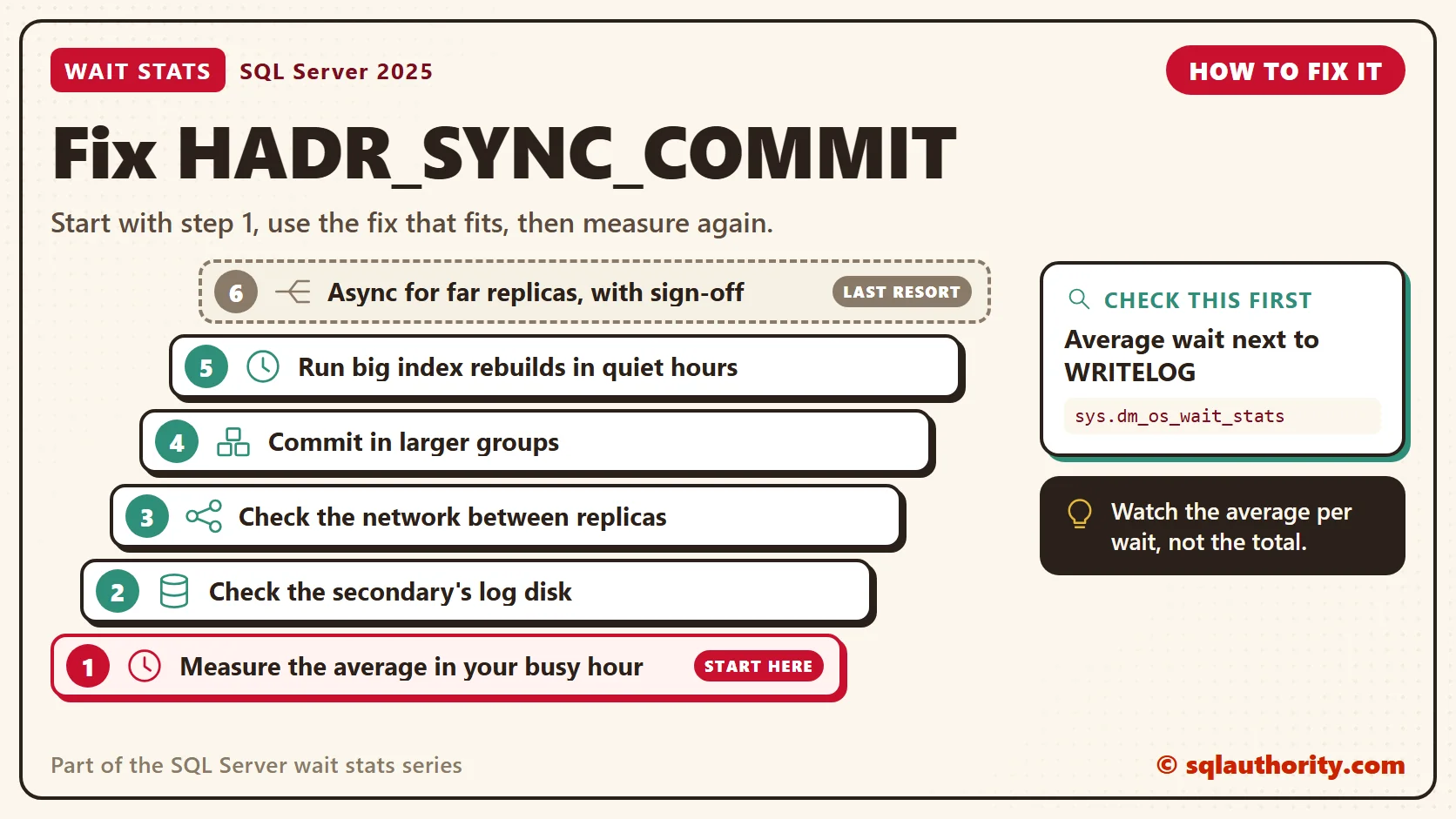
- Measure the average per recorded wait in your busy hour, and compare it with the WRITELOG average.
- Check the secondary’s log disk. On the secondary, read io_stall_write_ms per write for the log file from sys.dm_io_virtual_file_stats. It needs log storage as fast as the primary’s.
- Check the network between replicas: round-trip latency, and bandwidth during big jobs. A growing send queue points here.
- Commit less often. A loop that commits every row pays the round trip every row. Group the rows into larger transactions.
- Run large index rebuilds in quiet hours. They create a lot of log, and every byte crosses to the secondary.
- Use asynchronous commit for distant replicas, such as a disaster recovery site. Keep synchronous commit for the nearby replica you’d fail over to. Automatic failover needs synchronous commit, so set a replica’s failover mode to manual before you make it asynchronous.
New in SQL Server 2022 and 2025
Nothing in SQL Server 2022 or 2025 changes what HADR_SYNC_COMMIT means. A synchronous commit still waits for the secondary to harden the log. What still matters is fast log storage on every synchronous replica and a short network path between them.
Related Reading
The Clipboard Diner, a wait stats series. Previous: ASYNC_NETWORK_IO Wait Stats: When the Application Is Slow. Next: OLEDB Wait Stats: Linked Servers and Remote Calls. Every post is listed in the series guide.
Next, the pie case runs empty, and the bakery is across the street.
HADR_SYNC_COMMIT is not a slow primary, it is the price of one phone call before every plate leaves.
Published by Pinal Dave on SQLAuthority. More of my work at pinaldave.com.
Discover more from SQL Authority with Pinal Dave
Subscribe to get the latest posts sent to your email.