
WRITELOG wait stats measure the time a commit waits for its log records to reach the disk. A fully durable transaction that changed data isn’t finished until its log is safe on disk. So its commit waits for a log flush, and a slow flush shows up here.

This post is part of my wait stats series, told as one story at the Clipboard Diner. Every post is listed in the series guide.
Night 17 at the Clipboard Diner
After the pie standoff, Casey taped a new rule above booth 7: Hand back the card when you’re done. The next evening started quietly. Then the Friday supper crowd came in, and by seven every stool was full.
One rule at the Clipboard Diner never bends. Pat writes every sale in the order book before its plate can leave the pass. If the kitchen burns down, the book survives in the safe, and Casey knows who paid for what. Nobody argues with the rule. Tonight it cost them.
Pat was using the old fountain pen, the one that skips and blots. Each line took forever. Then six truckers at the counter ordered one coffee each, on six separate tickets. Six coffees meant six lines in the book, one after another. Behind Pat, plates lined up under the heat lamp. The fries went limp. Quinn stood at the pass with nothing to carry.
Casey timed one line with the stopwatch. Forty seconds. The cooks were fast and the plates were ready. Everything waited on one slow pen. Casey handed Pat a cheap ballpoint from the cup by the register. Then Casey asked the truckers, nicely, if one ticket for the whole counter would do. The plates started moving. Casey wrote: Pat’s pen, 40 seconds a line. Six coffees, six lines.
What WRITELOG Means
That’s what SQL Server does at every commit. The plate is ready, but it can’t leave until the sale is written in the book on disk.
SQL Server uses write-ahead logging. When a query changes a row, it changes the page in memory. It also writes a log record into the log buffer. The data page can go to disk later, at a checkpoint. The log can’t wait. Before SQL Server tells your application “committed”, the log records for that transaction must be written to the log file. That write is a log flush, and the time a commit spends waiting for it is WRITELOG.
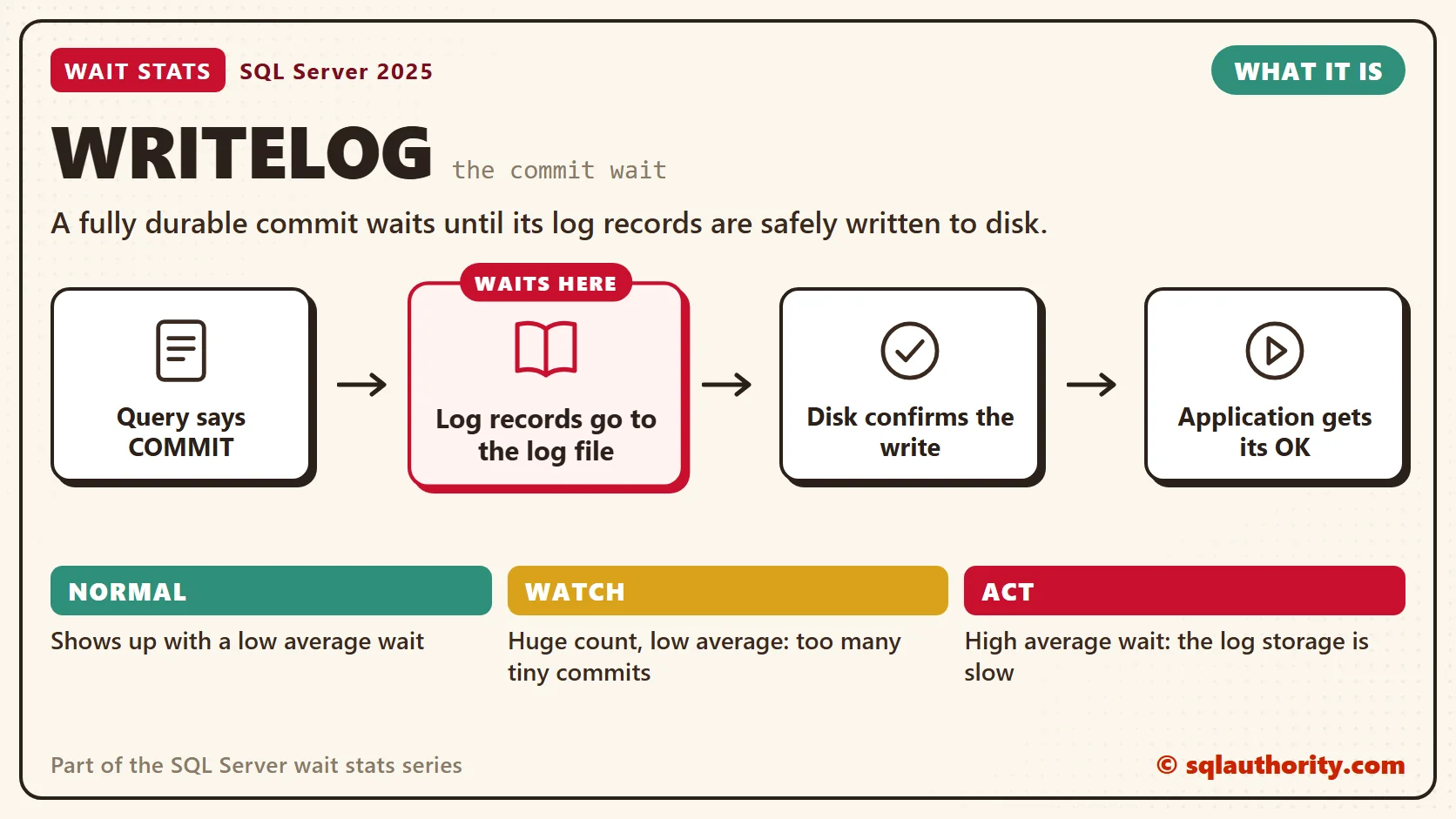
Each flush writes one log block, and a log block is at most 60 KB. A commit forces a flush of the block holding its commit record. Checkpoints cause log flushes too.
That gives WRITELOG two causes, the same two Casey found. The first is a slow pen: log storage with high write latency. The second is too many lines: thousands of tiny transactions, each with its own commit and its own flush. Without an explicit transaction, every single INSERT is its own transaction. A loop that inserts 10,000 rows that way waits on the disk 10,000 times.
Normal or a Problem?
| Situation | What it means | What to do |
|---|---|---|
| WRITELOG shows up with a low average wait | Normal. Every commit waits on the disk a little. | Leave it alone. |
| WRITELOG near the top with a high average wait | The log storage is slow. | Check log file latency, then the storage. |
| Huge WRITELOG count, low average wait | Many tiny commits. | Batch the commits in the application. |
| WRITELOG and LOGBUFFER climb together | The log can’t keep up with the volume. | Read the LOGBUFFER post next. |
| Log files share a volume with data files or other busy logs | Log writes wait behind other I/O. | Give busy logs their own fast storage. |
See It on Your Server
First, the wait itself. Divide wait_time_ms by waiting_tasks_count, and you get the average WRITELOG wait. Most of those waits are commits, but checkpoints and full log blocks flush too. So read it as the average flush wait, not an exact commit time.
-- How long is the average wait for a log flush?
SELECT wait_type,
       waiting_tasks_count,
       wait_time_ms,
       max_wait_time_ms,
       CAST(wait_time_ms * 1.0 / NULLIF(waiting_tasks_count, 0) AS decimal(12, 2)) AS avg_wait_ms
FROM sys.dm_os_wait_stats
WHERE wait_type IN (N'WRITELOG', N'LOGBUFFER')
ORDER BY wait_time_ms DESC;
Next, the log files. This query shows write latency and write size for every transaction log on the server.
-- Which log file makes commits wait the longest: slow writes or tiny writes?
SELECT DB_NAME(mf.database_id) AS database_name,
       mf.name AS log_file,
       CAST(vfs.io_stall_write_ms / 1000.0 AS decimal(18, 1)) AS write_waited_sec,
       vfs.num_of_writes,
       CAST(1.0 * vfs.io_stall_write_ms / NULLIF(vfs.num_of_writes, 0) AS decimal(10, 2)) AS avg_write_ms,
       CAST(vfs.num_of_bytes_written / 1024.0 / NULLIF(vfs.num_of_writes, 0) AS decimal(10, 1)) AS avg_write_kb,
       mf.physical_name
FROM sys.master_files AS mf
JOIN sys.dm_io_virtual_file_stats(NULL, NULL) AS vfs
    ON vfs.database_id = mf.database_id
   AND vfs.file_id = mf.file_id
WHERE mf.type_desc = N'LOG'
ORDER BY vfs.io_stall_write_ms DESC;
The database at the top has the biggest write_waited_sec, so it waited longest on its log. On modern flash storage I expect avg_write_ms of a few milliseconds or less. A high avg_write_ms points at the storage. A small avg_write_kb with a huge num_of_writes points at tiny commits, because each tiny commit writes a tiny block. These numbers are totals since the last restart, so compare a busy hour the way Wait Stats Over Time shows.
Here’s the tiny commit problem in a script. It creates a table and writes data, so run it only on a scratch database on a test server. The second loop does the same work with a commit every 1,000 rows. It flushes the log far fewer times.
-- WRITES DATA: test server, scratch database only
-- One commit per row vs one commit per 1,000 rows
CREATE TABLE dbo.OrderBook (OrderBookID int IDENTITY(1, 1) PRIMARY KEY, Note nvarchar(50) NOT NULL);
SET NOCOUNT ON;
DECLARE @i int = 1;
WHILE @i <= 10000
BEGIN
    INSERT INTO dbo.OrderBook (Note) VALUES (N'one coffee');
    SET @i += 1;
END;

SET NOCOUNT ON;
DECLARE @j int = 1;
BEGIN TRANSACTION;
WHILE @j <= 10000
BEGIN
    INSERT INTO dbo.OrderBook (Note) VALUES (N'one coffee');
    IF @j % 1000 = 0
    BEGIN
        COMMIT TRANSACTION;
        BEGIN TRANSACTION;
    END;
    SET @j += 1;
END;
COMMIT TRANSACTION;
Run each loop on its own, with the WRITELOG query before and after it. The first loop adds thousands of waits, and the second adds a handful.
Fix It
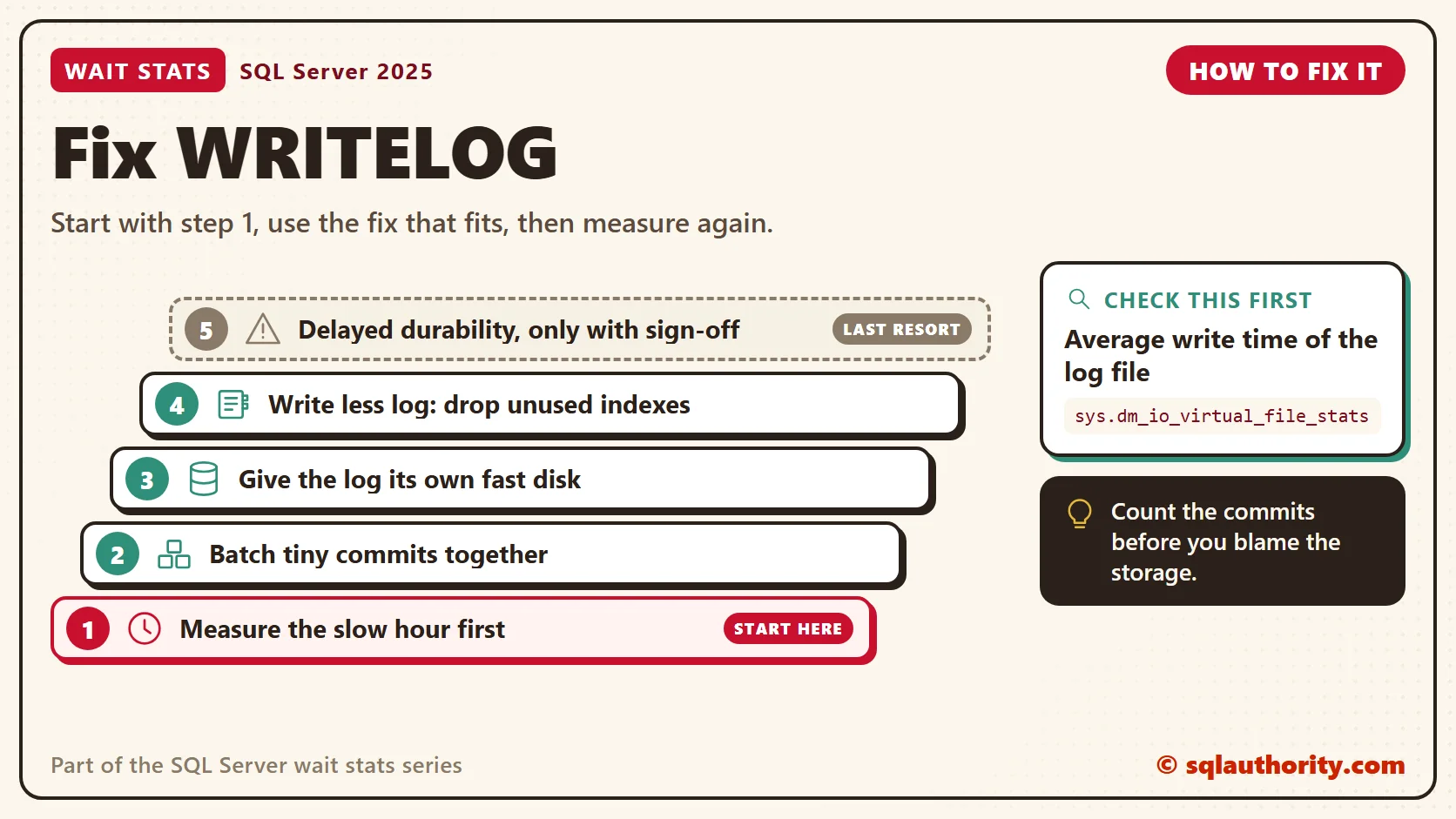
It’s easy to blame the storage team for WRITELOG. Check the commits before you make that call. A common culprit is an import that writes one row per transaction. One explicit transaction per batch can cut that import from hours to minutes.
- Measure first. Read the average WRITELOG wait and the log file latency during the slow hour.
- Batch tiny commits. Group rows into one transaction per batch, as in the second loop. Keep batches small enough that locks stay short.
- Give the log fast storage. Put busy logs on their own low-latency volume. One log file is enough, because SQL Server writes to one log file at a time.
- Write less log. Every index that a change touches adds its own log records. Drop indexes nobody reads, and don’t update rows that didn’t change.
- Delayed durability, only with a signed-off risk. It’s the last step, and it needs a business decision first.
Delayed durability lets a commit return before its log reaches the disk. SQL Server writes the log a little later in bigger blocks. If SQL Server stops before that write, even for a planned restart, those transactions are gone. The application was told they committed. Use it only when the business accepts losing the last moments of data in writing. You turn it on per database, then ask for it at commit. The ALTER changes a database setting, so try it on a test server first:
-- CHANGES A DATABASE SETTING: test server first
ALTER DATABASE ScratchDB SET DELAYED_DURABILITY = ALLOWED;
-- inside the application's transaction:
-- COMMIT TRANSACTION WITH (DELAYED_DURABILITY = ON);
-- to harden everything written so far:
-- EXEC sys.sp_flush_log;
You could say the real fix is always faster disks. Fair point, faster storage makes every flush cheaper. But an application that commits one row at a time still pays one round trip per row. Fix the commits first. Then measure again before you buy new storage.
New in SQL Server 2022 and 2025
Nothing new changes what WRITELOG means. Each fully durable commit still waits for its log flush. One change helps the log file in general. Since SQL Server 2022, log growths of 64 MB or less use instant file initialization, so they skip zeroing. That covers the 64 MB default log growth new databases have had since SQL Server 2016. That makes growth pauses shorter, but it doesn’t make a commit’s flush faster.
Related Reading
- WRITELOG Waits: Finding What Slows Transaction Log Writes
- Impact of Recovery Model on Insert Workload Stress Test and Wait Statistics
The Clipboard Diner, a wait stats series. Previous: THREADPOOL Wait Stats: When Worker Threads Run Out. Next: LOGBUFFER Wait Stats: When the Log Buffer Fills. Every post is listed in the series guide.
Pat’s little notepad is next, and it fills up faster than Pat can copy it into the book.
A durable commit is not done when the query finishes, it is done when the log is on disk.
Published by Pinal Dave on SQLAuthority. More of my work at pinaldave.com.
Discover more from SQL Authority with Pinal Dave
Subscribe to get the latest posts sent to your email.




4 Comments. Leave new
Nice one..Thanks Sir.
Hi Dave,
Can you please fix the link for “Find the most active file based on IO stall time based on the script written over”. It appears to be broken.
Sunil, here is the corrected link:
http://blog.sqlauthority.com/2010/04/19/sql-server-find-most-active-database-in-sql-server-dmv-dm_io_virtual_file_stats/
What do you do when 50% of your waits are WRITELOG on Hyperscale?
The disks are insanely fast…
I guess I’ll find out soon enoug