user_lookups is a starting point for checking a query’s missing index coverage. The counter does not name that query or its missing columns. Read the actual plan before widening an index.

Rank user_lookups with its counter window
This read-only query ranks ordinary clustered indexes in the current database. It includes startup context and the other access counters. It does not identify the nonclustered index behind each lookup. A heap uses a different RID Lookup path.
-- Read-only ranking in the current database. Counts are cumulative access operations.
SELECT SYSUTCDATETIME() AS CaptureUtc, s.sqlserver_start_time AS ServerStartTime,
 DB_ID() AS DatabaseId, SCHEMA_NAME(t.schema_id) AS TableSchema,
 t.name AS TableName, i.name AS ClusteredIndex,
 u.user_lookups AS UserLookups, u.user_seeks AS UserSeeks,
 u.user_scans AS UserScans, u.user_updates AS UserUpdates
FROM sys.tables AS t JOIN sys.indexes AS i ON i.object_id=t.object_id
JOIN sys.dm_db_index_usage_stats AS u
 ON u.database_id=DB_ID() AND u.object_id=i.object_id AND u.index_id=i.index_id
CROSS JOIN sys.dm_os_sys_info AS s
WHERE t.is_ms_shipped=0 AND i.type=1 AND i.index_id=1
 AND u.user_lookups>0
ORDER BY u.user_lookups DESC,t.object_id;
An empty result means no visible positive lookup rows match this query.
Treat counts as cumulative access operations, rather than rows read or time spent. The view can lose rows at restart or database shutdown. The original capture window therefore matters. On SQL Server 2022 or later, the diagnostics require VIEW SERVER PERFORMANCE STATE.
Ask which columns the query still needs
A narrow nonclustered index can find qualifying clustered keys. A Key Lookup can then retrieve missing columns from the clustered row. Inspect the lookup’s object, output columns and actual execution count. The clustered counter alone cannot supply that explanation.
A small number of selective lookups can be a sensible plan. Many returning rows can make a scan economical instead. The useful question is whether a specific repeated access deserves a change. An operator name by itself is insufficient evidence.
Compare complete values before comparing access
The code below creates 5,000 sample rows in a temporary table, with 1,000 category values. Category 1 selects five rows. A narrow category index omits Payload. The demonstration then rebuilds that same index with Payload included.
Enable Include Actual Execution Plan in SSMS and run the whole block. The comments mark the two capture points. The optimizer chooses the access paths without forced index or join hints.
DROP TABLE IF EXISTS #DemoRows, #Before, #After;
CREATE TABLE #DemoRows
(Id int NOT NULL PRIMARY KEY CLUSTERED, Category int NOT NULL, Payload varchar(200) NOT NULL);
CREATE TABLE #Before(Id int NOT NULL PRIMARY KEY, Payload varchar(200) NOT NULL);
CREATE TABLE #After(Id int NOT NULL PRIMARY KEY, Payload varchar(200) NOT NULL);

;WITH Digits AS
(SELECT n FROM (VALUES(0),(1),(2),(3),(4),(5),(6),(7),(8),(9)) AS d(n)),
Numbers AS
(SELECT 1+a.n+10*b.n+100*c.n+1000*d.n AS n
 FROM Digits AS a CROSS JOIN Digits AS b CROSS JOIN Digits AS c CROSS JOIN Digits AS d)
INSERT #DemoRows(Id,Category,Payload)
SELECT n, n%1000, CONVERT(varchar(12),n)+REPLICATE('x',188) FROM Numbers WHERE n<=5000;

CREATE INDEX IX_DemoRows_Category ON #DemoRows(Category);

-- Actual-plan capture point 1: Payload is absent from the narrow nonclustered index.
SELECT Id,Payload FROM #DemoRows WHERE Category=1;
INSERT #Before SELECT Id,Payload FROM #DemoRows WHERE Category=1;

CREATE INDEX IX_DemoRows_Category ON #DemoRows(Category)
 INCLUDE(Payload) WITH (DROP_EXISTING=ON);

-- Actual-plan capture point 2: the same query is covered by the wider nonclustered index.
SELECT Id,Payload FROM #DemoRows WHERE Category=1;
INSERT #After SELECT Id,Payload FROM #DemoRows WHERE Category=1;

-- Compare the complete results in both directions.
SELECT (SELECT COUNT(*) FROM #Before) AS BeforeRows,
 (SELECT COUNT(*) FROM #After) AS AfterRows,
 (SELECT COUNT(*) FROM (SELECT * FROM #Before EXCEPT SELECT * FROM #After) AS x) AS MissingAfter,
 (SELECT COUNT(*) FROM (SELECT * FROM #After EXCEPT SELECT * FROM #Before) AS y) AS NewAfter;

DROP TABLE #After, #Before, #DemoRows;
The code saves all five identifiers and payloads before and after the index change. It compares the complete results in both directions. Each identifier is unique, so duplicate rows cannot disappear behind EXCEPT. The last query shows both row counts and zero differences.
Read what the actual plans chose
If the first query chooses a seek and Key Lookup, follow the rows into the lookup. Inspect its missing Payload access and runtime executions. If it chooses a clustered scan, retain that observed result. Do not force a lookup merely to make the picture attractive.
The included column makes this particular query eligible for covered access. The clustered Id key is available as its row locator. The optimizer still chooses the actual plan. A cleaner diagram does not by itself prove a production speed improvement.
What the actual covering comparison showed
Both tested queries returned the same five complete identifiers and payloads. The narrow-index plan used a category seek and Key Lookup. Its lookup returned five rows over five executions. After coverage, the plan used one covering index seek with no lookup.
| Access | Executions | Rows read | Logical reads |
|---|---|---|---|
| Before: category Index Seek | 1 | 5 | 2 |
| Before: Key Lookup | 5 | 5 | 10 |
| After: covering Index Seek | 1 | 5 | 2 |
These counters belong to the named access operators, rather than every operator in the query. The lookup’s actual XML identifies clustered bookmark access. The sample’s millisecond timing counters were zero. They cannot establish an elapsed-time speedup.
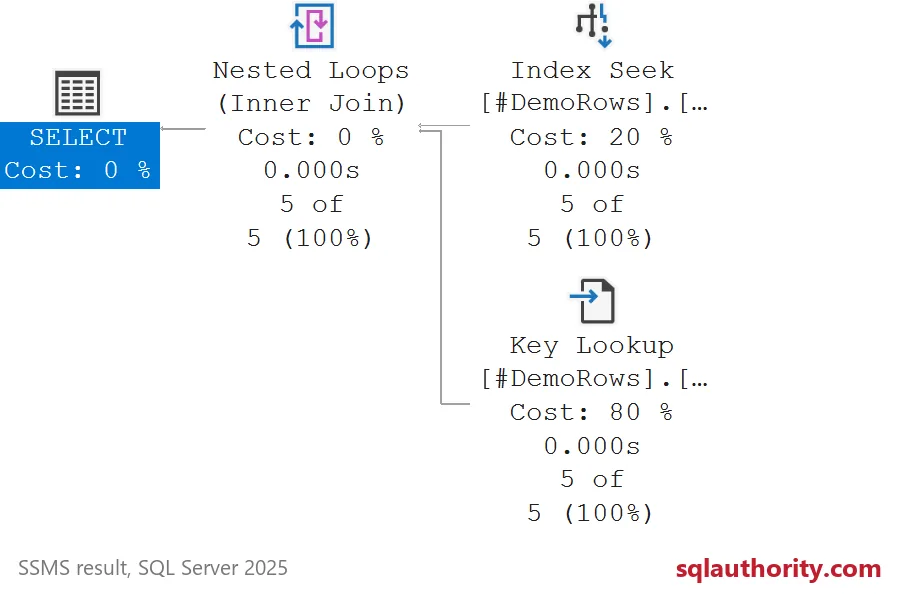
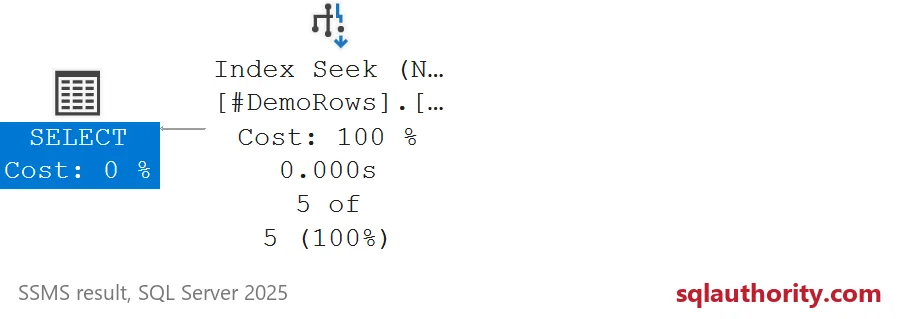
The diagrams’ cost percentages are estimates, not measured time. This comparison confirms a changed access pattern and unchanged returned values. Representative query parameters, index size and writes still determine the production tradeoff.

Pay attention to the wider index’s write cost
INCLUDE stores the projected column without making it a search key. More included data increases index storage and maintenance. Keep only coverage the query needs. Review existing overlap before adding another wide index.
I would argue against the include when rare lookups cost less than maintaining another payload copy. Test representative predicate values and writes, not only the five-row demonstration. Narrowing the requested result can also change coverage needs. That option requires the caller’s agreement because it changes returned data.
Check the same query after the change
Retain the original index definition and the exact query parameters. Compare complete values, actual plan work and representative workload behavior. Cumulative user_lookups does not decrease when coverage is added. Use a valid later interval or query-specific evidence to evaluate new activity.
Look at one real query plan and the counter will start to make sense.
A lookup count is not an index prescription, it is a reason to inspect a particular query.
Published by Pinal Dave on SQLAuthority. More of my work at pinaldave.com.
Discover more from SQL Authority with Pinal Dave
Subscribe to get the latest posts sent to your email.