
LCK_M wait stats show how long queries wait for a lock that another session holds. The lock itself is healthy, because it keeps two changes from colliding. The trouble starts when one session holds its locks far too long, and everyone behind it waits.

This post is part of my wait stats series, told as one story at the Clipboard Diner. Every post is listed in the series guide.
Night 15 at the Clipboard Diner
The night truck had finally rolled out with every crate full and the road clear. Wednesday started easy. By eight the diner was packed, and the jukebox was on its ninth round of the same old song. A softball team of six took booth 7 and stood the red “Reserved” card between the ketchup and the napkins.
They finished their milkshakes at 8:05. They paid Pat at 8:15 and tipped well. Then they stayed. Nobody ordered, nobody ate, and the card stayed up while they argued about the fourth inning.
By nine, three parties were waiting. A family of five wanted booth 7, the only booth big enough for them. They held the two-top by the window while they waited. Two truckers wanted that two-top, and a birthday group stood behind the family for booth 7 as well.
Quinn kept looking at booth 7, then at Casey. Casey walked the line backward. The truckers waited on the family, the family waited on booth 7, and booth 7 waited on nothing at all. The softball team had paid. They had never handed back the card.
At 9:40 Casey carried a fresh pot of coffee over. Would they like to finish the story at the counter? They laughed and moved in two minutes. Three parties sat down within five. Then Casey wrote it on the clipboard: Booth 7 paid at 8:15. Still here at 9:40.
What LCK_M Waits Mean
That’s what SQL Server does when a session finishes its work but never ends its transaction. Its locks stay in place, and every request that needs those rows waits with an LCK_M wait.
Before SQL Server reads or changes data, it takes a lock on it. Each lock has a mode. When a request asks for a mode that conflicts with a lock someone else holds, it waits. The wait type is LCK_M_ plus the mode it asked for, not the mode the other session holds. These are the ones I see most.
- LCK_M_S: waiting for a shared lock to read. Under the default read committed level, readers wait for writers.
- LCK_M_U: waiting for an update lock. An UPDATE or DELETE takes these while it searches for the rows to change.
- LCK_M_X: waiting for an exclusive lock to change a row, page or table.
- LCK_M_IS and LCK_M_IX: waiting for an intent lock on a table or page. Think of a sign on the door that says someone inside is reading or changing. These waits show up when another session holds the whole table, for example after lock escalation.
- LCK_M_SCH_S: waiting for a schema stability lock. Every query takes one to compile and run.
- LCK_M_SCH_M: waiting for a schema modification lock, used by ALTER TABLE and offline index rebuilds. It conflicts with every other lock. While it waits, new queries on that table line up behind it.
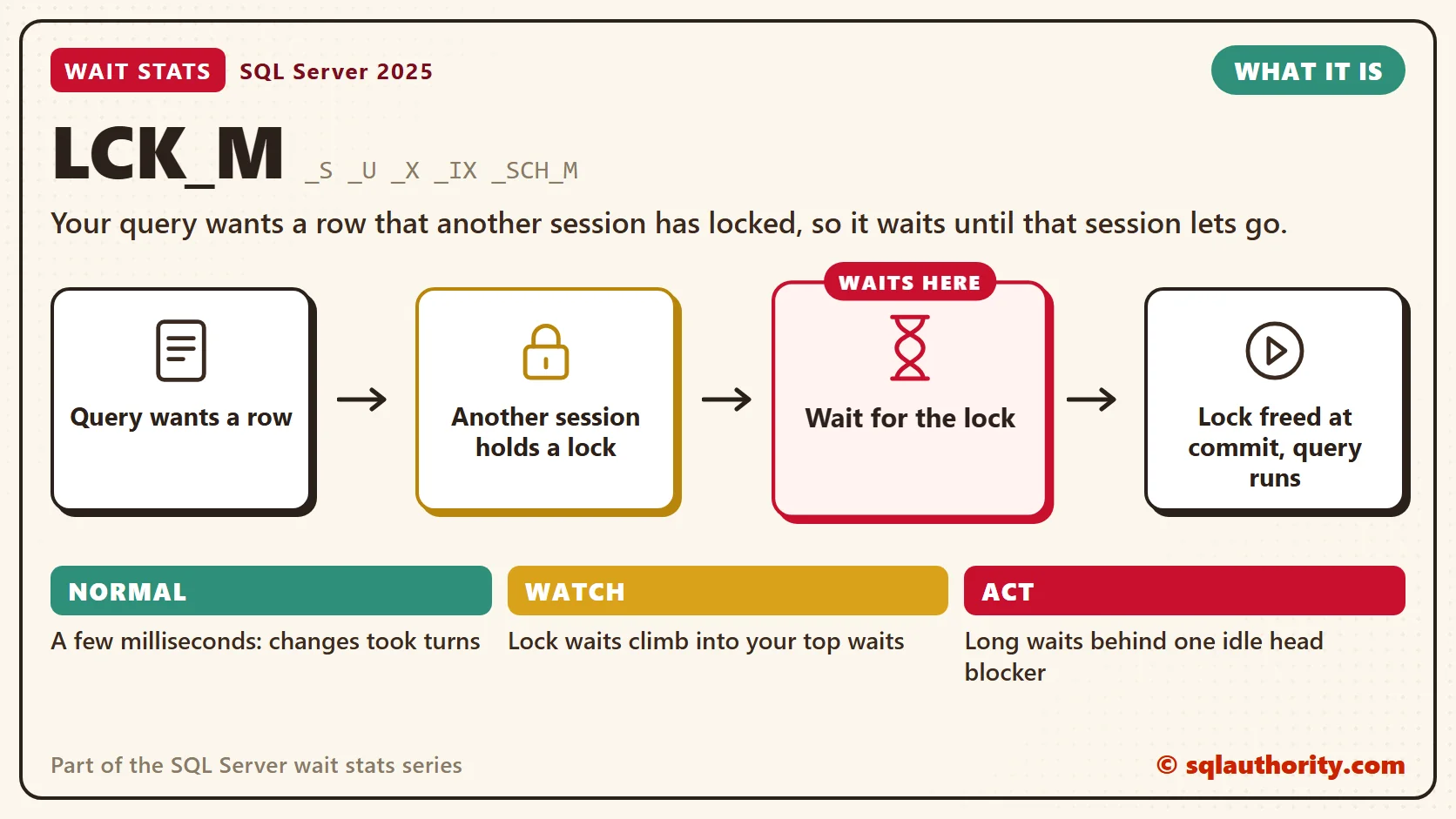
Blocking rarely stays one-on-one. One session waits on another, a third waits on the second, and you get a chain. The session at the front is the head blocker. It blocks others, and nothing blocks it. Fix the head, and the whole chain clears.
In my health checks the head blocker is usually asleep. Its status is sleeping, and its open transaction count is one or more. The application opened a transaction, did its work, and never committed. That’s the softball team that paid and stayed. A deadlock is a different animal: two sessions wait on each other, and SQL Server cancels one. Plain blocking ends only when the head blocker commits, rolls back or gets killed.
Normal or a Problem?
| Situation | What it means | What to do |
|---|---|---|
| Short LCK_M waits, a few milliseconds on average | Normal. Two changes to the same rows took turns. | Leave it alone. |
| LCK_M waits climb into your top waits with long max_wait_time_ms | Someone held locks for a long time. | Find the head blocker during the slow hour. |
| The head blocker is sleeping with an open transaction | The application left a transaction open. | Fix the commit path in the code, then end the session with care. |
| One LCK_M_SCH_M wait with a wall of LCK_M_SCH_S behind it | A schema change or index rebuild waits on readers, and new queries queue behind it. | Move maintenance to a quiet window, or use WAIT_AT_LOW_PRIORITY for online rebuilds. |
| Reports pile up on LCK_M_S during busy write hours | Readers wait on writers. | Consider read committed snapshot isolation (RCSI). |
See It on Your Server
Start with the history. This query lists every lock wait type since the last restart, with its average and its worst single wait.
-- Which lock modes have cost the most wait time since the last restart?
SELECT wait_type,
       waiting_tasks_count,
       wait_time_ms,
       max_wait_time_ms,
       CAST(wait_time_ms * 1.0 / NULLIF(waiting_tasks_count, 0) AS decimal(12, 2)) AS avg_wait_ms
FROM sys.dm_os_wait_stats
WHERE wait_type LIKE N'LCK[_]M[_]%'
  AND waiting_tasks_count > 0
ORDER BY wait_time_ms DESC;
A low average with a huge max_wait_time_ms tells me most lock waits are fine, and a few were terrible. Those few are the ones users remember.
Now look at right now, the way Live Wait Stats taught. The first query below lists every blocked request and who it waits on. The second finds the head blockers and counts the requests stuck directly behind each one.
-- Who is waiting on whom right now, longest wait first?
SELECT r.session_id AS waiting_session,
       r.blocking_session_id AS waits_on,
       r.wait_type,
       CAST(r.wait_time / 1000.0 AS decimal(12, 1)) AS waited_sec,
       r.wait_resource,
       DB_NAME(r.database_id) AS database_name,
       LEFT(t.text, 300) AS query_start
FROM sys.dm_exec_requests AS r
OUTER APPLY sys.dm_exec_sql_text(r.sql_handle) AS t
WHERE r.blocking_session_id > 0
ORDER BY r.wait_time DESC;

-- Which head blockers hold up the most requests, and is their transaction still open?
SELECT s.session_id AS head_blocker,
       q.requests_waiting,
       q.longest_wait_sec,
       s.status,
       s.open_transaction_count,
       s.last_request_end_time,
       s.login_name,
       s.host_name,
       s.program_name
FROM (SELECT blocking_session_id,
             COUNT(*) AS requests_waiting,
             MAX(wait_time) / 1000 AS longest_wait_sec
      FROM sys.dm_exec_requests
      WHERE blocking_session_id > 0
      GROUP BY blocking_session_id) AS q
JOIN sys.dm_exec_sessions AS s
    ON s.session_id = q.blocking_session_id
WHERE NOT EXISTS (SELECT 1
                  FROM sys.dm_exec_requests AS up
                  WHERE up.session_id = s.session_id
                    AND up.blocking_session_id > 0)
ORDER BY q.requests_waiting DESC;
In the head blocker results, look at three columns together. A status of sleeping, an open_transaction_count above zero and an old last_request_end_time mean a transaction nobody finished. The host_name and program_name tell you which application to call. In the first query, wait_resource names the exact row or page. My post on decoding wait_resource turns it into a table name.
Fix It
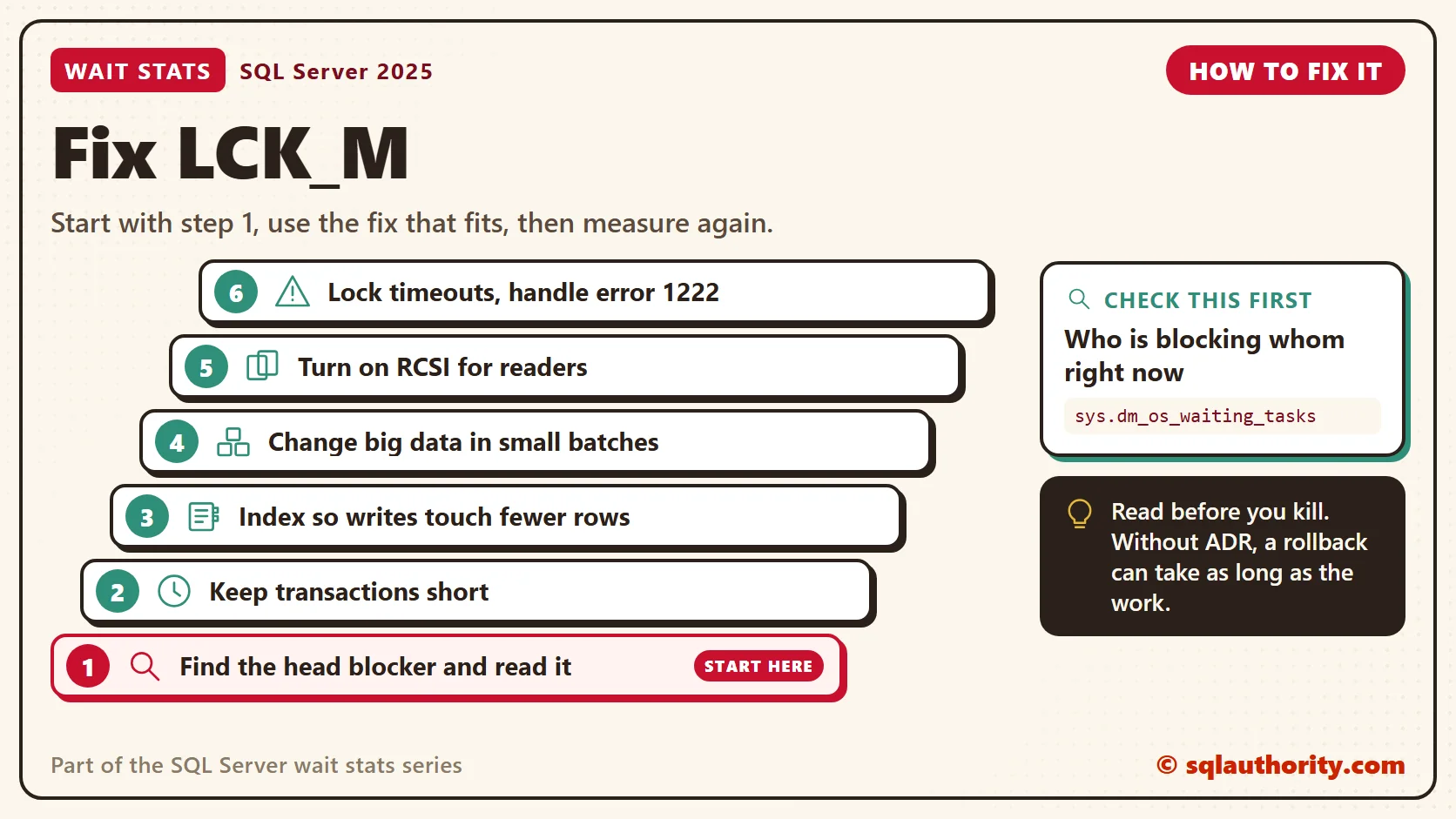
A common mistake is killing a head blocker without looking at what it is. Say it’s a data load that has run for two hours. Without accelerated database recovery (ADR), its rollback can run for nearly two more. With ADR on, the rollback is fast. Read the session and the database setting before you kill.
- Find the head blocker and read it. If an application left a transaction open, end the session with KILL. KILL rolls back the open transaction. Without ADR, a big transaction takes a long time to roll back.
- Keep transactions short. No user prompts, emails or remote calls inside a transaction. Commit in every code path, including errors. SET XACT_ABORT ON rolls the whole transaction back on most run-time errors.
- Index so writes touch fewer rows. An UPDATE that filters on a column with no index scans the whole table. It has to check every row, so it waits on any row someone else holds.
- Batch large changes. Update or delete a few thousand rows per transaction. Each batch commits fast. SQL Server tries lock escalation when one statement holds about 5,000 locks on one table.
- Turn on RCSI for read-heavy databases. Readers then read the last committed version and stop waiting on writers. Writers still block writers.
- Use lock timeouts with care. SET LOCK_TIMEOUT makes a statement give up with error 1222. The transaction can stay open, so catch that error and roll back in your TRY…CATCH block or the application.
You could say NOLOCK solves all of this in one word. Fair point, it stops readers from waiting on row and page locks. It still takes a schema stability lock, so it still waits behind a schema change. And NOLOCK reads changes that haven’t committed, and it can skip or double count rows while pages split. RCSI gives readers committed data without the wait.
RCSI has costs too: a version store, and a test of any code that counted on blocking. Turning it on also needs a moment with no other connections in the database.
New in SQL Server 2022 and 2025
The classic lock waits mean exactly what they always meant. SQL Server 2022 changed nothing about them. SQL Server 2025 adds optimized locking, which is off by default and needs accelerated database recovery first. Writers stop holding row locks until the transaction ends, and new waits such as LCK_M_S_XACT_READ appear.
It’s a big change, and it gets its own post: Optimized Locking Wait Stats. One warning ahead of time: no lock feature fixes a transaction that never ends. The softball team would sit there under any rules.
Related Reading
- Locking, Blocking, and Deadlocking: Differences, Similarities, and Best Practices
- Finding the Indexes Behind Lock Waits With Operational Stats
- SET LOCK_TIMEOUT and Error 1222: Waiting Less for Locks
- Blocking Alert: A T-SQL Check for Sessions Blocked Too Long
The Clipboard Diner, a wait stats series. Previous: BACKUPIO Wait Stats: Why Backups Wait. Next: THREADPOOL Wait Stats: When Worker Threads Run Out. Every post is listed in the series guide.
The next night, booth 7 fills up again, and every cook in the kitchen ends up waiting on it.
Blocking is not a lock problem, it is a transaction that forgot to end.
Published by Pinal Dave on SQLAuthority. More of my work at pinaldave.com.
Discover more from SQL Authority with Pinal Dave
Subscribe to get the latest posts sent to your email.




5 Comments. Leave new
Hi Pinal,
In our SSIS package we use DELETE command to clean a table before load it with fresh data. While running the step to clean table i.e DELETE all records, it goes under LCK_M_U wait type for indefinite time.
What could be the possible reasons?
Thanks in advance.
With Regards,
Prashant
I think LCK_M_SCH_S represents wait to acquire “schema stability lock” and not “schema share lock” as noted above.
I think, you have right, it should be ‘schema stability lock’
https://docs.microsoft.com/en-us/previous-versions/sql/sql-server-2008-r2/ms175519(v=sql.105)
Thanks for the info.
Do you know if is there a way to get an Alert when SQL Server raises a lock LCK_M_SCH_M?
I’m interested in that so I can work to try to prevent it.
thanks in advance,
Matteo
Try with a TRUNCATE command.