Block predicates stop a user from writing a row into another tenant’s data. A filter predicate only hides rows on the way out. Without a block predicate, a bad write goes in quietly and vanishes from view.

The record that disappeared
Picture a support ticket. A customer saves a new record, gets no error, and then cannot find it. Nothing crashed. The app passed the wrong tenant ID, and the row landed in someone else’s data.
Row-level security with only a filter predicate behaves exactly like that. Let me build a small demo and watch it happen. The demo creates a database called SqlAuthorityDemo and drops it at the end.
USE master;
DROP DATABASE IF EXISTS SqlAuthorityDemo;
GO
CREATE DATABASE SqlAuthorityDemo;
GO
USE SqlAuthorityDemo;
GO
CREATE TABLE dbo.TenantData
(TenantId int NOT NULL, ItemId int NOT NULL, Description nvarchar(100) NULL);
A filter predicate alone
The predicate is a small inline function. It returns a row only when the row’s TenantId matches the tenant stored in SESSION_CONTEXT. If no tenant is set, nothing matches, and nothing is visible.
SESSION_CONTEXT only carries the value. It does not prove who the user is. Your application must set it from the authenticated request, never from raw user input.
CREATE FUNCTION dbo.TenantPredicate(@TenantId int)
RETURNS TABLE WITH SCHEMABINDING
AS RETURN SELECT 1 AS allowed
   WHERE @TenantId = CONVERT(int, SESSION_CONTEXT(N'TenantId'));
GO
CREATE SECURITY POLICY dbo.TenantPolicy
ADD FILTER PREDICATE dbo.TenantPredicate(TenantId) ON dbo.TenantData
WITH (STATE = ON);
Now act as tenant 1 and insert a row that belongs to tenant 2. The insert succeeds. The select as tenant 1 shows nothing, so it looks like the row was lost. Switch to tenant 2 and it is sitting there.
EXEC sys.sp_set_session_context @key = N'TenantId', @value = 1;
INSERT dbo.TenantData VALUES (2, 9, N'Slipped through');
SELECT 'as tenant 1' AS viewer, TenantId, ItemId, Description FROM dbo.TenantData;

EXEC sys.sp_set_session_context @key = N'TenantId', @value = 2;
SELECT 'as tenant 2' AS viewer, TenantId, ItemId, Description FROM dbo.TenantData;
DELETE dbo.TenantData WHERE ItemId = 9;
Tenant 1 wrote into tenant 2’s rows, and nothing complained. That is the gap. I delete the stray row at the end of the block so the next step starts clean.
Add the block predicates
A block predicate checks the row after a write. AFTER INSERT checks new rows. AFTER UPDATE checks the result of a change, so it also catches a row that is moved to another tenant. Both reuse the same function.
ALTER SECURITY POLICY dbo.TenantPolicy
ADD BLOCK PREDICATE dbo.TenantPredicate(TenantId) ON dbo.TenantData AFTER INSERT,
ADD BLOCK PREDICATE dbo.TenantPredicate(TenantId) ON dbo.TenantData AFTER UPDATE;
Try the cross-tenant insert again
Run the same kind of write. Tenant 1 inserts a legal row, then tries a row for tenant 2. The first succeeds. The second fails, and the CATCH block shows the error.
EXEC sys.sp_set_session_context @key = N'TenantId', @value = 1;
INSERT dbo.TenantData VALUES (1, 1, N'Allowed row');
BEGIN TRY
    INSERT dbo.TenantData VALUES (2, 2, N'Wrong tenant');
END TRY
BEGIN CATCH
    SELECT ERROR_NUMBER() AS error_number, ERROR_MESSAGE() AS error_message;
END CATCH;
SELECT TenantId, ItemId, Description FROM dbo.TenantData ORDER BY TenantId, ItemId;
The error is 33504, and only the allowed row remains. Now the update test, which people forget. The update tries to move item 1 over to tenant 2. It fails with the same error.
BEGIN TRY
    UPDATE dbo.TenantData SET TenantId = 2 WHERE ItemId = 1;
END TRY
BEGIN CATCH
    SELECT ERROR_NUMBER() AS error_number, ERROR_MESSAGE() AS error_message;
END CATCH;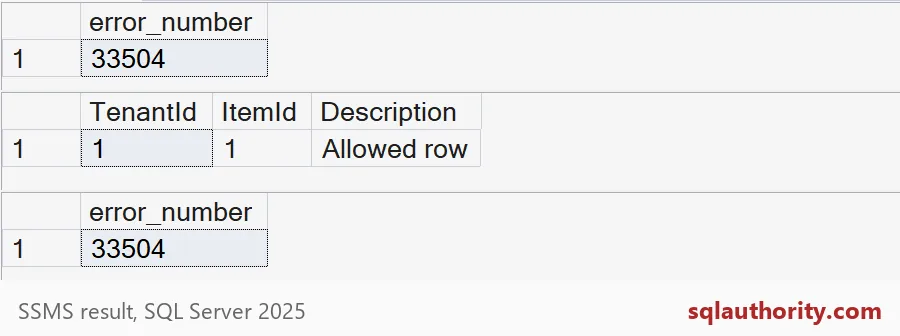

Who can switch the policy off
Row-level security is not a defense against administrators. Anyone who can alter the policy can turn it off. With no tenant set, the policy shows nothing. Turn it off and every row appears.
EXEC sys.sp_set_session_context @key = N'TenantId', @value = NULL;
SELECT COUNT(*) AS rows_policy_on FROM dbo.TenantData;

ALTER SECURITY POLICY dbo.TenantPolicy WITH (STATE = OFF);
SELECT COUNT(*) AS rows_policy_off FROM dbo.TenantData;

ALTER SECURITY POLICY dbo.TenantPolicy WITH (STATE = ON);
So guard the permission to alter policies like you guard backups. Also keep the predicate small. It runs on every protected read and write, so avoid joins in it and index the tenant column.
Finally, drop the demo database.
USE master;
DROP DATABASE IF EXISTS SqlAuthorityDemo;
When you review a tenant boundary, test the insert and the update, not just the select.
A tenant boundary is not only what you see, it is also what you can write.
Published by Pinal Dave on SQLAuthority. More of my work at pinaldave.com.
Discover more from SQL Authority with Pinal Dave
Subscribe to get the latest posts sent to your email.