
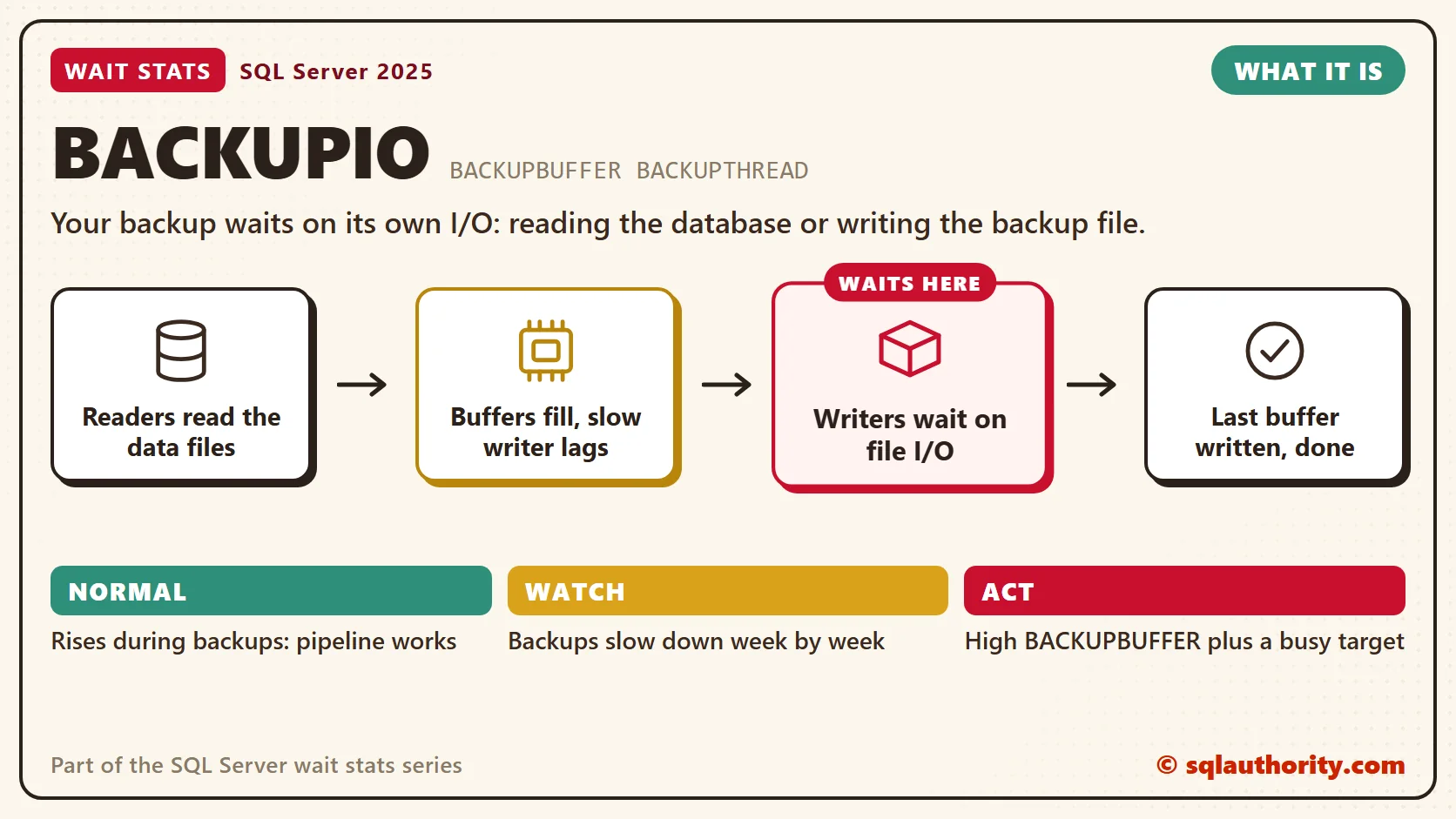
BACKUPIO wait stats show a backup waiting on its own I/O: reading the database or writing the backup file. Its partners are BACKUPBUFFER and BACKUPTHREAD. During a backup, all three are normal. They matter when backups run too long or spill into your busy hours.

This post is part of my wait stats series, told as one story at the Clipboard Diner. Every post is listed in the series guide.
Night 14 at the Clipboard Diner
The night baker was still asleep when the truck’s headlights swept across the kitchen at 3 AM. This time Casey didn’t stand at the door. Casey followed the whole load, from the cooler to the truck.
Down in the basement, Jesse and Jules packed food into wooden crates. Upstairs, the driver carried full crates across the lot and emptied them into the truck. There were twelve crates in all. A full one went up, and an empty one came back down.
By 3:20 Jesse and Jules were standing still. Every crate was upstairs, full, stacked by the tailgate. Casey climbed up to look. The truck was parked on the far side of the gravel lot. Every trip across the wet stones took a minute.
Casey timed it all. The packers waited for empty crates. The crates waited for the driver. The driver waited on the gravel. Up in the cab, the dispatcher waited for everyone to finish. Four kinds of waiting, one load.
Ace suggested more crates. Casey found six more, and the packers stayed busy for ten minutes. Then the stack by the tailgate grew again. More crates only hid the problem. The real fix was the road. Next week the truck would park on the pavement, and a second truck would take half the load.
Back in the warm kitchen, Casey wrote: Packers wait for crates. Crates wait for the road.
What BACKUPIO Means
That’s what SQL Server does during every backup. A backup is a pipeline. Reader threads read the data files into a set of memory buffers. Writer threads empty those buffers into the backup files. The session that ran BACKUP DATABASE waits for the whole pipeline to finish.
I see one reader per disk volume that holds data files, and one writer per backup file. Each piece of the pipeline has its own wait.
- BACKUPIO: a backup thread waiting for an I/O to finish. It’s a read from the data files or a write to the backup target. That’s the driver on the gravel.
- BACKUPBUFFER: a backup thread waiting for a buffer. The usual case is a reader waiting for an empty buffer because the writer is behind. That’s the packers with no empty crates.
- BACKUPTHREAD: a task waiting for a backup subtask to finish. Long waits here are fine when the subtask is busy with I/O. You’ll see it during restores too.
- ASYNC_IO_COMPLETION: the session itself, waiting for the whole job. That’s the dispatcher in the cab, and ASYNC_IO_COMPLETION Wait Stats covers it.
Two settings shape the buffers. BUFFERCOUNT is the number of crates. For backups to disk, MAXTRANSFERSIZE is the size of each crate, from 64 KB up to 4 MB. Multiply them and you get the memory the backup uses for buffers. Too many buffers can cause out-of-memory errors, so raise them with care.
You could say backups run at night, so who cares how they wait? Fair point, until the database grows. One day the nightly full backup runs into the 6 AM data load, and both slow down. Backup speed matters long before anyone complains.
Ace’s mistake is a common one on real servers. A backup to a network share runs slow, so someone raises BUFFERCOUNT and calls it tuned. The backup finishes two minutes sooner, and the share is still the bottleneck. The right fix is a faster target.
Normal or a Problem?
| Situation | What it means | What to do |
|---|---|---|
| BACKUPIO, BACKUPBUFFER and BACKUPTHREAD rise during backups | Normal. The pipeline is working. | Track backup duration instead of the waits. |
| Backups take longer every week | The database grew, or the target got slower. | Compare MB per second in the backup history. |
| BACKUPBUFFER is high and the backup target is busy | The writer can’t keep up. | Faster target, stripes, compression. |
| Backups run into business hours | Users share the disks with the backup. | Move the window, or add differential backups between fulls. |
| Backup waits outside your backup window | A tool or a job is taking extra backups. | Find it in msdb.dbo.backupset. |
See It on Your Server
The first query shows the backup waits since the last restart. Run the second one while a backup is running. It counts the backup threads waiting on each part of the pipeline.
-- How much time have the backup waits taken since the last restart?
SELECT wait_type,
       waiting_tasks_count AS waits,
       CAST(wait_time_ms / 1000.0 AS decimal(18, 1)) AS waited_sec,
       CAST(max_wait_time_ms / 1000.0 AS decimal(18, 1)) AS longest_wait_sec
FROM sys.dm_os_wait_stats
WHERE wait_type IN (N'BACKUPIO', N'BACKUPBUFFER', N'BACKUPTHREAD', N'ASYNC_IO_COMPLETION')
ORDER BY wait_time_ms DESC;

-- Run during a backup: how many backup threads wait on each part of the pipeline?
SELECT wt.session_id,
       r.command,
       r.percent_complete,
       wt.wait_type,
       COUNT(*) AS threads_waiting,
       MAX(wt.wait_duration_ms) AS longest_wait_ms
FROM sys.dm_os_waiting_tasks AS wt
LEFT JOIN sys.dm_os_tasks AS tk
    ON tk.task_address = wt.waiting_task_address
LEFT JOIN sys.dm_exec_requests AS r
    ON r.session_id = tk.session_id
   AND r.request_id = tk.request_id
WHERE wt.wait_type IN (N'BACKUPIO', N'BACKUPBUFFER', N'BACKUPTHREAD', N'ASYNC_IO_COMPLETION')
GROUP BY wt.session_id, r.command, r.percent_complete, wt.wait_type
ORDER BY wt.session_id, threads_waiting DESC;
During a backup, a big threads_waiting count on BACKUPBUFFER next to a long BACKUPIO wait points at a slow writer. That’s a slow target, like the gravel lot.
The waits tell you how the pipeline feels. The backup history tells you how fast it goes. This query rolls up the last eight weeks in msdb, one row per database, backup type and week.
-- Is backup speed holding steady week by week? (last 8 weeks)
SELECT bs.database_name,
       bs.type,
       wk.week_of,
       COUNT(*) AS backups,
       SUM(DATEDIFF(SECOND, bs.backup_start_date, bs.backup_finish_date)) AS busy_sec,
       CAST(SUM(bs.backup_size) / 1048576.0 AS decimal(18, 1)) AS size_mb,
       CAST(SUM(bs.compressed_backup_size) / 1048576.0 AS decimal(18, 1)) AS compressed_mb,
       CAST(SUM(bs.backup_size) / 1048576.0
            / NULLIF(SUM(DATEDIFF(SECOND, bs.backup_start_date, bs.backup_finish_date)), 0)
            AS decimal(18, 1)) AS mb_per_s
FROM msdb.dbo.backupset AS bs
-- week_of is the Monday that starts the backup's week (works on any version)
CROSS APPLY (SELECT DATEADD(DAY, -(DATEDIFF(DAY, 0, bs.backup_start_date) % 7),
                            CAST(bs.backup_start_date AS date)) AS week_of) AS wk
WHERE bs.backup_start_date >= DATEADD(WEEK, -8, SYSDATETIME())
GROUP BY bs.database_name, bs.type, wk.week_of
ORDER BY bs.database_name, bs.type, wk.week_of;
In the type column, D is a full backup, I is a differential and L is a log backup. Read mb_per_s down the weeks for one database and type. It’s data backed up per second, before compression, not the speed of the target. When it falls, something in the pipeline changed. When compressed_mb is close to size_mb, compression is off or the data doesn’t compress.
Fix It
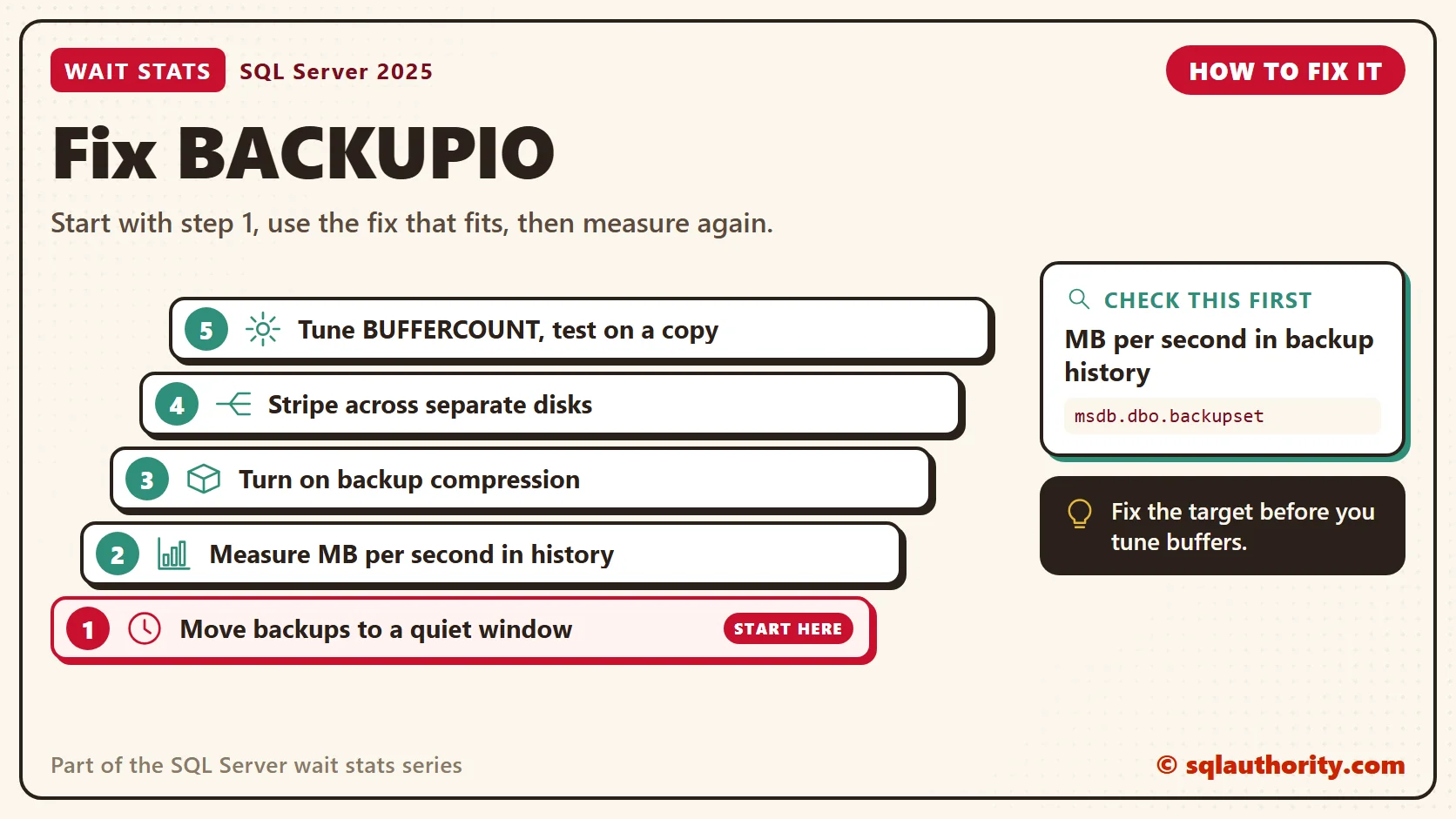
- Put backups in a quiet window. If the full backup no longer fits, run it fewer times a week and add differential backups between fulls.
- Measure MB per second from the history. If it falls, check the target first: a busy share, a slow network or a nearly full disk.
- Turn on backup compression, in the command or as the server default. Fewer bytes to write means less waiting on the road. Compression costs CPU, so test it next to your busy workload before you make it the server default. Express edition can’t create compressed backups.
- Stripe the backup to two or more files on separate disks or paths. Every stripe is needed to restore, so keep them together.
- Tune BUFFERCOUNT and MAXTRANSFERSIZE last, and test on a copy. My starting point is in the example below, not a rule.
Here’s a striped, compressed backup with more and bigger buffers. It writes backup files, so try it on a test server first. Change the names and paths to yours. Fifty buffers of 4 MB use 200 MB of memory.
If you test it against a production database, add COPY_ONLY to the WITH list. An extra full backup without it becomes the new base for your differential backups.
-- WRITES BACKUP FILES: test server first
-- Two stripes, compression, more and bigger buffers
BACKUP DATABASE Sales
TO DISK = N'E:\Backup\Sales_1.bak',
   DISK = N'F:\Backup\Sales_2.bak'
WITH COMPRESSION,
     CHECKSUM,
     BUFFERCOUNT = 50,
     MAXTRANSFERSIZE = 4194304;
New in SQL Server 2022 and 2025
SQL Server 2025 adds ZSTD backup compression. You choose the algorithm and a level inside the backup command.
-- WRITES A BACKUP FILE: test server first
-- SQL Server 2025: ZSTD compression
BACKUP DATABASE Sales TO DISK = N'E:\Backup\Sales.bak' WITH COMPRESSION (ALGORITHM = ZSTD, LEVEL = MEDIUM);
LEVEL can be LOW, which is the default, MEDIUM or HIGH. Higher levels make smaller files and use more CPU. Setting ZSTD as the server-wide default through sp_configure raises an error at present, so put it in each backup command.
SQL Server 2022 added ALGORITHM = QAT_DEFLATE, which uses Intel QuickAssist hardware. The meaning of BACKUPIO, BACKUPBUFFER and BACKUPTHREAD hasn’t changed in either version.
Related Reading
- SQL SERVER – What is Wait Type Parallel Backup Queue?
- SQL SERVER – Script: Current IO Related Waits on SQL Server
The Clipboard Diner, a wait stats series. Previous: Harmless Wait Stats: Waits You Can Safely Ignore. Next: LCK_M Wait Stats: Lock Waits and Blocking. Every post is listed in the series guide.
Tomorrow night, the party in booth 7 pays the bill but won’t leave.
A slow backup is not one problem, it is a pipeline you measure stage by stage.
Published by Pinal Dave on SQLAuthority. More of my work at pinaldave.com.
Discover more from SQL Authority with Pinal Dave
Subscribe to get the latest posts sent to your email.




4 Comments. Leave new
Hello Sir – thank you for your informative blog… I am a frequent visitor. Please moderate this post and delete at your pleasure. I say this because I am using a 3rd-party tool to compress my backups and am experiencing the BACKUPIO waittype. My curiosity has peaked. :)
Your prior experience wasn’t with Red Gate’s HyperBac product, was it? Your reply will not impact my decision to remove this product from my shop… it is already out of here. But it will help give me some insight as to why I struggle with this waittype even though my host is SAN attached. Many Thanks! Tony
Hi Sir,
I have a question here. We have a production server with 1800 databases in it. And we take differential backup everyday of all of them in sequential order which is consuming a lot of time since the backup order is sequential. I am planning to run backup parallely for 100 databases at a time.
But i see the waittype BACKUPIO with wait_time_ms as almost 30 minutes for now.
Do you think parallel backup is going to affect the performance in any manner?
Disk drives has no space issue and cpu is very low when we run the backups and each backup takes less than a minute. Appreciate your quick response.