

The zoom query editor feature in SQL Server 2012 makes code large enough for presentations, group discussions or anyone who prefers big fonts.
SQL SERVER – Denali – Clipboard Ring – CTRL+SHIFT+V
SQL Server Denali brings the clipboard ring from Visual Studio to SSMS. Copy a few items, then press CTRL+SHIFT+V to cycle through what you copied.
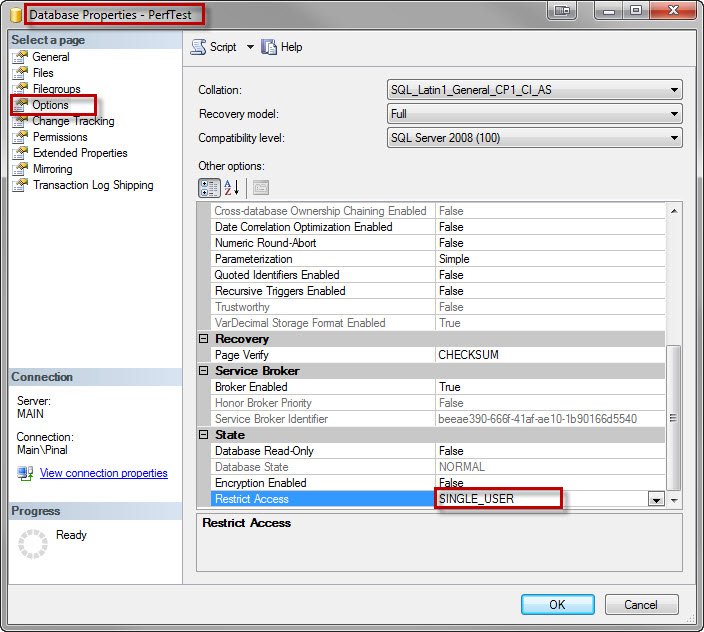
SQL SERVER – Change Database Access to Single User Mode Using SSMS
I showed before how to set single user mode with T-SQL before a backup. You can also set single user mode using SSMS, from the database properties page.
SQL SERVER – Upper Case Shortcut SQL Server Management Studio
Want an upper case shortcut in SSMS? Select a keyword and press CTRL+SHIFT+U to make it upper case, or CTRL+SHIFT+L to make it lower case.
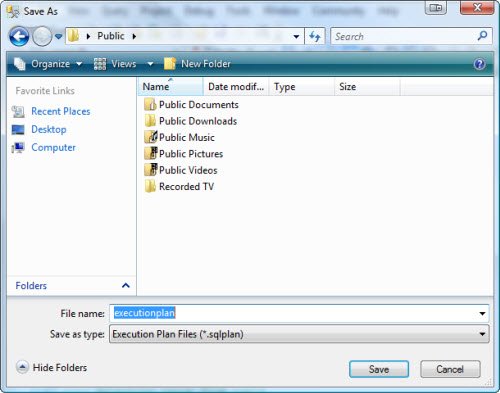
SQL SERVER – View XML Query Plans in SSMS as Graphical Execution Plan
Want to share a graphical execution plan? Save it as a .sqlplan file and send it. Anyone can open it in SSMS without the tables or indexes behind it.
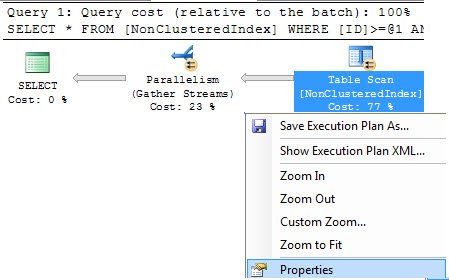
SQL SERVER – Parallelism – Row per Processor – Row per Thread
Do all processors handle an equal number of rows in a parallel query? The execution plan properties show the actual row per thread count, so you can check.

Estimated and Actual Execution Plans
Estimated and actual execution plans answer different questions; compare compiled choices with runtime rows, warnings, and resource use.