
PREEMPTIVE wait stats record the time a task spends in code outside SQL Server, such as a call into Windows. The wait name tells you which outside call it was. That makes these waits some of the most specific clues on the whole list.

This post is part of my wait stats series, told as one story at the Clipboard Diner. Every post is listed in the series guide.
Night 19 at the Clipboard Diner
After the fire department crowd, everyone wanted a slow night, and they got one. By 8:20 the only sound was the jukebox and the hiss of the grill. Kit had a grilled cheese for table 4 on the burner. Then Kit remembered the permit for the neon sign. The one with the flickering letter was due for renewal, and town hall took weekend calls only until nine.
Kit picked up the wall phone by the back door. The kitchen has a fair rule for the burners: a short turn, then step back if anyone is waiting. Kit knew the phone could take a while. So Kit slid the pan to the edge and let Jesse have the burner. That part was polite.
Then town hall put Kit on hold. The hold music was worse than the jukebox, which takes effort. Casey watched the clock. Kit wasn’t at a burner, so Casey’s turn-taking rule didn’t apply. Casey couldn’t tell town hall to hurry, or see what anyone there was doing. All Casey could see was Kit with a phone and the ticket for table 4 still in Kit’s apron pocket.
Fourteen minutes later the permit was renewed. Kit came back, waited for a free burner, and finished the grilled cheese. Table 4 was gracious about it. Casey wrote: Kit on the town hall line, 14 minutes. Their clock, not ours.
What PREEMPTIVE Waits Mean
That’s what SQL Server does when a task calls code it doesn’t control. The task steps off SQL Server’s own schedule and runs on Windows’ clock until the call returns.
Inside SQL Server, scheduling is cooperative. Workers take short turns on a scheduler and yield on their own, after a 4 ms quantum. That’s the fair rule from the SOS_SCHEDULER_YIELD Wait Stats post. It works because SQL Server wrote that code, and the code knows when to step back.
Code outside SQL Server doesn’t follow that rule. A Windows API, a DLL, a domain controller lookup or an OLE DB provider takes as long as it takes. So before such a call, the worker switches to preemptive mode. It leaves the scheduler, another worker takes the scheduler, and Windows schedules the thread. That’s Kit handing the burner to Jesse before picking up the phone.
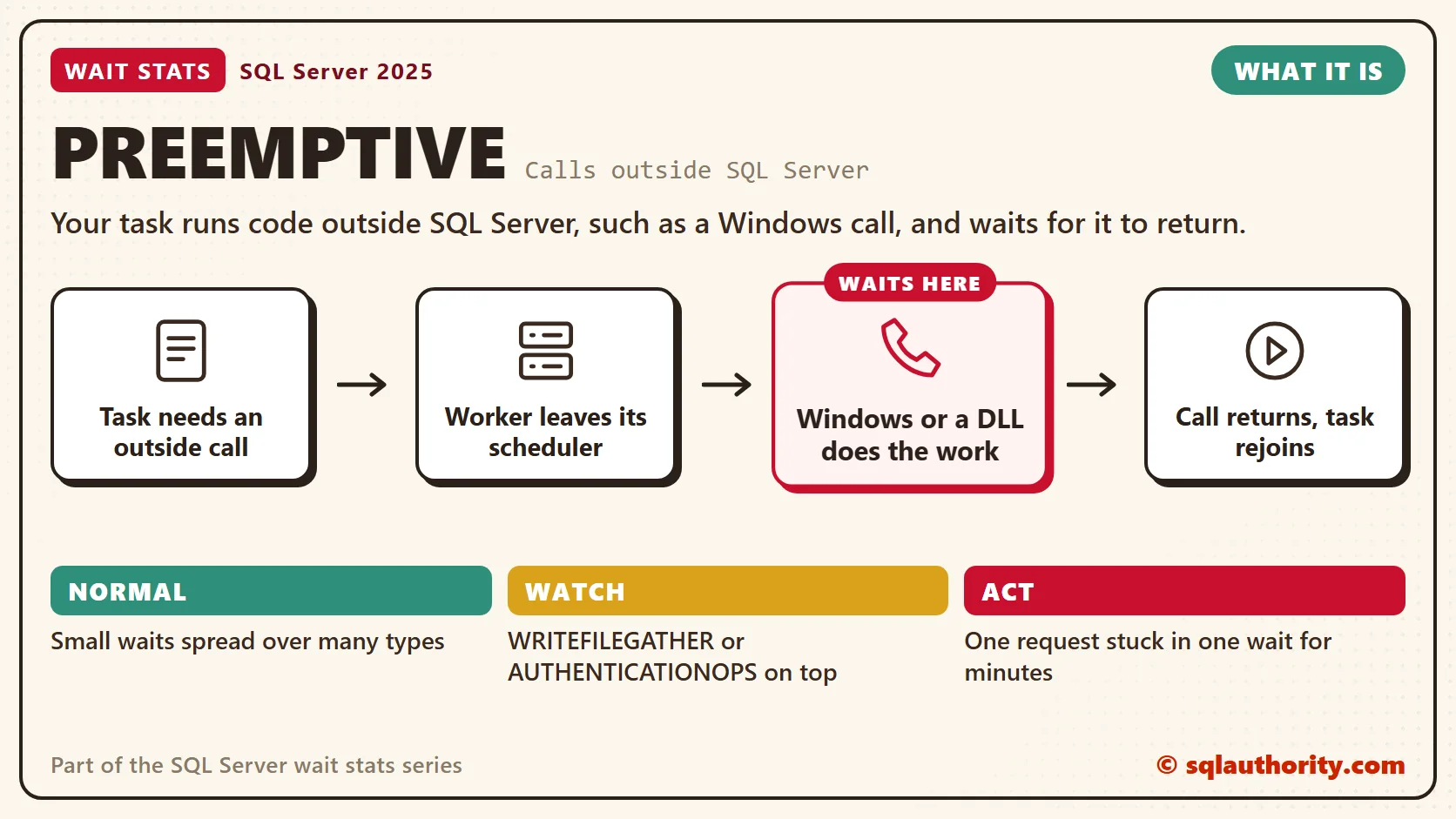
While the call runs, the task carries a PREEMPTIVE wait type that names the call. When the call returns, the worker gets back in line for its scheduler. One detail matters here. A preemptive wait isn’t always idle time, because the thread can be busy running Windows code. Don’t be surprised to see a request with status running and a PREEMPTIVE wait type at the same time.
These are the ones I see most in health checks. Microsoft lists most of them as internal use only. Read each name as a clue from its Windows call, not a promise:
- PREEMPTIVE_OS_WRITEFILEGATHER: Windows is writing zeros into new file space. That happens when a log grows, or a data file grows without instant file initialization.
- PREEMPTIVE_OS_AUTHENTICATIONOPS: Windows authentication work, such as checking a login with a domain controller.
- PREEMPTIVE_OS_FILEOPS: file system work, such as creating, opening or deleting files during backups, restores and file creation.
- PREEMPTIVE_OS_FLUSHFILEBUFFERS: SQL Server asks Windows to force a file’s buffered writes to disk.
- PREEMPTIVE_OS_GETPROCADDRESS: looking up a function inside a DLL. An extended stored procedure is a common caller, so check what the session ran. The next post covers those procedures.
Normal or a Problem?
| Situation | What it means | What to do |
|---|---|---|
| Small PREEMPTIVE waits spread over many types | Normal. SQL Server calls Windows all day. | Leave them alone. |
| PREEMPTIVE_SP_SERVER_DIAGNOSTICS or PREEMPTIVE_HADR_LEASE_MECHANISM on a cluster or availability group | Background health checks that run all day. | Leave them alone. The harmless list skips them. |
| PREEMPTIVE_OS_WRITEFILEGATHER near the top | Queries wait while new file space is zeroed. | Turn on instant file initialization and right-size file growth. |
| PREEMPTIVE_OS_AUTHENTICATIONOPS high and logins feel slow | Windows login checks are slow. | Check the network path to the domain controller. |
| One request sits in the same PREEMPTIVE wait for minutes | An outside call is stuck. | Find the session and what it called. |
See It on Your Server
This query lists the top preemptive waits since the last restart. It starts with the harmless list from Harmless Wait Stats, so background calls drop out. Every PREEMPTIVE_OS_ wait stays in. Read the specific names, never the family as a whole.
-- The harmless list: background housekeeping and deliberate pauses, not user work.
-- why: sleep = sleeps until needed, idle = waits for background work, startup = only at startup,
-- waitfor = asked to wait, broker/ag/trace/qstore/fulltext/xtp/clr = feature housekeeping,
-- internal = internal background task.
DECLARE @harmless TABLE (wait_type nvarchar(60) PRIMARY KEY, why varchar(10) NOT NULL);
INSERT @harmless (wait_type, why) VALUES
    (N'LAZYWRITER_SLEEP', 'sleep'), (N'SLEEP_BPOOL_FLUSH', 'sleep'), (N'SLEEP_TASK', 'sleep'),
    (N'SP_SERVER_DIAGNOSTICS_SLEEP', 'sleep'), (N'CHECKPOINT_QUEUE', 'idle'),
    (N'DIRTY_PAGE_POLL', 'idle'), (N'DISPATCHER_QUEUE_SEMAPHORE', 'idle'),
    (N'KSOURCE_WAKEUP', 'idle'), (N'LOGMGR_QUEUE', 'idle'), (N'ONDEMAND_TASK_QUEUE', 'idle'),
    (N'PREEMPTIVE_SP_SERVER_DIAGNOSTICS', 'idle'), (N'REQUEST_FOR_DEADLOCK_SEARCH', 'idle'),
    (N'RESOURCE_QUEUE', 'idle'), (N'SERVER_IDLE_CHECK', 'idle'), (N'SNI_HTTP_ACCEPT', 'idle'),
    (N'SOS_WORK_DISPATCHER', 'idle'), (N'UCS_SESSION_REGISTRATION', 'idle'),
    (N'VDI_CLIENT_OTHER', 'idle'), (N'CHKPT', 'startup'),
    (N'PWAIT_ALL_COMPONENTS_INITIALIZED', 'startup'), (N'SLEEP_DBSTARTUP', 'startup'),
    (N'SLEEP_DCOMSTARTUP', 'startup'), (N'SLEEP_MASTERDBREADY', 'startup'),
    (N'SLEEP_MASTERMDREADY', 'startup'), (N'SLEEP_MASTERUPGRADED', 'startup'),
    (N'SLEEP_MSDBSTARTUP', 'startup'), (N'SLEEP_PHYSMASTERDBREADY', 'startup'),
    (N'SLEEP_SYSTEMTASK', 'startup'), (N'SLEEP_TEMPDBSTARTUP', 'startup'),
    (N'STARTUP_DEPENDENCY_MANAGER', 'startup'), (N'WAITFOR', 'waitfor'),
    (N'WAITFOR_TASKSHUTDOWN', 'waitfor'), (N'WAIT_FOR_RESULTS', 'waitfor'),
    (N'BROKER_EVENTHANDLER', 'broker'), (N'BROKER_TASK_STOP', 'broker'),
    (N'BROKER_TO_FLUSH', 'broker'), (N'BROKER_TRANSMITTER', 'broker'), (N'DBMIRRORING_CMD', 'ag'),
    (N'DBMIRROR_DBM_EVENT', 'ag'), (N'DBMIRROR_DBM_MUTEX', 'ag'), (N'DBMIRROR_EVENTS_QUEUE', 'ag'),
    (N'DBMIRROR_WORKER_QUEUE', 'ag'), (N'HADR_CLUSAPI_CALL', 'ag'),
    (N'HADR_FILESTREAM_IOMGR_IOCOMPLETION', 'ag'), (N'HADR_LOGCAPTURE_WAIT', 'ag'),
    (N'HADR_NOTIFICATION_DEQUEUE', 'ag'), (N'HADR_TIMER_TASK', 'ag'), (N'HADR_WORK_QUEUE', 'ag'),
    (N'PARALLEL_REDO_DRAIN_WORKER', 'ag'), (N'PARALLEL_REDO_LOG_CACHE', 'ag'),
    (N'PARALLEL_REDO_TRAN_LIST', 'ag'), (N'PARALLEL_REDO_WORKER_SYNC', 'ag'),
    (N'PARALLEL_REDO_WORKER_WAIT_WORK', 'ag'), (N'PREEMPTIVE_HADR_LEASE_MECHANISM', 'ag'),
    (N'REDO_THREAD_PENDING_WORK', 'ag'), (N'PREEMPTIVE_XE_CALLBACKEXECUTE', 'trace'),
    (N'PREEMPTIVE_XE_DISPATCHER', 'trace'), (N'PREEMPTIVE_XE_GETTARGETSTATE', 'trace'),
    (N'PREEMPTIVE_XE_SESSIONCOMMIT', 'trace'), (N'PREEMPTIVE_XE_TARGETFINALIZE', 'trace'),
    (N'PREEMPTIVE_XE_TARGETINIT', 'trace'), (N'SQLTRACE_BUFFER_FLUSH', 'trace'),
    (N'SQLTRACE_INCREMENTAL_FLUSH_SLEEP', 'trace'), (N'SQLTRACE_WAIT_ENTRIES', 'trace'),
    (N'XE_BUFFERMGR_ALLPROCESSED_EVENT', 'trace'), (N'XE_DISPATCHER_JOIN', 'trace'),
    (N'XE_DISPATCHER_WAIT', 'trace'), (N'XE_LIVE_TARGET_TVF', 'trace'),
    (N'XE_TIMER_EVENT', 'trace'), (N'QDS_ASYNC_QUEUE', 'qstore'),
    (N'QDS_CLEANUP_STALE_QUERIES_TASK_MAIN_LOOP_SLEEP', 'qstore'),
    (N'QDS_PERSIST_TASK_MAIN_LOOP_SLEEP', 'qstore'), (N'QDS_SHUTDOWN_QUEUE', 'qstore'),
    (N'FT_IFTSHC_MUTEX', 'fulltext'), (N'FT_IFTSISM_MUTEX', 'fulltext'),
    (N'FT_IFTS_SCHEDULER_IDLE_WAIT', 'fulltext'), (N'WAIT_XTP_CKPT_CLOSE', 'xtp'),
    (N'WAIT_XTP_HOST_WAIT', 'xtp'), (N'WAIT_XTP_OFFLINE_CKPT_NEW_LOG', 'xtp'),
    (N'WAIT_XTP_RECOVERY', 'xtp'), (N'CLR_AUTO_EVENT', 'clr'),
    (N'AZURE_IMDS_VERSIONS', 'internal'), (N'POPULATE_LOCK_ORDINALS', 'internal'),
    (N'PVS_PREALLOCATE', 'internal'), (N'PWAIT_DIRECTLOGCONSUMER_GETNEXT', 'internal'),
    (N'PWAIT_EXTENSIBILITY_CLEANUP_TASK', 'internal'), (N'SOS_WORKER_MIGRATION', 'internal');

-- Which outside calls cost the most time since the last restart? (background ones skipped)
SELECT TOP (10)
       w.wait_type,
       w.waiting_tasks_count AS calls,
       CAST(w.wait_time_ms / 1000.0 AS decimal(18, 1)) AS waited_sec,
       CAST(1.0 * w.wait_time_ms / NULLIF(w.waiting_tasks_count, 0) AS decimal(12, 2)) AS avg_wait_ms,
       w.max_wait_time_ms AS longest_wait_ms,
       CAST(100.0 * w.wait_time_ms / NULLIF(SUM(w.wait_time_ms) OVER (), 0) AS decimal(5, 1)) AS share_pct
FROM sys.dm_os_wait_stats AS w
WHERE w.wait_type LIKE N'PREEMPTIVE[_]%'
  AND w.waiting_tasks_count > 0
  AND NOT EXISTS (SELECT 1 FROM @harmless AS h WHERE h.wait_type = w.wait_type COLLATE DATABASE_DEFAULT)
ORDER BY w.wait_time_ms DESC;
A high avg_wait_ms on one type means each call to that outside service is slow. A huge calls count with a tiny average means many quick calls, which is fine. The share_pct column shows how much of the outside time each type owns. Then look at who is outside right now.
-- Who is outside SQL Server right now, and how long has the request run?
SELECT r.session_id,
       r.status,
       r.command,
       r.wait_type,
       DATEDIFF(SECOND, r.start_time, SYSDATETIME()) AS request_age_sec,
       s.program_name,
       t.text AS query_text
FROM sys.dm_exec_requests AS r
JOIN sys.dm_exec_sessions AS s
    ON s.session_id = r.session_id
OUTER APPLY sys.dm_exec_sql_text(r.sql_handle) AS t
WHERE r.wait_type LIKE N'PREEMPTIVE[_]%'
ORDER BY r.start_time;
The command and query_text columns show what made the call. It can be a backup, a login, a file growth or an extended procedure. The timers in sys.dm_exec_requests leave out time spent outside SQL Server, so the query reads start_time instead. Run it a few times. A row that keeps the same wait while request_age_sec climbs is the phone call that never ends.
Fix It
Slow logins can pull a whole afternoon into query tuning. On such a server, the top real wait is PREEMPTIVE_OS_AUTHENTICATIONOPS, and it’s easy to skip past. The queries are fine, but every Windows login goes to a domain controller in another city. That fix takes minutes, and none of it is SQL.
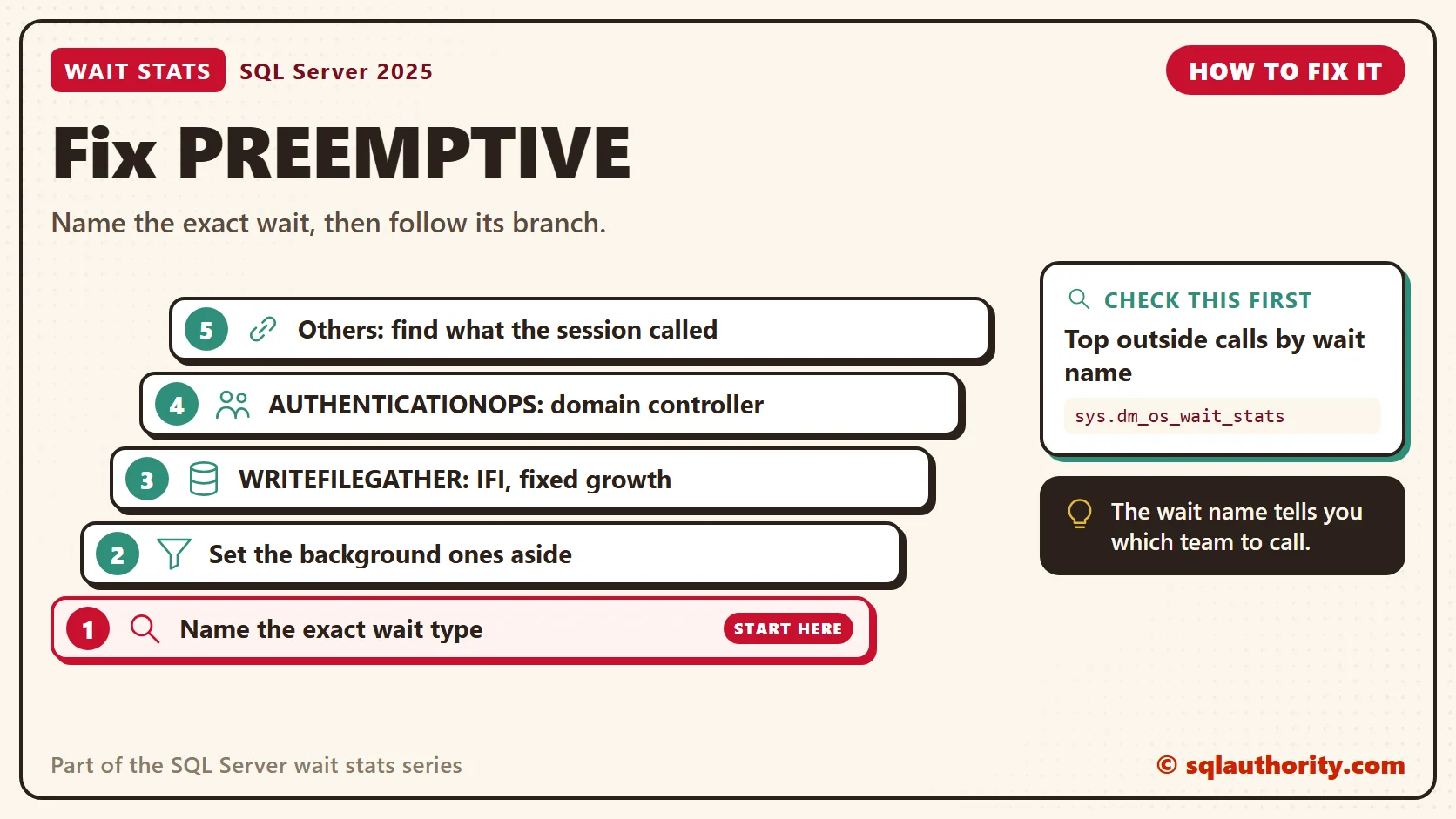
- Name the exact wait. Each PREEMPTIVE type points at a different outside service. Treat them as separate waits.
- Set the background ones aside. On cluster and availability group servers, the harmless list skips the health check waits for you.
- For WRITEFILEGATHER, turn on instant file initialization for data files. Give the SQL Server service account the “Perform volume maintenance tasks” right, restart the service, and check that IFI shows as on. Data files under transparent data encryption still get zeros. Use fixed growth sizes, and grow big files in a quiet window.
- For AUTHENTICATIONOPS, check the domain controller and the network path to it. Make sure applications use connection pooling, so they log in fewer times.
- For anything else, find what the session called and fix that outside piece. Killing the session doesn’t help much here, because it ends only when the outside call returns.
You could say preemptive waits aren’t SQL Server’s problem, so why read them at all. Fair point, the fix lives outside SQL Server. But your users still wait, and the wait name tells you which team to call. That’s worth a lot in a meeting where everyone blames the database.
New in SQL Server 2022 and 2025
Nothing new changes what preemptive waits mean. One change in SQL Server 2022 cuts some of them. Log growths of 64 MB or less now use instant file initialization, so they skip zeroing. Small log growths no longer add PREEMPTIVE_OS_WRITEFILEGATHER time. Larger log growths still zero the new space, so size your log well up front.
Related Reading
- PREEMPTIVE Waits and Scheduler Context
- DBCC CHECKDB Waiting for PREEMPTIVE_OS_DEVICEIOCONTROL
- What is the Meaning of PREEMPTIVE_HTTP_EVENT_WAIT? How to Fix it?
- Queries are in KILLED/ROLLBACK State with Wait PREEMPTIVE_OLEDB_RELEASE
The Clipboard Diner, a wait stats series. Previous: LOGBUFFER Wait Stats: When the Log Buffer Fills. Next: MSQL_XP Wait Stats: Extended Procedures and External Code. Every post is listed in the series guide.
Then an outside caterer moves into the kitchen, and Casey can only time the sauce.
A preemptive wait is not SQL Server being slow, it is SQL Server waiting on someone else’s clock.
Published by Pinal Dave on SQLAuthority. More of my work at pinaldave.com.
Discover more from SQL Authority with Pinal Dave
Subscribe to get the latest posts sent to your email.



26 Comments. Leave new
Hi Dave,
I am seeing on quite some new SQL 2008 R1 clusters the following wait typ;
wait_type wait_time_s pct running_pct
PREEMPTIVE_OS_AUTHENTICATIONOPS 7528.53 11.56 35.52
The servers are hosting the sharepoint databases of our enterprise. I have no clue how to debug this further.
Nice blog you have!
Hi Dave,
Your book SQL server Waits stats Joes 2 pros, is a very good book I really liked it
I have a small question, as you said Sql server by default is non- premeptive mode(Co operative mode)
I executed a query in one session which suppose to take some time to execute
in an another session I queried SYS.SYSPROCESSSES with spid as current session and previous session
What I found was for previous session the wait type was Preemptive , and status was runnable, which should be non preemptive and runnable according to our disscussion note (query in the previous session was still executing)
I am using SQL server 2008
can you please explain sir
Thank you
Hi Dave,
I am having problems with distributed querys and i only seeing the following wait type;;
PREEMPTIVE_OS_AUTHENTICATIONOPS
This type wait is related to MS DTC ????????
PREEMPTIVE_OS_AUTHENTICATIONOPS indicates a wait for authentication from one of the Domain Controllers
.
Hello, I’m currently receiving the PREEMPTIVE_OS_AUTHENTICATIONOPS error as well. We know the cause is due to a Domain Server restart. However, the process never stops and eventually consumes the TempDB and causes SQL Server to hault. the transaction is being ran by the SQLAgent – Job Manager by the service account, and is checking the sp_sqlagent_has_Server_Access. I cannot rollback/kill this transaction. Only success has been to restart the SQL Services. This has only been seen in our Dev environment, but today I’m seeing it in Production. Any further suggestions?
Hi Carman… Ive got a very similar issue after trying to diable a server audit. did you get anyware with this…??
Thanks, Mark.
Hi Mark, so far no further updates. It’s happened a second time today, and we will be having a all hands on deck (WinTel, DB and Network team) to go through all possibilities. dug a little more and found the xp_logininfo is the last call from the hung session. https://docs.microsoft.com/en-us/previous-versions/sql/sql-server-2008/ms190369(v=sql.100) leads us back to the DC/s restarting.
How about “PREEMPTIVE_XE_DISPATCHER”
wait_type sum_wait_time_ms pct_wait_time sum_waiting_tasks avg_wait_time_ms
———————————————————— ——————–
PREEMPTIVE_XE_DISPATCHER 657556625 39.1 4061 161919.9
PREEMPTIVE_XE_CALLBACKEXECUTE which appear to be associated with SQL Sever Auditing, while the OS is writing the audit file, in the case where you have select file type “FILE”. So in this condition, are these idle waits while SQLserver waits for the physical file to be written or is the SQL system halted while the OS files are being written?
Hi Dave,
I’m seeing a lot of the following wait stats for one of my production servers: “PREEMPTIVE_XE_SESSIONCOMMIT”…
The only thing different I’m running on this server is DB_Mirroring (SYNCHRONOUS MODE)…Would this have anything to do with this wait stat?
XE is for eXtended Events. Are you using them?
Yes I am using extended Events
Any idea on PREEMPTIVE_OS_WAITFORSINGLEOBJECT
I am seeing an increase in preemptive_com_getdata with a join to a Sybase server. Threre is also high IO on a ‘worktable’ which, to me indicates large data being transferred back. any ideas where to look or research
There is nothing officially in Books Online regarding waittype ‘PREEMPTIVE_COM_GETDATA’
According to above thread the PREEMPTIVE_COM_GETDATA shows we are waiting on something outside of SQL Server’s scheduler
“The PREEMPTIVE wait types give an indication of everything outside of SQL Server’s scheduler. So this wait type means that SQL Server is waiting for something outside of it’s control, in your case most probably the OLEDB data stream from your oracle provider.”
“Even better to use remote stored procedures to force processing to the right server and minimize communications between remote and local servers.”
related link:
Hi Panel:
I can see the preemptive_os_authenticationops
no.of Wait 15894
Wait Time(Sec) 4.62
%WaitTime 86.31
Max Wait Time(ms) 16
Avg Wait Time (ms) 0.3
Can you please help how to reduce this wait.
Amir Ali
Hi Pinal,
I am running a restore command and it’s stuck at xp_cmdshell for more than 3 hours , waittype preemptive_os_pipeops. Tried to kill the session but it’s hung and seem like not doing anything.
Hi Pinal Dave
We are receiving following Preemptive delays
PREEMPTIVE_OS_CRYPTIMPORTKEY
PREEMPTIVE_COM_GETDATA
can you help me how we reduce this type of wait
Is there any encryption method you are using?
No any more encryption method are used
Hi Pinal Dave, I have PREEMPTIVE_XE_DISPATCHER of 89% wait % utilizing this query:
SELECT wait_type,
wait_time_ms / 1000.0 AS wait_time_sec,
(wait_time_ms – signal_wait_time_ms) / 1000.0 AS resource_sec,
signal_wait_time_ms / 1000.0 AS signal_sec,
waiting_tasks_count,
100.0 * wait_time_ms / SUM(wait_time_ms) OVER() AS wait_pct,
ROW_NUMBER() OVER(ORDER BY wait_time_ms DESC) AS row_num
FROM sys.dm_os_wait_stats
WHERE wait_type NOT IN (
N’CLR_SEMAPHORE’, N’LAZYWRITER_SLEEP’,
N’RESOURCE_QUEUE’, N’SQLTRACE_BUFFER_FLUSH’,
N’SLEEP_TASK’, N’SLEEP_SYSTEMTASK’,
N’WAITFOR’, N’HADR_FILESTREAM_IOMGR_IOCOMPLETION’,
N’CHECKPOINT_QUEUE’, N’REQUEST_FOR_DEADLOCK_SEARCH’,
N’XE_TIMER_EVENT’, N’XE_DISPATCHER_JOIN’,
N’LOGMGR_QUEUE’, N’FT_IFTS_SCHEDULER_IDLE_WAIT’,
N’BROKER_TASK_STOP’, N’CLR_MANUAL_EVENT’,
N’CLR_AUTO_EVENT’, N’DISPATCHER_QUEUE_SEMAPHORE’,
N’TRACEWRITE’, N’XE_DISPATCHER_WAIT’,
N’BROKER_TO_FLUSH’, N’BROKER_EVENTHANDLER’,
N’FT_IFTSHC_MUTEX’, N’SQLTRACE_INCREMENTAL_FLUSH_SLEEP’,
N’DIRTY_PAGE_POLL’, N’SP_SERVER_DIAGNOSTICS_SLEEP’,
N’BROKER_RECEIVE_WAITFOR’, N’DBMIRROR_EVENTS_QUEUE’,
N’DBMIRRORING_CMD’, N’DBMIRROR_DBM_EVENT’,
N’ONDEMAND_TASK_QUEUE’)
How do I find the external processes responsible for this? This SQL Server host 2 databases used for Blackberry communications.
Do you have any extended events configured?
Hi Pinal,
What and all we have check when we see PREEMPTIVE_COM_GETDATA wait type in SQL Server? We are see this wait type frequently as we are running data from Oracle to SQL Through SSRS.
Please suggest on this.
i am getting this “XTP_PREEMPTIVE_TASK”
I am getting PREEMPTIVE_OS_WAITFORSINGLEOBJECT
Hi Pinal!
Thank you for that great article. You mentioned that preemptive waits have to be investigated. But what about non-preemptive?
I’m receiving time-to-time same messages, which differ by the scheduler id only
“Long Sync IO: Scheduler 18 had 1 Sync IOs in nonpreemptive mode longer than 1000 ms”
Could you advise me on the way to get the task that was applied to that scheduler? I’ve tried catching waits with XE but haven’t succeeded with it.
Thank you in advance.