
PAGELATCH wait stats show tasks queuing for a short grab on a page that’s already in memory. No disk is involved. A long queue almost always has one hot page behind it. It’s the last page of a busy table, or a map page in tempdb.

This post is part of my wait stats series, told as one story at the Clipboard Diner. Every post is listed in the series guide.
Night 12 at the Clipboard Diner
Jules’s tomatoes sat on the new steel shelf, and the night truck was long gone. Night 12’s trouble was smaller. It was a ticket book. At 6:30 PM the county fair let out, and every booth filled at once.
Every order goes on the next line of one ticket book at the pass. Kit wrote a line. Jesse waited with a pencil. Ace waited behind Jesse, and Jules behind Ace. Each line took three seconds. No cook held the book for long, but all four wanted the same line at the same moment.
The back table was worse. That’s where the cooks scribble scratch notes: half orders, swaps, who gets extra pickles. It had one notepad. Before writing, a cook checked the front page, which listed the blank pages left. Jules and Kit bumped elbows over that front page six times in ten minutes.
Casey didn’t buy a bigger notepad. Casey put four notepads on the back table, all the same size, so the cooks spread out. For the ticket book, Casey made a rule: one at a time, in a line, no crowding. No single line got written faster. But the shoving stopped, and the tickets flowed.
Before closing, Casey added one line: Nobody held the book. Everybody waited for it.
What PAGELATCH Means
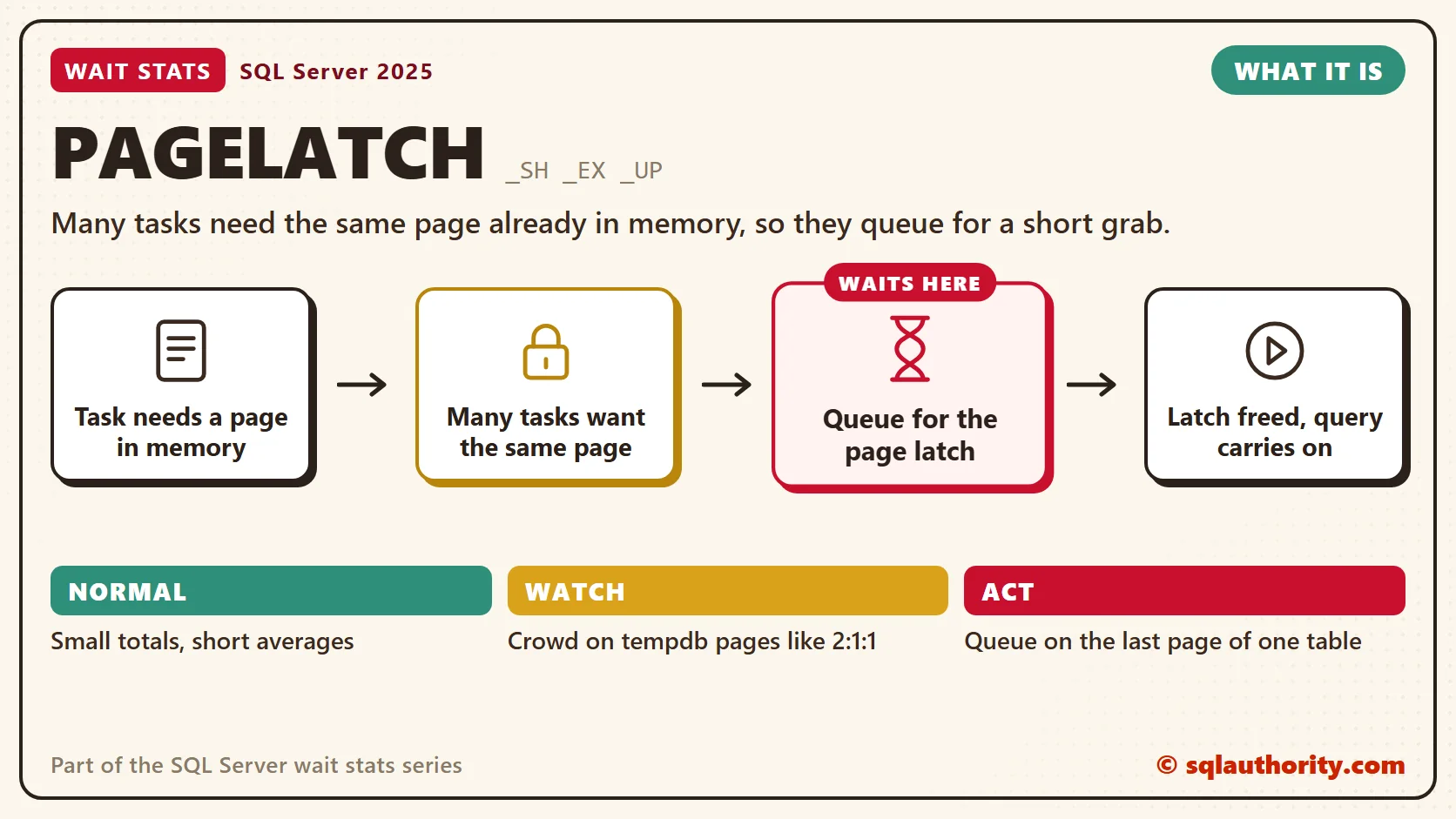
That’s what SQL Server does when many tasks need the same page in memory at the same moment. Before a task reads or changes a page in the buffer pool, it takes a latch on that page. A latch is a short grab. It lasts only while the page is being read or changed, and then it’s released.
A lock is a different thing. A lock protects the meaning of your data, like the “Reserved” card on booth 7. It can stay for the whole transaction, even minutes. A latch protects the bytes of a page, so two threads never change it at once. Isolation levels and NOLOCK change locks. They don’t remove latches.
The family has three common members. PAGELATCH_SH is a shared grab for reading. PAGELATCH_EX is an exclusive grab for changing a page, such as adding a row. PAGELATCH_UP is an update grab, used mostly on allocation pages. Don’t mix them up with PAGEIOLATCH Wait Stats, which wait for a page to come up from disk.
Hot spot one: the last page insert. A clustered index on an ever-increasing key, such as an IDENTITY column, sends every new row to the last page. With dozens of sessions inserting at once, they all queue for PAGELATCH_EX on that one page. That’s the ticket book.
Hot spot two: tempdb allocation. Temp tables, table variables, spills and sorts all live in tempdb. Creating an object means grabbing free pages, and that means updating map pages. In each tempdb data file, page 1 is the PFS page, which tracks how full each page is. Page 2 is the GAM and page 3 is the SGAM, which track free extents. That’s the front page of the notepad.
There’s a third, quieter hot spot. tempdb has system tables that record every temp table’s name and columns. Thousands of create and drop calls per second can crowd those pages too.
How to Read 2:1:1
A page latch wait points at a page written like 2:1:1. That’s database_id, file_id and page_id, joined by colons. Database 2 is always tempdb. So 2:1:1 is tempdb file 1, page 1, the PFS page.
In the same way, 2:1:2 is the GAM and 2:1:3 is the SGAM. File 2 is the log, so 2:3:1 is the PFS page of tempdb’s second data file. A user database page like 7:1:184022 that shows up again and again is your last page suspect. The map pages repeat further into big files, and sys.dm_db_page_info names the page type for you.
The usual trap is adding eight tempdb files to fix PAGELATCH waits without reading the wait resource. When it starts with 7, a user database, nothing changes. Read the page before you touch anything.
Normal or a Problem?
| Situation | What it means | What to do |
|---|---|---|
| Small PAGELATCH_SH and PAGELATCH_EX totals with short averages | Normal. Every page access takes a latch. | Leave it. |
| A queue for PAGELATCH_EX on one page of a user table during inserts | Last page insert on an ever-increasing key. | OPTIMIZE_FOR_SEQUENTIAL_KEY, then the key design. |
| PAGELATCH_UP or _EX on pages like 2:1:1, 2:1:2 or 2:1:3 | tempdb allocation contention. | Equal-size tempdb files. SQL Server 2022 helps more. |
| PAGELATCH on other tempdb pages that belong to system tables | tempdb metadata contention from temp table churn. | Fix temp table churn. On Enterprise edition, test memory-optimized tempdb metadata. |
| You’re checking disk latency because of PAGELATCH | Wrong place. These pages are already in memory. | Read the wait resource instead. |
See It on Your Server
Run this one during the slow period. It works on any current version and counts the tasks queued on each page.
-- Which pages have a crowd waiting on them right now?
SELECT wt.resource_description AS page,
       IIF(wt.resource_description LIKE N'2:%', 'tempdb', 'other database') AS lives_in,
       wt.wait_type,
       COUNT(*) AS tasks_waiting,
       MAX(wt.wait_duration_ms) AS longest_wait_ms
FROM sys.dm_os_waiting_tasks AS wt
WHERE wt.wait_type LIKE N'PAGELATCH[_]%'
GROUP BY wt.resource_description, wt.wait_type
ORDER BY tasks_waiting DESC, longest_wait_ms DESC;
The page at the top with a big tasks_waiting count is your hot page. The lives_in column reads its first number for you: 2 means tempdb, anything else is another database.
On SQL Server 2019 and later, the next query decodes the page for you. It names the page type and the table that owns it.
-- SQL Server 2019 and later: what kind of page, in which table, draws the crowd?
SELECT pi.page_type_desc,
       DB_NAME(pi.database_id) AS database_name,
       OBJECT_NAME(pi.object_id, pi.database_id) AS table_name,
       pi.index_id,
       COUNT(*) AS requests_waiting
FROM sys.dm_exec_requests AS r
CROSS APPLY sys.fn_PageResCracker(r.page_resource) AS pc
CROSS APPLY sys.dm_db_page_info(pc.db_id, pc.file_id, pc.page_id, 'DETAILED') AS pi
WHERE r.wait_type LIKE N'PAGELATCH[_]%'
GROUP BY pi.page_type_desc, pi.database_id, pi.object_id, pi.index_id
ORDER BY requests_waiting DESC;
A PFS, GAM or SGAM page type means allocation contention. A data or index page names the table to look at. Before you reach for OPTIMIZE_FOR_SEQUENTIAL_KEY, confirm that inserts on an ever-increasing key all hit the same last page. A tempdb table_name that starts with sys points at metadata contention.
Fix It
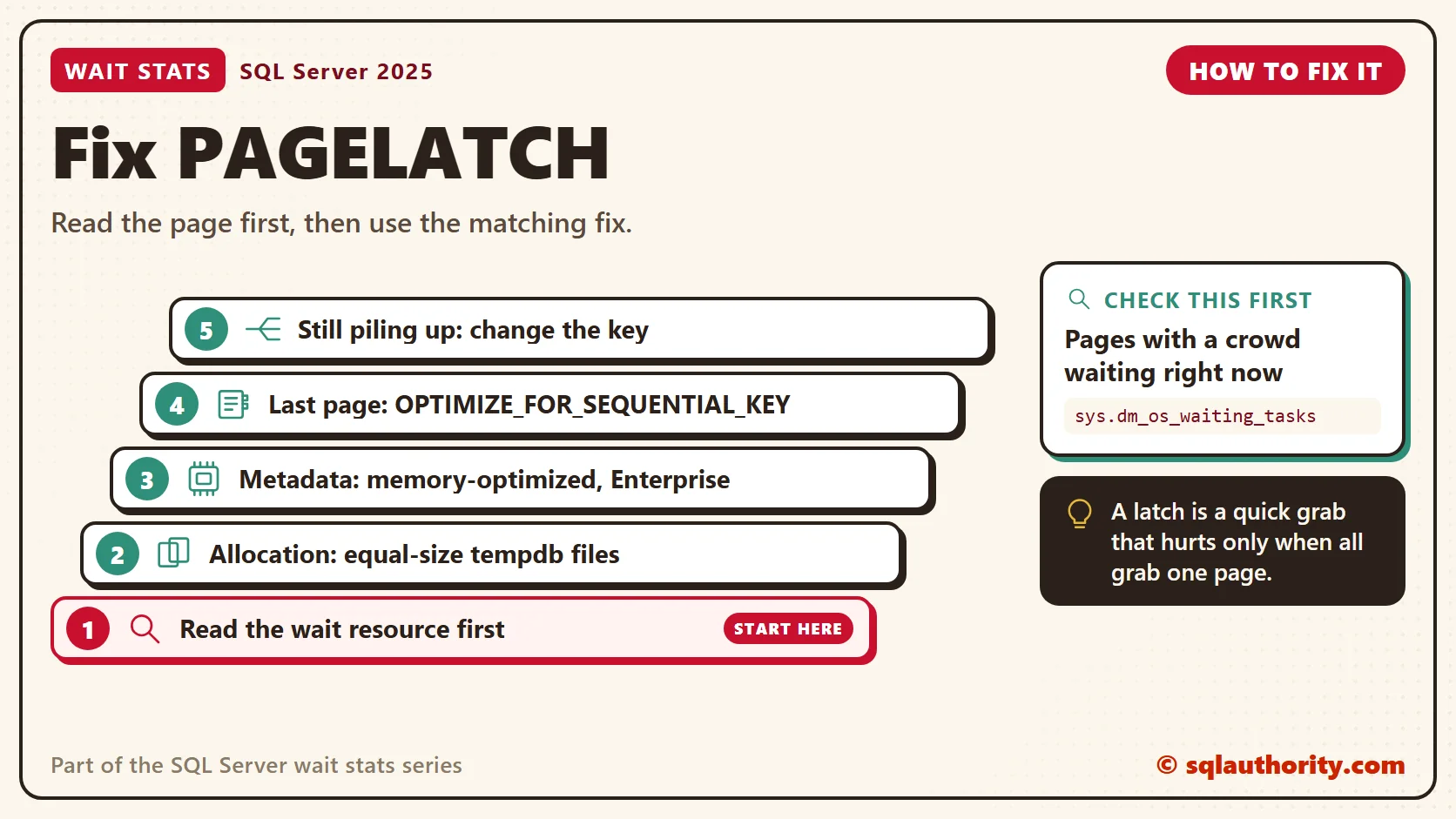
- Read the wait resource first. Decide which hot spot you have before you change anything.
- For tempdb allocation, give tempdb several data files with equal size and equal growth. I start with one per logical core, up to eight. Add more in steps of four only if the contention stays.
- For tempdb metadata, first look for code that creates and drops temp tables in a loop. On Enterprise edition, memory-optimized tempdb metadata (SQL Server 2019 and later) removes this contention. Turn it on only after you confirm heavy metadata contention. It uses memory and has limits, such as no columnstore indexes on temp tables. Test your workload, then restart to apply it.
- For a last page insert, turn on OPTIMIZE_FOR_SEQUENTIAL_KEY for that index (SQL Server 2019 and later).
- If inserts still pile up, change the design. Make the primary key nonclustered and cluster on another column, or pick a key that spreads inserts. Test first, because each choice has costs.
Here are the two statements for steps 3 and 4. Both change settings, so run them on a test server first. Change the table and index names to yours.
-- CHANGES SETTINGS: test server first
-- tempdb system tables in memory (Enterprise edition, needs a restart)
ALTER SERVER CONFIGURATION SET MEMORY_OPTIMIZED TEMPDB_METADATA = ON;

-- Calm a last page hot spot on one index
ALTER INDEX PK_Orders ON dbo.Orders SET (OPTIMIZE_FOR_SEQUENTIAL_KEY = ON);
OPTIMIZE_FOR_SEQUENTIAL_KEY doesn’t remove the latch. It controls how fast threads join the queue, which keeps throughput steady under a crowd. After you turn it on, you’ll see a new wait, BTREE_INSERT_FLOW_CONTROL, in place of some PAGELATCH_EX. That’s Casey’s line at the ticket book.
You could say a latch wait of a few milliseconds isn’t worth the trouble. Fair point, for one wait. The trouble is the queue. When two hundred sessions line up for one page, each one waits for everyone ahead of it.
New in SQL Server 2022 and 2025
SQL Server 2022 added system page latch concurrency, which cuts GAM and SGAM latch contention in tempdb. On Enterprise edition, add memory-optimized tempdb metadata from SQL Server 2019, and the classic tempdb hot spots shrink a lot.
Equal-size tempdb files still matter, and SQL Server 2025 doesn’t change how PAGELATCH works. A last page insert is still a design question.
Related Reading
- SQL SERVER – What is the Difference Between Latches and Locks
- SQL SERVER – Last Page Insert PAGELATCH_EX Contention Due to Identity Column
- SQL SERVER – Resolving Last Page Insert PAGELATCH_EX Contention with OPTIMIZE_FOR_SEQUENTIAL_KEY
- Latch Waits at the Top: Reading sys.dm_os_latch_stats
The Clipboard Diner, a wait stats series. Previous: ASYNC_IO_COMPLETION Wait Stats: Large File Operations. Next: Harmless Wait Stats: Waits You Can Safely Ignore. Every post is listed in the series guide.
Tomorrow night is nearly halfway, and the biggest lines on Casey’s clipboard turn out not to be problems at all.
A latch is not a lock, it is a quick grab that only hurts when everyone grabs the same page.
Published by Pinal Dave on SQLAuthority. More of my work at pinaldave.com.
Discover more from SQL Authority with Pinal Dave
Subscribe to get the latest posts sent to your email.




12 Comments. Leave new
Your explanation of the purpose of latches is incorrect. Latches are not primarily to protect pages being read from disk into memory. It’s a synchronization object for any in-memory access to any portion of a log or data file. Your description of locks vs latches is also incorrect.
Sir,
Updated both the points as suggested.
Thank you for your suggestions and comments, it always help community and readers.
Kind Regards,
Latches are also used for synchronization of non-database file structures, depending on the latch type.
I’ve moved my blog to a new location. The old location is still up, but the new location for the post is
I’d recommend actively monitoring for tempDB contention before you get it. Don’t wait until you are experiencing it.
Hi Robert, I cant seem to reach the page and have access to the said article. Thanks.
Thank you Paul and Robert,
It is very valuable information.
hi dave,
i working as a dba, i am very enthusiastic in learning performance tuning. recently in one of my servers i am seeing a lot of pageiolatch_sh wait_type. i am not sure how i could resolve this issue. it would be great if you could help me in solving the issue.
Hi Pinal,
Please publish the things only when you are sure about them. In this case Paul read that otherwise we will be in dark. Please remember that many users follow this blog and trust on you. I hope i pointed the correct isseu here.
Thanks for your answer
Hi Pinal,
SQL2000 server the application restarted frequently, the sysprocess i have 80 session in pageLatch_UP and waitresource in tempdb(2:2:100) and SQL target memory is 1.5 GB. kindly provide the solution.
I am experiencing PAGELATCH_EX waits for concurrent INSERTS that are blocking each other. The inserts are running the same SP that inserts into just the one table. The Waitresource is not from tempdb but in the user database. Does this mean there is some contention at the database or database file level. I checked that all files are having more than 10% free space. Any suggestions or ideas ? DO you think turning on update_stats_asynchronous could help.
I am experiencing PAGELATCH_UP waits for concurrent UPdates that are blocking each other. The updates are running the same SP that updates into just the one table. The Waitresource is not from tempdb but in the user database. Does this mean there is some contention at the database or database file level please help?