
ASYNC_IO_COMPLETION wait stats measure the time SQL Server waits for big file jobs to finish. Backups, restores and new data file space are where they come from. Most of it is normal. The part you can remove is file zeroing, and one Windows setting does it.

This post is part of my wait stats series, told as one story at the Clipboard Diner. Every post is listed in the series guide.
Night 11 at the Clipboard Diner
Jesse’s half of the sheet cake came up from the basement table before midnight. Casey’s next shelf was a big steel one by the back door. At 1 AM Jules carried up a crate of tomatoes to put on it. Casey held up a hand. House rule: every big new shelf gets a coat of paint before it holds anything.
So Jules set the crate on the floor and waited. Casey painted, and the paint dried. Eleven minutes went by for a shelf no customer would ever see.
At 3 AM the night truck backed up to the kitchen door, wipers slapping at the rain. Twice a week it boxes up a copy of everything in the cooler for a warehouse in town. The crew carried boxes for forty minutes. Casey stood at the door the whole time with the clipboard, waiting for the last box.
Kit wandered over with a mug of coffee. “You’re timing the truck? It always takes that long.” Casey nodded. The truck was the job. The paint was something else. The rule came from the days of splintery wood shelves. These shelves were steel, and any old chalk marks would vanish under the first crate anyway.
Casey wrote one line on the clipboard: Truck waits are the job. Paint waits are a habit.
What ASYNC_IO_COMPLETION Means
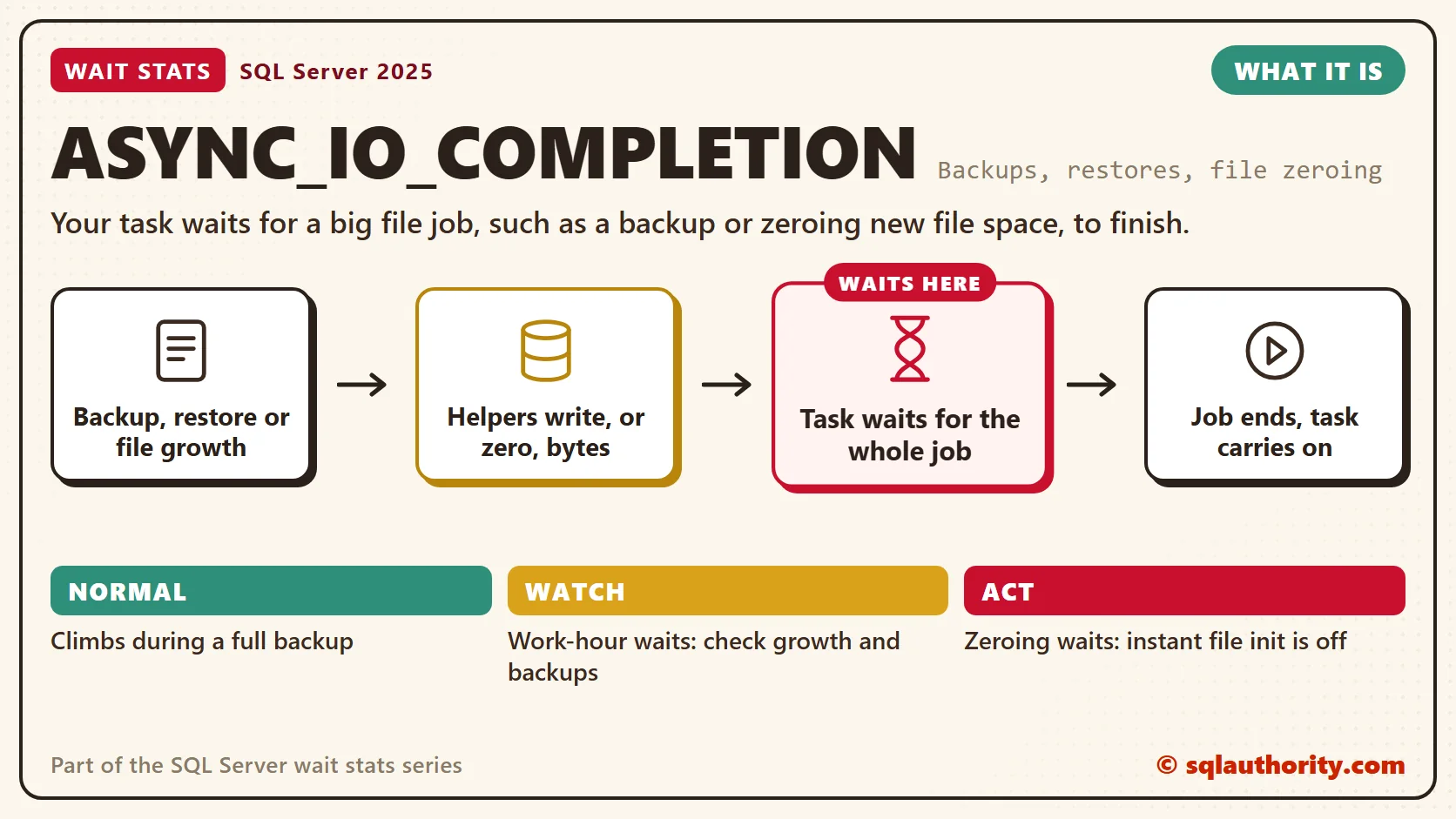
That’s what SQL Server does when it runs a big file job. A task starts a large piece of file work, and then it waits for the whole thing to finish. That waiting is ASYNC_IO_COMPLETION.
It’s disk work, but not the normal reading of data pages you met in PAGEIOLATCH Wait Stats. Last night’s IO_COMPLETION Wait Stats covered other disk work outside data pages. The difference here is that the I/O is asynchronous. These are the three big jobs where I meet it most, not the full list.
Backups. The task that runs BACKUP DATABASE hands the reading and writing to helper threads. Then it waits until the last byte is written. A backup holds this wait for long stretches, which is why the average wait time looks scary.
Restores. A restore works the same way. It also has to create the data files and the log file before it copies anything in.
New data file space. CREATE DATABASE, adding a file, a manual size change and autogrowth all add space. Without help, SQL Server writes zeros over every new byte before it uses it. A 50 GB growth means 50 GB of zeros. The session that needed the space waits the whole time. You’ll see PREEMPTIVE_OS_WRITEFILEGATHER next to it. That’s the call into Windows that writes the zeros.
Instant File Initialization
Instant file initialization (IFI) is the “no paint” rule. With IFI on, SQL Server claims new data file space and uses it at once. Old bytes on the disk stay there until real pages land on top of them.
IFI covers data files only. Log files get zeros, with one small exception below, because recovery reads the log and must know where it ends. A database with transparent data encryption can’t use IFI for its data files either.
You could say skipping the zeros is a security risk. Fair point. Leftover bytes from deleted files stay on the disk until SQL Server writes over them. A sysadmin could read them. I still turn IFI on almost everywhere, because a sysadmin can already read the live data. On shared disks or strict compliance systems, ask your security team first.
Here’s how the cost of zeroing adds up. Picture a 2 TB database whose data file grows by 10 percent at a time. Every growth is 200 GB of zeros, and one can land at 2 PM on a Monday. It’s tempting to blame the network for a full day before anyone reads the waits.
Normal or a Problem?
| Situation | What it means | What to do |
|---|---|---|
| ASYNC_IO_COMPLETION climbs while a full backup runs | Normal. Backups wait in long stretches. | Track how long backups take instead. |
| Huge average wait, small waiting_tasks_count | A few long jobs, such as nightly backups. | Check when they ran. Leave it alone if it’s your backup window. |
| Waits during CREATE DATABASE, RESTORE or growth, with PREEMPTIVE_OS_WRITEFILEGATHER | SQL Server is writing zeros to new data file space. | Check instant file initialization. |
| Users stall during business hours while a file grows | Autogrowth is zeroing in your busy time. | Pre-size the files and grow in fixed MB. |
| A restore sits for a long time before copying data | It’s zeroing data files (no IFI) or a big log file. | Turn on IFI and keep the log a sensible size. |
See It on Your Server
Start with the setting. The first query shows whether IFI is on. The second lists every file with its size and how it grows.
-- Is instant file initialization on? (SQL Server 2016 SP1 and later)
SELECT servicename,
       service_account,
       instant_file_initialization_enabled
FROM sys.dm_server_services;

-- Which files grow by percent, and how big are they?
SELECT DB_NAME(database_id) AS database_name,
       name AS file_name,
       type_desc,
       size / 128 AS size_mb,
       CASE WHEN is_percent_growth = 1
            THEN CAST(growth AS varchar(10)) + ' percent'
            ELSE CAST(growth / 128 AS varchar(10)) + ' MB'
       END AS growth_setting
FROM sys.master_files
ORDER BY is_percent_growth DESC, size DESC;
In the first result, read the row for the SQL Server service, not the Agent. Y means IFI is on. N means every new byte of data file space gets zeros first. In the second result, percent growth on a big file is the line to fix first.
The next block shows big file jobs running right now, then the totals since the last restart.
-- Which big file jobs are running right now, and how far along are they?
SELECT r.session_id,
       r.command,
       DB_NAME(r.database_id) AS database_name,
       r.wait_type,
       CAST(r.wait_time / 1000.0 AS decimal(12, 1)) AS waited_sec,
       r.percent_complete,
       r.total_elapsed_time / 1000 AS elapsed_sec
FROM sys.dm_exec_requests AS r
WHERE r.wait_type IN (N'ASYNC_IO_COMPLETION', N'PREEMPTIVE_OS_WRITEFILEGATHER')
   OR r.command LIKE N'BACKUP%'
   OR r.command LIKE N'RESTORE%'
ORDER BY r.total_elapsed_time DESC;

-- Few long waits (backups) or many medium ones (file growth)?
SELECT wait_type,
       waiting_tasks_count,
       CAST(wait_time_ms / 1000.0 AS decimal(18, 1)) AS waited_sec,
       CAST(1.0 * wait_time_ms / NULLIF(waiting_tasks_count, 0) AS decimal(12, 1)) AS avg_wait_ms,
       max_wait_time_ms
FROM sys.dm_os_wait_stats
WHERE wait_type IN (N'ASYNC_IO_COMPLETION', N'IO_COMPLETION', N'PREEMPTIVE_OS_WRITEFILEGATHER')
ORDER BY wait_time_ms DESC;
The percent_complete column fills in for backups and restores, so you can see how far along they are. In the totals, look at avg_wait_ms next to waiting_tasks_count. A handful of waits with a huge average are likely your backups. Many medium waits during the workday are worth a file growth check. Confirm either one with the backup history and file sizes for the same hours.
Fix It
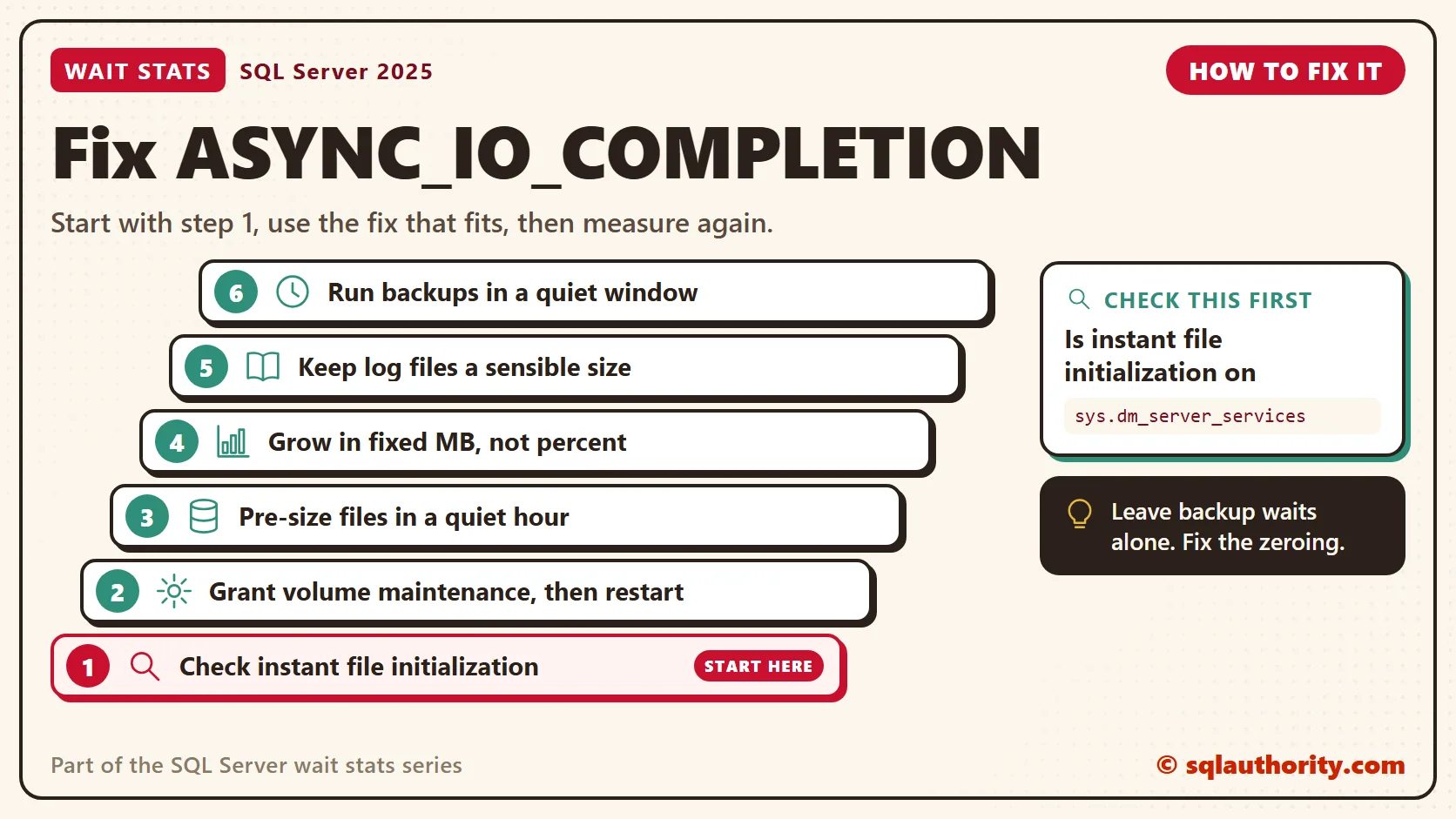
- Run the IFI check. If it says N, give the SQL Server service account the Windows right “Perform volume maintenance tasks”, then restart the service. New installs offer this as a checkbox in setup since SQL Server 2016.
- Pre-size data files during a quiet hour, so autogrowth becomes a rare safety net.
- Set growth in fixed megabytes, not percent. Percent growth gets bigger every time the file does.
- Keep log files a sensible size. IFI doesn’t cover them, so a huge log growth or a huge log in a restore still writes zeros.
- Run backups and restores in a quiet window, and leave their ASYNC_IO_COMPLETION alone. If they take too long, BACKUPIO Wait Stats has the fixes.
New in SQL Server 2022 and 2025
SQL Server 2022 brought a small piece of IFI to the log. Log growths of 64 MB or less skip the zeros, in every edition. New databases also start with a 64 MB log growth, so they get this without any change. Bigger log growths still write zeros.
SQL Server 2025 adds ZSTD backup compression, which means fewer bytes for the backup to write. The meaning of ASYNC_IO_COMPLETION hasn’t changed. It’s still the sound of a big file job, and IFI is still the first thing I check.
Related Reading
- SQL SERVER – Script: Current IO Related Waits on SQL Server
- How to Optimize Your Server Performance by Reducing IO Waits
The Clipboard Diner, a wait stats series. Previous: IO_COMPLETION Wait Stats: Spills, Sorts and File Growth. Next: PAGELATCH Wait Stats: Hot Pages in Memory and tempdb. Every post is listed in the series guide.
Tomorrow night, four cooks reach for the same line of one ticket book.
A backup wait is not a problem, it is the sound of the truck doing its job.
Published by Pinal Dave on SQLAuthority. More of my work at pinaldave.com.
Discover more from SQL Authority with Pinal Dave
Subscribe to get the latest posts sent to your email.



4 Comments. Leave new
Hi Dave,
these articles are extremely helpful. Thanks for sharing it with us for free!
Hi Pinal,
I use third party tool for taking compressed backups. While backup occurs prominently two types of lastwaittype are seen ASYNC_IO_COMPLETION and MSQL_XP both of them take considerable amount of wait time. How can i effectively reduce the wait time.
I have seen the same issue and resolved by below steps.
1. i have restored the same database earlier on the same location, However, when i try to restore the same database again i landed into ASYNC_IO_COMPLETION.
I ran below query to identify what is the error in logs.—-
select start_time, status, blocking_session_id
, wait_type, wait_time, last_wait_type, wait_resource
, percent_complete, estimated_completion_time
,total_elapsed_time, reads, writes, cpu_time
from sys.dm_exec_requests
where command = ‘RESTORE DATABASE’
Old location was : D:\Data\
New location : D:\Data1\
2. To resolve this issue i have created another location and restored database on the new location and that helps me to resolve this issue.
Thanks
Sachin Kumar
Help me