
A random number generator in SQL Server needs clear rules for its range, repeatability, and use. My original range example used ROUND and the wrong multiplier. Readers correctly pointed out the uneven distribution. The examples below fix that calculation and separate the different jobs.

Generate one integer from 1 through 999
For an integer range, both endpoints should be possible. Use FLOOR with the number of integers in the range. Run this complete example in SSMS:
DECLARE @Lower int = 1;
DECLARE @Upper int = 999;
IF @Lower > @Upper
    THROW 50000, 'Lower must not exceed Upper.', 1;
DECLARE @Width bigint = CONVERT(bigint, @Upper)
                      - CONVERT(bigint, @Lower) + 1;
SELECT CONVERT(int, CONVERT(bigint, @Lower)
       + CONVERT(bigint, FLOOR(RAND() * @Width))) AS RandomInteger;
The result is an integer from 1 through 999, inclusive. Change @Lower and @Upper to your required int bounds. Negative bounds work too. Equal bounds return that one value.
The width calculation uses bigint before subtraction. That prevents overflow when the bounds span more than an int can hold. The final result still fits the declared int range. Reversed bounds raise a clear error.
These examples use SQL Server 2012 or later syntax and were tested on SQL Server 2025. They use table variables or scalar expressions, so no sample database is required.
Why the original formula missed the upper bound
The old expression multiplied RAND() by @Upper - @Lower - 1, then rounded. With bounds 1 and 999, it cannot return 999. Rounding also gives the endpoint results narrower input intervals.
The corrected expression divides the input range into equal-width intervals using FLOOR. The + 1 includes the upper integer. This removes the mapping error; it does not make RAND() a cryptographic generator.
This check uses fixed inputs and the smaller range 1 through 6. These are chosen test values, not random draws. They make the missing upper endpoint easy to reproduce:
SELECT v.SampleValue,
       CONVERT(int, ROUND((6 - 1 - 1) * v.SampleValue + 1, 0))
           AS OriginalFormula,
       1 + CONVERT(int, FLOOR((6 - 1 + 1) * v.SampleValue))
           AS CorrectedFormula
FROM (VALUES (0.000000), (0.250000), (0.500000), (0.999999))
     AS v(SampleValue)
ORDER BY v.SampleValue;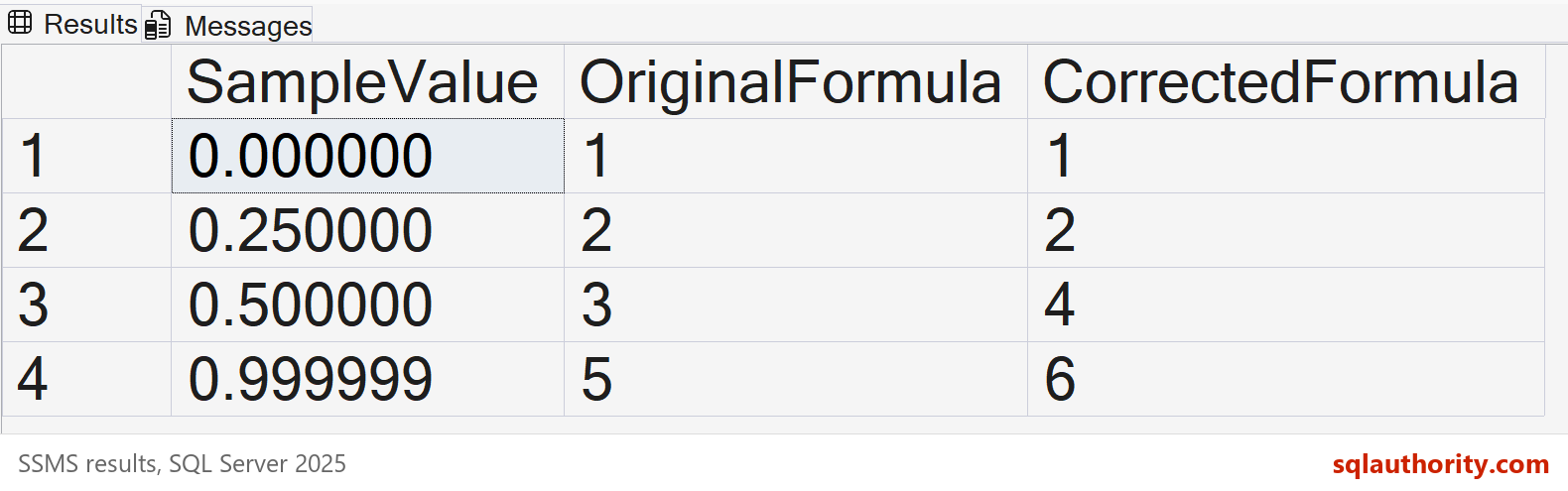
Generate a random float
RAND() produces a pseudo-random float greater than or equal to 0 and less than 1. Multiply and add to map that value to another interval:
SELECT RAND() AS RandomFloat;
SELECT 10.0 + (30.0 - 10.0) * RAND() AS RandomFloat10To30;
The second query uses the interval from 10 up to 30, excluding 30. Floating-point arithmetic is approximate. For integer endpoints, use the integer formula above instead of rounding a float.
Use a seed when a test must repeat
A fixed seed is useful when replaying a test. Calling RAND with that seed restarts its sequence for the connection. Later unseeded calls follow that seeded sequence.
The next script repeats the same two calls in the same order. Both result rows should show Yes. The displayed numbers are rounded for readability, but the equality check uses the original values.
DECLARE @Seeded1 float = RAND(42);
DECLARE @Next1 float = RAND();
DECLARE @Seeded2 float = RAND(42);
DECLARE @Next2 float = RAND();
SELECT v.Step,
       CONVERT(decimal(16,12), v.FirstRun) AS FirstRun,
       CONVERT(decimal(16,12), v.Replay) AS Replay,
       CASE WHEN v.FirstRun = v.Replay THEN 'Yes' ELSE 'No' END AS SameValue
FROM (VALUES (1, 'Seeded call', @Seeded1, @Seeded2),
             (2, 'Next call', @Next1, @Next2))
     AS v(SortOrder, Step, FirstRun, Replay)
ORDER BY v.SortOrder;
Do not call RAND(42) repeatedly when you expect a new sequence value. Each call resets the generator. Seed once, then use RAND() for subsequent values.
I also removed the old clock-based seed expression. Rapid calls can reuse the same clock value and produce repeats. Adding pieces of GETDATE() does not guarantee a fresh seed.
Generate a value for each row
Calling RAND() in a query does not promise a separate draw for every row. In this SELECT, its value repeats across the six rows. Microsoft also documents the same-value behavior for affected rows in INSERT and UPDATE statements.
For ordinary sample data, this shortcut uses NEWID() and CHECKSUM for a varying value per row. The result is between 1 and 1000:
SELECT v.RowID,
       CONVERT(decimal(10,6), RAND()) AS RandInThisSelect,
       1 + ABS(CONVERT(bigint, CHECKSUM(NEWID()))) % 1000 AS PerRowInteger
FROM (VALUES (1), (2), (3), (4), (5), (6)) AS v(RowID)
ORDER BY v.RowID;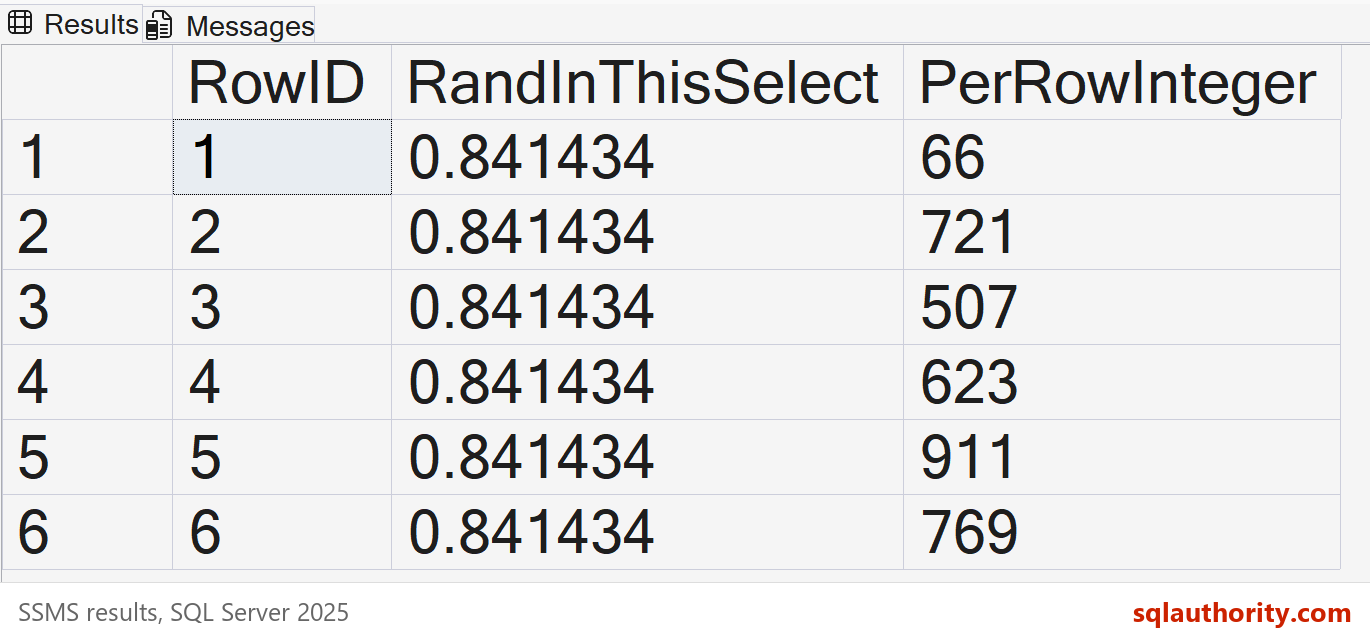
The conversion to bigint belongs inside ABS. CHECKSUM returns an int, and ABS(-2147483648) overflows that type. Converting the result after ABS would be too late.
I use this shortcut for disposable sample data. It does not guarantee an unbiased distribution or unique values. Hashing and taking a remainder are unsuitable when exact statistical fairness matters.
Generate exactly 10,000 sample rows
For a small demonstration, a loop makes one RAND() call per inserted row. This example generates integers from 1 through 6. The counts add up to exactly 10,000:
DECLARE @Samples TABLE (RandomInteger int);
DECLARE @i int = 0;
WHILE @i < 10000
BEGIN
    INSERT INTO @Samples (RandomInteger)
    VALUES (1 + CONVERT(int, FLOOR(6 * RAND())));
    SET @i += 1;
END;
SELECT RandomInteger, COUNT(*) AS Occurrences
FROM @Samples
GROUP BY RandomInteger
ORDER BY RandomInteger;
The original loop used <= 10000 while starting at zero, which produced 10,001 rows. This version uses < 10000. It also stops reseeding from the clock on every iteration.
The category counts will vary. Equal counts are not required, and one frequency table cannot prove randomness. For large test datasets, choose a generation method designed for that workload.
Random values can repeat
A valid random number generator can produce the same value more than once. None of these bounded-number examples guarantees uniqueness. Use an IDENTITY column or a SEQUENCE when you need ordinary generated identifiers. Enforce required uniqueness with a primary key or unique constraint.
For cryptographic random bytes, SQL Server provides CRYPT_GEN_RANDOM. This example returns 16 bytes:
SELECT CRYPT_GEN_RANDOM(16) AS RandomBytes;Do not use RAND() or the checksum shortcut for passwords or access tokens. A token design also needs suitable encoding, storage, expiration, and verification. A random-looking integer alone does not provide those properties.
Original video
The original SQL in Sixty Seconds video remains below. Use the updated scripts above as the reference for range boundaries and seeding.
More videos are available on my SQL in Sixty Seconds channel.
More SQL in Sixty Seconds videos
- Copy Database – SQL in Sixty Seconds #169
- 9 SQL SERVER Performance Tuning Tips – SQL in Sixty Seconds #168
- Excel – Sum vs SubTotal – SQL in Sixty Seconds #167
- 3 Ways to Configure MAXDOP – SQL in Sixty Seconds #166
- Get Memory Details – SQL in Sixty Seconds #165
- Get CPU Details – SQL in Sixty Seconds #164
- Shutdown SQL Server Via T-SQL – SQL in Sixty Seconds #163
- SQL Server on Linux – SQL in Sixty Seconds 162
- Query Ignoring CPU Threads – SQL in Sixty Seconds 161
- Bitwise Puzzle – SQL in Sixty Seconds 160
- Find Expensive Queries – SQL in Sixty Seconds #159
- Case-Sensitive Search – SQL in Sixty Seconds #158
- Wait Stats for Performance – SQL in Sixty Seconds #157
- Multiple Backup Copies Stripped – SQL in Sixty Seconds #156
Check the range, repetition, and purpose before choosing a random-number expression.
Published by Pinal Dave on SQLAuthority. More of my work at pinaldave.com.
Discover more from SQL Authority with Pinal Dave
Subscribe to get the latest posts sent to your email.




113 Comments. Leave new
We can do it in a single SQL statement:
Select ABS(CAST(CAST(NEWID() AS VARBINARY) AS INT))/10000
Output:
Posted By:
Shubham Saxena
[email removed]
Do it this way:
SELECT FLOOR(RAND() * POWER(CAST(10 as BIGINT), 4)) — 4 is the number of digits required in the random number.
There is a problem with this solution. Distribution of random numbers is not linear. They are not evenly distributed. I tested 50000 numbers
id howmany
5 6221
1 6390
3 12362
2 12509
4 12517
1 and 5 are the least probabilities you will get and 2,3,4 will be appearing more than 1 and 5. The beauty of a random algorithm is linear distribution which I can not find in this algorithm,
I need to assign a random rank to each row in a table when i select the records. Each time i should get different orders for the same record.
When i run first time it should be some thing like
Id Name Rank
1 AAA 121
2 BBB 2
3 CCC 192
4 DDD 71
and when i run next time it should be like
Id Name Rank
1 AAA 41
2 BBB 219
3 CCC 189
4 DDD 514
I found same result. Glad to see that I am not the only one. Pinal, this does not produce a random distribution: SELECT @Random = ROUND(((@Upper – @Lower -1) * RAND() + @Lower), 0)
I realized that RAND doesn’t work the way I thought.
I am trying to get random Numerics 22 digits
—- Create the variables for the random number generation
DECLARE @Random numeric(22,0);
DECLARE @Upper numeric(22,0);
DECLARE @Lower numeric(22,0);
DECLARE @i as smallint = 0;
WHILE @i < 5
Begin
—- This will create a random number between 1 and 999
SET @Lower = 1 —- The lowest random number
SET @Upper = 9999999999999999999999 —- The highest random number
SELECT @Random = ROUND(((@Upper – @Lower -1) * RAND() + @Lower), 0)
SELECT CONVERT(numeric(22,0), @Random)
SET @i = @i + 1
END
However I am getting trailing zeros??? Anythoughts
5269217793094762600000
2069010432392735200000
9874429441046535500000
4036267276971462400000
4622200941923071400000
Got it – select CONVERT(numeric(22,0),RAND() * 10000000000000000000000) + CONVERT(numeric(22,0),RAND() * 100000)
hai pinal dev ji,
can i get full course of SQL server from scratch to real time else, can i get guide for sqlauthority site map to learn SQL from your website (i see random posts)
Sorry, I don’t have any such offering for SQL from scratch. I do have special course. http://blog.sqlauthority.com/sql-server-performance-tuning-practical-workshop/
example : i have a table, my table having coloumn a,b,c . coloumn a (Primary key) then coloumn b and c data type is integer, how to create select between numer range cloumn b and c, when them input value random ?