
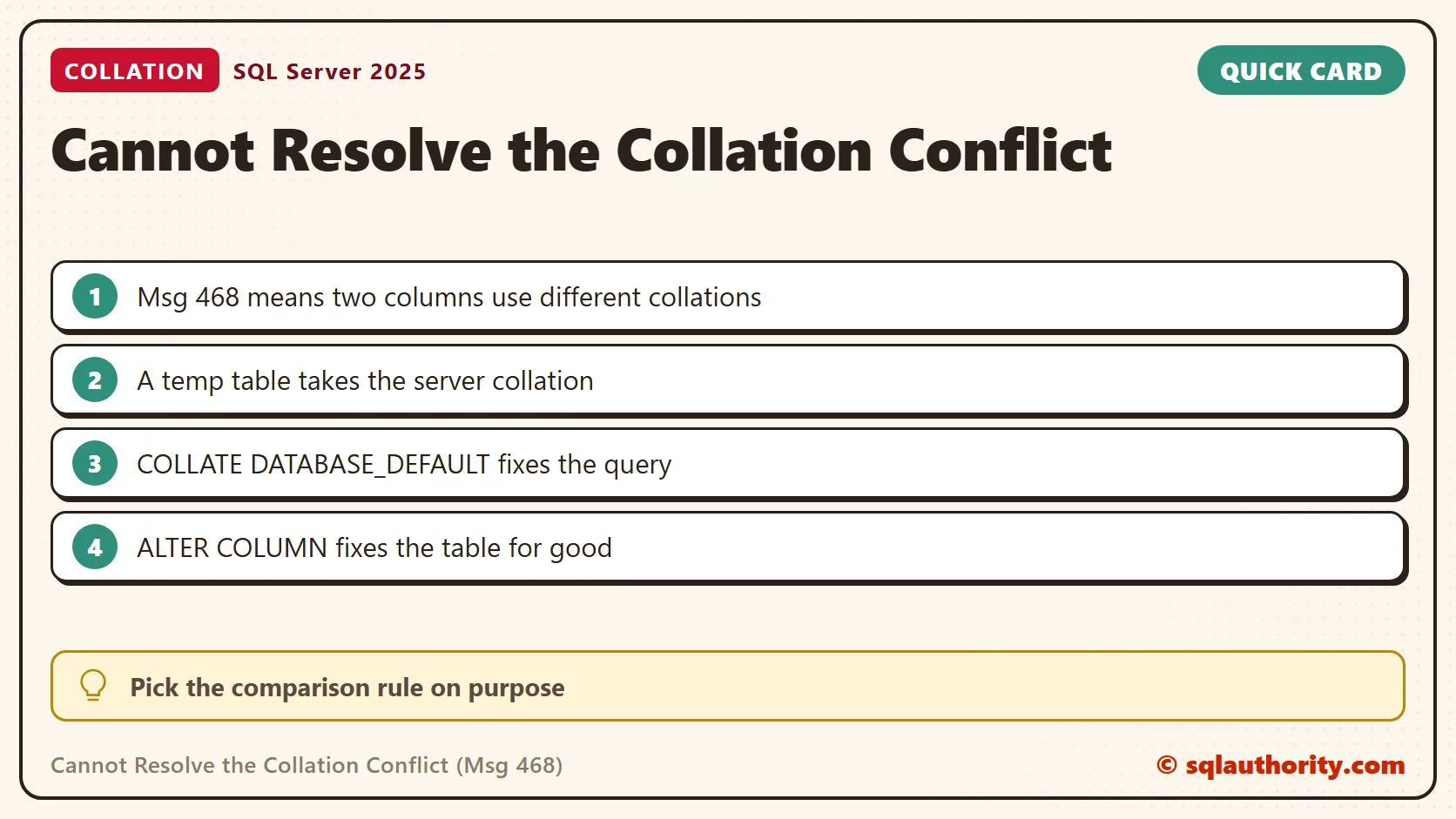
Cannot resolve the collation conflict (Msg 468) means two text values use different collations and SQL Server can’t pick one. This is episode 47 of SQL in Sixty Seconds. I reproduced the error on SQL Server 2025 and tested each fix.

It is one of the most common errors for developers who work with more than one database. Fix it first, then learn what collation means. Collation is the language a text column speaks. Two columns that speak different languages can’t be compared until you pick one. The pick matters, because a case sensitive comparison and a case insensitive one return different rows.
Watch the Original Video
What the Error Means
Every text column has a collation. It sets the rules for comparing and sorting text, such as case and accents. When a query compares two columns with different collations, SQL Server has no rule to prefer, so it stops. The message names both collations and the operation. I saw the equal to operation for a join and the UNION operation for a UNION.
Reproduce the Error
The usual cause is a temp table. It lives in tempdb, and its text columns take the collation of the server, not of your database. My server uses SQL_Latin1_General_CP1_CI_AS. I made a scratch database with a case sensitive collation, so the two sides differ.
CREATE DATABASE Clock_23260 COLLATE Latin1_General_CS_AS;
GO
USE Clock_23260;
The next script builds three tables: suppliers, an order list in a temp table and one with its own collation. The odd table gives the finder query later something to catch.
CREATE TABLE dbo.Supplier (SupplierName varchar(50) NOT NULL, City varchar(50) NOT NULL);
CREATE INDEX IX_Supplier_City ON dbo.Supplier (City);
INSERT INTO dbo.Supplier (SupplierName, City)
VALUES ('Green Valley Farms', 'Pune'), ('Sunrise Organics', 'Surat');
CREATE TABLE dbo.LegacyCode (Code varchar(10) COLLATE SQL_Latin1_General_CP1_CI_AS NOT NULL);
CREATE TABLE #SupplierOrder (SupplierName varchar(50) NOT NULL, Item varchar(50) NOT NULL);
INSERT INTO #SupplierOrder (SupplierName, Item)
VALUES ('green valley farms', 'Okra'), ('Sunrise Organics', 'Spinach');
SELECT s.SupplierName, o.Item
FROM dbo.Supplier AS s
JOIN #SupplierOrder AS o ON o.SupplierName = s.SupplierName;
The join fails with Msg 468: Cannot resolve the collation conflict between "Latin1_General_CS_AS" and "SQL_Latin1_General_CP1_CI_AS" in the equal to operation.
Confirm Which Columns Differ
Read the collations before you change anything. The first query shows the database and the server. The second lists every text column in the database. The third reads the temp table from tempdb.
SELECT DATABASEPROPERTYEX(DB_NAME(), 'Collation') AS DatabaseCollation,
       SERVERPROPERTY('Collation') AS ServerCollation;
SELECT t.name AS TableName, c.name AS ColumnName, c.collation_name
FROM sys.columns AS c
JOIN sys.tables AS t ON t.object_id = c.object_id
WHERE c.collation_name IS NOT NULL
ORDER BY t.name, c.column_id;
SELECT name AS ColumnName, collation_name
FROM tempdb.sys.columns
WHERE object_id = OBJECT_ID('tempdb..#SupplierOrder');
The database reports Latin1_General_CS_AS and the server reports SQL_Latin1_General_CP1_CI_AS. The supplier columns use the first, and the temp table columns use the second. That mismatch is the whole error.
Other causes look the same in these queries. A column created with its own COLLATE clause behaves like my odd table. A table in another database with a different default collation does too, but I did not run that case.
This query lists text columns whose collation differs from the database default. It returned no rows before I created the odd table, and one row after. Run it after you restore a database from another server.
SELECT t.name AS TableName, c.name AS ColumnName, c.collation_name
FROM sys.columns AS c
JOIN sys.tables AS t ON t.object_id = c.object_id
WHERE c.collation_name <> CONVERT(sysname, DATABASEPROPERTYEX(DB_NAME(), 'Collation'));
Fix It in the Query
The COLLATE DATABASE_DEFAULT clause compares by the rules of your current database. It returned one row, because that collation is case sensitive and "green valley farms" no longer matches.
SELECT s.SupplierName, o.Item
FROM dbo.Supplier AS s
JOIN #SupplierOrder AS o ON o.SupplierName COLLATE DATABASE_DEFAULT = s.SupplierName;
Naming the case insensitive collation on the other side returned both rows. Same join, two answers. Pick the rule on purpose, because the clause changes which rows match.
SELECT s.SupplierName, o.Item
FROM dbo.Supplier AS s
JOIN #SupplierOrder AS o ON o.SupplierName = s.SupplierName COLLATE SQL_Latin1_General_CP1_CI_AS;
Fix It at the Source
For temp tables, put COLLATE DATABASE_DEFAULT on the text columns when you create them. Later joins then need no clause, and the temp table follows the database wherever the code runs.
CREATE TABLE #SupplierOrder2 (SupplierName varchar(50) COLLATE DATABASE_DEFAULT NOT NULL, Item varchar(50) NOT NULL);
INSERT INTO #SupplierOrder2 (SupplierName, Item)
VALUES ('green valley farms', 'Okra'), ('Sunrise Organics', 'Spinach');
SELECT s.SupplierName, o.Item
FROM dbo.Supplier AS s
JOIN #SupplierOrder2 AS o ON o.SupplierName = s.SupplierName;
For a real table, change the column. The script below changes the supplier name and then repeats the failing join, which now returns both rows. ALTER COLUMN needs the full definition, including NOT NULL.
ALTER TABLE dbo.Supplier ALTER COLUMN SupplierName varchar(50) COLLATE SQL_Latin1_General_CP1_CI_AS NOT NULL;
GO
SELECT s.SupplierName, o.Item
FROM dbo.Supplier AS s
JOIN #SupplierOrder AS o ON o.SupplierName = s.SupplierName;
A column with an index needs three steps. In my test the same ALTER on an indexed column failed with Msg 5074 and Msg 4922. Drop the index, change the column and build the index again.
DROP INDEX IX_Supplier_City ON dbo.Supplier;
ALTER TABLE dbo.Supplier ALTER COLUMN City varchar(50) COLLATE SQL_Latin1_General_CP1_CI_AS NOT NULL;
CREATE INDEX IX_Supplier_City ON dbo.Supplier (City);
ALTER DATABASE … COLLATE is not a shortcut. In my test it changed the default for the database, and an existing column kept its old collation.
Related Tips
- Cannot Resolve Collation Conflict For Equal to Operation
- Find Collation of Database and Table Column Using T-SQL
- Effect of Case Sensitive Collation on Resultset
- Detecting Database Case Sensitive Property using fn_helpcollations()
- Collation Sensitivity Quiz: Does ‘jose’ Match ‘José’?
- Collate – Case Sensitive SQL Query Search
A collation conflict is not a bug in your query, it is two columns speaking different languages.
Published by Pinal Dave on SQLAuthority. More of my work at pinaldave.com.
Discover more from SQL Authority with Pinal Dave
Subscribe to get the latest posts sent to your email.

1 Comment. Leave new
we have used #temptable in so many procedure of mydb with join condition & collation of mydb and tempdb are different.
now I want to continue with mydb collation but can’t change collation of tempdb
what can i do?