
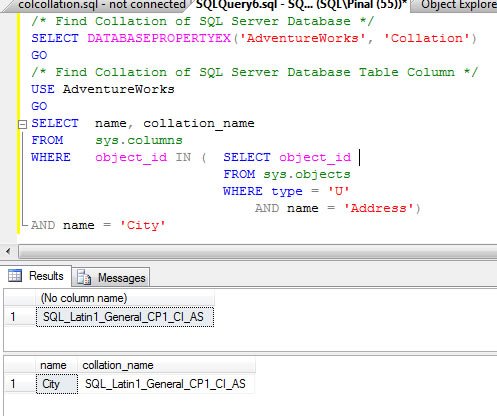
Today we will go over very quick tip about finding out collation of database and table column. Collations specify the rules for how strings of character data are sorted and compared, based on the norms of particular languages and locales
Today’s script are self explanatory so I will not explain it much.
/* Find Collation of SQL Server Database */
SELECT DATABASEPROPERTYEX('AdventureWorks', 'Collation')
GO
/* Find Collation of SQL Server Database Table Column */
USE AdventureWorks
GO
SELECT name, collation_name
FROM sys.columns
WHERE OBJECT_ID IN (SELECT OBJECT_ID
FROM sys.objects
WHERE type = 'U'
AND name = 'Address')
AND name = 'City'
Checking Collation Across the Whole Server
The scripts above still work. On newer versions I like to see everything in one place. The first query below lists the collation of every database on the server, the second returns the server collation, and the third lists every character column in user tables along with its collation.
SELECT name, collation_name
FROM sys.databases;

SELECT SERVERPROPERTY('Collation') AS ServerCollation;

SELECT OBJECT_NAME(c.object_id) AS TableName, c.name AS ColumnName, c.collation_name
FROM sys.columns AS c
WHERE c.collation_name IS NOT NULL
  AND OBJECTPROPERTY(c.object_id, 'IsUserTable') = 1;
Here is one caution from real projects. When you create a table, each character column takes the collation of the database unless you specify another one. If you later change the database collation, the existing columns keep their old collation. That is how one database ends up with mixed collations, and a join or comparison between two columns with different collations fails with a collation conflict error. Checking the collation of database and table column together, as in this post, catches that problem early.
Also keep in mind that temporary tables live in tempdb, and tempdb uses the server collation. If your database collation is different from the server collation, a join between a temporary table and a regular table can fail with the same error. Declaring the character columns of the temporary table with COLLATE DATABASE_DEFAULT avoids it. For an existing conflict, a COLLATE clause on one side of the comparison is a quick fix, but the real fix is to make the columns match. I run a check like this before and after every migration. It takes a few seconds and saves a long evening of debugging.
Published by Pinal Dave on SQLAuthority. More of my work at pinaldave.com.
Discover more from SQL Authority with Pinal Dave
Subscribe to get the latest posts sent to your email.



13 Comments. Leave new
You can do the same with
select table_name, column_name, collation_name
from information_schema.columns
where table_name = @table_name
Yeah, this works! Thank you!
Thank You very much…
Hmm,
Anyone else get this error when attempting to execute the output from script 3?:
ERROR: Load object, dump buffer.
ERROR: Load object, dump buffer.
I too got the following error for 3rd script (script to add dependencies) ERROR: Load object, dump buffer.
I know this is late, but it will help someone in future…We receive this error if the sequence is not followed properly during the execution. we see this error when step 14 is accidentally skipped.
Sir, Let suppose i have a column name “something_contact” in a table of database. Now i want to make a filter that will show me all the columns which contains “contact”. Remember it should be column not table containing “contact”. Is it posible?
If i am getting you right, i think i you can use like clause:
SELECT name
FROM sys.columns
where name Like ‘%contact%;
Hi Pinal,
I have changed the rule to handle case sensitive by updating database to SQL_Latin1_General_CP1_CI_AS.It worked fine. But again after changing the rule to SQL_Latin1_General_CP1_CS_AS ,it is behaving case sensitive ..
HI Pinal,
We have a situation where we are upgrading all our databases to new collation but do not know how to change all columns, fields, tables to the new collation. Any suggestion will be appreciated.
Great article site
How can I do this for a table type @table, because im getting this error for a temporary table:
Msg 468, Level 16, State 9, Procedure SPPInteroperaSiniestroOrdenCompania, Line 227
Cannot resolve the collation conflict between “SQL_Latin1_General_CP850_CI_AS” and “SQL_Latin1_General_CP850_CI_AI” in the equal to operation.
useful thank you