This Collation Sensitivity Quiz asks one question about three names that look almost the same. It’s about case, accents and the two letters at the end of a collation name. Read the setup, pick your answer, and then run the script to check yourself.

The Quiz
A database uses the collation SQL_Latin1_General_CP1_CI_AS. A table in it holds names such as jose, JOSE, Jose and José. Jordan runs a query with the filter WHERE Name = ‘jose’.
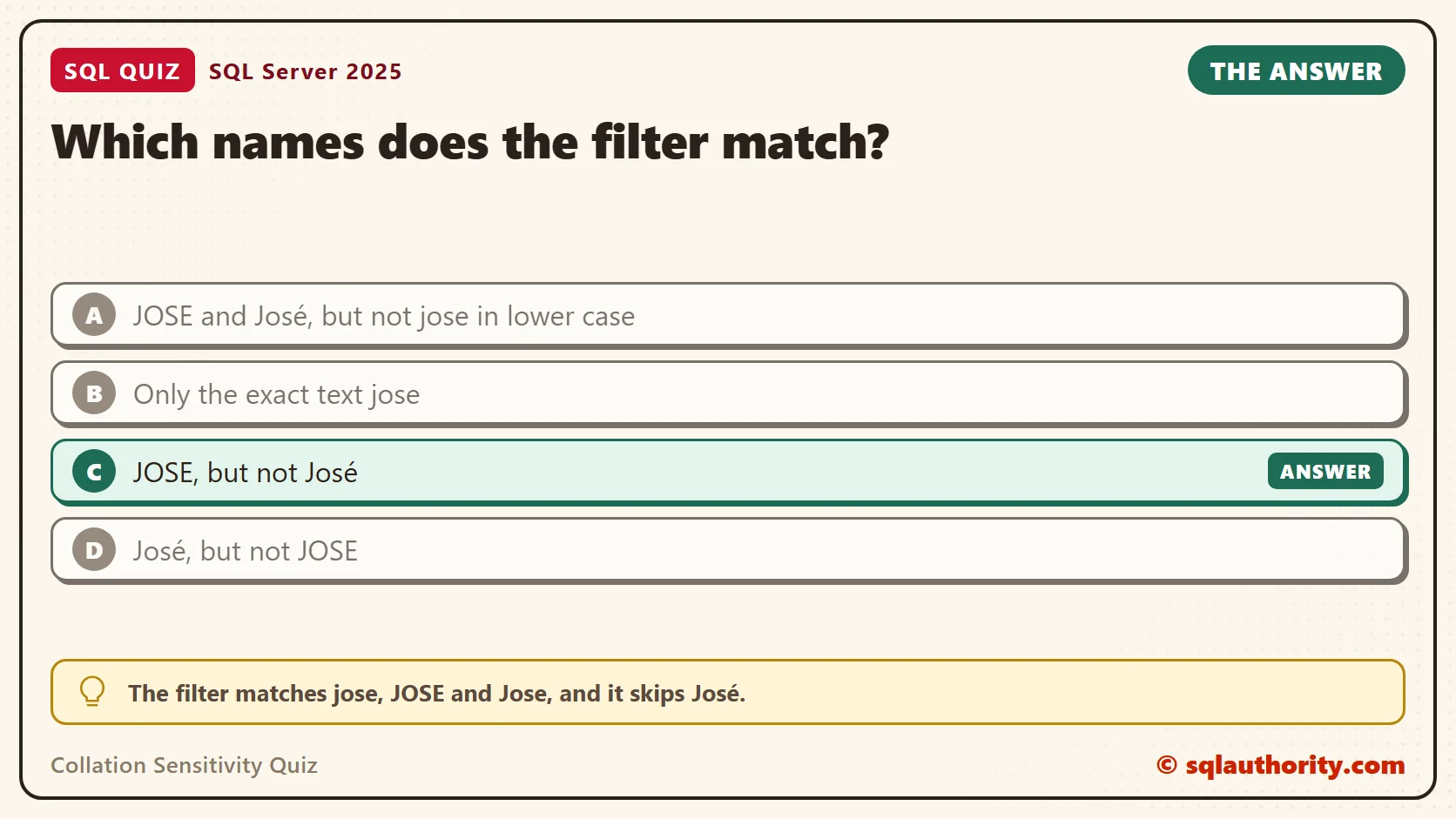
Which names does the filter match?
A. JOSE and José, but not jose in lower case
B. Only the exact text jose
C. JOSE, but not José
D. José, but not JOSE
Take a moment and pick one before you read on.
The Answer
The answer is C. The filter matches jose, JOSE and Jose, and it skips José.
Two letters in the collation name decide this. CI means case-insensitive, so upper and lower case count as the same letter. AS means accent-sensitive, so an e and an é count as different letters.
Prove It
The first script creates a small database called SqlQuizCollationSensitivity. It is used only for this example, so run it on a test server. The script sets the collation on purpose, so the result doesn’t depend on your server.
IF DB_ID(N'SqlQuizCollationSensitivity') IS NULL CREATE DATABASE SqlQuizCollationSensitivity COLLATE SQL_Latin1_General_CP1_CI_AS;
GO
USE SqlQuizCollationSensitivity;
GO
DROP TABLE IF EXISTS dbo.QuizPersonCS;
DROP TABLE IF EXISTS dbo.QuizPerson;
CREATE TABLE dbo.QuizPerson
(
    PersonID int IDENTITY(1,1) PRIMARY KEY,
    Name varchar(30) NOT NULL
);
INSERT INTO dbo.QuizPerson (Name) VALUES ('jose'), ('JOSE'), ('Jose'), ('José'), ('Josef');
SELECT DATABASEPROPERTYEX(DB_NAME(), 'Collation') AS DatabaseCollation;
SELECT PersonID, Name FROM dbo.QuizPerson WHERE Name = 'jose';
On SQL Server 2025, the first query returned SQL_Latin1_General_CP1_CI_AS. The second query returned three rows. José is missing, and so is Josef.
| PersonID | Name |
|---|---|
| 1 | jose |
| 2 | JOSE |
| 3 | Jose |
You can change the rule for a single query with COLLATE. This query asks the same question under three collations at once, one column for each.
SELECT Name,
    CASE WHEN Name = 'jose' COLLATE SQL_Latin1_General_CP1_CI_AS THEN 'Yes' ELSE 'No' END AS CI_AS,
    CASE WHEN Name = 'jose' COLLATE SQL_Latin1_General_CP1_CS_AS THEN 'Yes' ELSE 'No' END AS CS_AS,
    CASE WHEN Name = 'jose' COLLATE SQL_Latin1_General_CP1_CI_AI THEN 'Yes' ELSE 'No' END AS CI_AI
FROM dbo.QuizPerson
ORDER BY PersonID;| Name | CI_AS | CS_AS | CI_AI |
|---|---|---|---|
| jose | Yes | Yes | Yes |
| JOSE | Yes | No | Yes |
| Jose | Yes | No | Yes |
| José | No | No | Yes |
| Josef | No | No | No |
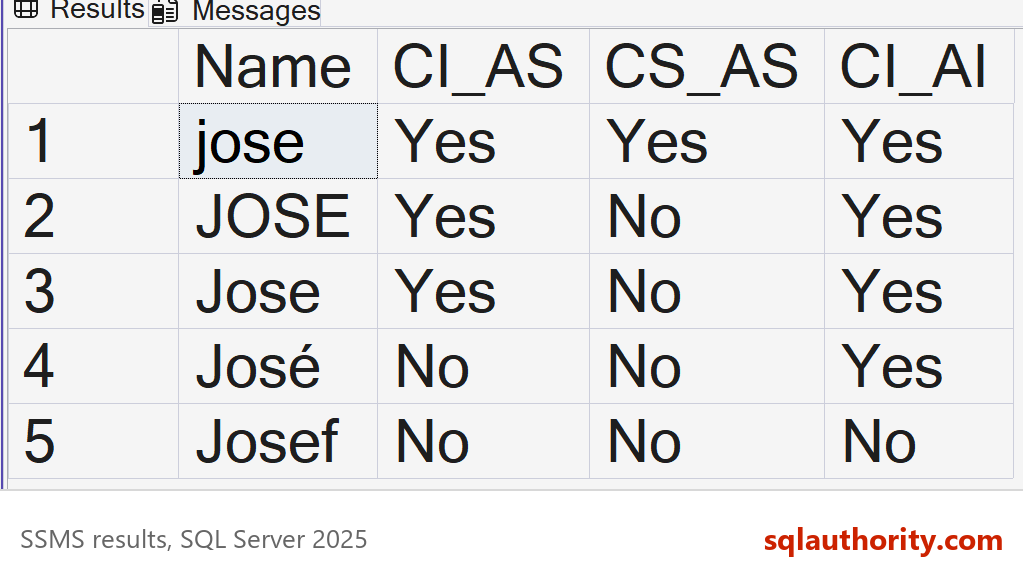
Read the CI_AI column next. With accents ignored, José joins the list. That’s the usual fix when users type names without accents. Josef stays out under all three collations, because jose and Josef differ by a whole letter.
Why the Other Answers Are Wrong
A can’t happen under any collation. Text always equals itself, so the exact text jose is always in the result. A would also match José, and that needs an accent-insensitive rule. Our AS says the opposite.
B is what you get with CS_AS, the third column in the table above. It’s the strictest of the three. This database isn’t set that way.
D would need a collation that ignores accents but counts case, such as one ending in CS_AI. Ours does the reverse. It ignores case and counts the accent, so José stays out.
What the Letters Mean
A collation name is a short code. In SQL_Latin1_General_CP1_CI_AS, the SQL_ prefix marks an older SQL Server collation. Latin1_General names the alphabet rules, and CP1 points to code page 1252. The last two parts, CI and AS, are the sensitivity settings.
There are two more settings. WS means width-sensitive, and KS means kana-sensitive. Width compares a normal letter with its full-width form, which East Asian text uses. Kana compares the two Japanese syllable sets, hiragana and katakana. The script below uses character codes, so you don’t need a special keyboard.
SELECT
    CASE WHEN NCHAR(65345) = N'a' COLLATE Latin1_General_CI_AS THEN 'Yes' ELSE 'No' END AS WidthInsensitive,
    CASE WHEN NCHAR(65345) = N'a' COLLATE Latin1_General_CI_AS_WS THEN 'Yes' ELSE 'No' END AS WidthSensitive,
    CASE WHEN NCHAR(12402) = NCHAR(12498) COLLATE Latin1_General_CI_AS THEN 'Yes' ELSE 'No' END AS KanaInsensitive,
CASE WHEN NCHAR(12402) = NCHAR(12498) COLLATE Latin1_General_CI_AS_KS THEN 'Yes' ELSE 'No' END AS KanaSensitive;| WidthInsensitive | WidthSensitive | KanaInsensitive | KanaSensitive |
|---|---|---|---|
| Yes | No | Yes | No |
The full-width a equals a normal a until you add WS. The two syllables for the sound hi are equal until you add KS.
Equal Doesn’t Mean Identical
Josef never matched jose in the tests above. That’s a result for those three collations, not a rule for every pair of spellings. Some collations treat different spellings as the same word. The German letter ß is a good example, because it can stand in for the two letters ss.
SELECT
    CASE WHEN N'straße' = N'strasse' COLLATE Latin1_General_CI_AS THEN 'Yes' ELSE 'No' END AS LinguisticRule,
    CASE WHEN N'straße' = N'strasse' COLLATE Latin1_General_BIN2 THEN 'Yes' ELSE 'No' END AS BinaryRule,
CASE WHEN N'jose' = N'Josef' COLLATE Latin1_General_CI_AS THEN 'Yes' ELSE 'No' END AS JoseVsJosef;| LinguisticRule | BinaryRule | JoseVsJosef |
|---|---|---|
| Yes | No | No |
Under Latin1_General_CI_AS, straße equals strasse. A binary collation compares raw character codes, so it says No. When a search returns a name you didn’t expect, the collation’s rules are the first place to look.
When Two Collations Meet
Sensitivity shows up as an error when two columns with different collations are compared. It shows up after a database move, or when a temp table in tempdb joins a user table. The next script builds a second table whose Name column is case-sensitive, and joins it to the first one.
CREATE TABLE dbo.QuizPersonCS
(
    PersonID int PRIMARY KEY,
    Name varchar(30) COLLATE Latin1_General_CS_AS NOT NULL
);
INSERT INTO dbo.QuizPersonCS (PersonID, Name) VALUES (1, 'jose');
GO
SELECT p.Name FROM dbo.QuizPerson AS p JOIN dbo.QuizPersonCS AS c ON c.Name = p.Name;
GO
SELECT p.Name FROM dbo.QuizPerson AS p JOIN dbo.QuizPersonCS AS c ON c.Name = p.Name COLLATE Latin1_General_CS_AS;
This is the text SSMS shows in the Messages tab for the first join. It is output, not code to run.
Msg 468, Level 16, State 9, Line 1
Cannot resolve the collation conflict between "SQL_Latin1_General_CP1_CI_AS" and "Latin1_General_CS_AS" in the equal to operation.
SQL Server won’t choose the comparison collation for you. The second join names one with COLLATE, and it returned a single row, jose. Only the exact lower-case text matched, because the comparison ran case-sensitive.
Find Out Which Collation You Have
Check the collation before you guess. The database has one, and every text column can have its own. This query lists both for the example tables.
SELECT DB_NAME() AS DatabaseName, DATABASEPROPERTYEX(DB_NAME(), 'Collation') AS DatabaseCollation;

SELECT OBJECT_NAME(c.object_id) AS TableName, c.name AS ColumnName, c.collation_name AS ColumnCollation
FROM sys.columns AS c
WHERE c.object_id IN (OBJECT_ID(N'dbo.QuizPerson'), OBJECT_ID(N'dbo.QuizPersonCS'))
  AND c.collation_name IS NOT NULL
ORDER BY TableName;
| TableName | ColumnName | ColumnCollation |
|---|---|---|
| QuizPerson | Name | SQL_Latin1_General_CP1_CI_AS |
| QuizPersonCS | Name | Latin1_General_CS_AS |
A column that doesn’t name a collation takes the one from its database. That’s why QuizPerson matches the database, and QuizPersonCS differs.
The server has a collation too, and it sets the default for new databases and for tempdb. On Azure SQL Database, a new database starts with SQL_Latin1_General_CP1_CI_AS unless you choose another one. This quiz gives the same answer there.
What to Remember
A collation decides what counts as equal. The defaults ignore case and respect accents, so jose and JOSE are the same name and José is another. If your users expect José to match jose, an accent-insensitive collation is the fix.
When I design a table with names, I check the collation of the database first. I use COLLATE on a column only when that column needs a rule of its own. A column-level collation also helps when the whole system must treat codes such as AB12 and ab12 as different.
When you finish testing, remove the example database.
USE master;
GO
ALTER DATABASE SqlQuizCollationSensitivity SET SINGLE_USER WITH ROLLBACK IMMEDIATE;
DROP DATABASE SqlQuizCollationSensitivity;
A collation is not a spelling check, it is the rule that decides what counts as the same letter.
Published by Pinal Dave on SQLAuthority. More of my work at pinaldave.com.
Discover more from SQL Authority with Pinal Dave
Subscribe to get the latest posts sent to your email.