
SQL Server pitfalls start with a small assumption. Each lesson here shows the mistake first and the fix second. The five topics are query hints, errors, permissions, XML and recursive queries.
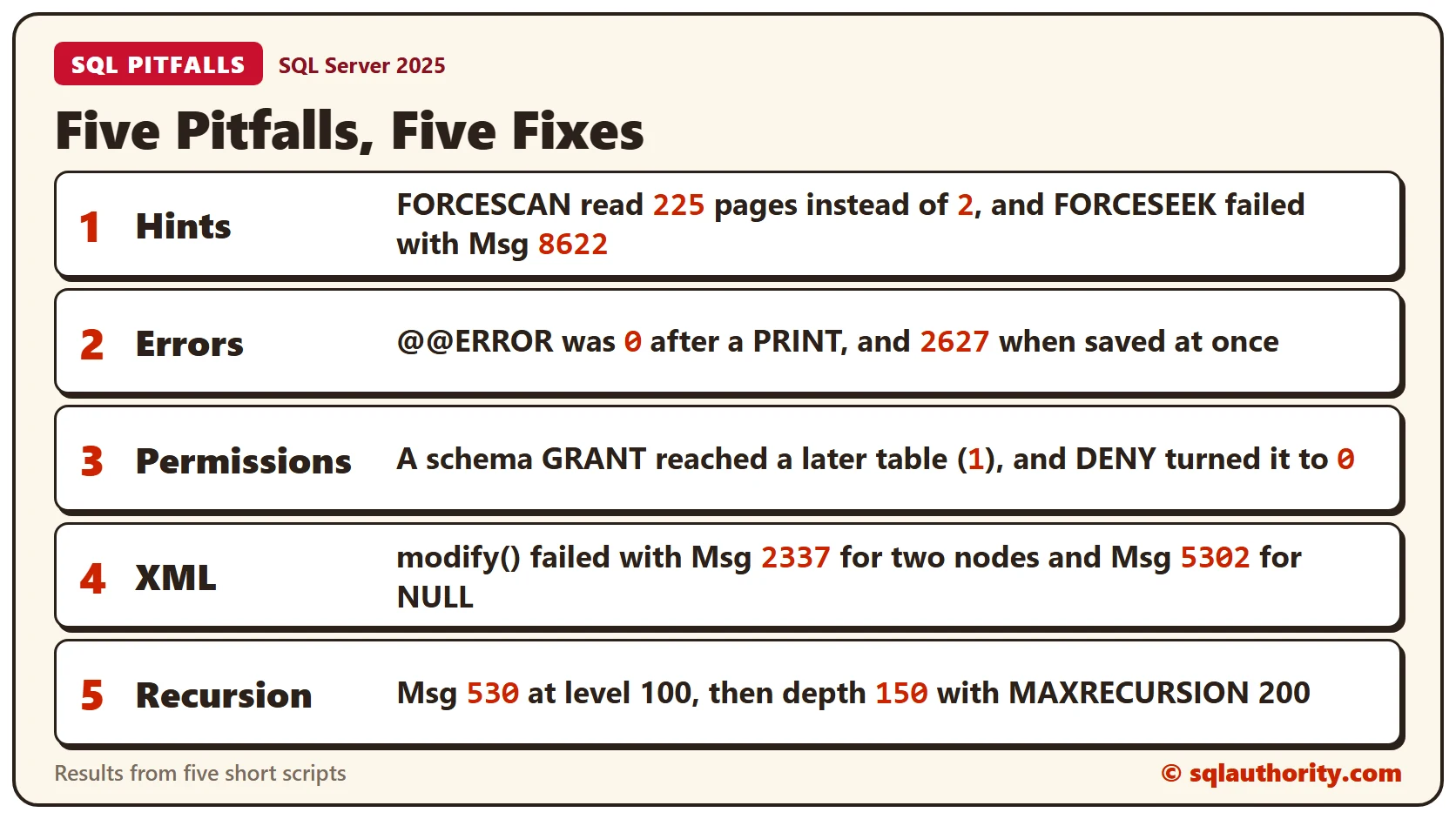
Every script runs in any test database, and every result comes from SQL Server 2025. Prefer the first script of each topic? Read SQL Server Lessons: Five Short Scripts You Can Run in a Minute.
Pitfall 1: A Hint Is an Order
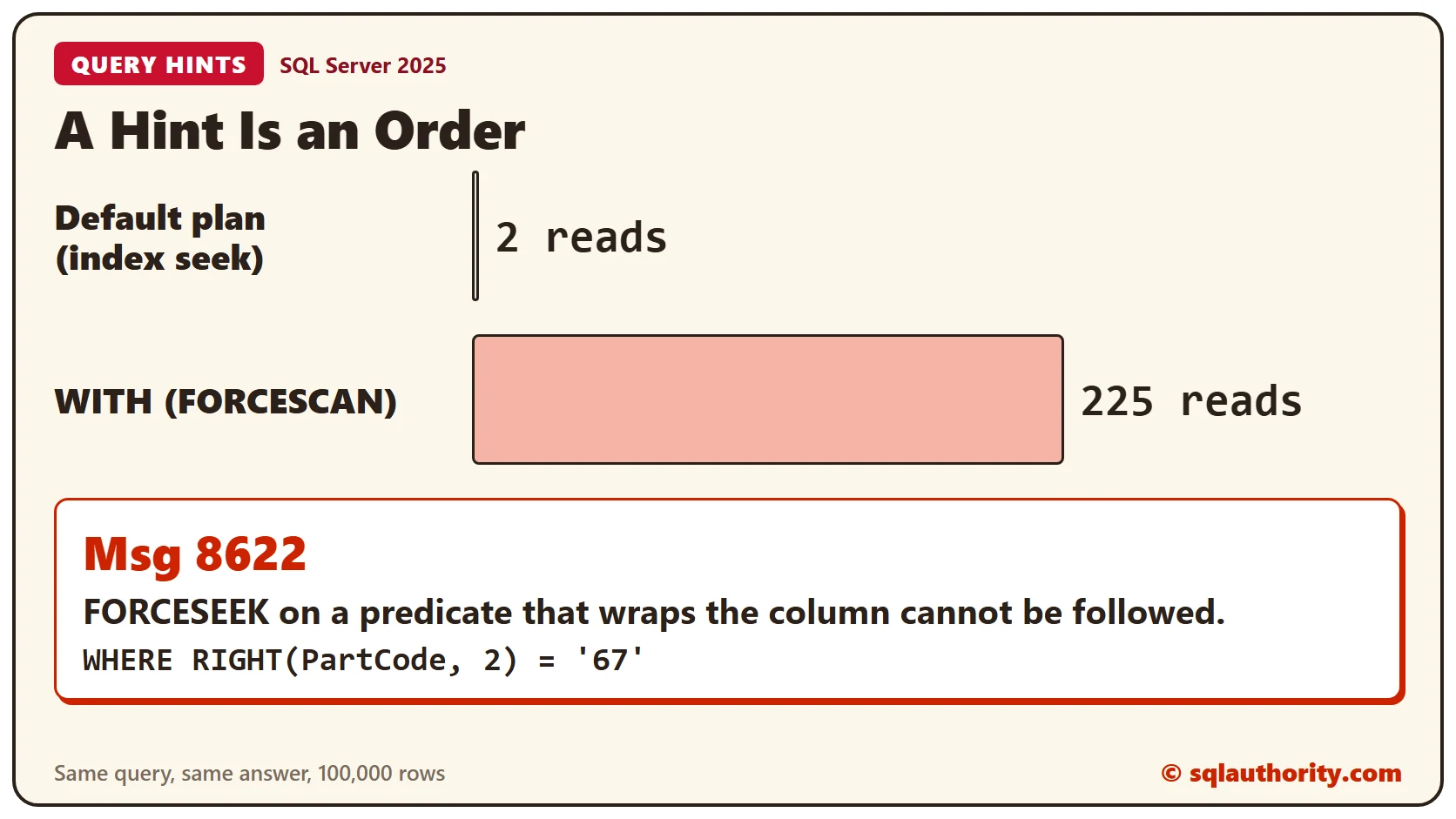
A query hint overrides the optimizer, so SQL Server follows it even when the result is worse. The Part table below holds 100,000 rows with an index on PartCode. The first query lets SQL Server choose. The second forces a scan with FORCESCAN.
CREATE TABLE dbo.Part (PartId int IDENTITY(1,1) PRIMARY KEY, PartCode char(8) NOT NULL, Qty int NOT NULL);
CREATE INDEX IX_Part_Code ON dbo.Part (PartCode);
INSERT INTO dbo.Part (PartCode, Qty)
SELECT TOP (100000) 'P' + RIGHT('0000000' + CAST(ROW_NUMBER() OVER (ORDER BY (SELECT 1)) AS varchar(7)), 7), 1
FROM sys.all_objects AS a CROSS JOIN sys.all_objects AS b;
SET STATISTICS IO ON;
SELECT COUNT(*) AS N FROM dbo.Part WHERE PartCode = 'P0004567';
SELECT COUNT(*) AS N FROM dbo.Part WITH (FORCESCAN) WHERE PartCode = 'P0004567';
SET STATISTICS IO OFF;Both queries returned one row. The default plan read 2 pages, and the forced scan read 225. The hint made a simple seek far more expensive.
A hint that SQL Server can’t follow fails outright. FORCESEEK needs a predicate that compares the column itself. This one wraps the column in RIGHT(), so the index can’t seek.
SELECT COUNT(*) AS N FROM dbo.Part WITH (FORCESEEK) WHERE RIGHT(PartCode, 2) = '67';SQL Server doesn’t fall back to another plan. It stops with Msg 8622 and asks you to resubmit the query without hints. Remove the hint, or rewrite the predicate to compare the column directly. Test every hint on the real query before it goes into code.
Pitfall 2: Reading @@ERROR Too Late
@@ERROR holds the error number of the last statement only. The next statement resets it, even a harmless PRINT. Here a duplicate key fails, a PRINT runs, and then a SELECT reads @@ERROR.
CREATE TABLE dbo.Tray (TrayId int NOT NULL CONSTRAINT PK_Tray PRIMARY KEY);
INSERT INTO dbo.Tray VALUES (1);
INSERT INTO dbo.Tray VALUES (1);
PRINT 'Insert finished';
SELECT @@ERROR AS ErrorAfterPrint;SQL Server raised error 2627, and the PRINT ran as well. The SELECT then returned 0, so the failure vanished. Save the value in a variable on the next line.
DECLARE @Err int;
INSERT INTO dbo.Tray VALUES (1);
SET @Err = @@ERROR;
PRINT 'Insert finished';
SELECT @Err AS SavedError;
This time the variable holds 2627. TRY and CATCH avoid the problem altogether, because the ERROR functions stay valid for the whole CATCH block. For the rules on what an error stops, read SQL Error Actions: What SQL Server Does After an Error.
Pitfall 3: Granting Table by Table
Analyst should read everything in the Reports schema. One GRANT on the schema covers every table in it, including tables created later. The script below creates the Returns table after the GRANT, and then asks SQL Server what Analyst can do.
CREATE SCHEMA Reports;
GO

CREATE TABLE Reports.Sales (SaleId int PRIMARY KEY, Amount decimal(10,2) NOT NULL);
CREATE TABLE dbo.Payroll (PayrollId int PRIMARY KEY, Amount decimal(10,2) NOT NULL);
CREATE USER Analyst WITHOUT LOGIN;
GRANT SELECT ON SCHEMA::Reports TO Analyst;
CREATE TABLE Reports.Returns (ReturnId int PRIMARY KEY, Amount decimal(10,2) NOT NULL);
EXECUTE AS USER = 'Analyst';
SELECT HAS_PERMS_BY_NAME('Reports.Sales', 'OBJECT', 'SELECT') AS Sales,
HAS_PERMS_BY_NAME('Reports.Returns', 'OBJECT', 'SELECT') AS Returns,
HAS_PERMS_BY_NAME('dbo.Payroll', 'OBJECT', 'SELECT') AS Payroll;
REVERT;Analyst can read Sales and Returns, and the Payroll table stays closed with a 0. Returns didn’t exist when the GRANT ran, so the schema grant covered it. HAS_PERMS_BY_NAME shows the permission a user has, which beats reading old GRANT statements and guessing.
A DENY on one table beats the schema grant. It keeps one table closed while the rest stay open.
DENY SELECT ON Reports.Returns TO Analyst;
EXECUTE AS USER = 'Analyst';
SELECT HAS_PERMS_BY_NAME('Reports.Sales', 'OBJECT', 'SELECT') AS Sales,
       HAS_PERMS_BY_NAME('Reports.Returns', 'OBJECT', 'SELECT') AS Returns;
REVERT;
Returns now shows 0 and Sales still shows 1. A DENY wins over a GRANT, even one that arrives through a schema or a role. Check for one before you widen access. DENY vs REVOKE: Why a Removed Permission Still Works explains how DENY differs from REVOKE.
Pitfall 4: Editing XML With modify()
The modify() method changes an xml value in place. It replaces a value, inserts a node or deletes one. This script changes the tea quantity, adds mint and removes biscuits from a small cart.
DECLARE @Cart xml = N'<cart><line sku="TEA1" qty="2"/><line sku="BIS2" qty="5"/></cart>';
SET @Cart.modify('replace value of (/cart/line[@sku="TEA1"]/@qty)[1] with "3"');
SET @Cart.modify('insert <line sku="MNT3" qty="1"/> as last into (/cart)[1]');
SET @Cart.modify('delete /cart/line[@sku="BIS2"]');
SELECT @Cart AS CartNow;
The cart now holds tea with a quantity of 3 and the new mint line. The biscuit line is gone.
The first mistake is a path that matches two nodes. A replace accepts one target only.
DECLARE @Cart xml = N'<cart><line sku="TEA1" qty="2"/><line sku="BIS2" qty="5"/></cart>';
SET @Cart.modify('replace value of (/cart/line/@qty) with "9"');
SQL Server stops with Msg 2337, because the path matched both lines. Add [1] to the path or narrow the filter, as the first script did.
The second mistake is a NULL. The modify() method can’t change an xml value that is NULL.
DECLARE @Empty xml = NULL;
SET @Empty.modify('insert <line sku="MNT3" qty="1"/> as last into (/cart)[1]');
That raises Msg 5302. Start from an empty root instead, and the insert works.
DECLARE @Cart xml = N'<cart/>';
SET @Cart.modify('insert <line sku="MNT3" qty="1"/> as last into (/cart)[1]');
SELECT @Cart AS CartNow;
The result is a cart that holds the one new line. To read XML back into rows, see Shredding XML in SQL Server: Turn XML Back Into Rows.
Pitfall 5: Recursion Stops at 100 Levels
A recursive query walks a tree one level at a time. SQL Server stops it at 100 levels by default, which protects you from a loop. The same limit hits a long chain that has no loop at all. First, a small tree: the Trips folder and everything under it.
CREATE TABLE dbo.Dir (DirId int PRIMARY KEY, DirName varchar(20) NOT NULL, ParentId int NULL, SizeMB int NOT NULL);
INSERT INTO dbo.Dir VALUES (1, 'Photos', NULL, 5), (2, 'Trips', 1, 40), (3, 'Hills', 2, 25),
                           (4, 'Coast', 2, 30), (5, 'Family', 1, 12);
WITH Sub AS
(
SELECT DirId, SizeMB FROM dbo.Dir WHERE DirName = 'Trips'
UNION ALL
SELECT d.DirId, d.SizeMB FROM dbo.Dir AS d JOIN Sub AS s ON d.ParentId = s.DirId
)
SELECT COUNT(*) AS Folders, SUM(SizeMB) AS TotalMB FROM Sub;The walk found 3 folders with a total of 95 MB. That’s Trips at 40, Hills at 25 and Coast at 30.
Now a chain of 150 rows, where each row points to the next one. The query measures how deep the chain goes.
CREATE TABLE dbo.Chain (Id int PRIMARY KEY, NextId int NULL);
INSERT INTO dbo.Chain (Id, NextId)
SELECT n, CASE WHEN n < 150 THEN n + 1 END
FROM (SELECT TOP (150) ROW_NUMBER() OVER (ORDER BY (SELECT 1)) AS n FROM sys.all_objects) AS t;
WITH Walk AS
(
SELECT Id, NextId, 1 AS Depth FROM dbo.Chain WHERE Id = 1
UNION ALL
SELECT c.Id, c.NextId, w.Depth + 1 FROM dbo.Chain AS c JOIN Walk AS w ON c.Id = w.NextId
)
SELECT MAX(Depth) AS Deepest FROM Walk;SQL Server raised Msg 530 and said the maximum recursion 100 was exhausted. Nothing was wrong with the data. Raise the limit with a number a little above your deepest chain.
WITH Walk AS
(
    SELECT Id, NextId, 1 AS Depth FROM dbo.Chain WHERE Id = 1
    UNION ALL
    SELECT c.Id, c.NextId, w.Depth + 1 FROM dbo.Chain AS c JOIN Walk AS w ON c.Id = w.NextId
)
SELECT MAX(Depth) AS Deepest FROM Walk OPTION (MAXRECURSION 200);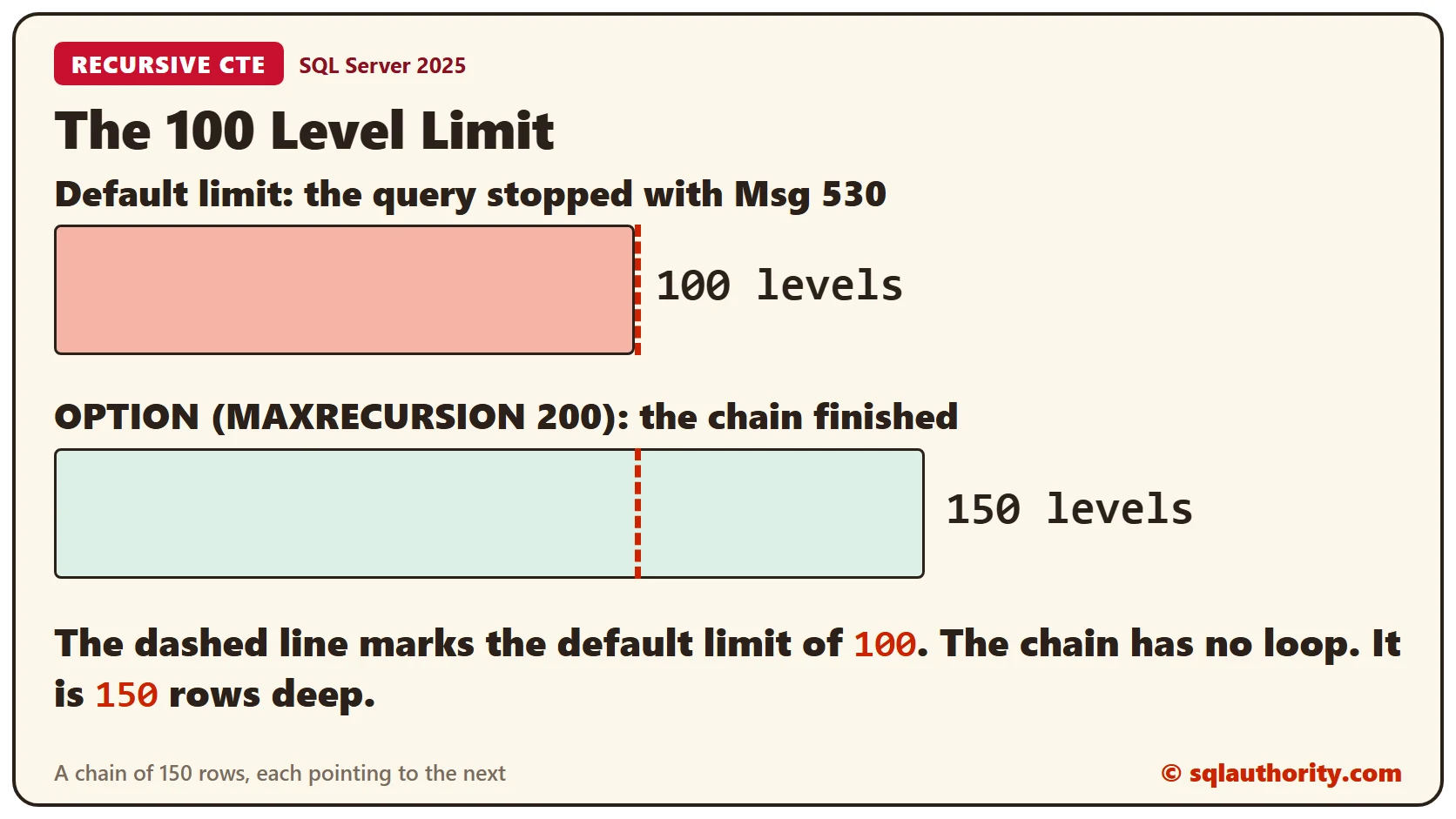
The answer is 150. MAXRECURSION 0 removes the limit. A loop in the data then runs without end, so I avoid 0 on data I don’t control. For loops, read Recursive CTE Cycles: Detect Loops and Depth Boundaries.
Clean Up
Remove the sample objects when you finish.
DROP USER Analyst;
DROP TABLE Reports.Returns;
DROP TABLE Reports.Sales;
DROP SCHEMA Reports;
DROP TABLE dbo.Payroll;
DROP TABLE dbo.Chain;
DROP TABLE dbo.Dir;
DROP TABLE dbo.Tray;
DROP TABLE dbo.Part;
What to Remember
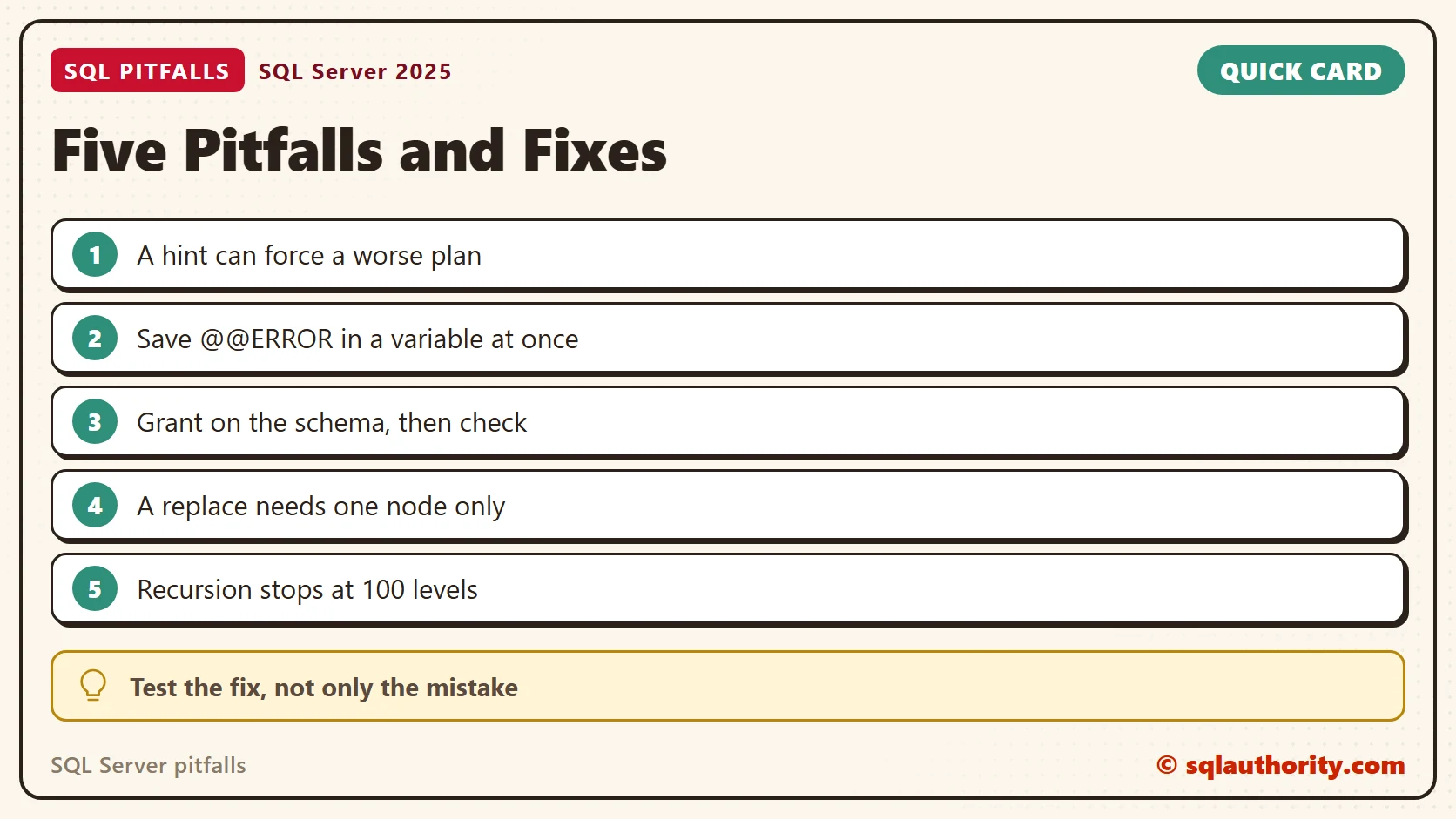
Every pitfall here has one cause: SQL Server did exactly what the code said. The fixes are small. Test a hint on the real query, save @@ERROR at once and check permissions with HAS_PERMS_BY_NAME. Give modify() one node and a non-NULL value, and raise the recursion limit on purpose.
To go further, read XACT_ABORT: Why a Half-Done Transaction Can Survive an Error and The SQL Server Permission Hierarchy.
A pitfall is not a flaw in SQL Server, it is a rule you haven’t met yet.
Published by Pinal Dave on SQLAuthority. More of my work at pinaldave.com.
Discover more from SQL Authority with Pinal Dave
Subscribe to get the latest posts sent to your email.



3 Comments. Leave new
Hi Rick
Your tips are super
Tx
Fantastic post. All the video, are super simple, and straight to the point.
Congrats and keep the good work.
Best Study Material … Thank you :)