DENY vs REVOKE is the difference between a locked door and a removed key. REVOKE takes away one permission entry. If the user holds the same permission through a role, access still works.

The ticket that says “I revoked it, but they can still read”
Here is a ticket I have seen in many shops. A manager asks you to remove a report user’s access to a table. You run REVOKE. You close the ticket. Next day the user is still reading the table, and now the manager is asking questions.
Nothing is broken. REVOKE removes one entry, the one you named. It does not hunt down every other way the user can get in. A role membership, a group, or a second grant can still open the door.
So let me build that exact situation. We need a table, a user without a login, and a role. The user gets the same SELECT permission twice: once directly and once through the role.
Give the user two ways in
The script drops anything left from an earlier run, then creates the table with one row. The cleanup at the end removes the user, the role and the table again.
DROP TABLE IF EXISTS dbo.ReportData;
DROP USER IF EXISTS ReportUser;
DROP ROLE IF EXISTS ReportReaders;

CREATE TABLE dbo.ReportData (Id int PRIMARY KEY);
INSERT dbo.ReportData (Id) VALUES (1);

CREATE USER ReportUser WITHOUT LOGIN;
CREATE ROLE ReportReaders;
ALTER ROLE ReportReaders ADD MEMBER ReportUser;

GRANT SELECT ON dbo.ReportData TO ReportReaders;
GRANT SELECT ON dbo.ReportData TO ReportUser;
REVOKE removes one entry, not the access
Now revoke the direct grant. Then switch to the user with EXECUTE AS and ask two questions. First, HAS_PERMS_BY_NAME asks SQL Server whether this user can select from the table. Second, a plain SELECT tries to read it.
REVOKE SELECT ON dbo.ReportData FROM ReportUser;

EXECUTE AS USER = 'ReportUser';
SELECT HAS_PERMS_BY_NAME(N'dbo.ReportData', N'OBJECT', N'SELECT') AS AfterRevoke;
SELECT Id FROM dbo.ReportData;
REVERT;
AfterRevoke is 1, and the query returns Id 1. The role grant is still there, so the user still reads the table. The REVOKE did exactly what it promised, and that was not what the manager wanted.
DENY is the one that wins
DENY is different. It writes an explicit “no” at that scope. A DENY beats any GRANT, even one that comes through a role. Run the same two checks again. The SELECT is wrapped in TRY and CATCH so the error shows up as a result instead of stopping the script.
DENY SELECT ON dbo.ReportData TO ReportUser;

EXECUTE AS USER = 'ReportUser';
SELECT HAS_PERMS_BY_NAME(N'dbo.ReportData', N'OBJECT', N'SELECT') AS AfterDeny;
BEGIN TRY
    SELECT Id FROM dbo.ReportData;
END TRY
BEGIN CATCH
    SELECT ERROR_NUMBER() AS ErrorNumber;
END CATCH;
REVERT;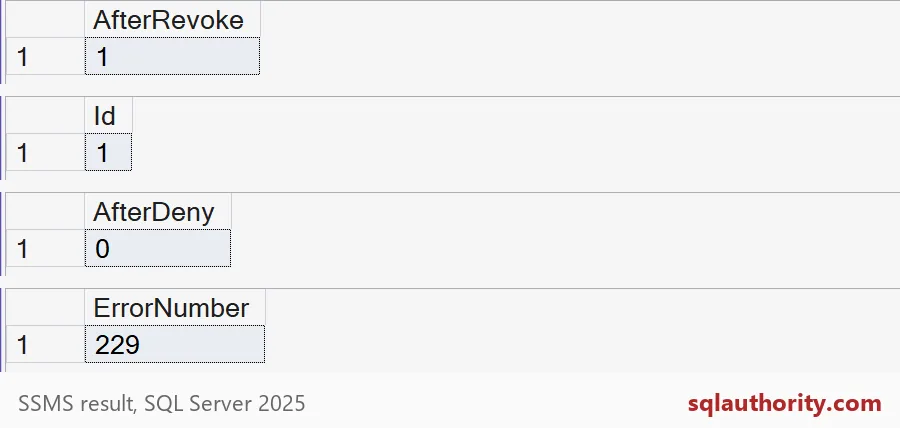
Now AfterDeny is 0, and the read fails with error 229. That is the permission denied error. The role still has its grant, but the DENY wins.

Undo a DENY and finish the job
Here is a detail that surprises people. REVOKE also removes a DENY. It deletes the entry, whatever kind it is. So revoking the DENY returns the user to whatever the role allows, and that is access again. To really close the door, you must change the role, or remove the user from it.
REVOKE SELECT ON dbo.ReportData FROM ReportUser;

EXECUTE AS USER = 'ReportUser';
SELECT HAS_PERMS_BY_NAME(N'dbo.ReportData', N'OBJECT', N'SELECT') AS AfterUndoDeny;
REVERT;

REVOKE SELECT ON dbo.ReportData FROM ReportReaders;

EXECUTE AS USER = 'ReportUser';
SELECT HAS_PERMS_BY_NAME(N'dbo.ReportData', N'OBJECT', N'SELECT') AS AfterRoleRevoke;
REVERT;
The first result is 1 again. After the role grant is revoked as well, the second result is 0. Now nobody gives the user access, and no DENY is needed.
So which one should you use? Use REVOKE when you want to stop granting access. Use DENY when you want to block it no matter what else is granted. DENY is a strong tool, so keep a note of where you used it. Someone will wonder later why a role grant stopped working.
Whichever you pick, test as the user. Run EXECUTE AS, check HAS_PERMS_BY_NAME, then try the real query. Those two checks take half a minute and they settle the argument. Finish with the cleanup.
DROP USER IF EXISTS ReportUser;
DROP ROLE IF EXISTS ReportReaders;
DROP TABLE IF EXISTS dbo.ReportData;
Next time someone says the access is gone, test it as that user before you close the ticket.
REVOKE is not a block, it is the removal of one permission entry.
Published by Pinal Dave on SQLAuthority. More of my work at pinaldave.com.
Discover more from SQL Authority with Pinal Dave
Subscribe to get the latest posts sent to your email.