
SQL error actions decide what happens to your code after a statement fails. Many people believe an error of severity 11 or higher stops everything after it. That’s true most of the time, but not every time, and the exceptions cause the surprises.
Four Reactions and One Setting
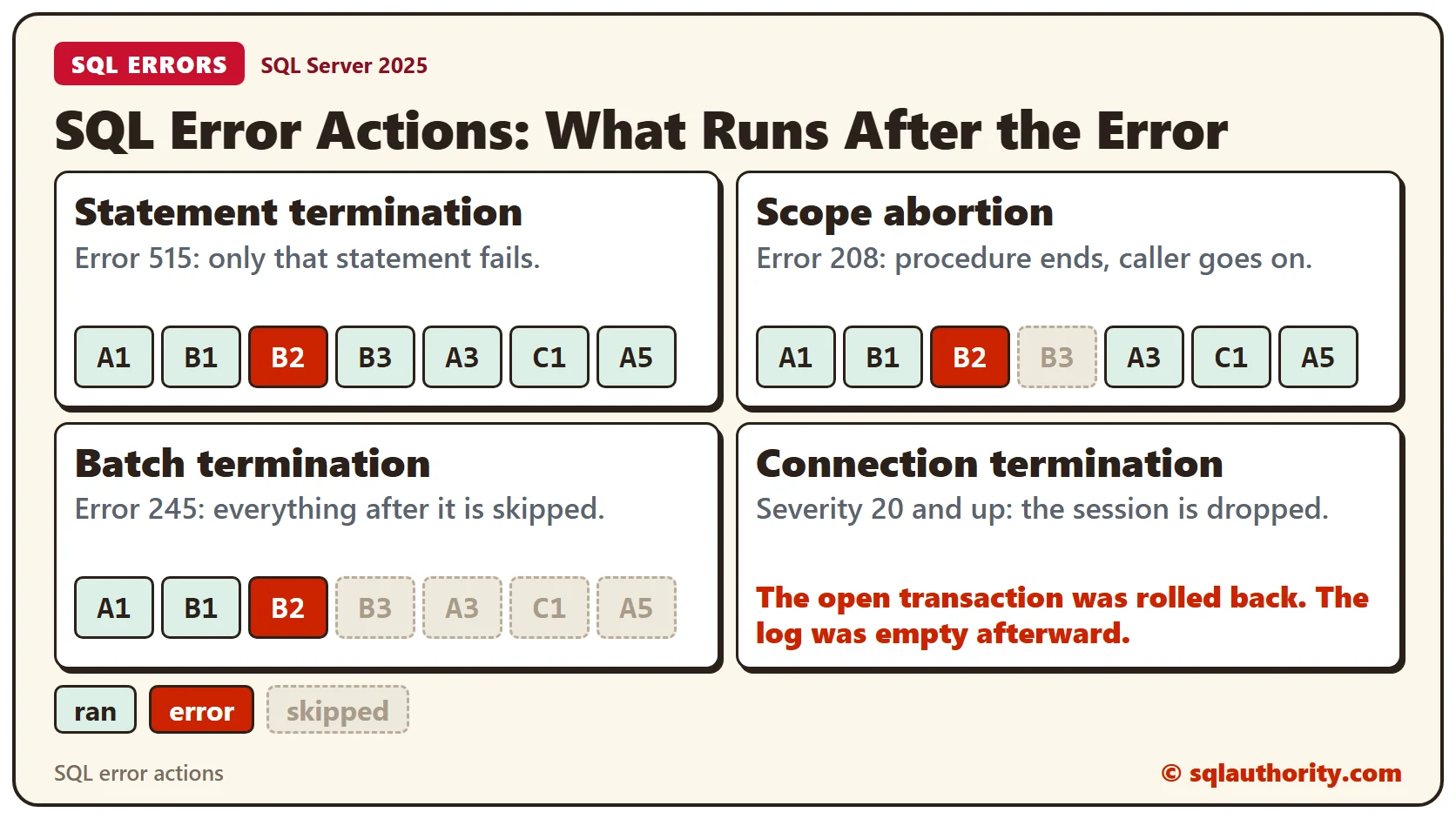
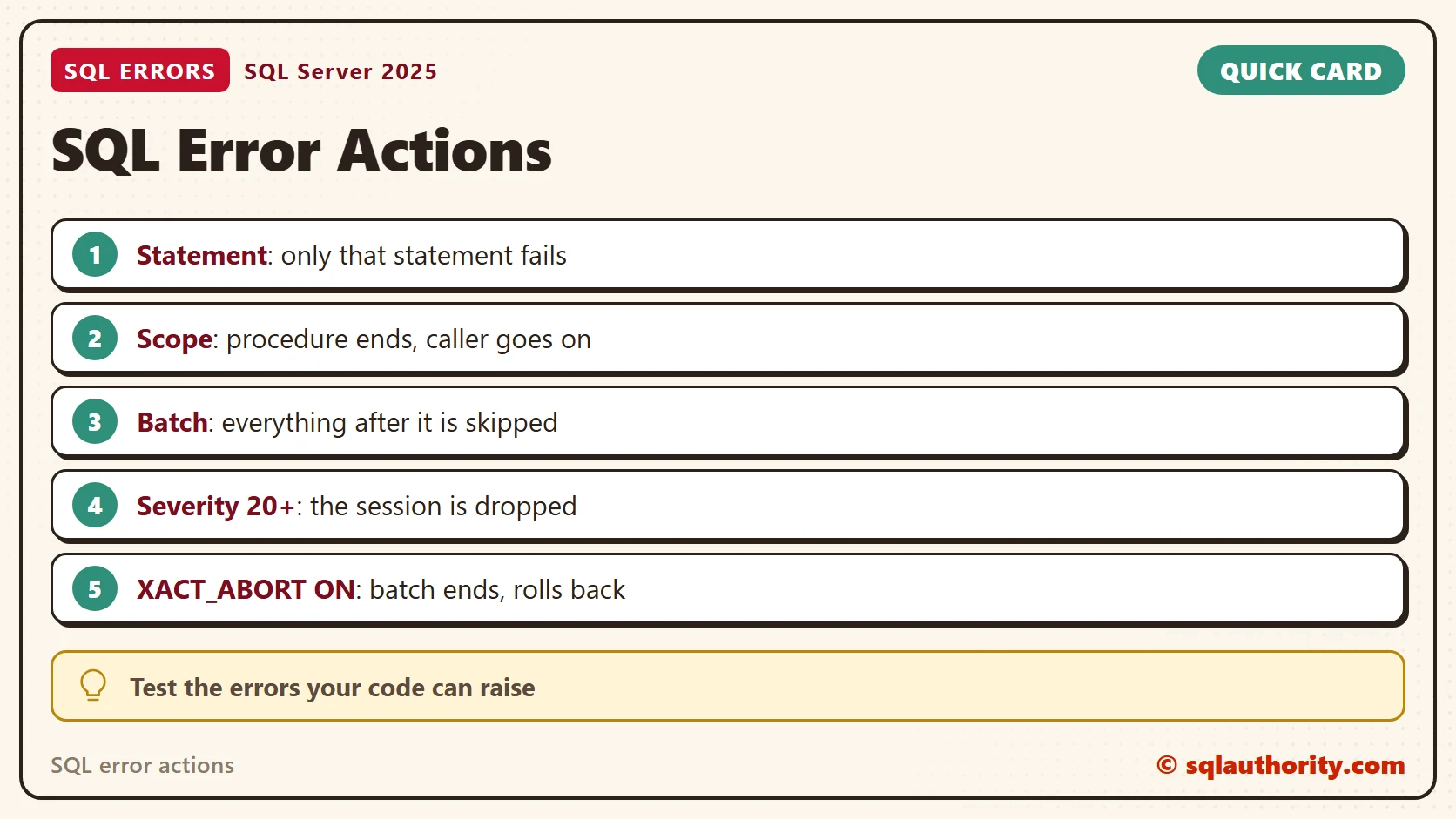
For errors of severity 11 to 16, SQL Server picks one of three reactions. Statement termination fails only the statement that hit the error, and the next statement runs. Scope abortion ends the current procedure, function or batch, and the code that called it carries on. Batch termination ends the whole call from the client.
A session setting called XACT_ABORT changes the choice. Errors of severity 20 to 25 get a fourth reaction that drops your session. A reader asked whether any rules decide which error gets which reaction. The reaction is built into each error, so the tests below show where common errors land. You can run the same test for any error your code can raise.
The Sample Code
Three small procedures show the difference. usp_A runs three steps and calls usp_B and usp_C. usp_B logs two steps and runs one statement in the middle, and the Mode value decides which statement that is. Every step writes a row to RunLog, so you can see afterward what ran. Run this in any test database. Every result in this post comes from SQL Server 2025.
CREATE TABLE RunLog (Step INT IDENTITY(1,1), What VARCHAR(30));
CREATE TABLE Pots (PotName VARCHAR(20) NOT NULL, Qty INT NOT NULL);
GO

CREATE PROCEDURE usp_C AS
INSERT INTO RunLog (What) VALUES ('C1');
GO

CREATE PROCEDURE usp_B @Mode VARCHAR(20) AS
INSERT INTO RunLog (What) VALUES ('B1');
IF @Mode = 'null' INSERT INTO Pots (PotName, Qty) VALUES (NULL, 1);
IF @Mode = 'divide' SELECT 1 / 0;
IF @Mode = 'overflow' SELECT CAST(300 AS TINYINT);
IF @Mode = 'truncate' INSERT INTO Pots (PotName, Qty) VALUES ('This name is far too long for the column', 1);
IF @Mode = 'raiserror' RAISERROR('Raised with severity 16', 16, 1);
IF @Mode = 'missing' SELECT * FROM NoSuchTable;
IF @Mode = 'convert' SELECT CAST('abc' AS INT);
IF @Mode = 'throw' THROW 50001, 'Thrown', 1;
INSERT INTO RunLog (What) VALUES ('B3');
GO

CREATE PROCEDURE usp_A @Mode VARCHAR(20) AS
INSERT INTO RunLog (What) VALUES ('A1');
EXEC usp_B @Mode;
INSERT INTO RunLog (What) VALUES ('A3');
EXEC usp_C;
INSERT INTO RunLog (What) VALUES ('A5');
GO
With no error, RunLog holds A1, B1, B3, A3, C1 and A5, in that order. B2 is the statement in the middle of usp_B, and it writes no row.
Statement Termination
A NULL inserted into a column that doesn’t allow NULL is the first test. SQL Server raises error 515 and skips that one insert.
TRUNCATE TABLE RunLog;
EXEC usp_A 'null';
GO

SELECT What FROM RunLog ORDER BY Step;
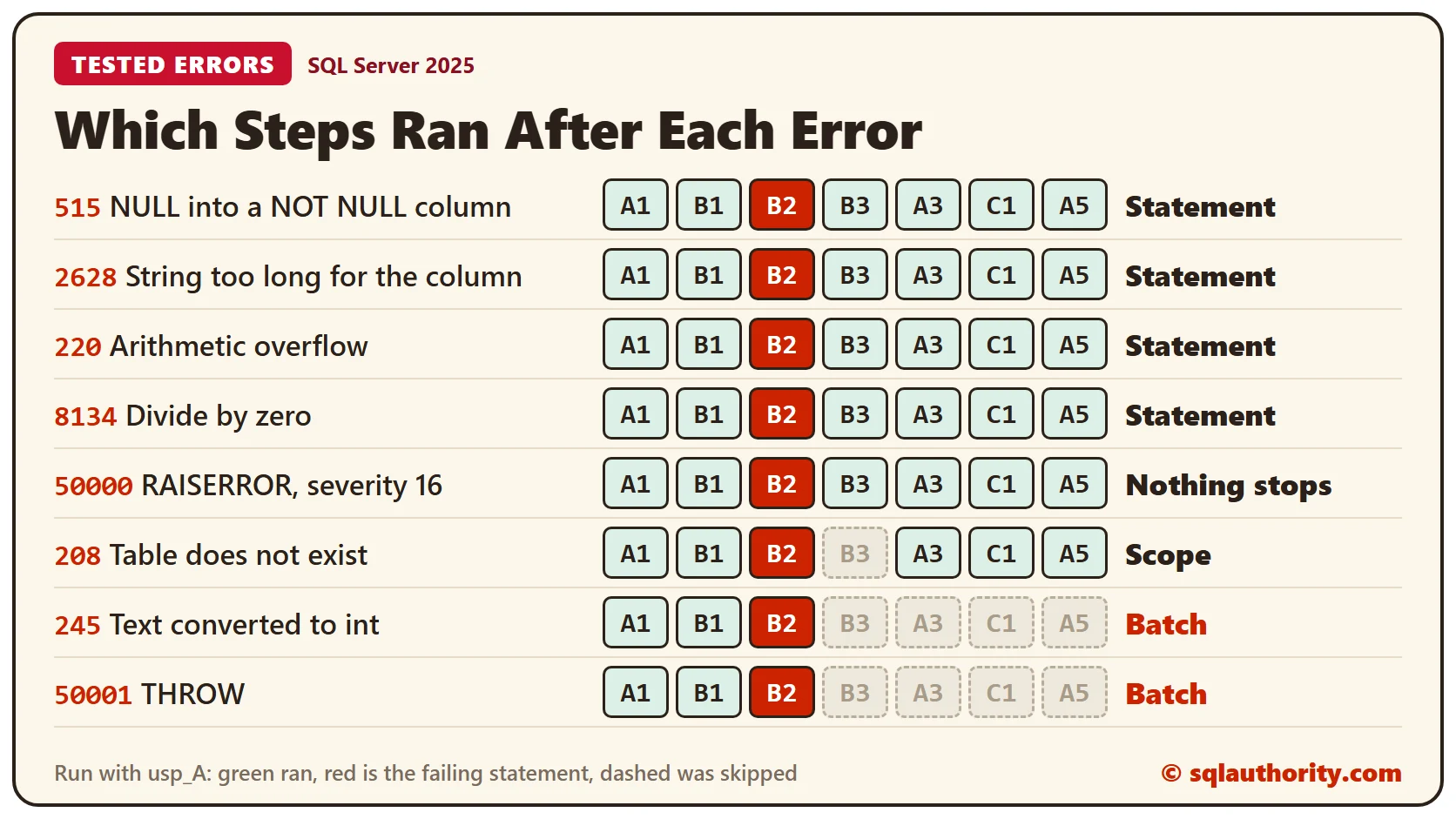
The log still shows A1, B1, B3, A3, C1 and A5. Only the failing insert is lost, and everything after it ran. Errors 2628 (string too long), 220 (arithmetic overflow) and 8134 (divide by zero) behaved the same way. RAISERROR with severity 16 showed its message and stopped nothing at all.
A transaction doesn’t change this. Run the same call inside BEGIN TRAN, and the transaction stays open after the error. COMMIT then saves the steps that worked, so the work is no longer all or nothing.
TRUNCATE TABLE RunLog;
BEGIN TRAN;
EXEC usp_A 'null';
SELECT @@TRANCOUNT AS OpenTransactions;
COMMIT;
GO

SELECT What FROM RunLog ORDER BY Step;
Scope Abortion
Mode ‘missing’ selects from a table that doesn’t exist, which raises error 208. SQL Server created usp_B without complaint, and it fails only when that line runs.
TRUNCATE TABLE RunLog;
EXEC usp_A 'missing';
GO

SELECT What FROM RunLog ORDER BY Step;
B3 is missing from the log. usp_B stopped at the error, but usp_A went on and ran A3, C1 and A5. The procedure that failed ended, and its caller continued.
Batch Termination
Mode ‘convert’ turns the text ‘abc’ into an integer, which raises error 245.
TRUNCATE TABLE RunLog;
EXEC usp_A 'convert';
GO

SELECT What FROM RunLog ORDER BY Step;
Only A1 and B1 are in the log. Nothing after the error ran, not in usp_B, not in usp_A and not the call to usp_C. THROW behaved the same way.
Batch termination doesn’t treat an open transaction the same way every time. After THROW, the transaction stayed open, so your code has to roll it back. After the conversion error, the transaction was already gone.
TRUNCATE TABLE RunLog;
BEGIN TRAN;
EXEC usp_A 'throw';
COMMIT;
GO

SELECT @@TRANCOUNT AS OpenTransactions;
SELECT What FROM RunLog ORDER BY Step;
IF @@TRANCOUNT > 0 ROLLBACK;
Change ‘throw’ to ‘convert’ and OpenTransactions comes back as 0. Don’t count on either behavior. Roll back in your own error handling.
XACT_ABORT
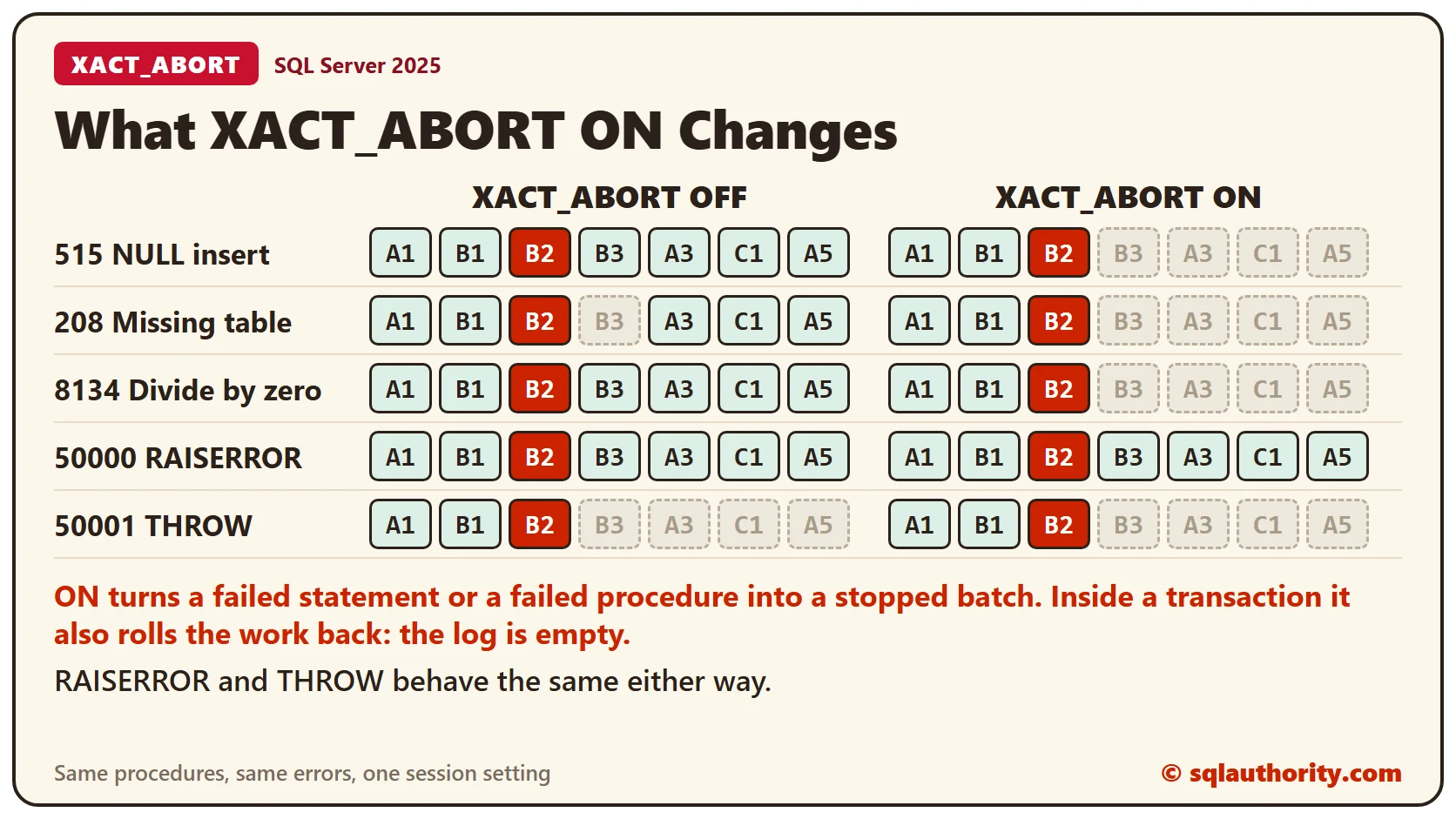
Statement termination has a catch. The code carries on after a failed step, so later steps can run on half-finished work. XACT_ABORT ON ends the batch at the first error instead.
SET XACT_ABORT ON;
TRUNCATE TABLE RunLog;
EXEC usp_A 'null';
GO

SELECT What FROM RunLog ORDER BY Step;
SET XACT_ABORT OFF;
Now the log holds only A1 and B1. The NULL insert ended the batch, the same as batch termination. The setting did the same for the missing table (error 208) and for divide by zero (error 8134). It didn’t change RAISERROR or THROW.
Inside a transaction, ON also rolls the work back.
SET XACT_ABORT ON;
TRUNCATE TABLE RunLog;
BEGIN TRAN;
EXEC usp_A 'null';
COMMIT;
GO

SELECT @@TRANCOUNT AS OpenTransactions;
SELECT What FROM RunLog ORDER BY Step;
SET XACT_ABORT OFF;
OpenTransactions is 0 and RunLog is empty, so A1 and B1 are gone too. OFF is the default. With OFF, SQL Server chooses the reaction for each error, as you saw above.
TRY…CATCH
TRY…CATCH takes the decision out of SQL Server’s hands. Errors from usp_A, whatever their usual reaction, jump to the CATCH block.
TRUNCATE TABLE RunLog;
BEGIN TRY
  EXEC usp_A 'convert';
END TRY
BEGIN CATCH
  INSERT INTO RunLog (What) VALUES ('CATCH');
END CATCH
SELECT What FROM RunLog ORDER BY Step;
The log shows A1, B1 and CATCH. Nothing in usp_A ran after the error, so A3, C1 and A5 are missing. I got the same result with errors 515 and 208 and with THROW.
Connection Termination
Errors of severity 20 and higher disconnect your session, and SQL Server rolls back any open transaction. This test used RAISERROR with severity 20, which needs WITH LOG. It writes a line to the SQL Server error log, so run it on a test server only.
BEGIN TRAN;
INSERT INTO RunLog (What) VALUES ('before the error');
RAISERROR('Severity 20 test', 20, 1) WITH LOG;
INSERT INTO RunLog (What) VALUES ('after the error');
SELECT 'still connected' AS Status;
SQL Server answered with message 2745, saying it was terminating the process, and the session ended. The second INSERT never ran. When I connected again, RunLog was empty and no transaction was open.
Clean Up
Remove the sample objects when you finish.
DROP PROCEDURE usp_A;
DROP PROCEDURE usp_B;
DROP PROCEDURE usp_C;
DROP TABLE Pots;
DROP TABLE RunLog;
What to Remember
Don’t assume an error stops the next statement. Check what your code does, with a log table like RunLog. Use SET XACT_ABORT ON in procedures that change data inside a transaction. Use TRY…CATCH when you want to handle the error yourself.
To go further, read XACT_ABORT: Why a Half-Done Transaction Can Survive an Error, An Error Handling Template for Stored Procedures With THROW and Errors TRY CATCH Cannot Catch.
An error message is not an instruction to stop, it is a report that you have to act on.
Published by Pinal Dave on SQLAuthority. More of my work at pinaldave.com.
Discover more from SQL Authority with Pinal Dave
Subscribe to get the latest posts sent to your email.




4 Comments. Leave new
BEGIN TRY
Statements 1
.
.
.
END TRY
BEGIN CATCH
IF @@TRANCOUNT > 0
ROLLBACK
END CATCH
In try catch block, the next statement will be executed after error occurred.
Dear Dave, you write: SQL Server will now choose which errors are drastic enough to fail an entire stored procedure (or batch) – under XACT_ABORT OFF.
Are there any rules the decisions are made?
Hi pinal sir,
Thank you for a simple and informative explanation.
Specially those image explain everything.
Regard$
Chirag Satasiya
Nice Job Pinal!! You are becoming full time writer