On May 25, 2018, European privacy law is going to enforce new global standards for privacy rights, security, and compliance. This new regulation is known as GDPR – General Data Protection Regulations. Lots of users who are using SQL Server often wonder How to make SQL Server GDPR compliance? Before you read this blog post, I suggest you read my earlier blog post about here which explains everything about GDPR. This blog post we will take about Authentication in SQL Server (Windows and Mixed Mode) which is for GDPR Article 25.

SQL SERVER – Identity Jumping 1000 – IDENTITY_CACHE
SQL Server 2017 has a wonderful feature which fixes a very old issue which DBA and developers have been struggling for a while. It would be impossible to find DBA or Developer who has not faced an issue when their identity column value has jumped or incremented by 1000. It is a very common issue and today we will see the solution of this issue with the help of IDENTITY_CACHE introduced in the latest version of SQL Server.

SQL SERVER – How to Kill All the Processes for Any Database?
Recently during Comprehensive Database Performance Health Check, to test our unique fix, we had to run a stress test on my customer’s development environment. Once we were done testing our script, we did not need our stress test queries to run on our server. Even though we stopped to run the batch file with stress test queries, there were few long-running queries kept on running on the server. This brought us to a very interesting point where we had to kill all the processes for one particular database.

SQL Authority News – Join me at SQLBits 2018 – 36 Scripts: Performance Tricks Jedi Master Wants You to Know
Many of you have previously attended my SQL Server Performance Tuning Practical Workshop. If you have attended this session, you probably know that my workshops are very quick paced and with simple tips which one can easily put in the practice. These workshops are an online and very effective way to learn while you are in the comfort of your office or home. Based on this workshop, I have to build another in-person workshop which is called “36 Scripts: Performance Tricks Jedi Master Wants You to Know”.

How to Find DISTINCT COUNT of Column Rows Without Using Distinct Count Keywords? – Interview Question of the Week #157
Question: How to Find DISTINCT COUNT of Column Without Using Distinct Count Keywords?
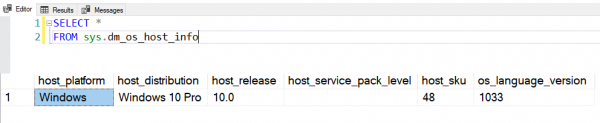
SQL SERVER – DMV to Get Host Information – sys.dm_os_host_info
There was a time when SQL Server used to run on only Microsoft Windows. However, the time has changed and SQL Server now runs on Linux as well. This is indeed a great move as I believe database such as SQL Server should be running on multiple platforms. This is indeed a very interesting but it ads one more additional check before I jump into Comprehensive Database Performance Health Check. In this blog post, we will learn about how to get host information from OS.

SQL SERVER – How to Make SQL Server GDPR Compliance?
I am really not sure how many times I have been asked about GDPR Compliance in the recent months. You must bookmark this page and share with your organizations if you are doing business with European Union or firm based out of European Union.
It is quite often to see the email in mailbox with the following title –
How to Make SQL Server GDPR Compliance?

SQL SERVER – Activity Monitor – Active Expensive Queries
Recently during Comprehensive Database Performance Health Check, I had a very interesting conversation. SQL Server has introduced Activity Monitor many version earlier. I think everybody is now pretty familiar with this tool and use it frequently. However, during my consulting work, I use different scripts which are much more efficient than Activity Monitor. However, it is alright to use it once in a while.
SQL SERVER – Performance Observation of TRIM Function
Earlier I wrote a blog post about how to remove leading and trailing spaces with TRIM function. SQL SERVER – 2017 – How to Remove Leading and Trailing Spaces with TRIM Function? After writing this blog post lots of people asked me its impact on SQL Server.