
Question: How do you compile queries without executing them? Use SET NOEXEC ON, then restore SET NOEXEC OFF when you finish the check.

I had heard this question before and had written about it twice. It’s a useful little debugging trick, provided we are clear about what happened: SQL Server compiles the batch, but the query does not run.
SET NOEXEC ON;
GO
SELECT 1;
GO
SET NOEXEC OFF;
GO
SELECT 1;
GO
Run this in a separate SSMS query window. The first SELECT 1 produces no result set. After NOEXEC is turned off, the second SELECT returns one row containing 1. GO separates the batches in SSMS; it is not a T-SQL statement.
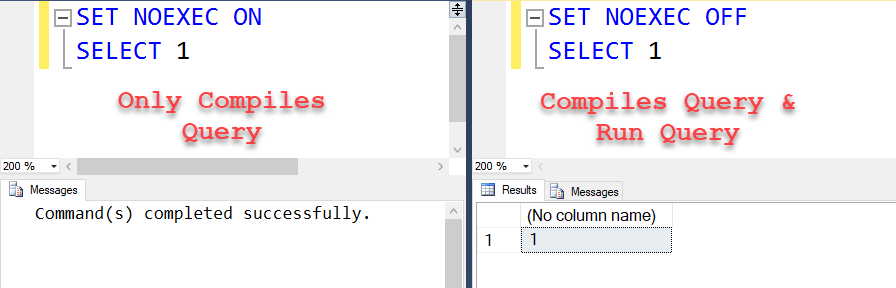
This checks more than punctuation, but it does not establish that a deployment will succeed. NOEXEC supports deferred name resolution, so a missing referenced object can escape the check. Runtime data conversions, permissions and actual data changes still need appropriate testing.
Keep the OFF batch visible. If an error interrupts your test, execute that batch or close the separate connection before running ordinary work.
For the earlier explanations, see What Does SET NOEXEC Do? and How to Validate Syntax and Not Execute a Statement. If you have another useful debugging trick, share it in the comments. I am happy to give credit to the person who suggests it.
Published by Pinal Dave on SQLAuthority. More of my work at pinaldave.com.
Discover more from SQL Authority with Pinal Dave
Subscribe to get the latest posts sent to your email.




3 Comments. Leave new
Hey!
Selecting a query and running using Control + F5, does the query compilation as well, doesnt it?
Not sure but Displaying estimation plan will give you some info
Click the parse button in tool bar will compile the code and not execute