
Question: How do you limit returned varchar(max) or nvarchar(max) data? SET TEXTSIZE limits the bytes returned by SELECT for large-value columns in the current session. It does not change the stored value or count characters.

I must admit I had to look this up when it came up during a performance health check.
The original example compared Object and TSQL in AdventureWorks2014.dbo.DatabaseLog before and after setting TEXTSIZE. Here is the same comparison using the current sample database:
USE AdventureWorks2025;
GO
SET TEXTSIZE -1;
SELECT [Object], [TSQL] FROM dbo.DatabaseLog;
SET TEXTSIZE 20;
SELECT [Object], [TSQL] FROM dbo.DatabaseLog;
SET TEXTSIZE -1;
TSQL is a large-value column and its returned value is limited. Object is not a max column, so this setting does not truncate it. My original comments incorrectly said “20 characters.” The limit is 20 bytes.
A short example makes that difference easier to see than a long database-log script:
SET TEXTSIZE 20;
SELECT CAST('ABCDEFGHIJKLMNOPQRSTUVWXYZ' AS varchar(max)) AS AsciiValue,
       CAST(N'ABCDEFGHIJKLMNOPQRSTUVWXYZ' AS nvarchar(max)) AS UnicodeValue;
SET TEXTSIZE -1;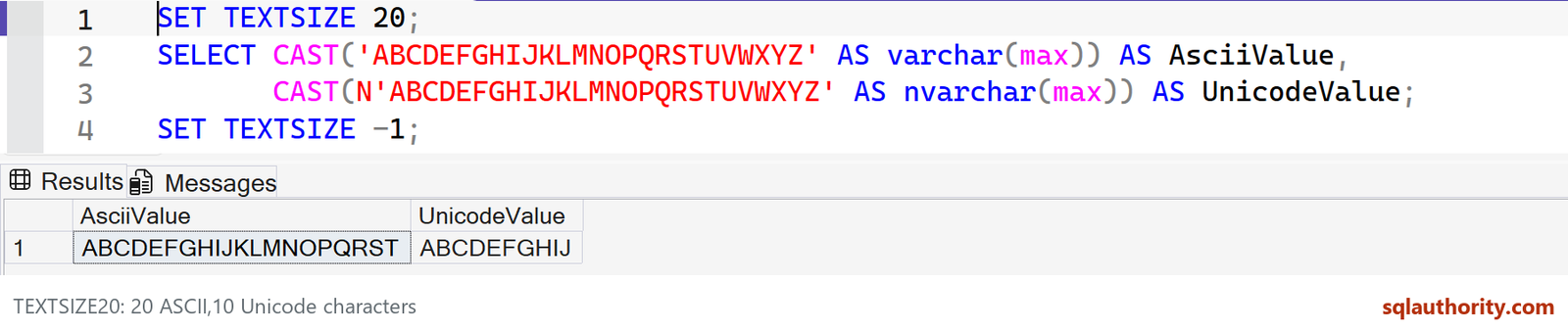
For these ASCII letters, varchar returns twenty letters and nvarchar returns ten. The nvarchar example uses two bytes per letter; this is not a general rule that a byte limit equals a particular number of displayed characters for every encoding.
The setting also applies to varbinary(max) and the legacy text, ntext and image types. It controls data returned to the client, not an UPDATE or a storage-size change. SET TEXTSIZE -1 restores unlimited return size, while 0 means the 4 KB default, not unlimited.
If you want an explicit character-based preview in one query, LEFT or SUBSTRING expresses that intent more clearly. SSMS’s display limits are another setting and can still shorten what appears on screen.
Have you found another small SQL Server setting that is easy to overlook? Leave it in the comments. Microsoft: TEXTSIZE units and supported types
Published by Pinal Dave on SQLAuthority. More of my work at pinaldave.com.
Discover more from SQL Authority with Pinal Dave
Subscribe to get the latest posts sent to your email.



1 Comment. Leave new
Another quick workaround to make select statement work faster is to limit the characters to be displayed using select SUBSTRING (nvarchar max column name, 1, 5000). Hope it helps.