
Question: How do you sort a varchar column that stores integers in numeric order?

Answer: Convert the values to a suitable numeric type in ORDER BY. A varchar column sorts as text, so it does not necessarily follow the numeric order you intended.
A senior developer asked this during a performance health check. Changing the column’s data type was the obvious answer, but it was not possible for that application at the time. We worked with the column they had.
IF OBJECT_ID('tempdb..#SqlaNumbers184397') IS NOT NULL
    THROW 50001, 'The sample table already exists in this session.', 1;
CREATE TABLE #SqlaNumbers184397 (NUMBER varchar(10));
INSERT #SqlaNumbers184397 (NUMBER)
VALUES ('8792'), ('199876'), ('9012'), ('876100'), ('2098763');

SELECT NUMBER FROM #SqlaNumbers184397 ORDER BY NUMBER;
SELECT NUMBER FROM #SqlaNumbers184397 ORDER BY CAST(NUMBER AS int);
SELECT NUMBER FROM #SqlaNumbers184397 ORDER BY NUMBER * 1;

-- SQL Server2012+: keep unconvertible text last rather than failing.
SELECT NUMBER FROM #SqlaNumbers184397
ORDER BY CASE WHEN TRY_CONVERT(bigint, NUMBER) IS NULL THEN 1 ELSE 0 END,
         TRY_CONVERT(bigint, NUMBER), NUMBER;
DROP TABLE #SqlaNumbers184397;
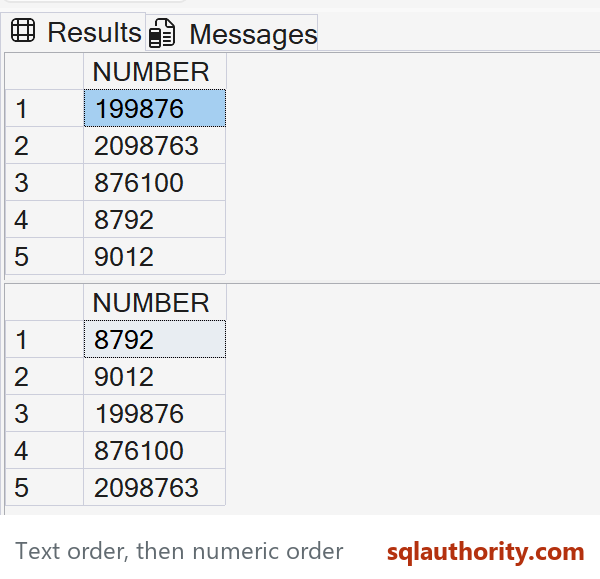
The first SELECT returns 199876, 2098763, 876100, 8792, 9012 under the usual digit ordering. It compares the character strings. The CAST and multiplication examples both return 8792, 9012, 199876, 876100, 2098763.
Which expression should you use?
I prefer explicit CAST when all values are valid and fit in int. Multiplying by 1 works because int takes precedence over varchar and SQL Server converts the string, but the conversion is easier to miss when reading the query. Both expressions fail on nonnumeric text or a number outside the int range.
The final SELECT uses TRY_CONVERT, available from SQL Server 2012, and bigint for a wider integer range. Unconvertible values become NULL; the CASE puts those values last instead of silently putting them first. Decide how to handle empty strings, NULLs, decimal text and invalid values according to your application’s rules. This is integer ordering, not a validator for every textual representation of a number.
Applying a conversion can require a sort even when the original text column has an index. For frequent large queries, the lasting answer is a suitable numeric column, validated data, or an appropriately designed persisted computed column and index. The original workaround is useful, but it does not remove the schema issue.
Have you handled this constraint in an existing application? Share the approach that worked for you.
Published by Pinal Dave on SQLAuthority. More of my work at pinaldave.com.
Discover more from SQL Authority with Pinal Dave
Subscribe to get the latest posts sent to your email.




3 Comments. Leave new
Another method: zero pad and then sort:
ORDER BY RIGHT(‘00000000000’+NUMBER,12)
The number of zeroes needs to be at least as long as the longest NUMBER. If you need to figure it out at run time:
SELECT @maxlength=MAX(LEN(NUMBER)) FROM #NUMBERS.
Then use RIGHT(REPLICATE(‘0’,@maxlength) +NUMBER, @maxlength)
We often use ORDER BY LEN(Col), Col
This works fine and avoids the overhead of casting to number, however only works if the number is „plain“ (without leading zeros, without decimals)
If the field in the source is a string but you expect a number to be contained in the value then I would use TRY_CAST as in the event of a rogue string being present the CAST in the order by would provoke an error.