
Question: Can you stop users from writing SELECT * against a view?

Answer: There is a trick: add a deliberately invalid expression to the view. Selecting every column then fails, while selecting the useful columns can succeed. It demonstrates projection behavior, but it’s not a reliable way to enforce coding standards or security.
During a Comprehensive Database Performance Health Check, we found a slow query that requested unnecessary columns from a wide view. After fixing the query, the developer asked whether we could require callers to name their columns. Here is the experiment I showed, using private object names so it can be tried in a disposable database:
-- Run only in a disposable user database, never against application objects.
IF OBJECT_ID(N'dbo.Sqla183637Customer') IS NOT NULL
   OR OBJECT_ID(N'dbo.Sqla183637View') IS NOT NULL
    THROW 50001, 'The private demonstration names already exist.', 1;
CREATE TABLE dbo.Sqla183637Customer
 (customer_id int, customer_name varchar(100), dob date);
INSERT dbo.Sqla183637Customer VALUES
 (10001,'Johnson','19921019'),
 (10002,'Peter','19570322'),
 (10003,'Clara','19811215');
EXEC sys.sp_executesql N'CREATE VIEW dbo.Sqla183637View AS
SELECT customer_id, customer_name, dob, ''a'' + 100 AS error
FROM dbo.Sqla183637Customer;';
BEGIN TRY
    EXEC sys.sp_executesql N'SELECT * FROM dbo.Sqla183637View;';
END TRY
BEGIN CATCH
    SELECT ERROR_NUMBER() AS ErrorNumber, ERROR_MESSAGE() AS ErrorMessage;
END CATCH;
SELECT customer_id, customer_name, dob FROM dbo.Sqla183637View;
DROP VIEW dbo.Sqla183637View;
DROP TABLE dbo.Sqla183637Customer;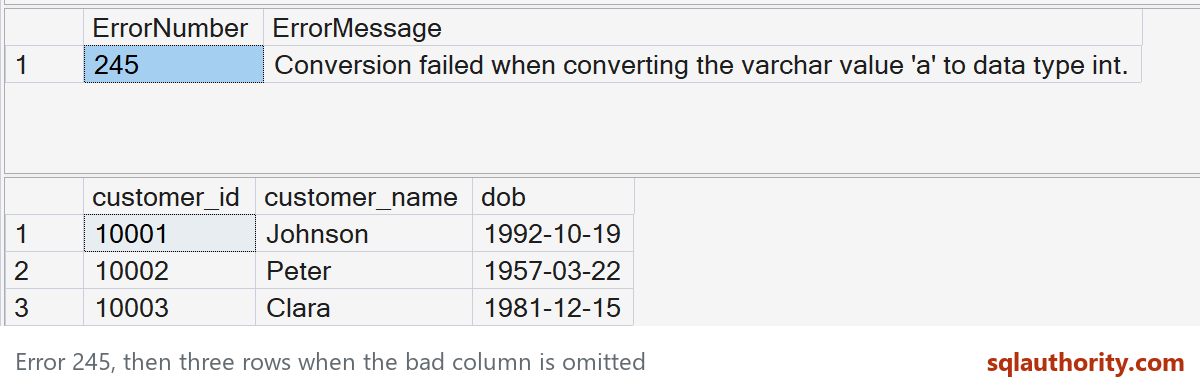
Error 245, then three rows when the bad column is omitted. Captured in SSMS on SQL Server 2025.
The int data type has higher precedence than varchar in 'a' + 100. Converting 'a' to an integer fails with error 245 when the expression is needed. The explicit projection doesn’t need that error column, so it returns Johnson, Peter and Clara without evaluating it in this example.
That surprise is the fun part. It’s also the reason I keep it as a lab curiosity rather than put a broken expression into a production view. A user could explicitly select the error column, and other tools or query shapes may evaluate it. It doesn’t distinguish an asterisk from an explicit list of all columns.
Use a view with the necessary columns, appropriate permissions and code review for the actual requirement. Grant callers the intended view access, not automatic access to its underlying table; permissions still need to match the data you are protecting. If you have another practical approach, leave a comment and I will give credit.

A broken column in a view is not a policy, it is a trap, and code review is the real way to stop SELECT *.
Published by Pinal Dave on SQLAuthority. More of my work at pinaldave.com.
Discover more from SQL Authority with Pinal Dave
Subscribe to get the latest posts sent to your email.



4 Comments. Leave new
Nice trick!
Interesting. Wonder if you could do the same thing with a calculated column?
You could create a BIT column and deny access to it i guess?
Nice.
Wondering how it will work if the user has select permission on view and the view calls a scalar function but user doesn’t have execute access on function. Will the explicit type out of columns will work on view ?