An append-only ledger table lets you add rows to an audit log but refuses to change or delete them. Add a digest stored somewhere else, and you can later prove that nobody rewrote history.

The question an auditor will ask
Picture an auditor reading your audit table. They ask a simple question: “Could someone with enough rights have edited these rows?” With an ordinary table, the honest answer is yes. A quiet UPDATE leaves no trace.
An append-only ledger table changes that answer. SQL Server accepts inserts and rejects updates and deletes. Let me build one so you can watch it say no. The demo creates a database named SqlAuthorityDemo and drops it at the end.
Create the ledger table
The only new part is the WITH clause at the bottom. LEDGER = ON makes it a ledger table, and APPEND_ONLY = ON blocks updates and deletes. I also turn on snapshot isolation, because the verify step later needs it.
USE master;
DROP DATABASE IF EXISTS SqlAuthorityDemo;
GO
CREATE DATABASE SqlAuthorityDemo;
ALTER DATABASE SqlAuthorityDemo SET ALLOW_SNAPSHOT_ISOLATION ON;
GO
USE SqlAuthorityDemo;
GO
CREATE TABLE dbo.AuditEvent
(
    EventId   bigint IDENTITY(1,1) PRIMARY KEY,
    EventTime datetime2(7) NOT NULL DEFAULT SYSUTCDATETIME(),
    EventText nvarchar(200) NOT NULL
)
WITH (LEDGER = ON (APPEND_ONLY = ON));

INSERT dbo.AuditEvent (EventText) VALUES (N'Demonstration event');
Try to change the row
Now play the bad guy. Try to update the event, then delete it. Each attempt fails with error 37359, and the original row is still there.
One trick here. SQL Server refuses these statements while it compiles them. A TRY block in the same batch would never get the error. Running each statement through sp_executesql compiles it in a separate batch, so the CATCH block can see it.
BEGIN TRY
    EXEC sys.sp_executesql
        N'UPDATE dbo.AuditEvent SET EventText = N''Changed event'' WHERE EventId = 1;';
END TRY
BEGIN CATCH
    SELECT ERROR_NUMBER() AS error_number;
END CATCH;

BEGIN TRY
    EXEC sys.sp_executesql N'DELETE dbo.AuditEvent WHERE EventId = 1;';
END TRY
BEGIN CATCH
    SELECT ERROR_NUMBER() AS error_number;
END CATCH;

SELECT EventId, EventText FROM dbo.AuditEvent ORDER BY EventId;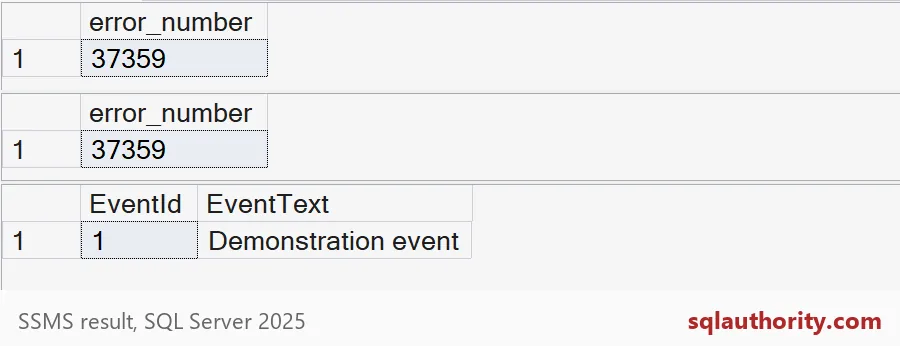
Funny detail: the DELETE gets the same error as the UPDATE. The message template says updates are not allowed for the append only ledger table.
SELECT message_id, text
FROM sys.messages
WHERE message_id = 37359 AND language_id = 1033;
See who wrote what
Every write to a ledger table is recorded as a ledger transaction, with a commit time and the name of the principal who did it. The table creation counts too, so in this demo you should see two rows: the create and the insert.
SELECT transaction_id, block_id, transaction_ordinal, commit_time, principal_name
FROM sys.database_ledger_transactions
ORDER BY commit_time, transaction_id;
The principal name is your own login, so I will not print mine. In production this column is gold. It says who inserted each audit row, whatever the row text claims.
Take a digest and verify it
A digest is a small JSON document with a hash that summarizes the whole ledger. Generate one, keep a copy, and later hand it back to SQL Server to check the history against it. The block below captures the digest and verifies against it right away.
DECLARE @Digest TABLE (digest nvarchar(max));

INSERT @Digest EXEC sys.sp_generate_database_ledger_digest;

SELECT digest FROM @Digest;

DECLARE @DigestArray nvarchar(max) = N'[' + (SELECT digest FROM @Digest) + N']';
EXEC sys.sp_verify_database_ledger @DigestArray;
The digest holds the database name, a block id, the hash and the commit time of the last transaction. Verification should finish with a message that it verified up to block 0.
The real lesson is where the digest lives. If it sits in the same database, anyone who can rewrite the table can rewrite the digest too. Store it outside the administrative reach of the people you are auditing, such as a separate storage account or a locked folder. Run the verify on a schedule, not once.

What a ledger does not do
A ledger proves that recorded rows were not changed. It cannot prove the application told the truth when it wrote them. Garbage in, tamper-proof garbage out.
Append-only also means the table only grows. Plan for storage and retention first. Restrict who can write, and test a restore plus verification before an auditor asks. Then drop the demo.
USE master;
DROP DATABASE IF EXISTS SqlAuthorityDemo;
Decide where the digest lives before you insert the first row.
An append-only ledger is not proof of truth, it is evidence of unchanged data.
Published by Pinal Dave on SQLAuthority. More of my work at pinaldave.com.
Discover more from SQL Authority with Pinal Dave
Subscribe to get the latest posts sent to your email.