
In SQL Server, you can use BCP command to export the result set to a csv file. In MySQL too, You can export data from a table or result set as a csv file in many methods. Here are two methods. Both let you export a resultset to CSV in a few steps.
Method 1 : Make use of Work Bench
If you are using Work Bench as a querying tool, you can make use of it’s Export option in the result window. Run the following code in Work Bench
SELECT db_names FROM mysql_testing;
The result will be shown in the result windows. There is an option called “File”. Click on it and it will prompt you a window to save the resultset to CSV or another format (Screen shot attached to show how file option can be used). Choose the directory and type out the name of the file.
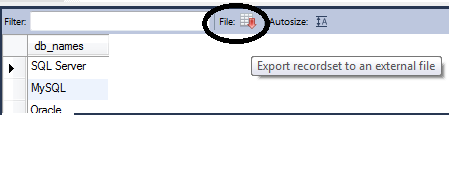
Method 2: Export the Resultset to CSV With the OUTFILE Command
You can do the export using a query with OUTFILE command as shown below
SELECT db_names FROM mysql_testing
INTO OUTFILE 'C:/testing.csv'
FIELDS ENCLOSED BY '"' TERMINATED BY ';' ESCAPED BY '"'
LINES TERMINATED BY '\r\n';
After the execution of the above code, you can find a file named testing.csv in C drive of the server.
Things to Know About INTO OUTFILE
INTO OUTFILE writes the file on the database server, not on your own computer, so the C drive in this example is the drive of the server. Your account needs the FILE privilege, and the secure_file_priv setting decides which folder MySQL is allowed to write to. Run SHOW VARIABLES LIKE ‘secure_file_priv’; to see it. MySQL also refuses to overwrite a file that already exists, so pick a new name each time or delete the old file first. If you need the file on your own machine, the Workbench export in Method 1 is the easier route.
Published by Pinal Dave on SQLAuthority. More of my work at pinaldave.com.
Discover more from SQL Authority with Pinal Dave
Subscribe to get the latest posts sent to your email.




7 Comments. Leave new
Hi guys, while executing query
——————————Start—————-
SELECT * FROM EmployeeMaster
INTO OUTFILE ‘C:/testing.csv’
FIELDS ENCLOSED BY ‘”‘ TERMINATED BY ‘;’ ESCAPED BY ‘”‘
LINES TERMINATED BY ‘rn’;
—————————————–END—–
we are getting error
Msg 156, Level 15, State 1, Line 2
Incorrect syntax near the keyword ‘INTO’.
Plz help me what is going wrong..
Thanks
dear sir one help. how to backup(godaddy database mssql) to my local system or anoter server.
thanks
R.rengaraj
hello sir,
i m getting error “Incorrect Syntax near the keyword ‘into’ ” when i m running command :-
select * from EMP
into OutFile ‘F:\sql\output.csv’
Fields Enclosed By ‘ ” ‘ Terminated by ‘;’ Escaped by ‘ ” ‘
Lines Terminated by ‘\r\n’
Incorrect syntax near the keyword ‘INTO’.
Above error display when i am executing your code.
Hello Sir,
When I am executing the above code I am getting “Incorrect syntax near the keyword INTO”
Example is for MySQL not SQL Server.
YEs I am also getting the same errorr