Retrying a deadlock victim is safe when the retry repeats the whole transaction and nothing is open around it. SQL Server rolls the victim back and raises error 1205. This post builds a bounded retry, tests it against a real deadlock, and shows two ways a retry does harm.
The Sample Tables
Stock holds two items with 100 units each, and a CHECK constraint keeps Qty from going below zero. AttemptLog records every try. PickLog stands in for any work a caller does before it calls the procedure. Every result in this post comes from SQL Server 2025, and the two sessions were two real connections.
CREATE TABLE dbo.Stock (
  ItemID int NOT NULL PRIMARY KEY,
  Item varchar(20) NOT NULL,
  Qty int NOT NULL CHECK (Qty >= 0)
);
INSERT INTO dbo.Stock (ItemID, Item, Qty) VALUES (1, 'Tea', 100), (2, 'Honey', 100);
CREATE TABLE dbo.PickLog (PickID int IDENTITY PRIMARY KEY, Note varchar(60) NOT NULL);
CREATE TABLE dbo.AttemptLog (
  LogID int IDENTITY PRIMARY KEY,
  Tag varchar(20) NOT NULL,
  Try int NOT NULL,
  Outcome varchar(20) NOT NULL,
  ElapsedMs int NOT NULL
);
The Retry Procedure
The unit of work moves units from one item to another. The procedure repeats that whole unit, not one statement. A rolled-back transaction takes every statement with it. A retry of the last statement alone would leave the first one undone.
The CATCH block rolls back what is left, logs the try and checks the error number. Only 1205 earns another go. After the third try the loop gives up, and THROW raises the original error. A short pause gives the other session time to finish. The think time inside the unit stands in for real work, and it makes the demo repeatable.
CREATE PROCEDURE dbo.MoveStockRetry
  @From int, @To int, @Qty int, @Think varchar(12), @Tag varchar(20)
AS
BEGIN
  SET NOCOUNT ON;
  DECLARE @Try int = 0, @Err int, @Start datetime2 = SYSUTCDATETIME();
  WHILE 1 = 1
  BEGIN
    SET @Try += 1;
    BEGIN TRY
      BEGIN TRANSACTION;
      UPDATE dbo.Stock SET Qty -= @Qty WHERE ItemID = @From;
      WAITFOR DELAY @Think;
      UPDATE dbo.Stock SET Qty += @Qty WHERE ItemID = @To;
      COMMIT TRANSACTION;
      INSERT dbo.AttemptLog (Tag, Try, Outcome, ElapsedMs)
      VALUES (@Tag, @Try, 'committed', DATEDIFF(MILLISECOND, @Start, SYSUTCDATETIME()));
      RETURN;
    END TRY
    BEGIN CATCH
      SET @Err = ERROR_NUMBER();
      IF XACT_STATE() <> 0 ROLLBACK TRANSACTION;
      INSERT dbo.AttemptLog (Tag, Try, Outcome, ElapsedMs)
      VALUES (@Tag, @Try, CONCAT('error ', @Err), DATEDIFF(MILLISECOND, @Start, SYSUTCDATETIME()));
      IF @Err <> 1205 OR @Try >= 3 THROW;
      WAITFOR DELAY '00:00:00.200';
    END CATCH;
  END;
END;
A Real Deadlock in Two Sessions
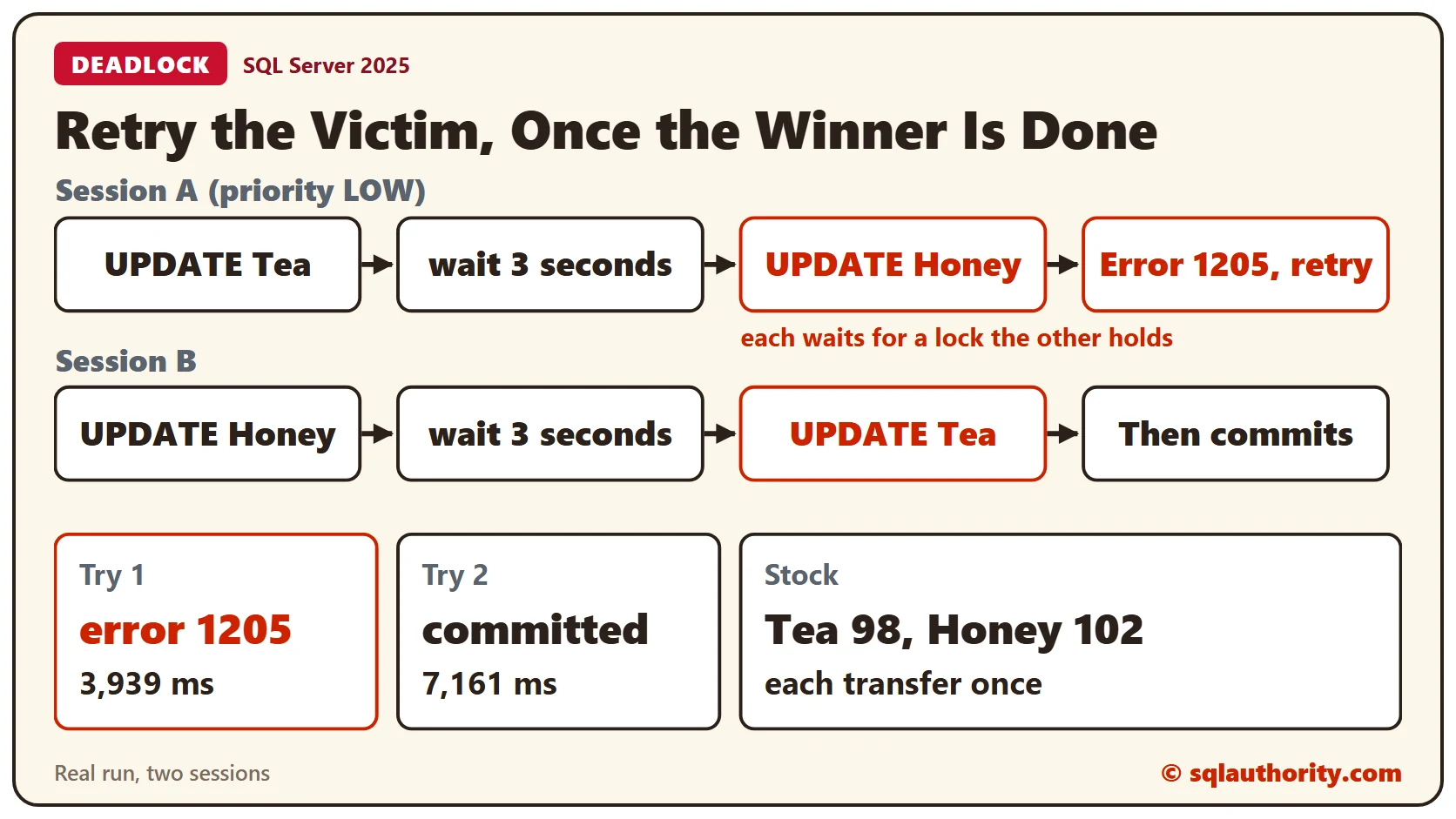
Session B takes Honey first and then Tea. Session A takes Tea first and then Honey. Each waits for the lock the other holds. Session A sets its deadlock priority to LOW. SQL Server then always chooses A as the victim, and the demo repeats. Read Deadlock Victim Selection: Protect One Transaction for how the choice works.
Open two query windows. Start session B first, and start session A about a second later.
BEGIN TRANSACTION;
UPDATE dbo.Stock SET Qty -= 3 WHERE ItemID = 2;
WAITFOR DELAY '00:00:03';
UPDATE dbo.Stock SET Qty += 3 WHERE ItemID = 1;
COMMIT TRANSACTION;
SET DEADLOCK_PRIORITY LOW;
EXEC dbo.MoveStockRetry @From = 1, @To = 2, @Qty = 5, @Think = '00:00:03', @Tag = 'round1';Session A returns without an error, and its caller never sees the deadlock. The log tells the story. Try 1 failed with error 1205 after 3,939 ms. Try 2 committed at 7,161 ms, once B had finished. Tea ends at 98 and Honey at 102, so each transfer was applied exactly once.
SELECT Try, Outcome, ElapsedMs FROM dbo.AttemptLog WHERE Tag = 'round1' ORDER BY LogID;
SELECT ItemID, Item, Qty FROM dbo.Stock ORDER BY ItemID;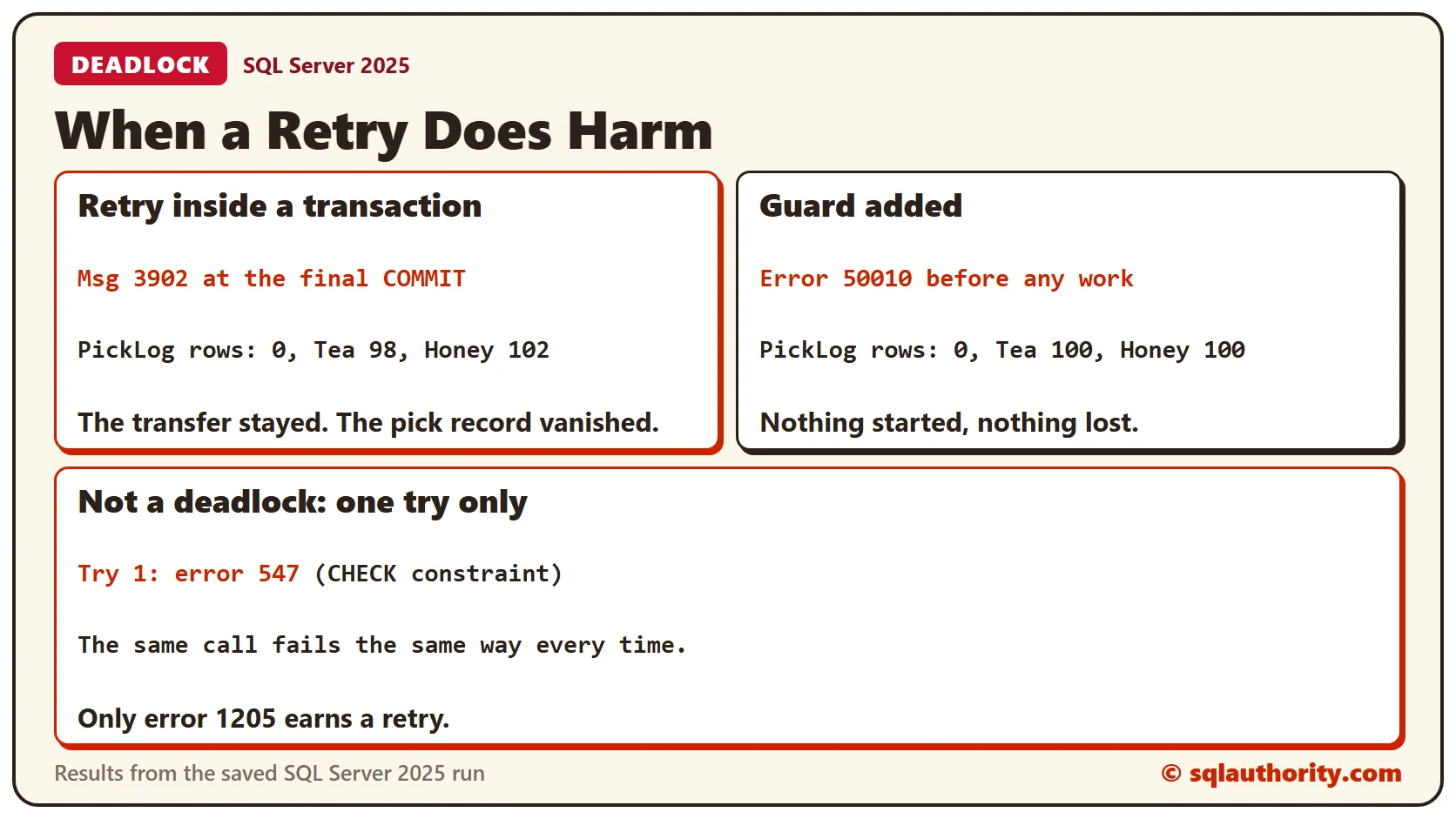
Harm One: A Retry Inside a Transaction
Now a caller opens its own transaction, logs a pick, and then calls the procedure. Reset the quantities to 100 first, and start session B again.
SET DEADLOCK_PRIORITY LOW;
BEGIN TRANSACTION;
INSERT INTO dbo.PickLog (Note) VALUES ('Picked 5 Tea for the order');
EXEC dbo.MoveStockRetry @From = 1, @To = 2, @Qty = 5, @Think = '00:00:03', @Tag = 'round2';
COMMIT TRANSACTION;
The deadlock rolls back the victim’s whole transaction. That includes the caller’s BEGIN TRANSACTION and the PickLog insert. The retry then runs in a transaction of its own and commits. When the caller reaches COMMIT, nothing is open.
SQL Server reports a transaction count mismatch, and then message 3902: the COMMIT has no corresponding BEGIN TRANSACTION. The log still shows error 1205 and then a commit. PickLog has 0 rows, yet Tea is 98 and Honey is 102. The transfer stayed and the pick record is gone.
SELECT Try, Outcome, ElapsedMs FROM dbo.AttemptLog WHERE Tag = 'round2' ORDER BY LogID;
SELECT COUNT(*) AS PickLogRows FROM dbo.PickLog;
SELECT ItemID, Item, Qty FROM dbo.Stock ORDER BY ItemID;
The fix is a guard. This procedure refuses to run when a transaction is already open.
CREATE PROCEDURE dbo.MoveStockSafe
  @From int, @To int, @Qty int, @Think varchar(12), @Tag varchar(20)
AS
BEGIN
  IF @@TRANCOUNT > 0
    THROW 50010, 'Call this procedure outside a transaction. A deadlock would roll back the caller too.', 1;
  EXEC dbo.MoveStockRetry @From, @To, @Qty, @Think, @Tag;
END;
Reset the quantities and call it from inside a transaction. The error arrives before any work starts. The caller can roll back and retry its whole outer transaction, which is the only unit a retry can repeat.
BEGIN TRY
  BEGIN TRANSACTION;
  INSERT INTO dbo.PickLog (Note) VALUES ('Picked 5 Tea for the order');
  EXEC dbo.MoveStockSafe @From = 1, @To = 2, @Qty = 5, @Think = '00:00:00', @Tag = 'round3';
  COMMIT TRANSACTION;
END TRY
BEGIN CATCH
  SELECT ERROR_NUMBER() AS ErrorNumber, ERROR_MESSAGE() AS ErrorMessage;
  IF @@TRANCOUNT > 0 ROLLBACK TRANSACTION;
END CATCH;
The message is Call this procedure outside a transaction. A deadlock would roll back the caller too. PickLog has 0 rows after the rollback, and the quantities are still 100.
SELECT COUNT(*) AS PickLogRows FROM dbo.PickLog;
SELECT ItemID, Item, Qty FROM dbo.Stock ORDER BY ItemID;
Harm Two: An Error That Isn’t a Deadlock
Moving 1,000 units out of Tea breaks the CHECK constraint. The same call fails the same way every time. Retrying it only wastes time.
EXEC dbo.MoveStockSafe @From = 1, @To = 2, @Qty = 1000, @Think = '00:00:00', @Tag = 'round4';SQL Server raises message 547, and the procedure throws it at once. The log shows a single try.
SELECT Try, Outcome, ElapsedMs FROM dbo.AttemptLog WHERE Tag = 'round4' ORDER BY LogID;
SELECT ItemID, Item, Qty FROM dbo.Stock ORDER BY ItemID;
A retry has a third cost when the work isn’t safe to repeat. SQL Server: Why Retrying an INSERT Can Create Duplicate Rows covers that case.
Keep the Cause in View
A retry hides a deadlock from the user. It doesn’t hide it from the server, so log every try as this procedure does. A deadlock that needs retries every day has a cause to fix. The usual fix is to touch the tables in the same order. Read Resolving Deadlock by Accessing Objects in the Same Order.
Clean Up
Remove the procedures and tables when you finish.
DROP PROCEDURE dbo.MoveStockSafe;
DROP PROCEDURE dbo.MoveStockRetry;
DROP TABLE dbo.AttemptLog;
DROP TABLE dbo.PickLog;
DROP TABLE dbo.Stock;
What to Remember
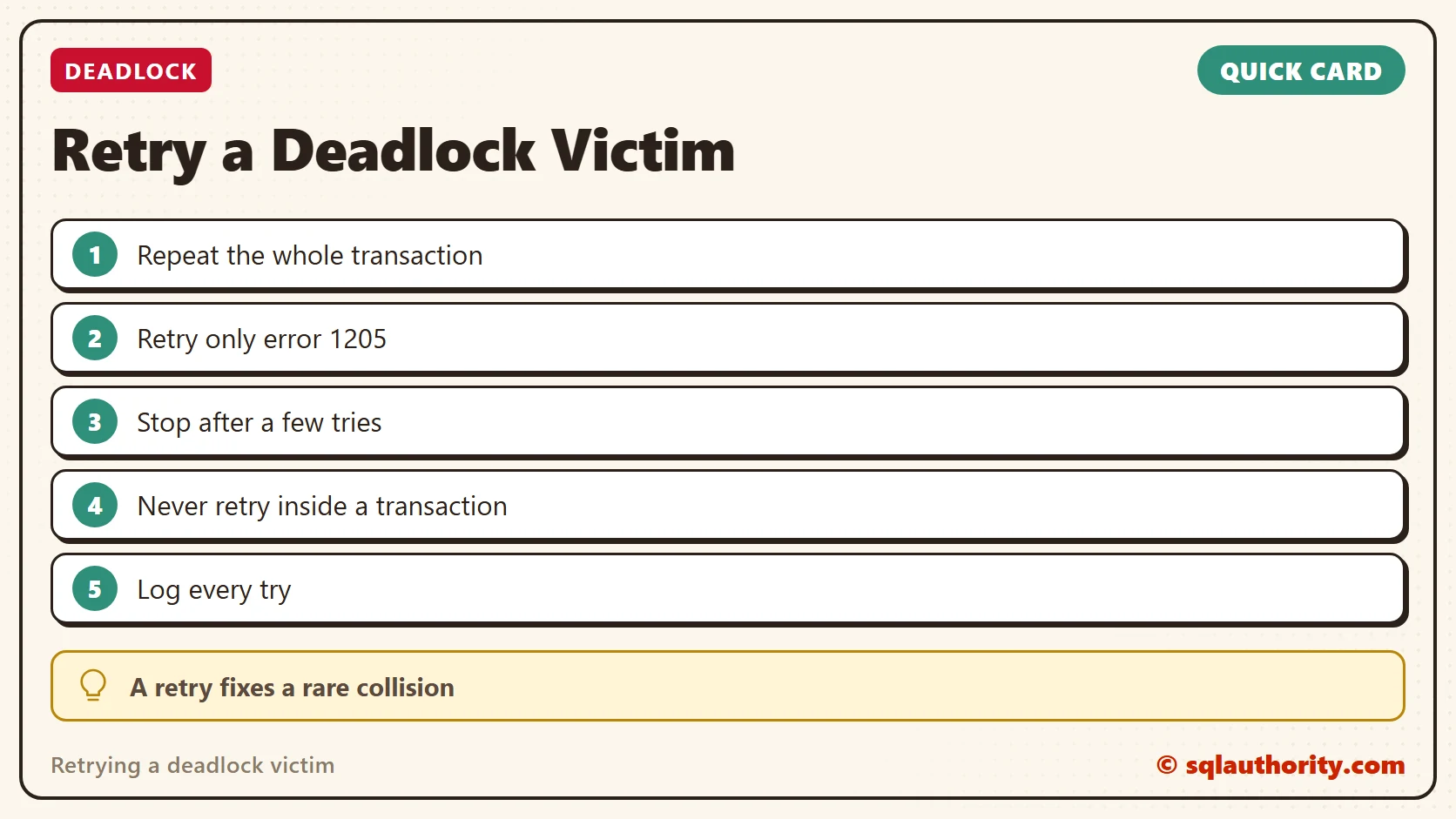
Repeat the whole transaction, retry only error 1205, and stop after a few tries. Refuse to run inside an outer transaction, because a deadlock rolls that back too. Log every try.
To go further, read A Retry Loop in T-SQL for Deadlock Victims and Lock Timeouts and SQL Server Deadlock, Slow-Cooked: A Recipe That Serves Two Sessions.
A retry is not a cure for a deadlock, it is a second chance for the victim.
Published by Pinal Dave on SQLAuthority. More of my work at pinaldave.com.
Discover more from SQL Authority with Pinal Dave
Subscribe to get the latest posts sent to your email.