A schema snapshot lets you prove that a deployment script is safe to run twice. Take a snapshot after the first run and another after the second. If they match, the second run changed nothing. This post guards a column, an index, a constraint and a data fix, then lets the snapshots decide.
The Sample Table
Plant is the table as it stood before the release. SchemaSnapshot will hold what we see. Every result in this post comes from SQL Server 2025. Name every constraint yourself, as PK_Plant is named here. A guard and a snapshot both look things up by name.
CREATE TABLE dbo.Plant (
  PlantID int NOT NULL CONSTRAINT PK_Plant PRIMARY KEY,
  Name varchar(30) NOT NULL,
  Price decimal(8,2) NOT NULL
);
INSERT INTO dbo.Plant (PlantID, Name, Price) VALUES (1, 'Fern', 10.00), (2, 'Lavender', 6.50), (3, 'Basil', 3.00);
CREATE TABLE dbo.SchemaSnapshot (
  Label varchar(20) NOT NULL,
  Kind varchar(10) NOT NULL,
  Name nvarchar(128) NOT NULL,
  Detail nvarchar(400) NOT NULL
);
A Release Written the Plain Way
This release adds a Zone column with a default, an index on Name and a check constraint on Zone. It then raises every price by 10 percent and puts Lavender in zone 8. GO separates the batches. Dropping and recreating objects is covered in DROP IF EXISTS and CREATE OR ALTER for Iterative Deployments. This post adds to a table that already exists.
ALTER TABLE dbo.Plant ADD Zone tinyint NOT NULL CONSTRAINT DF_Plant_Zone DEFAULT (5);
GO
CREATE INDEX IX_Plant_Name ON dbo.Plant (Name);
GO
ALTER TABLE dbo.Plant ADD CONSTRAINT CK_Plant_Zone CHECK (Zone BETWEEN 1 AND 13);
GO
UPDATE dbo.Plant SET Price = Price * 1.10;
UPDATE dbo.Plant SET Zone = 8 WHERE Name = 'Lavender';
The Snapshot and the Diff
The snapshot procedure reads the catalog views for the table. It stores each column, each index, each check and default constraint, and each row as JSON. It reads whatever columns exist at that moment, so the same code works before and after the release.
CREATE PROCEDURE dbo.TakeSnapshot @Label varchar(20)
AS
BEGIN
  SET NOCOUNT ON;
  INSERT INTO dbo.SchemaSnapshot (Label, Kind, Name, Detail)
  SELECT @Label, 'column', c.name, CONCAT(t.name, ', null=', c.is_nullable)
  FROM sys.columns AS c
  JOIN sys.types AS t ON t.user_type_id = c.user_type_id
  WHERE c.object_id = OBJECT_ID('dbo.Plant')
  UNION ALL
  SELECT @Label, 'index', i.name, CONCAT(i.type_desc, ', unique=', i.is_unique)
  FROM sys.indexes AS i
  WHERE i.object_id = OBJECT_ID('dbo.Plant') AND i.name IS NOT NULL
  UNION ALL
  SELECT @Label, 'check', k.name, k.definition
  FROM sys.check_constraints AS k
  WHERE k.parent_object_id = OBJECT_ID('dbo.Plant')
  UNION ALL
  SELECT @Label, 'default', d.name, d.definition
  FROM sys.default_constraints AS d
  WHERE d.parent_object_id = OBJECT_ID('dbo.Plant')
  UNION ALL
  SELECT @Label, 'row', JSON_VALUE(j.value, '$.PlantID'), j.value
  FROM OPENJSON((SELECT * FROM dbo.Plant ORDER BY PlantID FOR JSON PATH)) AS j;
END;
The diff procedure compares two snapshots with EXCEPT in both directions. It returns every entry found in one snapshot and not the other, followed by a count. A count of 0 means the two states are identical.
CREATE PROCEDURE dbo.SnapshotDiff @A varchar(20), @B varchar(20)
AS
BEGIN
  SELECT 'only in ' + @A AS Side, Kind, Name, Detail
  FROM (SELECT Kind, Name, Detail FROM dbo.SchemaSnapshot WHERE Label = @A
        EXCEPT
        SELECT Kind, Name, Detail FROM dbo.SchemaSnapshot WHERE Label = @B) AS x
  UNION ALL
  SELECT 'only in ' + @B, Kind, Name, Detail
  FROM (SELECT Kind, Name, Detail FROM dbo.SchemaSnapshot WHERE Label = @B
        EXCEPT
        SELECT Kind, Name, Detail FROM dbo.SchemaSnapshot WHERE Label = @A) AS y
  ORDER BY Side, Kind, Name;
  SELECT @@ROWCOUNT AS DifferentRows;
END;
Run the Plain Script Twice
Run the release on the fresh table and take snapshot ‘run 1’. Run it again and take ‘run 2’. Then compare.
EXEC dbo.TakeSnapshot 'run 1';

EXEC dbo.TakeSnapshot 'run 2';

EXEC dbo.SnapshotDiff 'run 1', 'run 2';
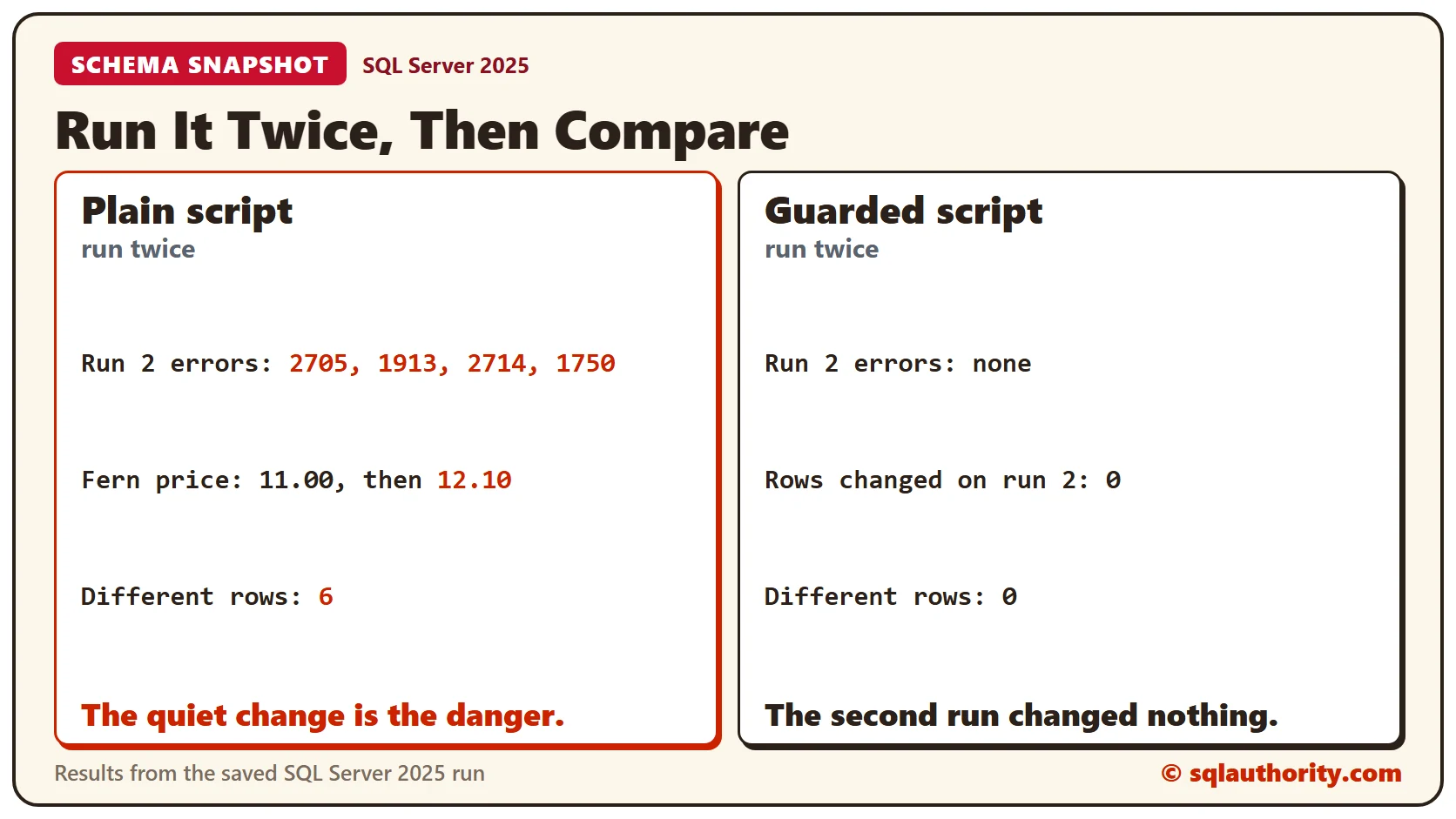
The first run is silent. The second run raises four error messages. Message 2705 says the column exists, 1913 says the index exists, and 2714 says the constraint exists. Message 1750 follows the last one. Those errors are loud and harmless.
The quiet part is the danger. The price update ran a second time. The diff returns 6 rows. Fern went from 11.00 to 12.10, Lavender from 7.15 to 7.87 and Basil from 3.30 to 3.63. A script that adjusts a value can’t be run twice. A script that sets a value can.
Guard Every Step
Each change now asks first. COL_LENGTH returns NULL when a column doesn’t exist, so it guards the column. The catalog views guard the index and the constraint by name. The data fixes name both the row and the old value. They set a price once and then match nothing.
IF COL_LENGTH('dbo.Plant', 'Zone') IS NULL
  ALTER TABLE dbo.Plant ADD Zone tinyint NOT NULL CONSTRAINT DF_Plant_Zone DEFAULT (5);
GO
IF NOT EXISTS (SELECT 1 FROM sys.indexes WHERE object_id = OBJECT_ID('dbo.Plant') AND name = 'IX_Plant_Name')
  CREATE INDEX IX_Plant_Name ON dbo.Plant (Name);
GO
IF NOT EXISTS (SELECT 1 FROM sys.check_constraints WHERE parent_object_id = OBJECT_ID('dbo.Plant') AND name = 'CK_Plant_Zone')
  ALTER TABLE dbo.Plant ADD CONSTRAINT CK_Plant_Zone CHECK (Zone BETWEEN 1 AND 13);
GO
UPDATE dbo.Plant SET Price = 11.00 WHERE Name = 'Fern' AND Price = 10.00;
UPDATE dbo.Plant SET Price = 7.15 WHERE Name = 'Lavender' AND Price = 6.50;
UPDATE dbo.Plant SET Price = 3.30 WHERE Name = 'Basil' AND Price = 3.00;
UPDATE dbo.Plant SET Zone = 8 WHERE Name = 'Lavender' AND Zone = 5;
Why GO Matters
The column and the data fix are in different batches on purpose. SQL Server checks every column name when it compiles a batch. A statement that uses Zone can’t share a batch with the statement that adds it. A test table shows what happens.
CREATE TABLE dbo.Pot (PotID int NOT NULL PRIMARY KEY);ALTER TABLE dbo.Pot ADD Size tinyint NULL;
UPDATE dbo.Pot SET Size = 3;SQL Server answers Msg 207: Invalid column name ‘Size’. The ALTER didn’t run either, because the whole batch failed to compile. A check afterwards returns NULL for the column.
SELECT COL_LENGTH('dbo.Pot', 'Size') AS SizeColumn;Run the Guarded Script Twice
Reset the table to its first state, then repeat the experiment with the guarded script. Take ‘run 1’ after the first run and ‘run 2’ after the second, and compare again.
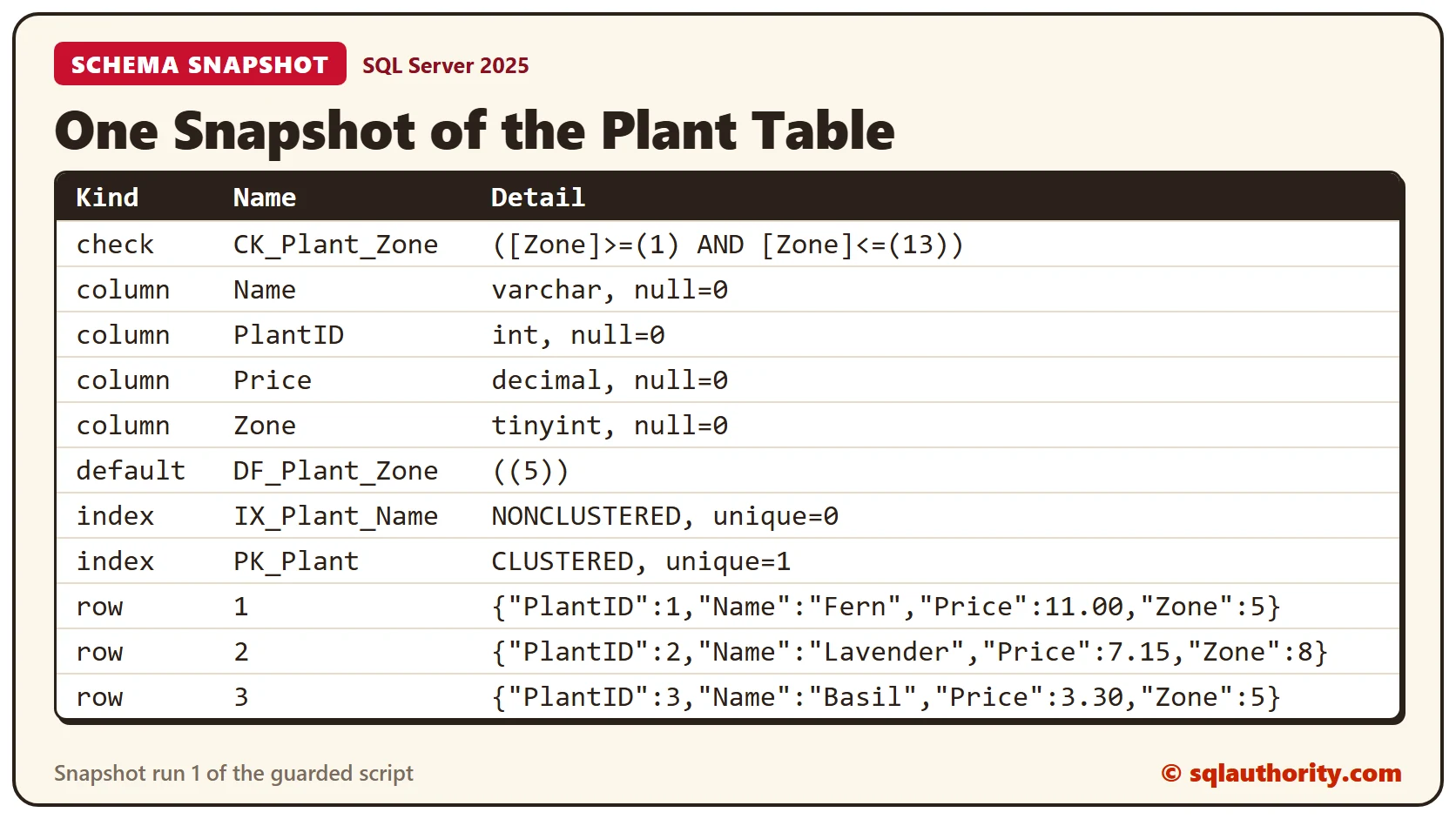
The first run prints 1 row affected for each of the four updates. The second run prints no errors, and each update reports 0 rows affected. The diff returns no rows and a count of 0. The second run changed nothing.
SELECT Kind, Name, Detail FROM dbo.SchemaSnapshot WHERE Label = 'run 1' ORDER BY Kind, Name;The list above is snapshot ‘run 1’. Read it once, because it is the record of what the release should leave behind. It shows the definition of the check constraint and the default, not only their names.
What the Snapshot Can and Can’t Prove
A guard looks for a name. If an object with that name exists but has a different definition, the guard skips it without a word. The snapshot shows the definition, so compare it with the one you expect. The snapshot covers one table. Add the other objects your release touches to the procedure.
Clean Up
Remove the procedures and tables when you finish.
DROP PROCEDURE dbo.SnapshotDiff;
DROP PROCEDURE dbo.TakeSnapshot;
DROP TABLE dbo.SchemaSnapshot;
DROP TABLE dbo.Pot;
DROP TABLE dbo.Plant;
What to Remember
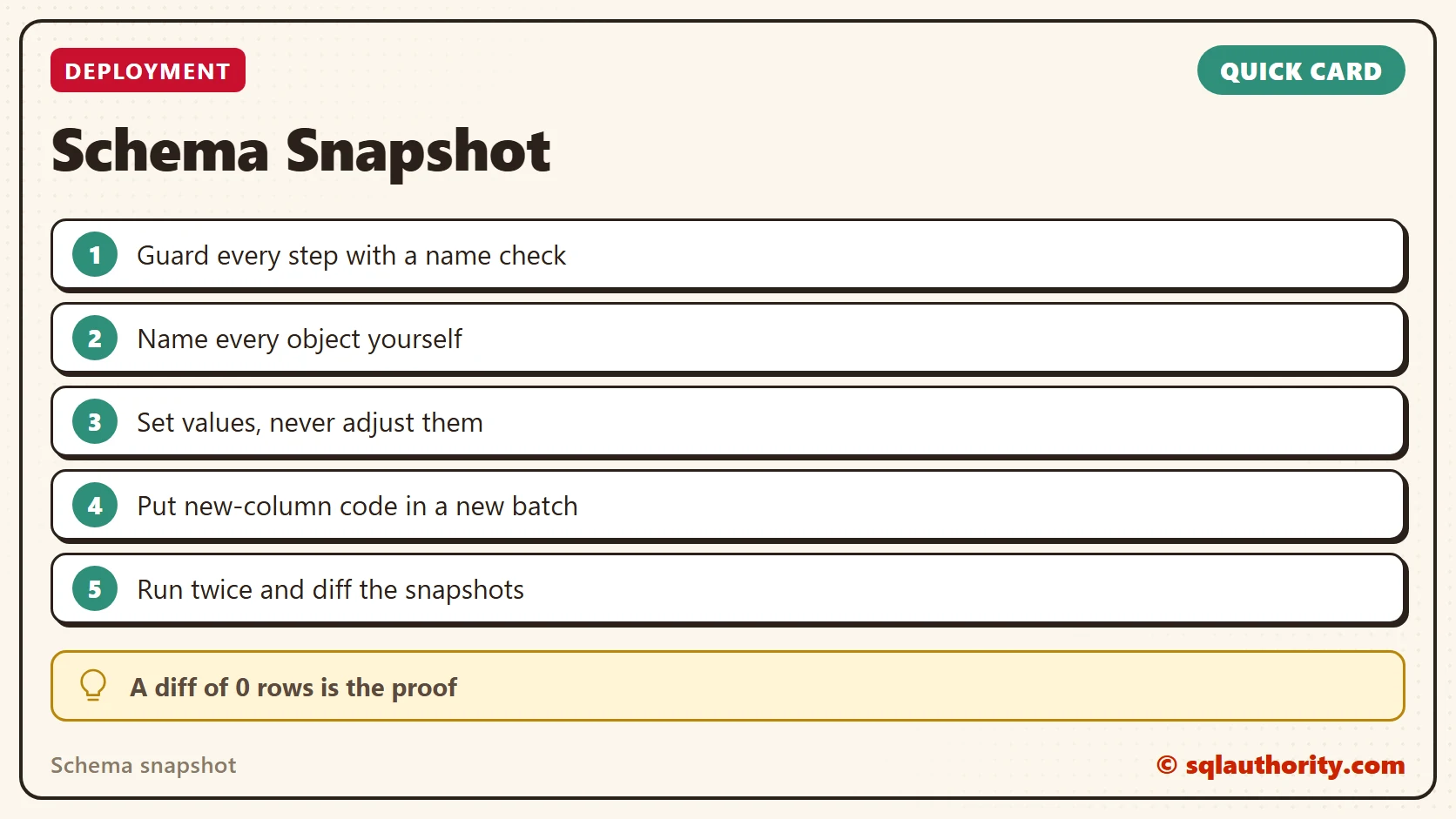
Guard every step, name every object, and set values instead of adjusting them. Put a statement in its own batch when it needs the column the previous batch adds. Then run the script twice and let the diff say whether the second run changed anything.
To go further, read DROP IF EXISTS and CREATE OR ALTER for Iterative Deployments, Writing Rerunnable Deployment Scripts for Database Changes and Idempotent Deployment Scripts: Safe to Run Twice.
A script is not safe because it ran once, it is safe because the second snapshot matches.
Published by Pinal Dave on SQLAuthority. More of my work at pinaldave.com.
Discover more from SQL Authority with Pinal Dave
Subscribe to get the latest posts sent to your email.