
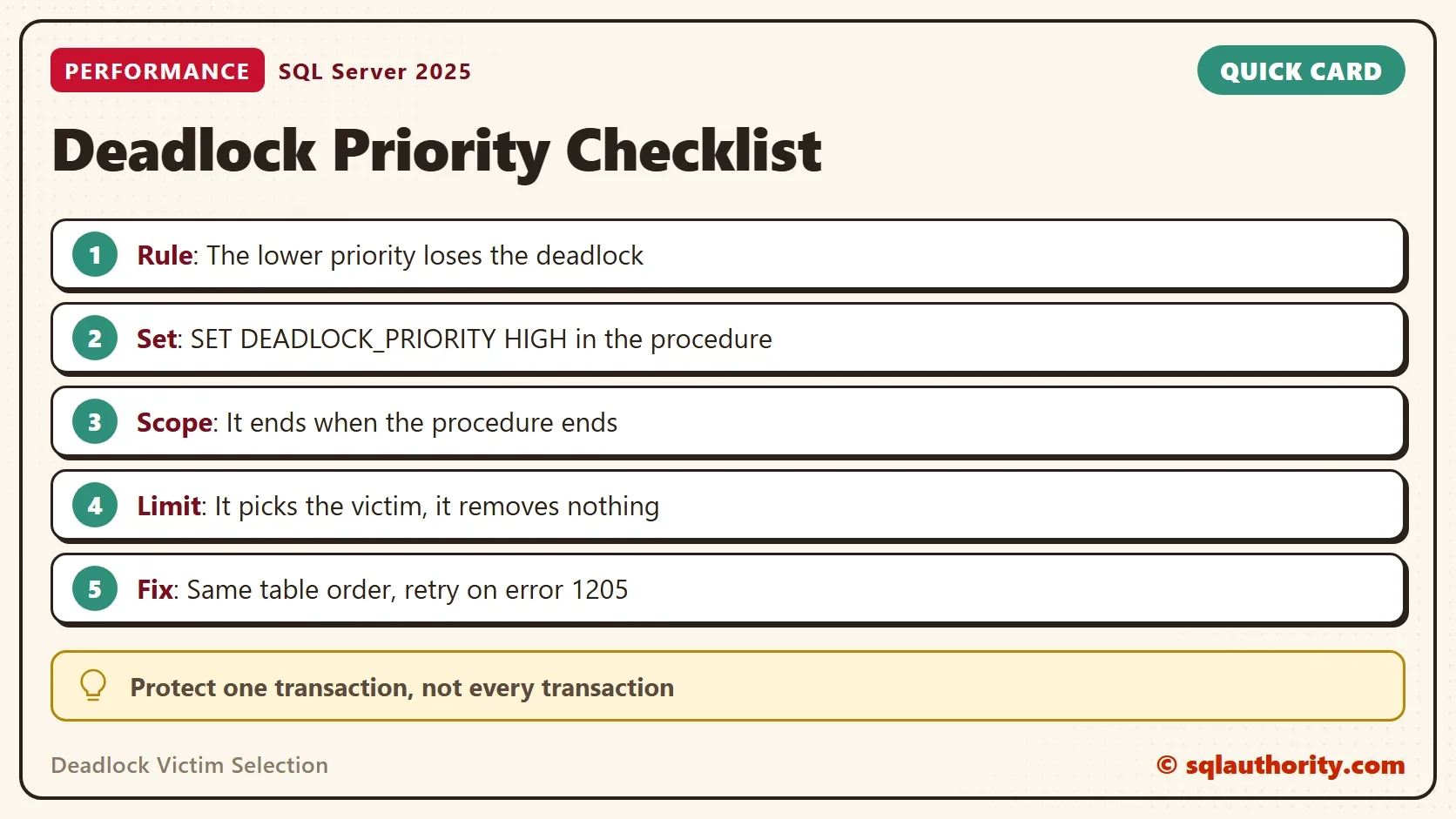
Deadlock victim selection decides which transaction SQL Server cancels when two block each other, and you can influence the choice. One statement, SET DEADLOCK_PRIORITY, tells SQL Server which transaction to protect. It is a small change for a big problem, and it has limits.

How SQL Server Chooses the Victim
A deadlock is a circle of waits. Session A holds a lock that B needs, and B holds a lock that A needs. Neither can move, so SQL Server’s deadlock monitor picks one session, rolls its transaction back and sends it error 1205. The other session continues.
Deadlock victim selection follows three rules in order. The session with the lower DEADLOCK_PRIORITY loses. If the priorities are equal, the session that is cheaper to roll back loses. That is the one that has written less to the log. If the cost is equal too, SQL Server picks one at random. The first rule is the only one you control.
A large financial organization had one transaction that kept becoming the deadlock victim. The deadlocks came from a few large concurrent updates of an invoices table, and the code could not change much. Priority was the one lever left, so that is where this post starts.
Create the Demo Database
The database is DeadlockVictimDemo, and it holds an invoices table and a payments table. The procedure updates invoices first, waits four seconds, and then updates payments. The script can run twice.
IF DB_ID(N'DeadlockVictimDemo') IS NULL CREATE DATABASE DeadlockVictimDemo;
GO
USE DeadlockVictimDemo;
GO
DROP TABLE IF EXISTS dbo.Invoices;
DROP TABLE IF EXISTS dbo.Payments;
CREATE TABLE dbo.Invoices (InvoiceID int NOT NULL PRIMARY KEY, Total decimal(10,2) NOT NULL);
CREATE TABLE dbo.Payments (PaymentID int NOT NULL PRIMARY KEY, Amount decimal(10,2) NOT NULL);
INSERT INTO dbo.Invoices VALUES (1, 100.00), (2, 250.00);
INSERT INTO dbo.Payments VALUES (1, 100.00), (2, 250.00);
GO
CREATE OR ALTER PROCEDURE dbo.PostPayment @Priority varchar(10)
AS
BEGIN
    SET NOCOUNT ON;
    IF @Priority = 'HIGH' SET DEADLOCK_PRIORITY HIGH;
    BEGIN TRANSACTION;
    UPDATE dbo.Invoices SET Total = Total + 1 WHERE InvoiceID = 1;
    WAITFOR DELAY '00:00:04';
    UPDATE dbo.Payments SET Amount = Amount + 1 WHERE PaymentID = 1;
    COMMIT TRANSACTION;
END;
Set the Priority
The setting takes LOW, NORMAL, HIGH or a whole number from -10 to 10. The session’s current value is visible in sys.dm_exec_sessions, so you can check it. The script sets three values, and reads each one back.
SELECT deadlock_priority AS DefaultPriority FROM sys.dm_exec_sessions WHERE session_id = @@SPID;
SET DEADLOCK_PRIORITY HIGH;
SELECT deadlock_priority AS HighPriority FROM sys.dm_exec_sessions WHERE session_id = @@SPID;
SET DEADLOCK_PRIORITY LOW;
SELECT deadlock_priority AS LowPriority FROM sys.dm_exec_sessions WHERE session_id = @@SPID;
SET DEADLOCK_PRIORITY NORMAL;
| DefaultPriority | HighPriority | LowPriority |
|---|---|---|
| 0 | 5 | -5 |
NORMAL is 0, HIGH is 5 and LOW is -5. A number lets you rank more than three levels. The scope matters for the old problem, because a procedure can carry the setting itself. A SET statement inside a procedure ends when the procedure returns.
CREATE OR ALTER PROCEDURE dbo.ShowPriority
AS
BEGIN
    SET DEADLOCK_PRIORITY HIGH;
    SELECT deadlock_priority AS InsideProcedure FROM sys.dm_exec_sessions WHERE session_id = @@SPID;
END;
GO
EXEC dbo.ShowPriority;
SELECT deadlock_priority AS AfterProcedure FROM sys.dm_exec_sessions WHERE session_id = @@SPID;| InsideProcedure | AfterProcedure |
|---|---|
| 5 | 0 |
That is the minimum code change. One line at the top of the important procedure protects that transaction and leaves the rest of the session alone.
Reproduce a Deadlock
The demo needs two query windows. In window 1, run the important transaction with the high priority. Then, within a second, start window 2. It touches the same tables in the opposite order.
-- Window 1
USE DeadlockVictimDemo;
EXEC dbo.PostPayment @Priority = 'HIGH';
SELECT 'window 1 finished' AS Result;
-- Window 2: start this within a second of window 1
USE DeadlockVictimDemo;
SET NOCOUNT ON;
BEGIN TRANSACTION;
UPDATE dbo.Payments SET Amount = Amount + 1 WHERE PaymentID = 1;
WAITFOR DELAY '00:00:02';
UPDATE dbo.Invoices SET Total = Total + 1 WHERE InvoiceID = 1;
COMMIT TRANSACTION;
SELECT 'window 2 finished' AS Result;
About four seconds in, window 1 asks for the payment row that window 2 holds, and the circle closes. Window 2 is chosen as the victim. Its message reads like this, and window 1 finishes normally. The process number differs on your server.
Msg 1205, Level 13, State 51, Line 6
Transaction (Process ID 112) was deadlocked on lock resources with another process and has been chosen as the deadlock victim. Rerun the transaction.
Now change window 1 to EXEC dbo.PostPayment @Priority = 'NORMAL'; and repeat. The cost of the two transactions is close but not equal. The victim changes from run to run, and your counts will differ. Neither window is safe.
| Window 1 priority | Window 2 priority | Victim |
|---|---|---|
| HIGH | default | Window 2 in 6 of 6 runs |
| default | default | Window 1 in 4 of 6 runs, window 2 in 2 of 6 |
What the Setting Does Not Do
You could argue that priority solves deadlocks. It doesn’t. The deadlock still happens, and some transaction still dies. The setting moves the damage to a transaction you care about less. That organization saw fewer deadlocks for the important transaction, but the total did not fall. Two high priority sessions that collide are back to the cost rule, and then to chance.
That makes priority a tool for one transaction that must not lose, not a habit for every deadlock. If every procedure runs at HIGH, nothing is protected. Treat the setting as a patch while the real fix is prepared. There are two fixes.
Fix the Deadlock Itself
The first fix is the order of access. Both windows touch the same two tables. When every transaction updates invoices before payments, nobody holds a lock the other needs next. This version of window 2 follows that order.
USE DeadlockVictimDemo;
GO
CREATE OR ALTER PROCEDURE dbo.PostRefundOrdered
AS
BEGIN
    SET NOCOUNT ON;
    BEGIN TRANSACTION;
    UPDATE dbo.Invoices SET Total = Total - 1 WHERE InvoiceID = 1;
    WAITFOR DELAY '00:00:02';
    UPDATE dbo.Payments SET Amount = Amount - 1 WHERE PaymentID = 1;
    COMMIT TRANSACTION;
    SELECT 'refund finished' AS Result;
END;
Run window 1 first, then EXEC dbo.PostRefundOrdered; in window 2. There is no deadlock. Window 2 waits for window 1 to commit, then both finish.
The second fix is a retry. A deadlock victim is told to rerun the transaction, so let the code do that. This procedure retries up to three times when it receives error 1205. Retry only a transaction that is safe to run again.
CREATE OR ALTER PROCEDURE dbo.PostRefund
AS
BEGIN
    SET NOCOUNT ON;
    DECLARE @Try int = 1;
    WHILE @Try <= 3
    BEGIN
        BEGIN TRY
            BEGIN TRANSACTION;
            UPDATE dbo.Payments SET Amount = Amount - 1 WHERE PaymentID = 1;
            WAITFOR DELAY '00:00:02';
            UPDATE dbo.Invoices SET Total = Total - 1 WHERE InvoiceID = 1;
            COMMIT TRANSACTION;
            SELECT @Try AS Attempts;
            RETURN;
        END TRY
        BEGIN CATCH
            IF @@TRANCOUNT > 0 ROLLBACK TRANSACTION;
            IF ERROR_NUMBER() = 1205 AND @Try < 3
                SET @Try += 1;
            ELSE
                THROW;
        END CATCH;
    END;
END;
With window 1 at HIGH and window 2 running this procedure, the first attempt loses and the second succeeds. The procedure reports 2 attempts.
When You Can’t Change the Code
If the code belongs to a vendor, you can’t add the SET line. Read committed snapshot isolation removes deadlocks between readers and writers without a code change. It does not help when two writers deadlock, as in the demo. A better index shortens the time locks are held. Both are database level changes. Test them first, because they change how every query in the database behaves.
What to Remember
Deadlock victim selection starts with priority, then cost, then chance. Put SET DEADLOCK_PRIORITY HIGH at the top of the one procedure that must win. Measure the total number of deadlocks before and after, because the setting hides nothing and fixes nothing.
Then fix the cause: one order of access, short transactions and a retry for error 1205. When you finish testing, drop the example database.
USE master;
GO
ALTER DATABASE DeadlockVictimDemo SET SINGLE_USER WITH ROLLBACK IMMEDIATE;
DROP DATABASE DeadlockVictimDemo;
A deadlock priority is not a cure, it is a choice of who pays.
Published by Pinal Dave on SQLAuthority. More of my work at pinaldave.com.
Discover more from SQL Authority with Pinal Dave
Subscribe to get the latest posts sent to your email.



3 Comments. Leave new
Hi,
about deadlock it’s very difficult to modify code when the code belongs to a solution provider or software package under penalty of no longer being supported.
in some cas i can modify data access strategy.
hello, it is advisable to use this instruction every time you have a deadlock and a high priority instruction
Hi Yes i was try to used on this production . But problem is any enviroment multiple sp,’s are important to safe without dead lock . But after using this just reduce the nubmer of deadlocks .but still getting. I hope proper maintence and monitring are always needs this.
Like
” Without heart human does’nt work ,Same like without DBA prod. enviroment does’nt work.”
Thanks
Ajit kumar