A running total cursor can often be replaced by one SUM OVER. The window function keeps a balance in order, the same way the loop does, in a single statement.

The loop everyone has written once
You need a balance after every transaction. The first thing many of us wrote was a cursor. Read a row, add it to a variable, store the result, fetch the next row. It works, and it keeps working until the table gets big and the report gets slow.
Before I replace anything, I want proof that the new query gives the same answer. So we build both on the same three rows, including one negative amount.
Build the cursor version
Here is the input. Id gives a unique order. The amounts are 10.00, minus 3.00 and 7.00.
DROP TABLE IF EXISTS #LedgerDemo;
DROP TABLE IF EXISTS #CursorDemo;

CREATE TABLE #LedgerDemo (Id int PRIMARY KEY, Amount decimal(12, 2) NOT NULL);
CREATE TABLE #CursorDemo (Id int PRIMARY KEY, Balance decimal(38, 2) NOT NULL);

INSERT #LedgerDemo (Id, Amount) VALUES (1, 10.00), (2, -3.00), (3, 7.00);
Now the cursor. It visits each row in Id order and writes the running balance into a second table.
SET NOCOUNT ON;
DECLARE @id int, @amount decimal(12, 2), @balance decimal(38, 2) = 0;

DECLARE LedgerCursor CURSOR LOCAL FAST_FORWARD FOR
    SELECT Id, Amount FROM #LedgerDemo ORDER BY Id;

OPEN LedgerCursor;
FETCH NEXT FROM LedgerCursor INTO @id, @amount;

WHILE @@FETCH_STATUS = 0
BEGIN
    SET @balance = @balance + @amount;
    INSERT #CursorDemo (Id, Balance) VALUES (@id, @balance);
    FETCH NEXT FROM LedgerCursor INTO @id, @amount;
END;

CLOSE LedgerCursor;
DEALLOCATE LedgerCursor;
Replace it with SUM OVER
The window version is one expression. I put it next to the cursor result so you can compare them row by row.
SELECT l.Id, l.Amount,
       c.Balance AS CursorBalance,
       SUM(l.Amount) OVER (ORDER BY l.Id ROWS UNBOUNDED PRECEDING) AS WindowBalance
FROM #LedgerDemo AS l
JOIN #CursorDemo AS c ON c.Id = l.Id
ORDER BY l.Id;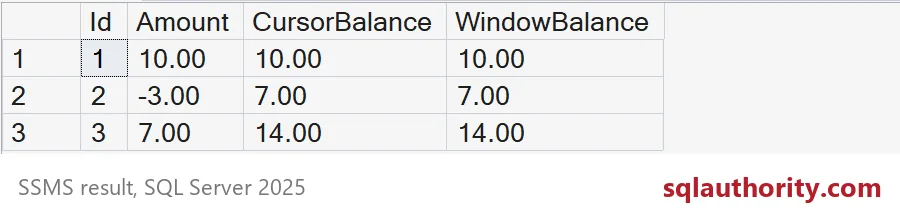
Both balance columns say 10.00, 7.00 and 14.00. The negative amount lowers the balance before the next row is added, in both versions. ROWS UNBOUNDED PRECEDING means “everything from the first row up to this one.” That is exactly what the loop did.
Ties and the default frame
Here is where people get bitten. Real ledgers have several rows on the same date, and a date does not give a unique order. Let me show you two accounts, with two moves on the same day for account 1.
DROP TABLE IF EXISTS #Moves;
CREATE TABLE #Moves (
    MoveId    int PRIMARY KEY,
    AccountId int NOT NULL,
    MoveDate  date NOT NULL,
    Amount    decimal(12, 2) NOT NULL
);

INSERT #Moves (MoveId, AccountId, MoveDate, Amount) VALUES
    (1, 1, '2026-01-01', 100.00), (2, 1, '2026-01-02', -30.00),
    (3, 1, '2026-01-02', -20.00), (4, 1, '2026-01-03',  50.00),
    (5, 2, '2026-01-01', 500.00), (6, 2, '2026-01-02', -100.00);

SELECT MoveId, AccountId, MoveDate, Amount,
       SUM(Amount) OVER (PARTITION BY AccountId ORDER BY MoveDate) AS DefaultFrame,
       SUM(Amount) OVER (PARTITION BY AccountId ORDER BY MoveDate, MoveId
                         ROWS UNBOUNDED PRECEDING) AS RowsFrame
FROM #Moves
ORDER BY AccountId, MoveDate, MoveId;
Look at moves 2 and 3. They share a date. The DefaultFrame column, which has no ROWS clause, shows 50.00 on both rows, so you never see the balance after move 2 alone. The RowsFrame column steps from 100.00 to 70.00 to 50.00, as the loop would. I added MoveId to the ORDER BY as a tie breaker, which makes the order certain.
PARTITION BY AccountId restarts the balance for each account. With a cursor, you would write extra code to reset the variable. Here, account 2 simply starts again at 500.00.

Same answer on more rows
Three rows prove little. Let me load 100,000 rows into a second pair of tables and run both methods. I time each one and compare the balances.
DROP TABLE IF EXISTS #Big;
DROP TABLE IF EXISTS #BigCursor;
DROP TABLE IF EXISTS #BigWindow;

CREATE TABLE #Big (Id int PRIMARY KEY, Amount decimal(12, 2) NOT NULL);
CREATE TABLE #BigCursor (Id int PRIMARY KEY, Balance decimal(38, 2) NOT NULL);

INSERT #Big (Id, Amount)
SELECT value, (value % 7) - 2 FROM GENERATE_SERIES(1, 100000);
SET NOCOUNT ON;
DECLARE @id int, @amount decimal(12, 2), @balance decimal(38, 2) = 0;
DECLARE @start datetime2 = SYSDATETIME();
DECLARE BigCursor CURSOR LOCAL FAST_FORWARD FOR SELECT Id, Amount FROM #Big ORDER BY Id;
OPEN BigCursor;
FETCH NEXT FROM BigCursor INTO @id, @amount;
WHILE @@FETCH_STATUS = 0
BEGIN
SET @balance = @balance + @amount;
INSERT #BigCursor (Id, Balance) VALUES (@id, @balance);
FETCH NEXT FROM BigCursor INTO @id, @amount;
END;
CLOSE BigCursor;
DEALLOCATE BigCursor;
SELECT DATEDIFF(MILLISECOND, @start, SYSDATETIME()) AS CursorMs;
SET @start = SYSDATETIME();
SELECT Id, SUM(Amount) OVER (ORDER BY Id ROWS UNBOUNDED PRECEDING) AS Balance
INTO #BigWindow
FROM #Big;
SELECT DATEDIFF(MILLISECOND, @start, SYSDATETIME()) AS WindowMs;Read CursorMs and WindowMs. The cursor took a few seconds on my test server, while the window query took a fraction of one second. Your times will differ, but the gap should be easy to see.
SELECT COUNT(*) AS RowsCompared,
       SUM(CASE WHEN c.Balance = w.Balance THEN 0 ELSE 1 END) AS MismatchedRows
FROM #BigCursor AS c
JOIN #BigWindow AS w ON w.Id = c.Id;
RowsCompared is 100000 and MismatchedRows is 0. Every balance agrees.
When not to swap
Some balances follow rules a sum cannot express. Think of a cap, a reset after a threshold, or carry-forward logic that depends on the previous result. For those, a loop may still be the right tool. Compare empty input, negative amounts, opening balances and several accounts before you retire a cursor. Then clean up.
DROP TABLE IF EXISTS #LedgerDemo, #CursorDemo, #Moves, #Big, #BigCursor, #BigWindow;Next time you see a loop adding to a variable, ask whether SUM OVER can say it in one line.
A running balance is not a reason to loop, it is a reason to define the order.
Published by Pinal Dave on SQLAuthority. More of my work at pinaldave.com.
Discover more from SQL Authority with Pinal Dave
Subscribe to get the latest posts sent to your email.