XQuery FLWOR can iterate over source items and construct a different XML result. I use it to filter three products and reorder the survivors. The new elements deliberately differ from the source elements.
The source stores each price as an attribute on item. The result stores it as text inside product. Selecting the original nodes alone would not make that structural change.

Follow the transformation clauses
The fixed document contains products three, one and two with prices nine, twelve and five. Source order is deliberately different from ascending price order. The middle product is above the chosen limit.
The for clause visits each item. The where clause keeps prices no greater than ten. The order by clause compares prices after conversion to integers.
The return expression creates product elements with identifier attributes and price text. A selected element wraps the new sequence. The SQL output also includes scalar diagnostics for its count and first product.
WITH Input AS
(
    SELECT CAST('<items><item id="3" price="9"/><item id="1" price="12"/><item id="2" price="5"/></items>' AS xml) AS Doc
), Transformed AS
(
    SELECT Doc.query('<selected>{
        for $item in /items/item
        where xs:int($item/@price) le 10
        order by xs:int($item/@price)
        return <product id="{data($item/@id)}">{data($item/@price)}</product>
    }</selected>') AS ResultXml
    FROM Input
)
SELECT ResultXml,
       ResultXml.value('count(/selected/product)', 'int') AS ProductCount,
       ResultXml.value('(/selected/product/@id)[1]', 'int') AS FirstProductId,
       ResultXml.value('(/selected/product/text())[1]', 'int') AS FirstPrice
FROM Transformed;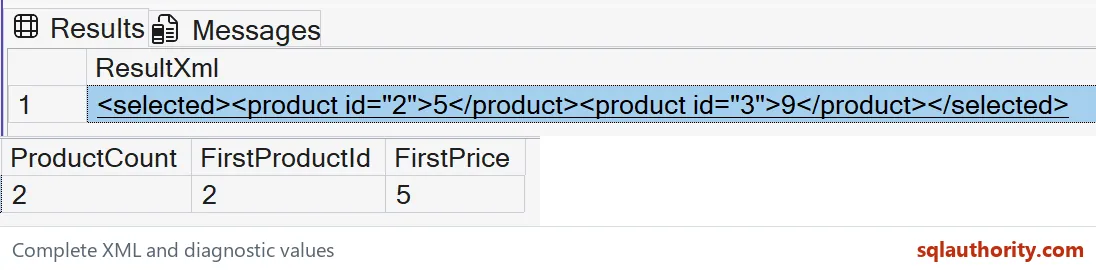

Read the newly constructed output
The expected result contains product two with price five, followed by product three with price nine. Product one is excluded because twelve exceeds the limit. The source order does not determine this new sequence.
ProductCount should be two, FirstProductId two and FirstPrice five. These columns explain the XML result without replacing it. The query also returns the complete constructed XML.
The numeric conversion is important to the ordering question. Sorting price text can produce a different order from sorting numbers. The fixed small integers make the chosen interpretation explicit.
The new product elements are not the source item nodes copied unchanged. Their names and price placement are constructed by return. This distinction matters when an interface expects a different XML contract.
Keep input validation separate
Every source item in this example has one identifier and one valid integer price. The query relies on those bounded inputs. Missing, repeated or malformed values need explicit rules before using the same conversion.
I don’t assign an arbitrary price to an item with no value. That could make it appear affordable when the source did not establish a price. Validate such records separately or define a clear missing-value policy.
The result’s order is explicit because it is part of this interface. Equal prices would need an additional ordering key if their relative order mattered. The current prices are distinct, so that ambiguity is absent.
FLWOR describes iteration, optional filtering and ordering, and result construction. Not every expression needs every named clause. This one omits let because its few scalar expressions do not need separate bindings.
Choose XML or relational output deliberately
This example keeps the transformation inside the XML model. It does not turn products into relational rows with nodes. That would be a different output requirement and a different query shape.
The source document remains available to the SELECT expression and is never updated. The result is a new XML value. An application can inspect that result before deciding where to send or store it.
The query establishes no XML index or performance advantage. It demonstrates a bounded change in shape and order. Preserve the full source and output when testing a more detailed XML transformation.
Test it on a tiny document first, and the output shape stays easy to trust.
A FLWOR query is not a filter on the source, it is a new XML shape.
Published by Pinal Dave on SQLAuthority. More of my work at pinaldave.com.
Discover more from SQL Authority with Pinal Dave
Subscribe to get the latest posts sent to your email.