SQRT returns a square root without limiting the result to whole numbers. I distinguish its approximate calculation from the decimal scale chosen to display that result.

Choose the calculation contract
An integer input doesn’t imply an integer square root. Four has a whole-number root, while two doesn’t. Returning only an integer would discard part of the second answer. The input and output types therefore deserve separate attention.
SQRT returns float. Its argument can be float or any type that converts implicitly to float. This example supplies decimal inputs explicitly. That input type doesn’t make the root calculation exact decimal arithmetic.
I’d keep the mathematical operation separate from its display format. A report may need six fractional digits without requiring that intermediate precision everywhere. Casting the result states the displayed scale. It doesn’t change the function’s approximate computation.
Compare perfect and fractional roots
The literal input includes zero, two, four and nine. A fifth row contains NULL. The output retains the typed input and casts the root to decimal(12,6). A separate property column records the function result’s underlying SQL base type.
Two is expected to display as 1.414214 at this scale. Four and nine display as 2.000000 and 3.000000. Their trailing digits follow the final decimal cast. They do not imply that every square root is an exactly representable decimal.
The zero input remains a valid zero result. NULL remains missing rather than becoming zero. SQL_VARIANT_PROPERTY also returns NULL for the missing expression. That row prevents a property check from silently treating a NULL value as a typed non-NULL result.
WITH Inputs AS
(
    SELECT Id, CAST(InputValue AS decimal(8,2)) AS InputValue
    FROM (VALUES (1, 0), (2, 2), (3, 4), (4, 9), (5, NULL))
        AS v(Id, InputValue)
)
SELECT Id, InputValue, CAST(SQRT(InputValue) AS decimal(12,6)) AS DisplayRoot,
       CONVERT(varchar(20), SQL_VARIANT_PROPERTY(
           SQRT(InputValue), 'BaseType')) AS NativeType
FROM Inputs
ORDER BY Id;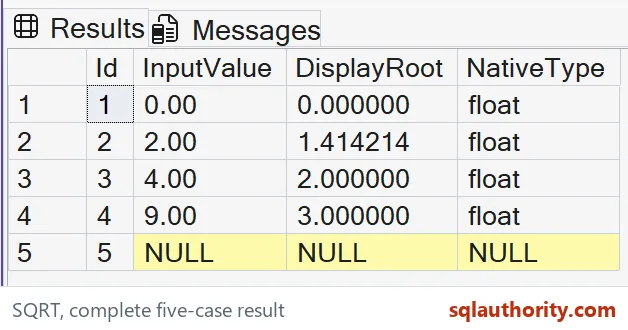
Respect the permitted input range
A real square root requires a nonnegative input. The demonstration doesn’t execute negative examples that would stop its useful result query. Its literal values establish a deliberately narrow valid domain. Validate an application’s input contract before applying the expression to stored data.
I can justify filtering negative measurements when the source contract rejects them. That policy also removes rows from the result. I’d keep a separate rejection count or diagnostic output where omission matters. A calculation returning fewer records can conceal source problems.
A missing measurement needs a different decision from a negative measurement. Substituting zero for both would merge two meanings. This script performs neither substitution. The input column remains visible so that each output can be understood in context.
Check values and displayed precision
Approximate numbers can carry differences beyond the selected display scale. A rounded decimal output is suitable for this small result specification. It isn’t proof of unrestricted equality between floating calculations. Set the precision and comparison rule for the actual consumer.
The script is a read-only CTE over five literal rows. It creates no objects and changes no options. ORDER BY fixes the case sequence. Keep all inputs, displayed roots and base-type property values together.
Compare all five complete tuples and SQL types before reusing the query. Include the missing input rather than discarding that row. A screenshot with shortened decimals would miss the selected display contract. Keep the complete copyable SQL beside any result image.

Take your time with the small cases. They teach the most.
A displayed decimal root is not an exact calculation, it is a chosen view of a float result.
Published by Pinal Dave on SQLAuthority. More of my work at pinaldave.com.
Discover more from SQL Authority with Pinal Dave
Subscribe to get the latest posts sent to your email.