
This Locking and Blocking Quiz asks whether updating a different row still makes you wait. Most people say no, because the two rows have nothing to do with each other. The test below shows when that’s true and when it isn’t.

The Quiz
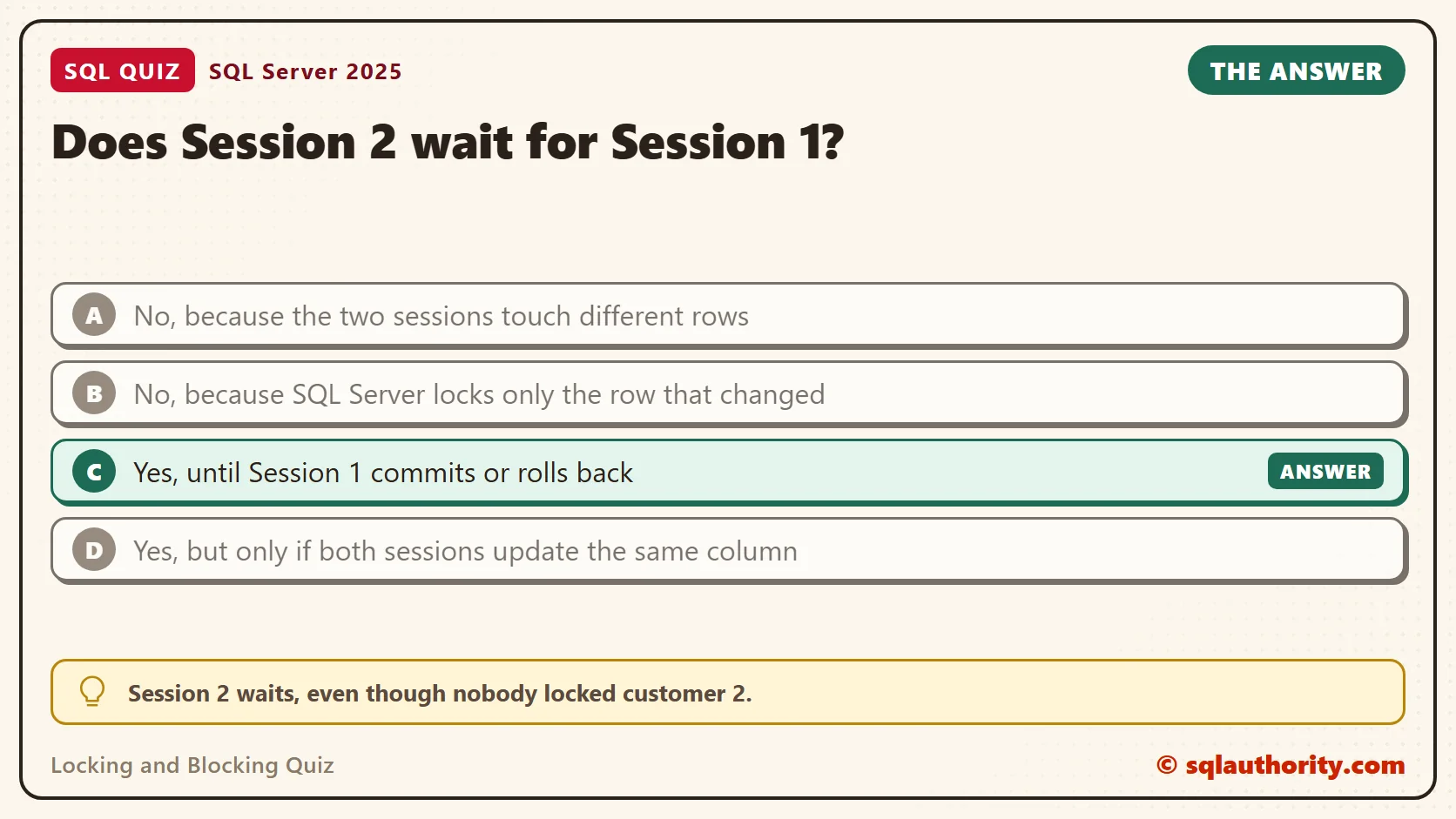
A table holds 2,000 customers, each with a balance. The table has no index. Session 1 starts a transaction, updates customer 1 and leaves the transaction open. Session 2 then updates customer 2, a different row. The database has its default settings: locking READ COMMITTED, with row versioning and optimized locking switched off.
Does Session 2 wait for Session 1?
A. No, because the two sessions touch different rows
B. No, because SQL Server locks only the row that changed
C. Yes, until Session 1 commits or rolls back
D. Yes, but only if both sessions update the same column
Pick one before you read on.
The Answer
The answer is C. Session 2 waits, even though nobody locked customer 2.
Without an index, SQL Server can’t jump to customer 2. It reads the table from the start and checks every row. Before it reads a row it plans to change, it asks for an update lock. Customer 1 sits at the start, and Session 1 holds an exclusive lock on it. Session 2 stops there, before it reaches customer 2.
So the wait doesn’t come from the row you want. It comes from a row you have to walk past.
Prove It
This test uses two query windows connected to the same server. Window 1 plays Session 1, and Window 2 plays Session 2. Run each step in the window named, in the order shown.
Step 1, in Window 1: create a small test database with one table of 2,000 customers and no index. Use a test server.
IF DB_ID(N'SqlQuizLockingAndBlocking') IS NULL CREATE DATABASE SqlQuizLockingAndBlocking;
GO
USE SqlQuizLockingAndBlocking;
GO
DROP TABLE IF EXISTS dbo.QuizCustomer;
CREATE TABLE dbo.QuizCustomer
(
    CustomerID int NOT NULL,
    CustomerName nvarchar(40) NOT NULL,
    Balance decimal(10,2) NOT NULL
);
INSERT INTO dbo.QuizCustomer (CustomerID, CustomerName, Balance)
SELECT TOP (2000) n, CONCAT(N'Customer ', n), 100.00
FROM (SELECT ROW_NUMBER() OVER (ORDER BY (SELECT NULL)) AS n FROM sys.all_objects AS a CROSS JOIN sys.all_objects AS b) AS Numbers;
Still in Window 1, confirm the settings the quiz assumes. All three columns should show 0.
SELECT is_read_committed_snapshot_on, is_accelerated_database_recovery_on, DATABASEPROPERTYEX(DB_NAME(), 'IsOptimizedLockingOn') AS IsOptimizedLockingOn
FROM sys.databases WHERE name = DB_NAME();
| is_read_committed_snapshot_on | is_accelerated_database_recovery_on | IsOptimizedLockingOn |
|---|---|---|
| 0 | 0 | 0 |
Step 2, in Window 1: update customer 1 and leave the transaction open. Don’t commit it.
USE SqlQuizLockingAndBlocking;
BEGIN TRANSACTION;
UPDATE dbo.QuizCustomer SET Balance = Balance + 10 WHERE CustomerID = 1;
Step 3, in Window 2: update customer 2. A lock timeout of 3 seconds ends the wait with error 1222. The script catches the error and reports how long the update waited.
USE SqlQuizLockingAndBlocking;
SET LOCK_TIMEOUT 3000;
DECLARE @Start datetime2 = SYSDATETIME(), @Outcome nvarchar(30) = N'Row updated';
BEGIN TRY
    UPDATE dbo.QuizCustomer SET Balance = Balance + 10 WHERE CustomerID = 2;
END TRY
BEGIN CATCH
    SET @Outcome = CONCAT(N'Error ', ERROR_NUMBER(), N', lock timeout');
END CATCH;
SELECT @Outcome AS Outcome, DATEDIFF(MILLISECOND, @Start, SYSDATETIME()) AS WaitedMs;| Outcome | WaitedMs |
|---|---|
| Error 1222, lock timeout | 3007 |
The update for customer 2 waited the full 3 seconds and then gave up. Nothing about customer 2 was locked, yet it couldn’t finish.
Watch the Wait Happen
Now remove the timeout and see the wait as it happens. Step 4, in Window 2: run the same update with no limit. It doesn’t finish, so leave it running.
SET LOCK_TIMEOUT -1;
UPDATE dbo.QuizCustomer SET Balance = Balance + 10 WHERE CustomerID = 2;
Step 5, in Window 1: list the row locks in the database, for every session.
SELECT request_session_id AS SessionID, resource_type, request_mode, request_status
FROM sys.dm_tran_locks
WHERE resource_database_id = DB_ID() AND resource_type = N'RID'
ORDER BY request_session_id;
| SessionID | resource_type | request_mode | request_status |
|---|---|---|---|
| 112 | RID | X | GRANT |
| 114 | RID | U | WAIT |
Your session numbers and wait times will differ a little. Window 1 holds one row lock in exclusive mode (X). Window 2 asks for an update lock (U) on the same row and is in WAIT status. The row is customer 1, the one Session 2 never wanted.
Step 6, in Window 1: end the transaction. Window 2 finishes at once.
ROLLBACK TRANSACTION;
Add an Index and Run It Again
Now give Session 2 a way to find customer 2 without reading customer 1. First, see how SQL Server finds that row today. Step 7, in Window 2: ask for the plan of a read with the same filter. No transaction is open now, so it runs at once.
SET STATISTICS PROFILE ON;
SELECT CustomerID FROM dbo.QuizCustomer WHERE CustomerID = 2;
SET STATISTICS PROFILE OFF;
The query prints a plan in the Results tab. Read the PhysicalOp column.
| PhysicalOp |
|---|
| Table Scan |
That is the scan from the answer. Step 8, in Window 2: build an index on the column the update filters on, and run step 7 again.
CREATE INDEX IX_QuizCustomer_CustomerID ON dbo.QuizCustomer (CustomerID);
| PhysicalOp |
|---|
| Index Seek |
The scan became a seek. Now repeat step 2 in Window 1, and then repeat step 3 in Window 2.
| Outcome | WaitedMs |
|---|---|
| Row updated | 0 |
The same update finished with no wait, while Session 1 was still open. The seek goes straight to customer 2. It never touches customer 1, so it never meets the lock. Roll back in Window 1 to close the step.
ROLLBACK TRANSACTION;
Why the Other Answers Are Wrong
A is the common guess, and it’s wrong. Different rows only help when SQL Server can reach its row without passing the locked one. With no index, it can’t.
B starts from a true fact. The update locked only one row, as step 5 showed. The mistake is the conclusion. Session 2 collides with that one row while it searches for its own.
D is wrong because locks belong to rows, not to columns. Both sessions changed the Balance column in every run. The only thing that changed between a wait and no wait was the index.
Another Way Out: Optimized Locking
SQL Server 2025 has a database option called optimized locking. In my tests it didn’t help on its own. It worked only with accelerated database recovery and READ_COMMITTED_SNAPSHOT also switched on. Then an update takes row locks only after it has found the rows that qualify.
Try it on the same table. In Window 1, move out of the test database. The test database has no open transaction now.
USE master;
In Window 2, switch the three options on and drop the index. ROLLBACK IMMEDIATE closes other connections to this test database, so use it only here.
USE master;
ALTER DATABASE SqlQuizLockingAndBlocking SET ACCELERATED_DATABASE_RECOVERY = ON WITH ROLLBACK IMMEDIATE;
ALTER DATABASE SqlQuizLockingAndBlocking SET OPTIMIZED_LOCKING = ON WITH ROLLBACK IMMEDIATE;
ALTER DATABASE SqlQuizLockingAndBlocking SET READ_COMMITTED_SNAPSHOT ON WITH ROLLBACK IMMEDIATE;
USE SqlQuizLockingAndBlocking;
DROP INDEX IX_QuizCustomer_CustomerID ON dbo.QuizCustomer;
Repeat step 2 in Window 1, and then step 3 in Window 2. The table has no index again, and the update still ran at once.
| Outcome | WaitedMs |
|---|---|
| Row updated | 4 |
Finish the test with a rollback in Window 1.
ROLLBACK TRANSACTION;
Run the settings check from step 1 again in Window 1. This time all three columns show 1. Azure SQL Database turns on accelerated database recovery and READ_COMMITTED_SNAPSHOT by default. Check these settings there before you trust the quiz answer.
What to Remember
Blocking between different rows usually means a scan, so I check the plan first. When I review a slow update, I look at its filter column. Then I ask whether the plan shows a scan or a seek. Then I read the lock resource, as in step 5, to see which row or page the waiting request needs. Only then do I name the cause.
An index removed this wait, but it doesn’t promise that blocking stops. Page locks, table locks, lock escalation, other queries that scan the table and schema changes can still block an update. Optimized locking is a useful safety net, but it needs three database options and a recent version. For the basics of locks, read What Is Locking and Blocking in SQL Server?
When you finish testing, remove the example database. Run this in either window.
USE master;
GO
ALTER DATABASE SqlQuizLockingAndBlocking SET SINGLE_USER WITH ROLLBACK IMMEDIATE;
DROP DATABASE SqlQuizLockingAndBlocking;
Blocking is not about the row you want, it is about every row you have to pass.
Published by Pinal Dave on SQLAuthority. More of my work at pinaldave.com.
Discover more from SQL Authority with Pinal Dave
Subscribe to get the latest posts sent to your email.



1 Comment. Leave new
Dave you do great work!
I request you to put up lot of documentation and analysis on SP_who2 command explanation and how to release locks etc stuff on your site. I was disappointed by even MSDN, BOL.. people escape explanation by referring BOL. Vo bolta nahi :))
I searched in your site, not much detailed, please do put up sessions of it..
with great respect
Phani