
RANK( ), DENSE_RANK( ), and ROW_NUMBER( ) return the same numbers until your data has a tie. Where they differ is how they treat tied values. SQL Server has a fourth ranking function, NTILE, which splits rows into groups instead of ranking them.
The Sample Table
Eight teas have a score each. Two teas tie at 9.5, and three tie at 8.7. Run this in any test database. Every result in this post comes from SQL Server 2025.
CREATE TABLE TeaScores (Tea VARCHAR(20) NOT NULL, Score DECIMAL(3,1) NOT NULL);
INSERT INTO TeaScores (Tea, Score) VALUES
  ('Darjeeling', 9.8), ('Assam', 9.5), ('Nilgiri', 9.5), ('Oolong', 9.1),
  ('Sencha', 8.7), ('Matcha', 8.7), ('Rooibos', 8.7), ('Chamomile', 8.0);
GO
Three Functions, One Query
Each ranking function reads its order from the ORDER BY inside its OVER( ) clause. Put all three in one query, and you can compare them row by row.
SELECT Tea, Score,
  RANK() OVER (ORDER BY Score DESC) AS RankNo,
  DENSE_RANK() OVER (ORDER BY Score DESC) AS DenseRankNo,
  ROW_NUMBER() OVER (ORDER BY Score DESC, Tea) AS RowNo
FROM TeaScores
ORDER BY Score DESC, Tea;
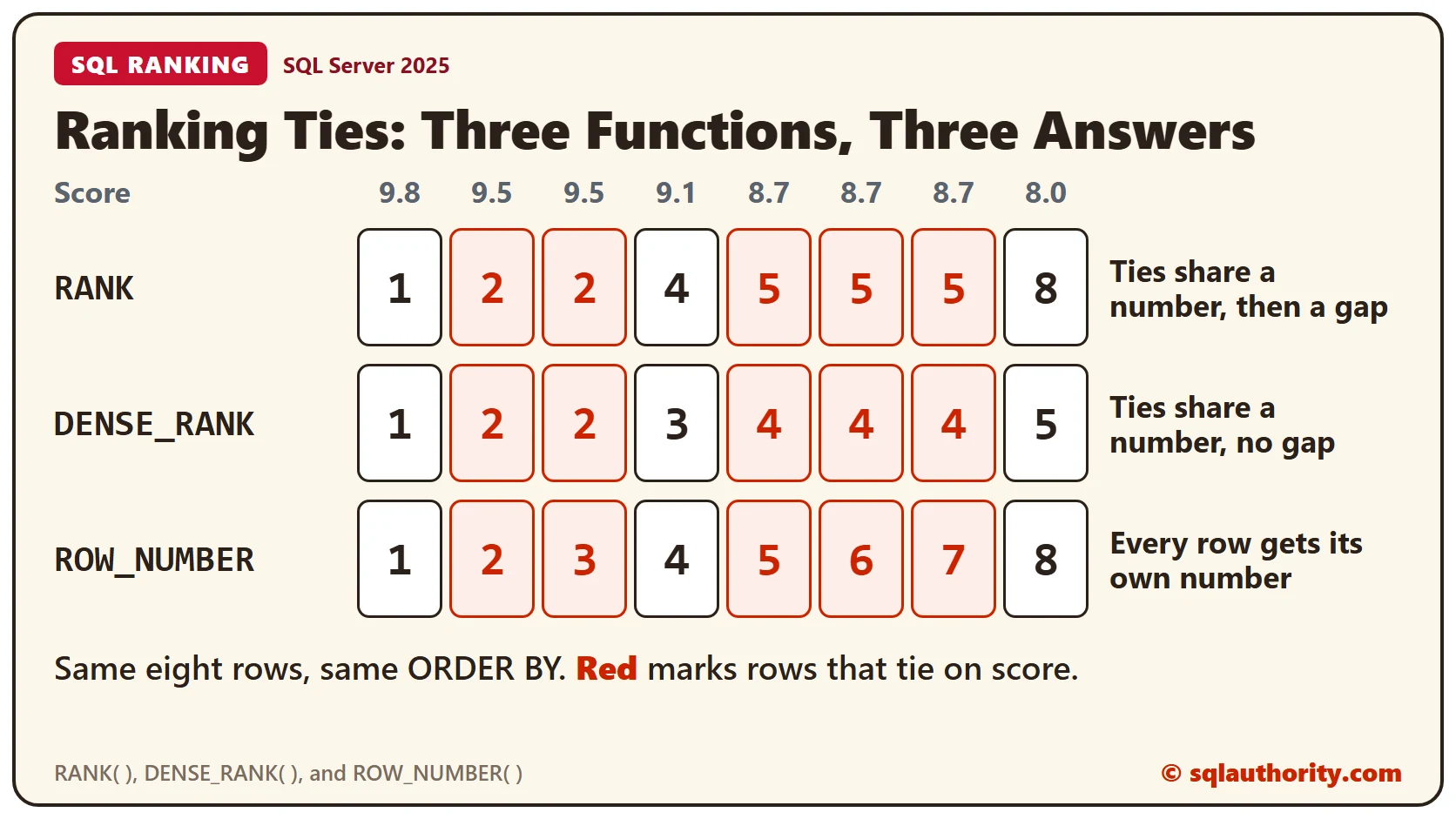
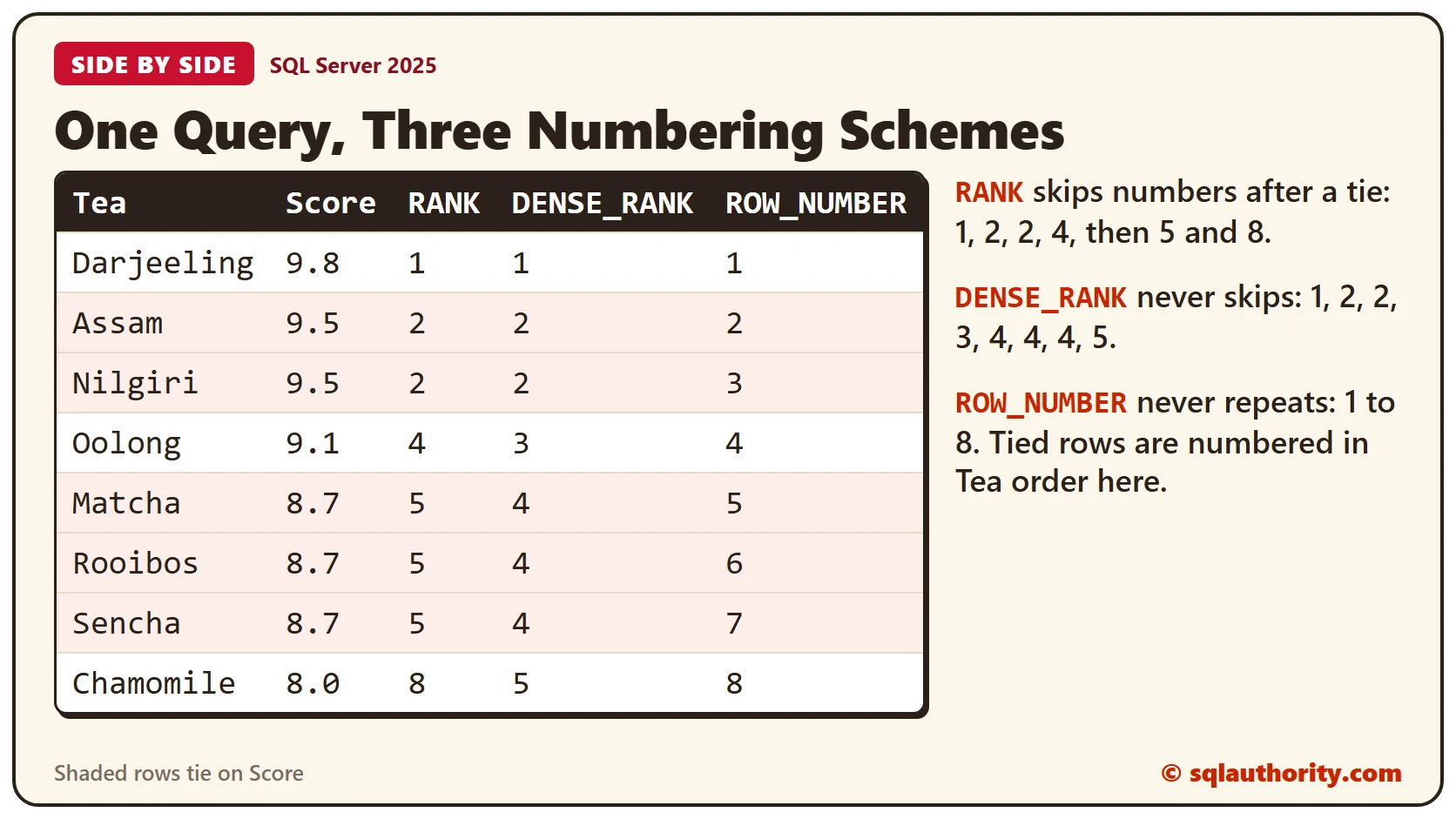
Until the first tie, the three columns match. Assam and Nilgiri tie at 9.5, and RANK and DENSE_RANK both give them 2. After that, the functions part ways.
RANK leaves a gap after a tie. Two teas share 2, so no row gets 3, and the next row gets 4. The three teas at 8.7 share 5, so the next rank is 8. DENSE_RANK has no gaps: Oolong is 3, the 8.7 teas share 4, and Chamomile is 5.
Here’s a simple way to remember them. RANK is one plus the number of rows that score higher. DENSE_RANK is one plus the number of distinct scores that are higher. Check Oolong: three rows score higher, so its RANK is 4. Only two distinct scores are higher, so its DENSE_RANK is 3.
ROW_NUMBER never repeats, so it gives tied rows different numbers. Nothing decides their order unless you add a tiebreaker. The query above uses Tea as the tiebreaker. Matcha, Rooibos and Sencha always come out as 5, 6 and 7.
The ORDER BY Inside OVER
The ORDER BY inside OVER( ) sets the numbers. The ORDER BY at the end of the query only sets the order of the rows you see. This query numbers the teas by score and shows them by name.
SELECT Tea, Score, ROW_NUMBER() OVER (ORDER BY Score DESC) AS RowNo FROM TeaScores ORDER BY Tea;Without a tiebreaker, the three teas at 8.7 came out as Sencha 5, Matcha 6 and Rooibos 7. The earlier query numbered them Matcha, Rooibos and Sencha. Same data, different numbers, so add the tiebreaker.
When OVER Is Missing
Every ranking function needs an OVER( ) clause, and SQL Server tells you when it’s missing. The second query below has an empty OVER( ) clause.
SELECT Tea, Score, RANK() FROM TeaScores ORDER BY Score DESC;
GO

SELECT Tea, Score, RANK() OVER () FROM TeaScores ORDER BY Score DESC;
The first query fails with message 10753, which says the function must have an OVER clause. The second fails with message 4112, which says the OVER clause needs an ORDER BY. Move the ORDER BY inside the parentheses.
The Top Three Distinct Scores
DENSE_RANK is the one to use for the top three distinct scores, because it has no gaps. Rank the rows in a CTE, then filter on the number. The query below runs the same filter with all three functions.
WITH Ranked AS (
  SELECT Tea, Score, DENSE_RANK() OVER (ORDER BY Score DESC) AS ScoreRating
  FROM TeaScores
)
SELECT Tea, Score, ScoreRating FROM Ranked WHERE ScoreRating <= 3 ORDER BY ScoreRating, Tea;

WITH Ranked AS (
  SELECT Tea, Score, RANK() OVER (ORDER BY Score DESC) AS ScoreRating
  FROM TeaScores
)
SELECT Tea, Score, ScoreRating FROM Ranked WHERE ScoreRating <= 3 ORDER BY ScoreRating, Tea;

WITH Ranked AS (
  SELECT Tea, Score, ROW_NUMBER() OVER (ORDER BY Score DESC, Tea) AS ScoreRating
  FROM TeaScores
)
SELECT Tea, Score, ScoreRating FROM Ranked WHERE ScoreRating <= 3 ORDER BY ScoreRating, Tea;
DENSE_RANK returns four rows, and they hold the three top scores: 9.8, 9.5 and 9.1. RANK returns three rows and misses Oolong, because Oolong has rank 4. ROW_NUMBER returns exactly three rows, one per number.
Use <= and not =. Filtering on = 3 returns only Oolong, the tea at third place. To list the scores alone, add DISTINCT.
WITH Ranked AS (
  SELECT Tea, Score, DENSE_RANK() OVER (ORDER BY Score DESC) AS ScoreRating
  FROM TeaScores
)
SELECT DISTINCT Score FROM Ranked WHERE ScoreRating <= 3 ORDER BY Score DESC;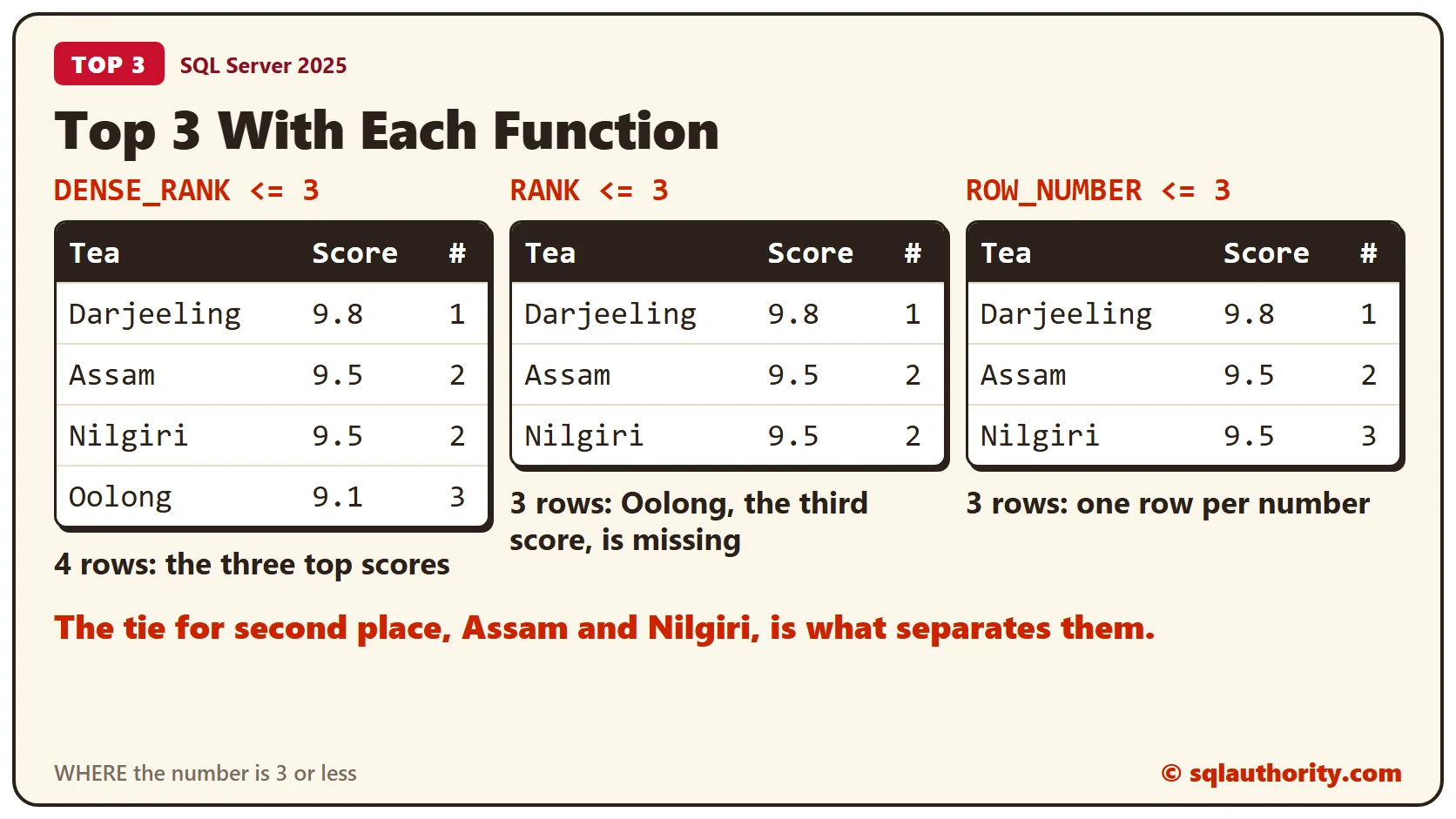
Clean Up
Remove the sample table when you finish.
DROP TABLE TeaScores;What to Remember
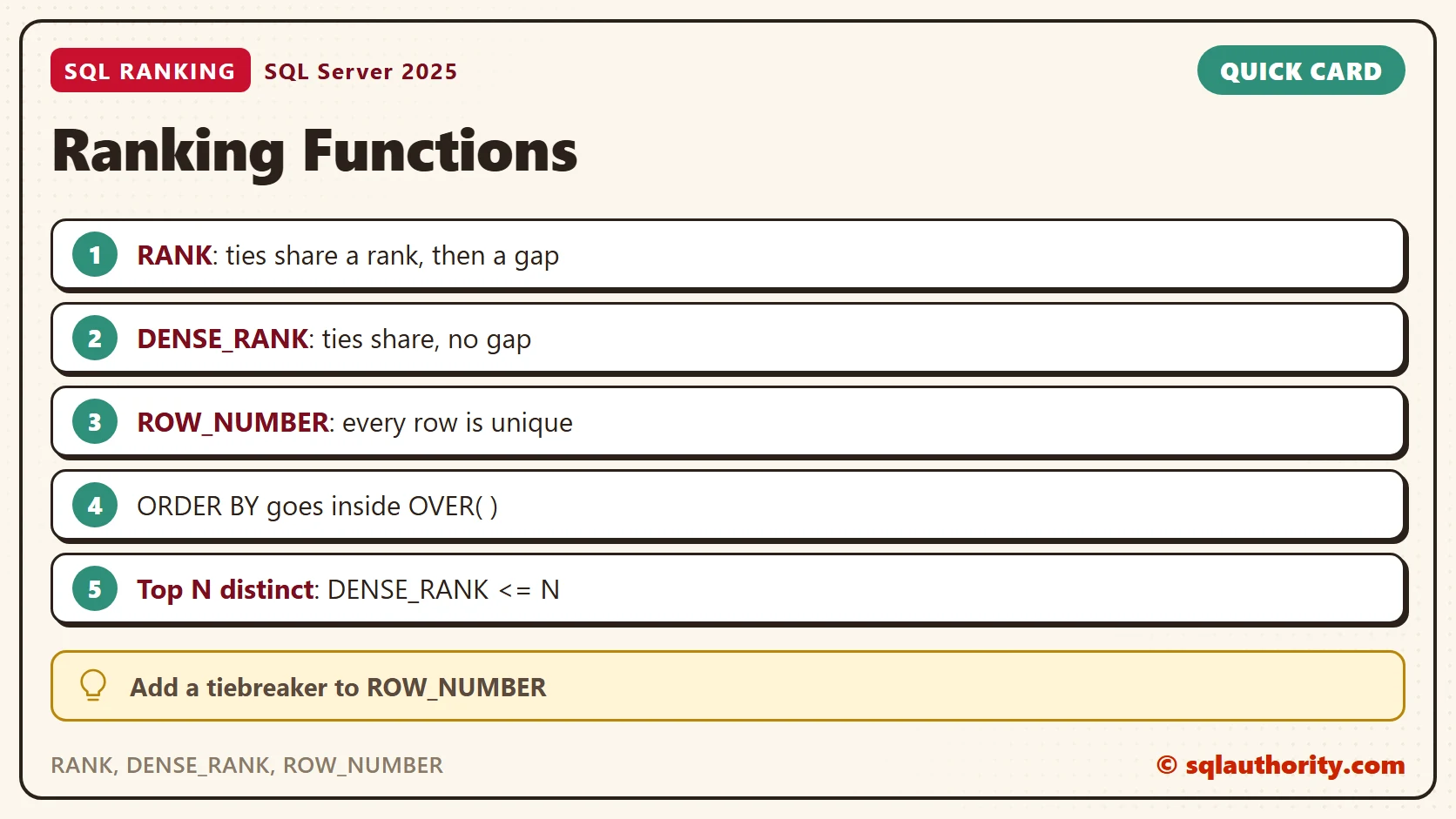
Use RANK when ties should share a place and the gaps are fine. Use DENSE_RANK to count distinct values, such as the top three scores. Use ROW_NUMBER when every row needs its own number, and add a tiebreaker to its ORDER BY.
To go further, read RANK vs DENSE_RANK: Keep Poll Ties at the Cutoff and Splitting Work Into Equal-Sized Batches With NTILE.
A ranking function is not a sort order, it is a rule for what a tie is worth.
Published by Pinal Dave on SQLAuthority. More of my work at pinaldave.com.
Discover more from SQL Authority with Pinal Dave
Subscribe to get the latest posts sent to your email.




9 Comments. Leave new
This time I guess you have a typo. For the five highest distinct scores none of your choices give the answer mostly because of typo in main body of the question. 2) and 4) are syntactically correct
4) is the one closest to the solution as it presents only the distinct values of scores
The question should have
“WHERE ScoreRating <= 5" instead of "WHERE ScoreRating = 5"
SELECT * FROM
(SELECT *, DENSE_RANK( ) OVER(ORDER BY Score DESC) as ScoreRating
FROM [Contestants]) AS ContestantFinal
WHERE ScoreRating <= 5
Leo Pius
USA
Hi Sir,
None of the options provided are answer for the question.
1st and 3rd Option is syntactically incorrect which will throw an error.
2nd option is syntactically correct but will provide null result
as Rank() will provide 5 values of rank 1,2,3,4,4 and there is no rank which is equal to 5
SELECT * FROM
(SELECT *, RANK() OVER(ORDER BY Score DESC) as ScoreRating
FROM PlayerScore) AS ContestantFinal
WHERE ScoreRating = 5
4th Option is syntactically correct
SELECT * FROM
(SELECT *, DENSE_RANK( ) OVER(ORDER BY Score DESC) as ScoreRating
FROM PlayerScore) AS ContestantFinal
WHERE ScoreRating = 5
This option will provide only the 5th ranked value that is
Player : Eric
Score : 9.20
ScoreRating : 5
So all the options does not satisfy the question which says to list 5 Highest distinct scores and the ranks.
The correct query is :
SELECT * FROM
(SELECT Distinct Score, DENSE_RANK( ) OVER(ORDER BY Score DESC) as ScoreRating
FROM PlayerScore) AS ContestantFinal
WHERE ScoreRating <= 5
this will provide the required result for the question with the result
Score ScoreRating
——- ————–
9.9 1
9.8 2
9.7 3
9.6 4
9.2 5
Nice question…:)
Thanks
P.Anish Shenoy,
INDIA
Hi Pinal
Option 4 is correct. But need to some changes in the query
SELECT Distinct Score FROM
(SELECT Score,DENSE_RANK( ) OVER(ORDER BY Score DESC) as ScoreRating
FROM [Contestants]) AS ContestantFinal
WHERE ScoreRating <= 5
Rajesh Garg
India
Of the options provided, I would think you are looking for #4 to be the answer
DENSE_RANK() OVER (ORDER BY Score DESC) as ScoreRating
because your article states “DENSE_RANK( ) is very useful for finding the five highest distinct amounts, because it finds each amount and has no gap in its numbering sequence.”
However running that query will only return those with scores equal to the 5th highest score. You’d acutally want something like this to return just the 5 highest scores…
Select * FROM
(SELECT distinct Score, DENSE_Rank() Over( Order by Score Desc) as ScoreRating
From Contestants) as ContestantFinal
where ScoreRating <= 5
from the USA
hi friend ‘s i have a question to all who belong to database pls give me ans if u know friend’s pls….. question is:- how we can retrieve four highest sallry from a table pls tell me query
select top 4 * from table order by salarycolumn desc
Thanks for the info. Really helped me a lot.