Self-referencing foreign keys keep a manager’s row in place while people still report to it. They do not choose the reorganization, and they do not stop reporting loops. You still need a plan for both.

The table that points at itself
A manager leaves on Friday. On Monday, HR asks you to remove the row. You run a DELETE and SQL Server says no. Good. Two people still report to that manager, and the database refuses to leave them dangling.
The setup is one table. ManagerId points at EmployeeId in the same table, and NULL marks the top of the tree. A foreign key makes sure every non-NULL manager exists. An index on ManagerId helps you find direct reports quickly. The demo uses one table, dbo.EmployeeHierarchyDemo, and drops it at the end.
DROP TABLE IF EXISTS dbo.EmployeeHierarchyDemo;
GO
CREATE TABLE dbo.EmployeeHierarchyDemo
(EmployeeId int NOT NULL PRIMARY KEY,
 EmployeeName nvarchar(80) NOT NULL,
 ManagerId int NULL,
 CONSTRAINT CK_EmployeeHierarchyDemo_Self CHECK (ManagerId IS NULL OR ManagerId <> EmployeeId),
 CONSTRAINT FK_EmployeeHierarchyDemo_Manager FOREIGN KEY (ManagerId)
     REFERENCES dbo.EmployeeHierarchyDemo (EmployeeId));

CREATE INDEX IX_EmployeeHierarchyDemo_Manager ON dbo.EmployeeHierarchyDemo (ManagerId);

INSERT dbo.EmployeeHierarchyDemo VALUES (1, N'Lead', NULL), (2, N'Replacement', NULL);
INSERT dbo.EmployeeHierarchyDemo VALUES (3, N'Report A', 1), (4, N'Report B', 1);
Try the delete first
Let me run the Friday delete and catch what happens. The block prints the error number and how many rows are left.
BEGIN TRY
    DELETE dbo.EmployeeHierarchyDemo WHERE EmployeeId = 1;
END TRY
BEGIN CATCH
    SELECT ERROR_NUMBER() AS ErrorNumber,
           (SELECT COUNT(*) FROM dbo.EmployeeHierarchyDemo) AS RowsLeft;
END CATCH;
Error 547, and all four rows are still there. The foreign key did its job. It did not tell you what to do next, because that is a business decision. You could reassign the reports, promote them to the top, archive the manager, or wait for HR.
Move the reports, then delete
Here HR picked reassignment: both reports move to employee 2, the replacement. Do it in one transaction, so nobody ever sees the reports without a manager, and a failure rolls everything back.
DECLARE @OldManager int = 1, @NewManager int = 2;

BEGIN TRY
    BEGIN TRANSACTION;
    UPDATE dbo.EmployeeHierarchyDemo SET ManagerId = @NewManager WHERE ManagerId = @OldManager;
    DELETE dbo.EmployeeHierarchyDemo WHERE EmployeeId = @OldManager;
    COMMIT TRANSACTION;
END TRY
BEGIN CATCH
    IF @@TRANCOUNT > 0 ROLLBACK TRANSACTION;
    THROW;
END CATCH;

SELECT EmployeeId, EmployeeName, ManagerId FROM dbo.EmployeeHierarchyDemo ORDER BY EmployeeId;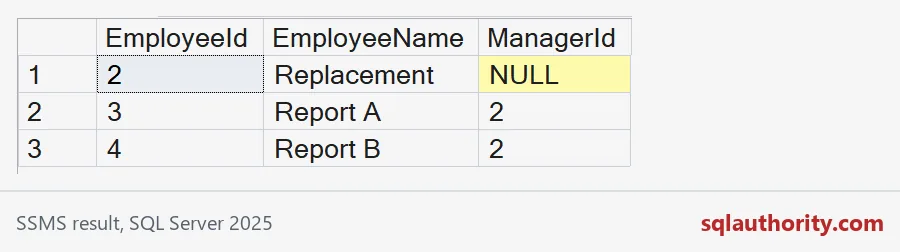
The manager is gone and nobody is orphaned. On a busy system, hierarchy changes also need sensible locking, because two sessions reorganizing the same branch can step on each other. Keep the same lock order every time.

What the foreign key cannot stop
Now the part people miss. My table has a CHECK that blocks a person managing themselves. But the foreign key only asks, “does this manager exist?” So two people can manage each other. The block below tries both.
BEGIN TRY
    UPDATE dbo.EmployeeHierarchyDemo SET ManagerId = 3 WHERE EmployeeId = 3;
    SELECT N'Own manager' AS Attempt, 0 AS ErrorNumber;
END TRY
BEGIN CATCH
    SELECT N'Own manager' AS Attempt, ERROR_NUMBER() AS ErrorNumber;
END CATCH;

UPDATE dbo.EmployeeHierarchyDemo SET ManagerId = 4 WHERE EmployeeId = 3;
UPDATE dbo.EmployeeHierarchyDemo SET ManagerId = 3 WHERE EmployeeId = 4;

SELECT EmployeeId, EmployeeName, ManagerId FROM dbo.EmployeeHierarchyDemo WHERE EmployeeId IN (3, 4) ORDER BY EmployeeId;
The self-manager attempt fails with error 547, from the CHECK. The two-person loop goes through without a complaint. Report A reports to Report B, and Report B reports to Report A. Nobody in that loop reaches the top.
Find loops with a visited path
A recursive CTE can walk every manager chain. It carries a path of visited ids and flags a repeat, then stops. Start from every employee, not only the roots. A loop that is cut off from the top has no root to start from.
WITH Walk AS
(SELECT EmployeeId AS StartEmployee, EmployeeId, ManagerId,
        CAST('/' + CONVERT(varchar(11), EmployeeId) + '/' AS varchar(max)) AS Visited,
        CAST(0 AS bit) AS HasCycle
 FROM dbo.EmployeeHierarchyDemo
 UNION ALL
 SELECT w.StartEmployee, m.EmployeeId, m.ManagerId,
        CAST(w.Visited + CONVERT(varchar(11), m.EmployeeId) + '/' AS varchar(max)),
        CAST(CASE WHEN CHARINDEX('/' + CONVERT(varchar(11), m.EmployeeId) + '/', w.Visited) > 0
                  THEN 1 ELSE 0 END AS bit)
 FROM Walk AS w
 JOIN dbo.EmployeeHierarchyDemo AS m ON m.EmployeeId = w.ManagerId
 WHERE w.HasCycle = 0)
SELECT StartEmployee, Visited
FROM Walk
WHERE HasCycle = 1
ORDER BY StartEmployee
OPTION (MAXRECURSION 1000);
It finds the loop from both starting points: 3, 4, 3 and 4, 3, 4. Without the visited path, the recursion would only stop at the recursion limit, and the error message would be your first clue.
Run a check like this after bulk loads. Better, validate every manager change in a controlled procedure, because two sessions can each pass a check and still create a loop together. Review multi-row changes as a proposed final tree, not one row at a time. Then clean up.
DROP TABLE IF EXISTS dbo.EmployeeHierarchyDemo;A foreign key keeps the tree attached. You still have to keep it a tree.
A self-reference is not a valid hierarchy, it is a relationship needing cycle rules.
Published by Pinal Dave on SQLAuthority. More of my work at pinaldave.com.
Discover more from SQL Authority with Pinal Dave
Subscribe to get the latest posts sent to your email.