RANK vs DENSE_RANK changes which tied poll options pass a cutoff. First decide whether you want competition positions, distinct score levels or a fixed number of rows. These rules can produce different answers from the same votes.

Use invented votes to make the tie rule visible
The main poll has vote totals 100, 80, 80, 60 and 40. These values are made up. The table also holds a second poll where every option has zero votes and a third poll with a tie at the cutoff. This works on SQL Server 2012 or later.
DROP TABLE IF EXISTS #PollOptions;
CREATE TABLE #PollOptions(PollId int NOT NULL,OptionId int NOT NULL,
  OptionLabel nvarchar(20) NOT NULL,Votes int NOT NULL,PRIMARY KEY(PollId,OptionId));
INSERT #PollOptions VALUES
  (1,1,N'First',100),(1,2,N'Second',80),(1,3,N'Third',80),(1,4,N'Fourth',60),(1,5,N'Fifth',40),
  (2,1,N'Zero A',0),(2,2,N'Zero B',0),(2,3,N'Zero C',0),
  (3,1,N'Cutoff A',100),(3,2,N'Cutoff B',80),(3,3,N'Cutoff C',60),(3,4,N'Cutoff D',60);
SELECT PollId,OptionId,OptionLabel,Votes,
ROW_NUMBER() OVER(PARTITION BY PollId ORDER BY Votes DESC,OptionId) AS RowSequence,
RANK() OVER(PARTITION BY PollId ORDER BY Votes DESC) AS CompetitionRank,
DENSE_RANK() OVER(PARTITION BY PollId ORDER BY Votes DESC) AS DensePosition,
RANK() OVER(PARTITION BY PollId ORDER BY Votes DESC,OptionId) AS TiesBrokenById
INTO #PollRanks FROM #PollOptions;The setup block above creates and fills #PollOptions. PARTITION BY PollId keeps each poll separate. Votes define ranking ties. The final display can use OptionId to order tied options without changing their shared rank.
Choose the cutoff that matches the question
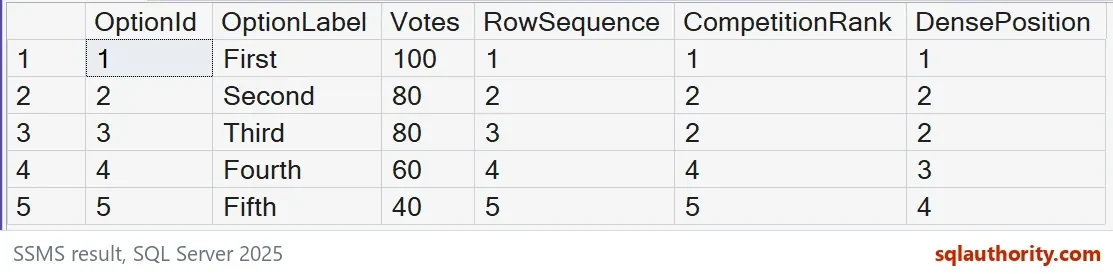
RANK gives the main poll positions 1, 2, 2, 4 and 5. DENSE_RANK gives levels 1, 2, 2, 3 and 4. Both preserve the equal 80-vote options. Their difference is the gap after that tie.
Filtering CompetitionRank <= 3 returns three options here. Filtering DensePosition <= 3 returns four options. The latter includes the 60-vote option because it has the third distinct score. Neither rule promises exactly three rows for every poll.
SELECT PollId,
  SUM(CASE WHEN CompetitionRank<=3 THEN 1 ELSE 0 END) AS RankCutoffRows,
  SUM(CASE WHEN DensePosition<=3 THEN 1 ELSE 0 END) AS DenseCutoffRows,
  SUM(CASE WHEN RowSequence<=3 THEN 1 ELSE 0 END) AS RowLimitRows
FROM #PollRanks GROUP BY PollId ORDER BY PollId;
The third poll has totals 100, 80, 60 and 60. Its competition ranks are 1, 2, 3 and 3. A rank-three cutoff keeps both tied 60-vote options. Therefore, that cutoff returns four rows, even though its number is three.

Keep row selection separate from equality
ROW_NUMBER assigns a separate sequence to each row. This example orders by votes and the unique option identifier within each poll. Filtering the sequence can enforce a three-row limit. That selection intentionally chooses among tied scores.
Adding OptionId to the ranking window also changes the tie definition. With unique option identifiers, equal vote totals no longer tie across every ordering expression. The query below shows TiesBrokenById matching RowSequence on every row. Use the extra identifier only where that behavior is intended.
SELECT PollId,OptionId,Votes,RowSequence,CompetitionRank,DensePosition,TiesBrokenById
FROM #PollRanks ORDER BY PollId,Votes DESC,OptionId;
TOP WITH TIES follows the whole ordering list
DECLARE @WithTies bigint,@WithUniqueId bigint;
SELECT @WithTies=COUNT_BIG(*) FROM
  (SELECT TOP(3) WITH TIES OptionId FROM #PollOptions WHERE PollId=3 ORDER BY Votes DESC) AS t;
 SELECT @WithUniqueId=COUNT_BIG(*) FROM
  (SELECT TOP(3) WITH TIES OptionId FROM #PollOptions WHERE PollId=3 ORDER BY Votes DESC,OptionId) AS t;
SELECT @WithTies AS TopWithVoteTies,@WithUniqueId AS TopWithUniqueId;
On the cutoff-tie poll, ordering only by votes returns four rows. Adding the unique option identifier returns three. TOP WITH TIES compares the complete ORDER BY criteria at the boundary.
Check zero votes and missing polls explicitly
All three zero-vote options in the second poll share rank one and dense position one. That does not turn them into meaningful winners. A poll without options produces no ranked rows. Decide whether your user interface should show ties, no participation or an empty poll.
When you are done, drop the demo tables.
DROP TABLE #PollRanks;
DROP TABLE #PollOptions;
Try the demo table with your own poll numbers and see where the cutoff lands.
A rank is not a row count, it is a position that ties can share.
Published by Pinal Dave on SQLAuthority. More of my work at pinaldave.com.
Discover more from SQL Authority with Pinal Dave
Subscribe to get the latest posts sent to your email.