NTILE splits a fixed work list into equal-sized batches, and you should save the result before any worker starts. The bucket numbers are easy. Keeping them stable is the real job.

Eight workers, one list
Say you have 100 customers to process and eight workers. You want each worker to take about the same number of customers. NTILE does that. NTILE(8) deals the ordered rows into eight buckets of nearly equal size.
It balances rows, not the ID range. If your IDs have gaps, the buckets still hold nearly the same number of customers. When the rows do not divide evenly, the extra rows go to the first buckets.
The demo starts with 100 customers, Ids 1 to 100. It stores the bucket for each customer in a second temp table, called the assignment. The ORDER BY uses the unique Id, so the same input always gives the same buckets.
DROP TABLE IF EXISTS #BatchAssignment;
DROP TABLE IF EXISTS #Customers;

CREATE TABLE #Customers (Id int PRIMARY KEY);
INSERT #Customers (Id) SELECT value FROM GENERATE_SERIES(1, 100);

SELECT Id, NTILE(8) OVER (ORDER BY Id) AS BatchId
INTO #BatchAssignment
FROM #Customers;
Read the batch sizes
The query below summarizes each batch: its first Id, last Id and row count.
SELECT BatchId, MIN(Id) AS FirstId, MAX(Id) AS LastId, COUNT_BIG(*) AS AssignedRows
FROM #BatchAssignment
GROUP BY BatchId
ORDER BY BatchId;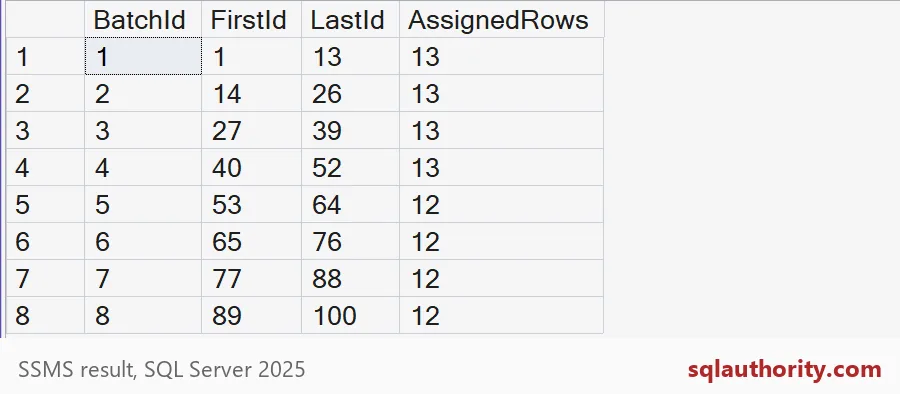
A hundred rows do not divide by eight. Each bucket would be 12.5 rows, so something has to give. Batches 1 to 4 got 13 rows each, and batches 5 to 8 got 12. That adds up to 100. Batch 3 covers Ids 27 to 39. Pulling that batch’s members from the saved assignment confirms it.
SELECT Id
FROM #BatchAssignment
WHERE BatchId = 3
ORDER BY Id;
You get 13 rows, Ids 27 through 39. A worker can take that list and start.
What if there are fewer rows than buckets
Ask for eight buckets over only three rows, and NTILE does not invent rows. It uses buckets 1, 2 and 3 and stops.
SELECT Id, NTILE(8) OVER (ORDER BY Id) AS BatchId
FROM #Customers
WHERE Id <= 3
ORDER BY Id;
Your code should not assume that every batch number exists. A worker that waits for batch 8 on a three-row day will wait forever.
Why you save the assignment
Here is the mistake. Imagine each worker runs NTILE itself, at its own start time. Meanwhile a new customer arrives with Id 0. It sorts to the front, and every row shifts one place. Some rows slide into the next bucket. Two workers may now process the same customer, and another customer may be missed.
INSERT #Customers (Id) VALUES (0);

SELECT n.Id, a.BatchId AS SavedBatchId, n.NewBatchId
FROM (SELECT Id, NTILE(8) OVER (ORDER BY Id) AS NewBatchId FROM #Customers) AS n
JOIN #BatchAssignment AS a ON a.Id = n.Id
WHERE n.NewBatchId <> a.BatchId
ORDER BY n.Id;
Four customers change batch: Ids 13, 26, 39 and 52. Each one sits at the edge of a batch and slips into the next. Four sounds small, but each of those is a customer that one worker has already counted as theirs and another now claims. With more new rows, more customers would shift. Calculate the assignment once, store it, and let every worker read from the stored copy.

Track the work itself
A saved assignment also gives you a place to track progress. I add a Status column and let a worker claim batch 3. The UPDATE only touches rows that are still waiting, so a second worker cannot claim the same rows.
ALTER TABLE #BatchAssignment ADD Status varchar(10) NOT NULL DEFAULT 'Waiting';
GO
UPDATE #BatchAssignment
SET Status = 'Claimed'
WHERE BatchId = 3 AND Status = 'Waiting';

SELECT Status, COUNT_BIG(*) AS RowsInStatus
FROM #BatchAssignment
GROUP BY Status
ORDER BY Status;
You see 13 rows Claimed and 87 Waiting. In a real job you would add Completed and Failed, so a crashed worker’s rows can be found and retried.
One more caution. Equal row counts do not mean equal effort. If some customers need much more processing, one worker will finish late. Use smaller batches, or balance by an estimate of the work. The last block removes the demo tables.
DROP TABLE IF EXISTS #BatchAssignment;
DROP TABLE IF EXISTS #Customers;
Before you start the workers, save who gets what.
An equal batch is not equal work, it is an equal number of rows.
Published by Pinal Dave on SQLAuthority. More of my work at pinaldave.com.
Discover more from SQL Authority with Pinal Dave
Subscribe to get the latest posts sent to your email.