An ORDER BY on a column with duplicates needs a tie-breaker, or the rows inside each tie can come back in any order. Most of the time they look fine, which is exactly why this bug survives code review. Then one day a player is on page one and page two of the same leaderboard.

Ties are allowed to come back in any order
Say you sort by score and four players share a 90. You told SQL Server what to do with the 90s versus the 85s. You said nothing about who goes first among the 90s. So SQL Server picks whichever is handy, and “handy” can change with the plan, the indexes or the day of the week.
Build a tiny leaderboard
Six entries, four of them tied at 90. The table is a plain heap with no index, like a fresh table someone created in a hurry. The temp table disappears when you close the window.
DROP TABLE IF EXISTS #Entries;
CREATE TABLE #Entries (EntryId int NOT NULL, Player varchar(10) NOT NULL, Score int NOT NULL);
INSERT #Entries VALUES (1, 'Mia', 90), (2, 'Zed', 90), (3, 'Amy', 90), (4, 'Bob', 85), (5, 'Eli', 90), (6, 'Cy', 85);
The same query, a different answer
Ask for the top three, then for the first page of two rows. Both queries sort by score and nothing else.
SELECT TOP (3) EntryId, Player, Score
FROM #Entries
ORDER BY Score DESC;

SELECT EntryId, Player, Score
FROM #Entries
ORDER BY Score DESC
OFFSET 0 ROWS FETCH NEXT 2 ROWS ONLY;
On my server the top three are Amy, Zed and Mia, and page one is Amy and Zed. Now someone adds a clustered index on Player. It has nothing to do with scores, and I do not touch the data or the query. Then the next visitor asks for page two.
CREATE CLUSTERED INDEX IX_Entries_Player ON #Entries (Player);

SELECT TOP (3) EntryId, Player, Score
FROM #Entries
ORDER BY Score DESC;

SELECT EntryId, Player, Score
FROM #Entries
ORDER BY Score DESC
OFFSET 2 ROWS FETCH NEXT 2 ROWS ONLY;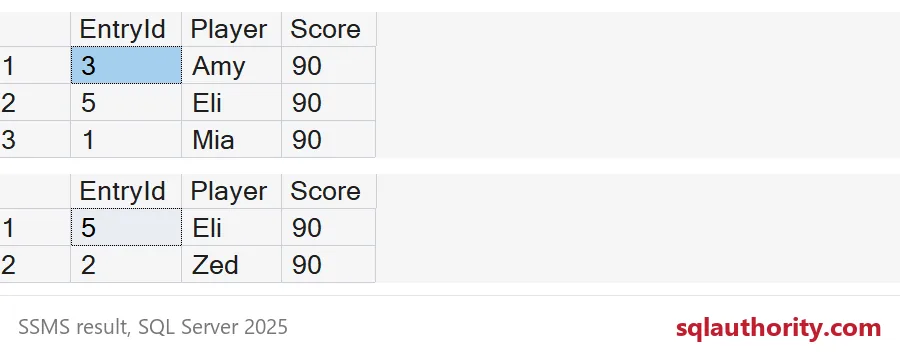
The top three are now Amy, Eli and Mia. Same query, same data, one different player. Page two returns Eli and Zed. Zed was already on page one, and Mia never showed up on either page. Nobody changed a score, yet one player appears twice and another disappears. The tied rows were read in a different order, and nothing in the query said which order was correct.
Add a tie-breaker
The fix is one more column at the end of ORDER BY, one that is never duplicated. The primary key is the usual choice. Now there is exactly one correct order, and every plan has to produce it.
SELECT TOP (3) EntryId, Player, Score
FROM #Entries
ORDER BY Score DESC, EntryId;

SELECT EntryId, Player, Score
FROM #Entries
ORDER BY Score DESC, EntryId
OFFSET 0 ROWS FETCH NEXT 2 ROWS ONLY;

SELECT EntryId, Player, Score
FROM #Entries
ORDER BY Score DESC, EntryId
OFFSET 2 ROWS FETCH NEXT 2 ROWS ONLY;

SELECT EntryId, Player, Score, ROW_NUMBER() OVER (ORDER BY Score DESC, EntryId) AS Place
FROM #Entries
ORDER BY Place;
The top three are Mia, Zed and Amy. Page one is Mia and Zed, and page two is Amy and Eli, so every 90 appears exactly once. ROW_NUMBER wants the same tie-breaker. Here Mia is place 1, Zed 2, Amy 3 and Eli 4.

Choosing the tie-breaker
Pick a column that is unique for the rows being sorted. A primary key works. A date or a name does not, because those repeat. Do not reach for NEWID() either, since a random tie-break is just the original bug with extra steps. Sometimes tied players should share a place instead. That is a different question. I covered it in TOP WITH TIES: Keep Every Row at the Cutoff.
One more habit helps. Keep the tie-breaker in the query itself, not in your memory. Someone will copy the query into a new report next year. If the unique column is already there, the copy inherits the fix without a single conversation.
To check your own server, find the paging queries and the TOP queries behind your screens. Read the last column of each ORDER BY and ask whether it can repeat. If the answer is yes, add the key. It costs one word and it saves one very confusing support ticket.
DROP TABLE IF EXISTS #Entries;Ties are normal. Only the order inside them needs your attention.
ORDER BY is not a full ranking, it is only as exact as its last column.
Published by Pinal Dave on SQLAuthority. More of my work at pinaldave.com.
Discover more from SQL Authority with Pinal Dave
Subscribe to get the latest posts sent to your email.