Percent change between rows is one subtraction and one division, and the division is where reports break. One zero in last month’s column and the whole query stops with an error. One NULL and you get a blank nobody can explain. Let me show you how I handle both, using a small revenue table.

Where the divide by zero comes from
The formula is simple: (this month minus last month) divided by last month. LAG gives you last month’s value on the same row. The trouble is that last month can be zero, missing, or not there at all. Picture a 2 AM page because the nightly revenue report died on a product that had a zero month. That is a rough way to start a Tuesday.
Build a small revenue table
Two products. Alpha has a zero month in March and a missing amount in May. Beta skipped February entirely. The temp table vanishes when you close the window.
DROP TABLE IF EXISTS #Revenue;
CREATE TABLE #Revenue (Product varchar(10) NOT NULL, MonthStart date NOT NULL,
                       Amount decimal(10, 2) NULL, PRIMARY KEY (Product, MonthStart));
INSERT #Revenue VALUES
    ('Alpha', '2026-01-01', 100), ('Alpha', '2026-02-01', 120), ('Alpha', '2026-03-01', 0),
    ('Alpha', '2026-04-01', 50), ('Alpha', '2026-05-01', NULL), ('Alpha', '2026-06-01', 80),
    ('Beta', '2026-01-01', 200), ('Beta', '2026-03-01', 220), ('Beta', '2026-04-01', 198);
The naive version fails on the first zero
Here is what most of us write first. PARTITION BY keeps each product’s rows separate, and ORDER BY puts the months in sequence.
SELECT Product, MonthStart, Amount,
       LAG(Amount) OVER (PARTITION BY Product ORDER BY MonthStart) AS PrevAmount,
       (Amount - LAG(Amount) OVER (PARTITION BY Product ORDER BY MonthStart))
         / LAG(Amount) OVER (PARTITION BY Product ORDER BY MonthStart) * 100 AS NaivePct
FROM #Revenue
WHERE Product = 'Alpha'
ORDER BY Product, MonthStart;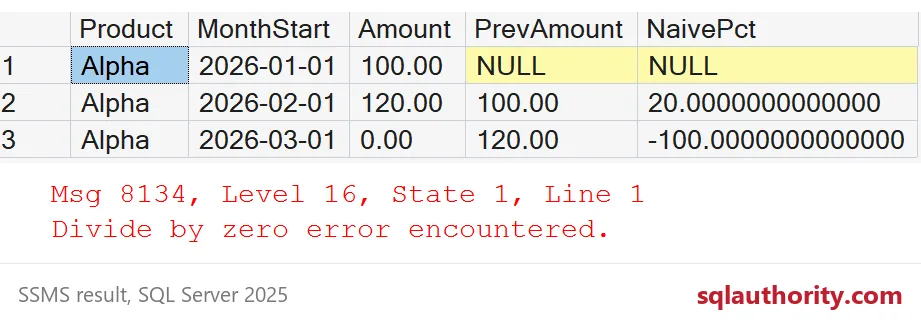
The first three rows come back fine: NULL for January, 20 for February and -100 for March. Then March becomes the previous value for April, and SQL Server raises error 8134, “Divide by zero error encountered.” The report is gone. Notice that the first row is NULL because there is nothing before January. That part is correct and expected.
Let NULLIF turn zero into unknown
Wrap the divisor in NULLIF(PrevAmount, 0). A zero becomes NULL, and anything divided by NULL is NULL, so the query finishes. I also multiply by 100.0 first to keep the math in decimals. A Reason column says why a row has no percentage, so nobody has to guess.
WITH x AS (
    SELECT Product, MonthStart, Amount,
           LAG(Amount) OVER (PARTITION BY Product ORDER BY MonthStart) AS PrevAmount,
           LAG(MonthStart) OVER (PARTITION BY Product ORDER BY MonthStart) AS PrevMonth
    FROM #Revenue
)
SELECT Product, MonthStart, Amount, PrevAmount,
       CAST(100.0 * (Amount - PrevAmount) / NULLIF(PrevAmount, 0) AS decimal(9, 1)) AS PercentChange,
       CASE WHEN PrevAmount IS NULL THEN 'previous missing'
            WHEN Amount IS NULL THEN 'amount missing'
            WHEN PrevAmount = 0 THEN 'previous was zero'
            WHEN DATEDIFF(MONTH, PrevMonth, MonthStart) > 1 THEN 'skipped a month'
            ELSE '' END AS Reason
FROM x
ORDER BY Product, MonthStart;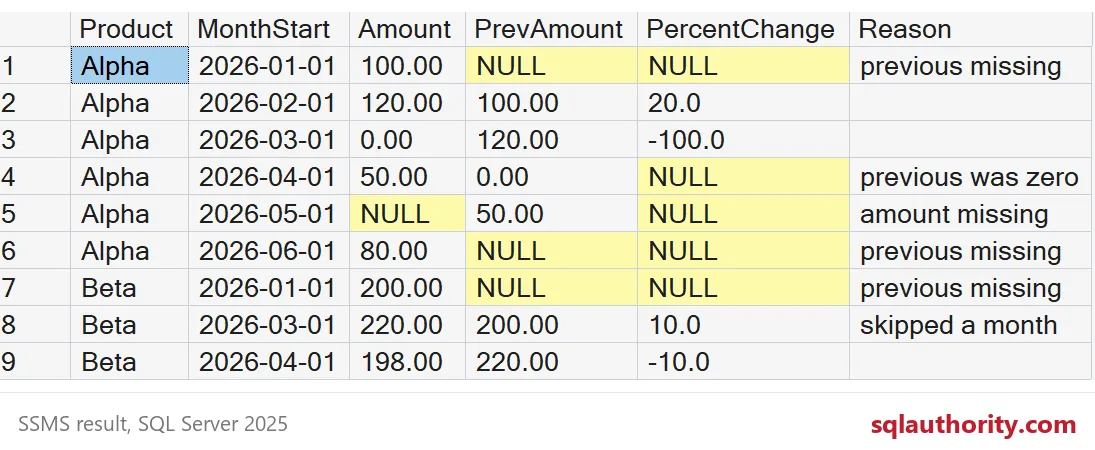
April now shows NULL with “previous was zero”. I would not turn that NULL into 0 with ISNULL. Zero percent says nothing changed, and that is false: revenue went from nothing to 50. Unknown is the honest answer. The same applies to May, where the amount itself is missing. If you would rather compare against the last known value, read LAG IGNORE NULLS: Read the Previous Available Value.

Missing months and negative bases
Look at Beta. LAG returns the previous row, not the previous month. Beta has no February row, so March is compared with January: 200 to 220, which shows as 10.0. That is a two-month change dressed as a one-month change, which is why the Reason column flags it. Also note that Beta’s January is NULL, not Alpha’s June. PARTITION BY kept the products apart.
Two more traps. Dividing integers before multiplying throws away the fraction, and I covered that in Integer Division in T-SQL: Why Your Percentages Come Out Zero. And a negative previous value flips the sign of the answer.
SELECT (150 - 100) / 100 * 100 AS IntegersOnly,
       100.0 * (150 - 100) / 100 AS DecimalFirst;

SELECT CAST(100.0 * (-50 - -100) / NULLIF(-100, 0) AS decimal(9, 1)) AS NegativeBase,
       CAST(100.0 * (-50 - -100) / NULLIF(ABS(-100), 0) AS decimal(9, 1)) AS AbsoluteBase;
The integer version returns 0 where the decimal version returns 50. A loss that shrinks from minus 100 to minus 50 shows -50.0 with a plain divisor, which reads like it got worse. With ABS in the divisor it shows 50.0, which matches reality. To check your own data, run the final query and read every row with a Reason.
DROP TABLE IF EXISTS #Revenue;A report that says “unknown” is more useful than one that says nothing or crashes.
A missing percentage is not a failure, it is an honest answer.
Published by Pinal Dave on SQLAuthority. More of my work at pinaldave.com.
Discover more from SQL Authority with Pinal Dave
Subscribe to get the latest posts sent to your email.