TOP WITH TIES keeps every row tied at an ordered cutoff. I use it when excluding an equally qualified row would change the report’s meaning. The requested number doesn’t always equal the returned row count.

Start with the cutoff rule
Imagine a shortlist based on scores. The leading score is 95, and the next two scores are both 90. Asking for two rows raises a practical question: should one of the equal scores disappear?
I’d settle that question before adding an identifier to the ordering. If the score alone defines qualification, both rows at 90 belong at the cutoff. A report requiring exactly two rows needs a different rule.
TOP (2) WITH TIES uses the ORDER BY values to find that boundary. Ties can expand the selected set beyond two rows. The phrase WITH TIES applies to the complete ordering list, not one chosen column.
Compare the complete queries
The following batch creates its inputs with VALUES and reads them through common table expressions. Each statement is independent. Copy the whole batch to compare the five result sets without creating database objects.
;WITH Input AS
(
    SELECT ItemId, Score
    FROM (VALUES
        (CAST(1 AS int), CAST(95 AS int)),
        (2, 90),
        (3, 90),
        (4, 80),
        (5, NULL)
    ) AS v(ItemId, Score)
), Selected AS
(
    SELECT TOP (2) WITH TIES ItemId, Score
    FROM Input
    ORDER BY Score DESC
)
SELECT ItemId, Score
FROM Selected
ORDER BY Score DESC, ItemId;

;WITH Input AS
(
    SELECT ItemId, Score
    FROM (VALUES
        (CAST(1 AS int), CAST(95 AS int)),
        (2, 90),
        (3, 90),
        (4, 80),
        (5, NULL)
    ) AS v(ItemId, Score)
), Selected AS
(
    SELECT TOP (2) WITH TIES ItemId, Score
    FROM Input
    ORDER BY Score DESC, ItemId
)
SELECT ItemId, Score
FROM Selected
ORDER BY Score DESC, ItemId;

;WITH Input AS
(
    SELECT ItemId, Score
    FROM (VALUES
        (CAST(1 AS int), CAST(10 AS int)),
        (2, NULL),
        (3, NULL)
    ) AS v(ItemId, Score)
), Selected AS
(
    SELECT TOP (2) WITH TIES ItemId, Score
    FROM Input
    ORDER BY Score DESC
)
SELECT ItemId, Score
FROM Selected
ORDER BY Score DESC, ItemId;

;WITH Input AS
(
    SELECT ItemId, Score
    FROM (VALUES
        (CAST(1 AS int), CAST(95 AS int)),
        (2, 90),
        (3, 90),
        (4, 80),
        (5, NULL)
    ) AS v(ItemId, Score)
), Selected AS
(
    SELECT TOP (0) WITH TIES ItemId, Score
    FROM Input
    ORDER BY Score DESC
)
SELECT ItemId, Score
FROM Selected
ORDER BY Score DESC, ItemId;

;WITH Input AS
(
    SELECT ItemId, Score
    FROM (VALUES
        (CAST(1 AS int), CAST(95 AS int)),
        (2, 90),
        (3, 90),
        (4, 80),
        (5, NULL)
    ) AS v(ItemId, Score)
), Selected AS
(
    SELECT TOP (100) WITH TIES ItemId, Score
    FROM Input
    ORDER BY Score DESC
)
SELECT ItemId, Score
FROM Selected
ORDER BY Score DESC, ItemId;
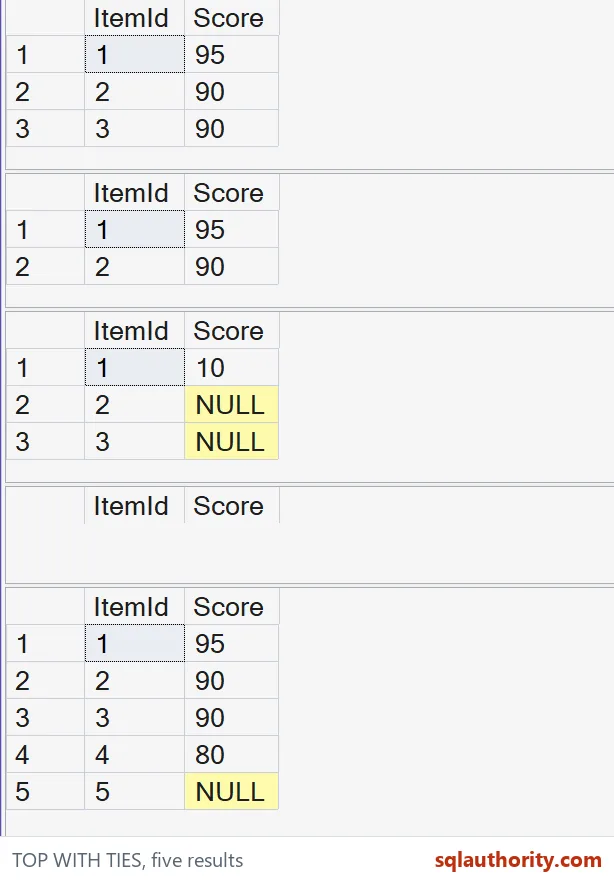
The first result contains ItemId 1, 2 and 3. Score 90 is the second-row cutoff, so both rows at that score qualify. The outer query then displays the selected rows in a predictable identifier order.
The second query adds ItemId to the selection’s ordering list. The pairs (90, 2) and (90, 3) differ. That query returns ItemId 1 and 2 because the unique identifier removes the score-only tie.
The identifier didn’t merely make the picture tidier. It changed the selection rule inside TOP. Keeping that distinction visible prevents a display preference from silently becoming a qualification requirement.

Separate selection from presentation
The Selected common table expression decides which rows qualify. Its ORDER BY supports TOP and the tie comparison. The final ORDER BY decides how the completed selected set is presented to the reader.
I don’t rely on the inner ordering to guarantee the outer result order. An outer query needs its own ORDER BY. Adding ItemId only to that outer ordering preserves score-based selection while stabilizing presentation.
Look at the NULL boundary
SQL Server sorts NULL below non-NULL values. With descending scores, the supplied score comes first. In the third query, the requested second row reaches the NULL scores, and both NULL-score rows share that boundary.
That result includes all three input rows. Decide whether a missing score should qualify before choosing the cutoff. If missing scores aren’t eligible, apply the appropriate WHERE filter before TOP selects rows.
Check the limits before using it
The fourth query requests zero rows and returns none. The fifth requests more rows than exist and returns the full five-row input. WITH TIES doesn’t create rows to fill an oversized request.
WITH TIES requires ORDER BY and is available for SELECT statements. The example targets SQL Server T-SQL, rather than every product that accepts SQL. It doesn’t create objects, change options or measure performance.
I wouldn’t use a tie-expanded shortlist as an exact-size paging contract. First decide whether equality at the boundary should include everyone. Then keep the selection rule separate from the ordering used to display its result.
Decide who qualifies at the cutoff first, and the rest follows.
A cutoff is not always a row limit, it is a boundary defined by the complete ordering rule.
Published by Pinal Dave on SQLAuthority. More of my work at pinaldave.com.
Discover more from SQL Authority with Pinal Dave
Subscribe to get the latest posts sent to your email.