
Backup and Restore is one of the core tasks for DBAs. They often do this task more times than they would have ideally loved to do so. One thing I noticed in my career that every successful DBA knows how to automate their tasks and spend their time either playing games on a computer or learning something new!
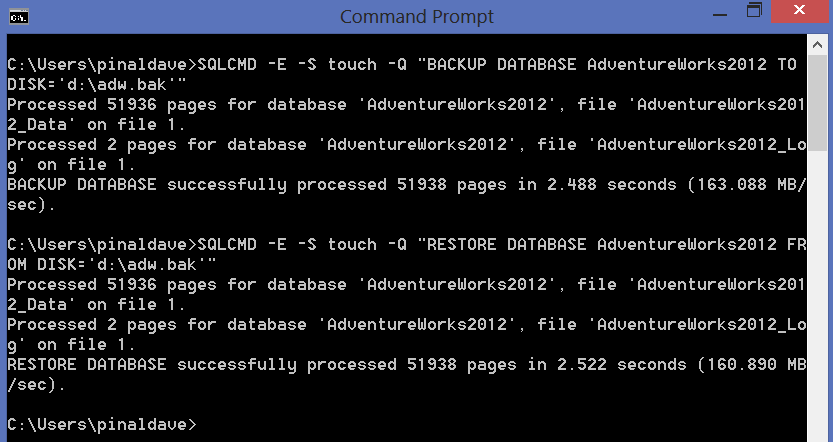
Let us see how a DBA can automate their task about Backup and Restore using SQLCMD. I am demonstrating a very simple example in this blog post. Please adapt the script based on your environment and needs.
Here is the basic script for Backup and Restore
Note: name of my database server is touching and I am connecting it with windows authentication.
Backup
BACKUP DATABASE AdventureWorks2012 TO DISK='d:\adw.bak'
Restore
RESTORE DATABASE AdventureWorks2012 FROM DISK='d:\adw.bak'
Here is the basic script for Backup and Restore using SQLCMD
Backup
C:\Users\pinaldave>SQLCMD -E -S touch -Q
"BACKUP DATABASE AdventureWorks2012 TO DISK='d:\adw.bak'"
Restore
C:\Users\pinaldave>SQLCMD -E -S touch -Q
"RESTORE DATABASE AdventureWorks2012 FROM DISK='d:\adw.bak'"
Please leave a comment if you are facing any issue. As mentioned earlier the scripts are very basic scripts, you may have to adapt them based on your environment. For example, if you are facing error there are chances that database files are already open or exists on the drive. You you should also have necessary permissions to do backup and restore as well file operations in your server.
Watch a 60 second video on this subject
Reference: Pinal Dave (https://blog.sqlauthority.com)




65 Comments. Leave new
how to automate backup from one server and restore it in another server? pls explain using sql cmd as well as sql query if possible.
Dear Pinal,
i am trying to backup using cmd prompt, following error was encouter
——————————————————————————-
HResult 0x35, Level 16, State 1
Named Pipes Provider: Could not open a connection to SQL Server [53].
Sqlcmd: Error: Microsoft SQL Native Client : An error has occurred while establishing a connection to the server. When connecting to SQL Server 2005, this failure may be caused by the fact that under the default settings SQL Server does not
allow remote connections..
Sqlcmd: Error: Microsoft SQL Native Client : Login timeout expired.
——————————————————————————–
Kindly solve my issue
Thanks in advance
Man, you are great! So Simple and so usefull! Congrats, my friend!
None of these work get incorrect syntax on the backup command every time! I am using the first example you show for backup.
Your posts are very helpful to me. I have referred to several over the past few months while I take a DBM certification course.
is it possible to use sqlcmd and backup a database without the log files? I assume I should be doing a Differential backup?
Thanks
yes, its possible.
Hi,
I am trying to take the backup using Sqlcmd but nothing happens. I dont get the backup file in the specified folder nor i get any error message.
C:\Users\ahmad>sqlcmd -S win8Secondary\SOLARWINDS_ORION
1> BACKUP DATABASE [SolarWindsOrion] TO DISK=’C:\DB-Backup\db-back.bak
2~
3~ BACKUP DATABASE SolarWindsOrion TO DISK=’C:\DB-Backup\db-back.bak
4>
5>
6>
7> BACKUP DATABASE SolarWindsOrion TO DISK=’C:\DB-Backup\db-back.bak
8~
9~ BACKUP DATABASE SolarWindsOrion TO DISK=’C:\DB-Backup\db-back.bak
10>
11>
Your help with this will be much appreciated.
Please use “GO” as batch separator.. your command is not sent to SQL unless you terminate batch using GO
Restore-SqlDatabase : System.Data.SqlClient.SqlError: The backup set holds a backup of a database other than the
existing ‘test_restore’ database.
I am getting above error
msg 3201, level 16, state 1, server server_name, Line 1 cannot open backup device ‘d:\adw.bak. Operating System error 5.
msg 3013, level 16, state 1, server server_name Line 1 backup database terminating abnormally
System Error 5 = Access Denied.
Generally I avoid keeping files on root of the drive like you have. I use “Run As Administrator” and keep file on some folder where I have permission.
Hi
Pinal dave,
i am able to restore my database from .bak file. my question is , i had taken backup with date and time so i have multiple backup with date and time so how to restore latest one by batch file?
How do I incorporate a date stamp into the backup name? for example: testmmddyy.bak instead of test.bak
@echo off
title “Titulo da Janela”
color b
SET date=
for /F “tokens=1-3 delims=/ ” %%a in (‘date /T’) do set date=%%c%%b%%a
SET time=
for /F “tokens=1-3 delims=: ” %%a in (‘time /T’) do set time=%%c%%a%%b
REM **Variavel que vai guardar a data e hora no backup.
SET DATAATUAL=_%date%-%time%
REM **Nome do Backup para identificar caso faça backups de vários bancos.
SET NOMEBACKUP=Nome
REM **nome ou ip do computador que está com o banco de dados.
SET SQLHOST=localhost
SET SQLDATABASE=nomeDoBancoDeDados
REM **Usuário da base de dados
SET SQLUSER=user
REM **Senha da base de dados
SET SQLPASSWORD=pass
REM **Diretório de destino do arquivo de Backup
SET DESTBACKUP=C:\
@echo Efetuando o backup do banco de dados, aguarde…
sqlcmd -U %SQLUSER% -P %SQLPASSWORD% -S %SQLHOST% -d %SQLDATABASE% -Q “backup database %SQLDATABASE% to disk=’%DESTBACKUP%%NOMEBACKUP%%SQLDATABASE%%DATAATUAL%.bak'” > %DESTBACKUP%%NOMEBACKUP%%SQLDATABASE%%DATAATUAL%.log
7za a “%DESTBACKUP%%NOMEBACKUP%%SQLDATABASE%%DATAATUAL%.7z” “%DESTBACKUP%%NOMEBACKUP%%SQLDATABASE%%DATAATUAL%.bak”
if exist “%DESTBACKUP%%NOMEBACKUP%%SQLDATABASE%%DATAATUAL%.bak” del /q “%DESTBACKUP%%NOMEBACKUP%%SQLDATABASE%%DATAATUAL%.bak”
REM *Apaga backups mais antigos que 31 dias, se quiser alterar é só mudar a quantidade de dias.
forfiles -p %DESTBACKUP% -s -d -31 -m *.7z -c “cmd /c del /f /q “@path” ”
timeout /t 5