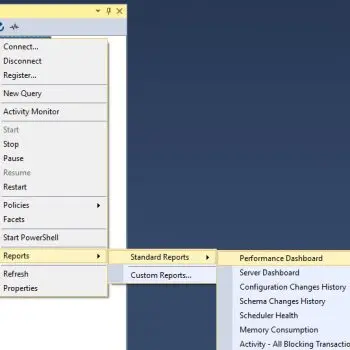
Regular readers of my blog are aware of the fact that I have written about this subject umpteen times earlier, and every time I have spoken about a new issue related to it. Few days ago, I had redone my local home network. I have LAN setup with wireless router connected with my four computers, two mobile devices, one printer and one VOIP solution. I had also formatted my primary computer and clean installed SQL Server 2008 into it. Yesterday, incidentally, I was sitting in my yard trying to connect SQL Server located in home office and suddenly I stumbled upon the following error. Finding the solution was the most infuriating part as it consumed my precious 10 minutes.
Let us look at few of the common errors received:
An error has occurred while establishing a connection to the server.
(provider: Named Pipes Provider, error: 40 – Could not open a connection to SQL Server) (Microsoft SQL Server, Error: 5)
An error has occurred while establishing a connection to the server. When connecting to SQL Server 2005, this failure may be caused by the fact that under the default settings SQL Server does not allow remote connections. (provider: Named Pipes Provider, error: 40 – Could not open a connection to SQL Server) (Microsoft SQL Server, Error: 1326)
I eventually found the resolution to this error on this blog itself; so I was saved from hunting for the solution. I am sure there are a number of developers who had previously fixed this error while installing SQL Server 2008 or SQL Server 2005 but in due course forgot the right solution to this error. This is just a quick refresher. Make sure to bookmark this as you never know when you would need this solution.
Let us check into the steps to resolve this error.
1) SQL Server should be up and running.
Go to All Programs >> Microsoft SQL Server 2008 >> Configuration Tools >> SQL Server Configuration Manager >> SQL Server Services, and check if SQL Server service status is “Running”.
In addition, ensure that your remote server is in the same network. Run “sqlcmd -L” in your command prompt to ascertain if your server is included in your network list. You can even find tutorial for the same here SQL SERVER – Find All Servers From Local Network – Using sqlcmd – Detect Installed SQL Server on Network.
I have confronted numerous situations when these nerve-wracking errors crop up, and most of the time when I try to troubleshoot I notice that SQL Server services are neither running nor installed. If SQL Server is not installed as default instance SQL Server Browser should be running together with it; we will explore this further in Topic 5.
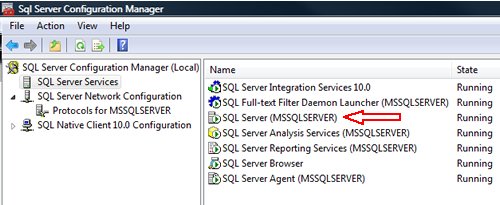
2) Enable TCP/IP in SQL Server Configuration
When two or more SQL Servers are connected across network they do all communication using TCP/IP. The default port of SQL Server installation is 1433. This port can be changed through SQL Server Configuration Manager. TCP/IP should be enabled for SQL Server to be connected.
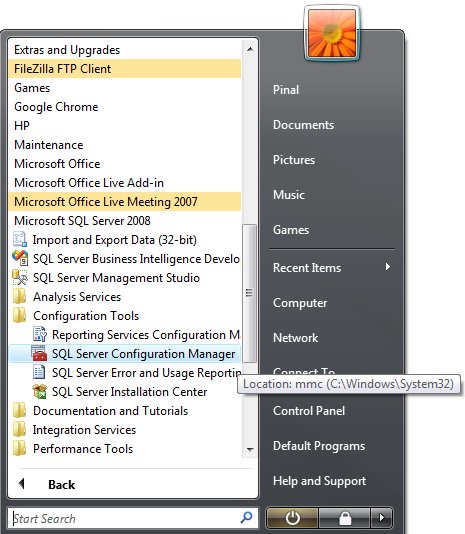
Go to All Programs >> Microsoft SQL Server 2008 >> Configuration Tools >> SQL Server Configuration Manager >> Select TCP/IP
Right Click on TCP/IP >> Click on Enable
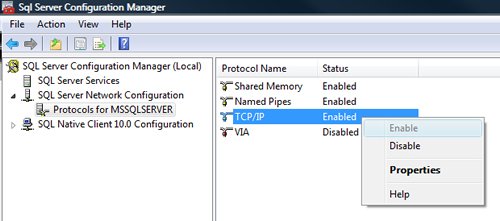
You must restart SQL Server Services for all the changes to take effect. Right click and go to menu properties to select location where default port of SQL Server can be changed.
3) Open Port in Windows Firewall
Windows Firewall is very efficacious in protecting the Operating system from all sorts of malicious attacks. By default, many of the ports and services are refrained from running by firewall. Time and again, SQL Server ports are not open in firewall as well. All the ports on which SQL Server is running should be added to exception and firewall should filter all the traffic from those ports. As described, by default SQL Server runs on port 1433, but if default port is changed then the new port should be added to exception. If SQL Server has named instance (another instance besides default instance) is installed, SQL Server browser should also be added to the exception, as described in Step 7.
Go to Control Panel >> Windows Firewall >> Change Settings >> Exceptions >> Add Port
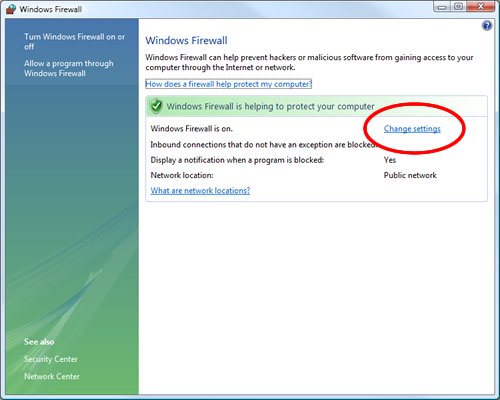
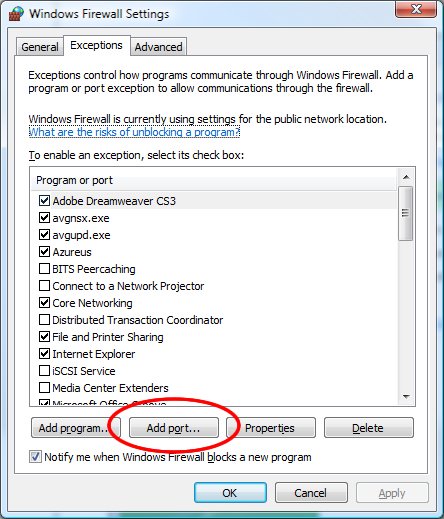
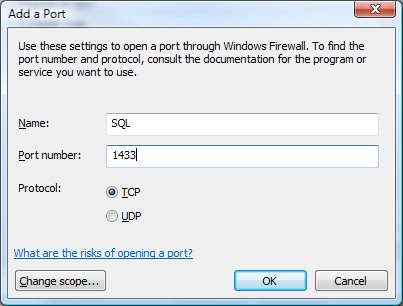
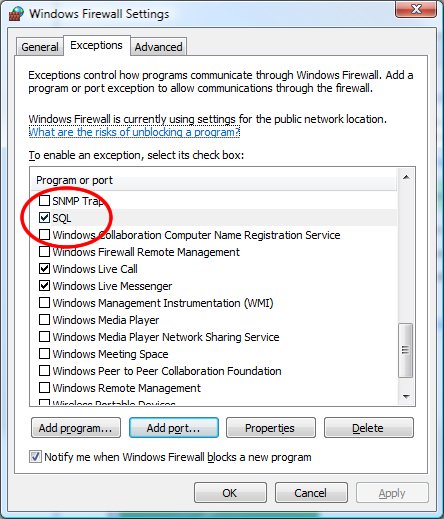
Make the following entries in popup “Add a Port” and click OK.
Name : SQL
Port Number: 1433
Protocol: Select TCP
4) Enable Remote Connection
Enabling remote connection is another important, yet oft-neglected step that is frequently missed by database administrators while setting up SQL Server. If this feature is turned off SQL Server will function smoothly on local machine, but it will let another server connect to it remotely. By default this feature is ON in SQL Server 2008.
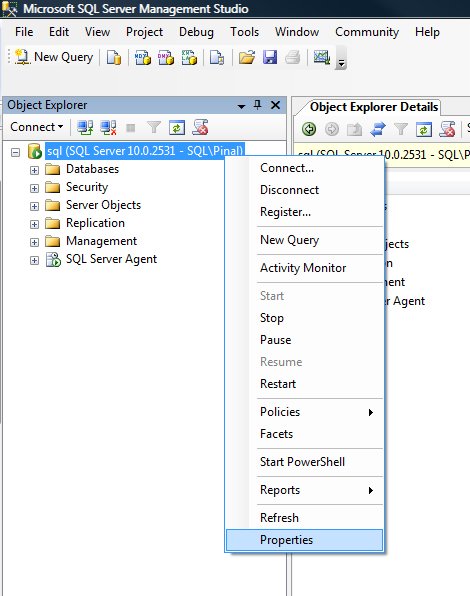
Right click on the server node and select Properties.
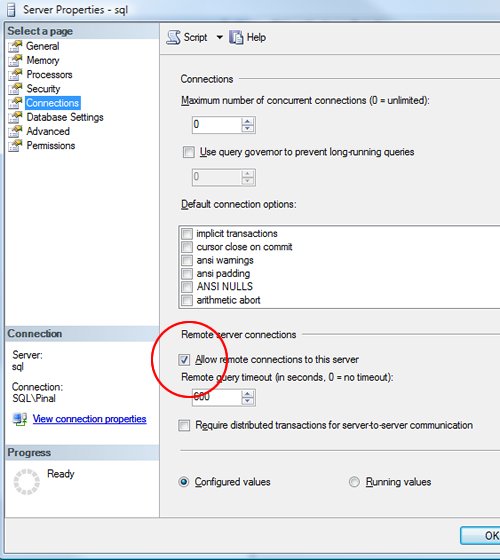
Go to Left Tab of Connections and check “Allow remote connections to this server”
5) Enable SQL Server Browser Service
If SQL Server is not installed as default instance but instead installed as named instance and also if there is no specific TCP/IP port configured, it will give rise to the error that is being discussed in this article. If SQL Server Browser service is enabled, it will allow the server to be connected through dynamic TCP/IP port. Enabling this service is a one-time process, as on enabling it once it will apply to all the instances installed on the same server.
Go to All Programs >> Microsoft SQL Server 2008 >> Configuration Tools >> SQL Server Configuration Manager >> SQL Server Browser
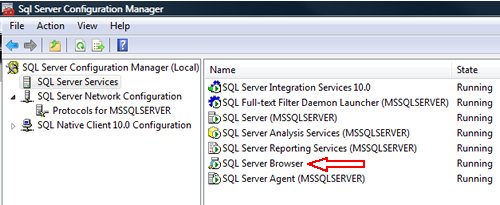
Right Click on SQL Server Browser >> Click on Enable
6) Create exception of sqlbrowser.exe in Firewall
As elucidated in Step 6, sqlbrowser service needs to be enabled for named instance. Windows Firewall may prevent sqlbrowser.exe to execute. So, it is imperative to add exception for the same in windows firewall.
Search for sqlbrowser.exe on your local drive where SQL Server is installed. Copy the path of the sqlbrowser.exe like C:\Program Files\Microsoft SQL Server\90\Shared\sqlbrowser.exe and create the exception of the file in Firewall, as delineated in Step 3.
7) Recreate Alias
It is getting quite common to create alias of SQL Server and use it in application. This will ensure that in future if any physical SQL Server has to be moved, it will not be required to change any code or connection string. You can simply create alias with the same name pointing to different SQL Server and it will start working instantaneously. I have observed that a couple of times due to internal error while recreating alias this error was fixed.
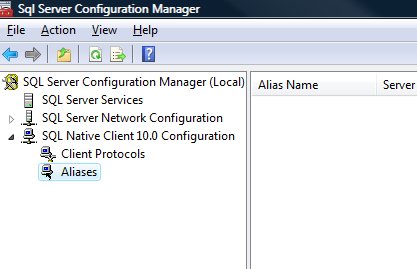
Go to All Programs >> Microsoft SQL Server 2008 >> Configuration Tools >> SQL Native Client 10.0 Configuration >> Aliases
Delete the alias that is giving problem and recreate it with identical parameters.
I have tried my best to include all the methods of fixing this error and if I have missed any, please leave a comment and I will be very glad to include them here. I have put in my effort to encompass this issue in one article that needs to be refereed when any connection error comes up.
Reference : Pinal Dave (http://blog.SQLAuthority.com)


Holy Moly.
Can Microsoft make this any more complicated? Maybe I’m a dreamer, but this configuration-rats-nest is just asking for trouble.
Oh wait. Oracle makes it harder. Nevermind. I love it.
Ignore my earlier comment.
-)
that’s why don’t use both of them
Yes, that’s genius advice. Except I build applications for both SQL 2005 and 2008, as well as VS 2005 / 2008, .NET 2.0, 3.5, etc.. bottom line; professionals have sophisticated needs and this is classic ‘fail’.
Yes, i think SQL Server 2008 is the most complicated installation ever.
I’m a programmer who’s usually admin-challenged especially when it comes to networks, protocols, ports, and yet I really didn’t have any trouble getting all my SQL servers set up and all accessible from a workstation-hosted copy of Management Studio.
Now, making sure they are using the strongest security best practices, that’s a topic for another day…
hello dave……
the connection which i am trying works well with other application.. but when i try to store an excel file in to database i get such error…….
can u please help me…..
i am using asp.net c#….
Another possible problem I found was to make sure the port listend to was the one expected mine for example had dynamic ports and the IPALL was set to 1066 instead of 1433. From msdn:
SQL Server 2008 Books Online (April 2009)
How to: Configure a Server to Listen on a Specific TCP Port (SQL Server Configuration Manager)
If enabled, the default instance of the SQL Server Database Engine listens on TCP port 1433. Named instances of the Database Engine and SQL Server Compact 3.5 SP1 are configured for dynamic ports. This means they select an available port when the SQL Server service is started. When you are connecting to a named instance through a firewall, configure the Database Engine to listen on a specific port, so that the appropriate port can be opened in the firewall.
For more information about the default Windows firewall settings, and a description of the TCP ports that affect the Database Engine, Analysis Services, Reporting Services, and Integration Services, see Configuring the Windows Firewall to Allow SQL Server Access.
To assign a TCP/IP port number to the SQL Server Database Engine
In SQL Server Configuration Manager, in the console pane, expand SQL Server Network Configuration, expand Protocols for , and then double-click TCP/IP.
In the TCP/IP Properties dialog box, on the IP Addresses tab, several IP addresses appear in the format IP1, IP2, up to IPAll. One of these is for the IP address of the loopback adapter, 127.0.0.1. Additional IP addresses appear for each IP Address on the computer. Right-click each address, and then click Properties to identify the IP address that you want to configure.
If the TCP Dynamic Ports dialog box contains 0, indicating the Database Engine is listening on dynamic ports, delete the 0.
In the IPn Properties area box, in the TCP Port box, type the port number you want this IP address to listen on, and then click OK.
In the console pane, click SQL Server Services.
In the details pane, right-click SQL Server () and then click Restart, to stop and restart SQL Server.
After you have configured SQL Server to listen on a specific port, there are three ways to connect to a specific port with a client application:
Run the SQL Server Browser service on the server to connect to the Database Engine instance by name.
Create an alias on the client, specifying the port number.
Program the client to connect using a custom connection string.
See Also
Thank you vince.Ur post was helpful.
Thanks Vince, you solved the problem, this extra step solved the problem.
Quite useful…
Thanks for the post. It saved our time.
Thanks Vince, that extra step was needed for us as well.
u da man
Finally!!!!!! Thanks!!!!
You are a life saver. Thanks!
thanks Vince! enabling inbound port 1433 and forcing sql server to listen to that port instead of dynamic solved it! thanks again.
Well let me tell you… I get the error on the local machine trying to attach a database using osql.
So I don’t know what to do.
Hello,
Thank you for your article, your blog is a very good source of information for sql server professionals. It is a rather good practice to create alias for servers.
In my company, we have upgraded a customer application from sql server 2000 to sql server 2008, we created an alias with the same name of the server in order to keep the applications running. One day it just vanished from the alias section in mmc configuration manager.
Then when I tried to add it again, it exhibits me a screen displaying “WMI Error: The file exists”, with an error code 0×80070050. I can create other alias, but this with the same name I created before, I can’t. I am stuck on this problem.
I wonder if you have ever faced a similar problem, if you can help me out.
Thank you!
Oh My God!! your’re the best… you have solve this big problem to me. You’re my new Saint.. Thanks you so much.. I didn’t realise the meaning to sheard solutions… God
bless you!!
hi,
my problem is that i have done everything but the error still persists
error is
A network-related or instance-specific error occurred while establishing a connection to SQL Server. The server was not found or was not accessible. Verify that the instance name is correct and that SQL Server is configured to allow remote connections. (provider: Named Pipes Provider, error: 40 – Could not open a connection to SQL Server)
but when i connect my database through wizard in datalist it works .my connection works properly but with sqlcommand it creates problem. i work on sql2005 and visual studio 2008
I have the EXACT same problem…. followed the instructions but still can’t connect yet the import / export wizard will allow me to see the tables from my local machine.
Have you solved this problem yet?
See the link
http://support.microsoft.com/?kbid=888228
If your SQL server instance is named and on a cluster the Windows Vista and 7 firewall is blocking the connection because the response from the SQL server is from the host IP address not the SQL server.
Hope this helps,
Jack
hi ,
when i create connection string in web config file everything is working fine.
dont understand why there is a problem when i create the connection string on .aspx page.
never mind things r working now.
Thank you, Vince!!!
I tried everything I could find on this subject with no luck until I read this:
“To assign a TCP/IP port number to the SQL Server Database Engine
In SQL Server Configuration Manager, in the console pane, expand SQL Server Network Configuration, expand Protocols for , and then double-click TCP/IP.
In the TCP/IP Properties dialog box, on the IP Addresses tab, several IP addresses appear in the format IP1, IP2, up to IPAll. One of these is for the IP address of the loopback adapter, 127.0.0.1. Additional IP addresses appear for each IP Address on the computer. Right-click each address, and then click Properties to identify the IP address that you want to configure.
If the TCP Dynamic Ports dialog box contains 0, indicating the Database Engine is listening on dynamic ports, delete the 0.”
Once I deleted those zeros and put in 1433 for TCP ports on each IP address, voila!
Boy what a pain in the arse!
A connection was successfully established with the server, but then an error occurred during the pre-login handshake. When connecting to SQL Server 2005, this failure may be caused by the fact that under the default settings SQL Server does not allow remote connections. (provider: Named Pipes Provider, error: 0 – No process is on the other end of the pipe.) (Microsoft SQL Server, Error: 233)
I had this issue when my connection string was wrong.
Thanks for the obvious! Your comment jogged my meneory and made me realize I was running the release version instead of the debug version of my app. The connection string was only correct in the debug one!
Back to basics! Think before you click…
Cheers,
Paul
I follow ur tutorial. problem solved. Thanks for ur step-by-step guide. You are great man….
I hope you could give me some advise as well regarding my problem. Currently I am working with a Windows Mobile project that will communicate with SQL Server 2005. To connect to my SQL Server my connection is “Data Source=myIPaddress,1433;Initial Catalog=databasename;User ID=sa;Password=sa;”. When I’ve tried to open it in SQL Management Express it is working fine. But when I’ve tried to that setting in my Visual Studio 2008 code, I always get the error “SQLException”. Is there anything that I need to adjust in my Windows Mobile Emulator? I hope you could help me. Thanks and kind regards.
Gracias amigo, no tenia idea del error que me estaba dando y con tu explicacion me ayudo a solucionar mi coneccion con el servidor. espero poder contar contigo para cualquier consulta mas adelante, muchas gracias.
Thanks a lot! You did my day! I have tried to solve this problem for all day…but no luck.. but now it`s working again..:)
So, I installed a clean default setup of SQL 2008 x64 on Windows 7 Ultimate x64, before even opening SQL MC I updated it to SP1.
Yet, I cannot connect to my Server using SQL MC.
I get the following error:
A network-related or instance-specific error…
Veryfy the instance name and that SQL is allowed remote connections (provider: Named Pipes Provider, Error: 40 – Could not open a connection to SQL Server) (Microsoft SQL Server, Error: 3)
Things I’ve done:
Protocols are Enabled (Named Pipes, TCP/IP, etc)
Disabled Firewall (To get it out of the equation) yet, I added port 1433 TCP just in case
Rule out Client:
Tried client Toad freeware version and IT CONNECTS!!!! without a problem, leaving firewall, TCP/IP Named Pipes issues aside.
Theory:
SQL Management Console has problems with Windows 7 Ultimate x64 bits.
I couldn’t find anything on the web that relates to this problems other than the fact that SQL has known compatibility issues with Windows 7, but I thought they were solved after SP1
Any help would be greatly appreciated
HI Ezequiel,
Your solutions is of immense help to me. I have your suggestions of removing dynamic values of zeros and putting up 1433 in the TCP port and it worked.
Thanks a lot.
Hats off to you.
Regards,
Sudeep Kar
I followed all the steps, my problem is still in there. Mine may be different in that I have two servers: One application server that has asp.net application pointed to the database server.
When I run my application from IIS server, I got the following error:
A network-related or instance-specific error occurred while establishing a connection to SQL Server. The server was not found or was not accessible. Verify that the instance name is correct and that SQL Server is configured to allow remote connections. (provider: Named Pipes Provider, error: 40 – Could not open a connection to SQL Server)
Please help me
hi Yoseph….
I am facing the same problem as mentioned above
Asp.net application is on one server
Database is on another server.While trying to make a connection from asp.net application to the database the error is being displayed.
Is your error resolved?
If yes, can you help me out.
i am also having the same problem.
if u solved this problem means help me out
Hi Pinal,
There are greate articles in this site.
I just had a feed back on your Article. where you mentioned
“You can simply create alias with the same name pointing to different SQL Server and it will start working instantaneously”
I am not sure if that is correct. I will get error if I want to creat alias with same name.
In general, seems to me sql alias is kind of “useless” . It
is tightly coupled with specific server. and if the server
changes then alias needs an “update” too.
Thank you so much, your post help me a lot configuring sql to allow remote connections. I was having a hard time trying to figure out what was wrong (sql browser wasn’t running).
Thank you and keep working hard with your blog :D
One more minor issue encountered is when people use sqlexpress.They connect to the server as machine\sqlexpress. So, in the connection string in the code, a “.” or “local” or “machinename” won’t work. it has to be server = “machinename\sqlexpress” otherwise we will get the same error.
Punit’s response on November 5, 2009 at 5:31 am resolved my problem guys.
Í’m using Windows 7, SQL 2005 Express, Visual Studio 2008 and could not get ASP.NET SQL Server Setup Wizard to see the SQL Server instance.
Please note that i also followed the toher steps in the initial article.
Enjoy
I’ve been trying to install the Sharepoint Designer Training Module on Sharepoint 2007 on various flavors of Windows 2008 server, using the SQL Express setup that falls out of the SharePoint install, and I kept hitting this same Named Pipes 040 error. I finally have gotten past the hurdle after trying all the additional steps suggested in this blog. The key ingredients seem to be:
1. Make sure the TCP/IP and Named Pipes are enabled in the Protocols section.
2. Make sure the Server Browser service is enabled; it is set to “Start Mode – disabled” by default.
3. Use the fully qualified SQL Server name in the “Server Field,” “[SERVER]\OFFICESERVERS” (OFFICESERVERS is the default name for the SQL Express server that automatically comes out of the Sharepoint install).
Thanks Forrest!
Using Visual Studio 2008 with SQL Express 2005.
Trying to add data connection and getting this error. After reading your third point noticed server name doesn’t include SQL instance, added that and works perfectly.
Thanks again :)
Thanks Punit!
“machinename\sqlexpress” instead of “machinename” fixed my problem.
And thanks to Pinal Dave for this great blog.
Mike
I had the same error msg…and intellisence kept complaining about the syntax (invalid escape sequence)…so i used “machinename\\sqlinstance” and it worked…hope this helps someone else…
Well, of course. This is basic programming stuff :)
“foo\bar”
Here the compiler (or parser to be precise) thinks \ starts an escape sequence. It this case it would interpret \b as backspace. So you need to tell the compiler that what you meant was actually backslash.
“foo\\bar”
In C# there’s another way to do it.
@”foo\bar”
@ before quatation mark tells that what ever is inside the quatation marks must not be escaped.
Thanks for publishing – blogs and other published information has really helped!
Hey,
I’ve installed win2k8 R2 and MSSQL server 2k8, please be aware that you have to install SP1 to get the whole thing to work :-O
Hi,
I’m using SQL 2005 Standard Instance.
When I try to open the SQL Server Management studio it throws the below error.
———–
Cannot connect to .
A network-related or instance-specific error occurred while establishing a connection to SQL Server. The server was not found or was not accessible. Verify that the instance name is correct and that SQL Server is configured to allow remote connections. (provider: Named Pipes Provider, error: 40 – Could not open a connection to SQL Server)
————
Solution I have tried:
a. Start > All Programs > SQL Server 2005 > Configuration Tools > SQL Server Surface Area Configuration
b. Click on Surface Area Configuration for Services and Connection
c. Select the instance that is having a problem > Database Engine > Remote Connections
d. Enable local and remote connections > ‘TCP/IP’ and ‘Named Pipes’.
Still i get the same error.
Could anyone help me out on this?
- Ramesh
Hi,
Add your server IP address & name in C:\WINDOWS\system32\drivers\etc\hosts.
Note:Open hosts with notepad & below add server IP address & name & save it.
This works for Me.
I have the SP1 already installed on the server.
Still the issue arises.
Thank you very much, this articles help me a lot.
Pinal, the screen shots are not populating, could you please fix that, Thanks
yeah I am working on it right away. My hosting capacity is used up. Upgraded my plan will take few hours.
Just testing our set up on 2008 and was running in to error 40.
This was a great help.
Thanks
hi
can i connect using [servername] ONLY ? without the \SQLEXPRESS ?
im using SQL 2005
Hello Mike
Either uninstall & then reinstall the SQL server with named instance MSSQLSERVER or create an alias.
Regards,
Pinal Dave
hi,i am from china,i am poor in english,last week,i install sql 2008, when i install it ,it report some errors,but it still install success,but i connect the sql server,it report the follow(not same you ):
A network-related or instance-specific error occurred while establishing a connection to SQL Server. The server was not found or was not accessible. Verify that the instance name is correct and that SQL Server is configured to allow remote connections. (provider: SQL Network Interfaces, error: 26 – Error Locating Server/Instance Specified)
i follow you :
All Programs >> Microsoft SQL Server 2008 >> Configuration Tools >> SQL Server Configuration Manager >> SQL Server Services, and check if SQL Server service status is “Running”.
it is can not run
it said:
the request filed or the service did not respond in a timely fashion consult then event log or other applicable error log s of deatils
i wait your apply.i in trouble……….
can you send me a mail ,thanks
Hi, have teh same problem.. accidentaly I enabled the VIA protocol and after tha refresh, the SQL Server Services was stopped.
With “SQL Server Configuration Manager”, disable then VIA in “Clients protocols” from “SQL NAtive Client” option… Its works for me.
Hi,
I want to connect to a SQL server 2008 (64 bit)
running on windows server 2008 from a windows xp professional(32 bit) machine ,which is in the same local area network.While doing that, I’m getting an error
“A network-related or instance-specific error occurred while establishing a connection to SQL Server. The server was not found or was not accessible. Verify that the instance name is correct and that SQL Server is configured to allow remote connections. (provider: Named Pipes Provider, error: 40 – Could not open a connection to SQL Server) (Microsoft SQL Server, Error: 53)
For help, click: http://go.microsoft.com/fwlink?ProdName=Microsoft+SQL+Server&EvtSrc=MSSQLServer&EvtID=53&LinkId=20476
”
I’ve checked all the settings found in your post.Everything is perfect.I’ve disabled the firewall in both machines.Even then I’m getting the same error.I can see the sql server name in management studio but while connecting I’m getting the above mentioned error.
Can you please help me in resolving this?
Thanks in advance
Jithesh
With “SQL Server Configuration Manager”, disable then VIA in “Clients protocols” from “SQL NAtive Client” option… Its works for me.
ok. here’s a weird one. My code works fine in a “Website” created in Visual Studio 2008. I use C# and use LinQ to SQL to do my queries and such. Today I needed to send some emails to some clients so I created a windows app and started building it. As soon as it tries the first query I get the same error that is mentioned above (I found this page by searching on the error).
I’ve done some experimenting and I’m REALLY confused. on a web page (default.aspx) this code returns the count correctly for people who haven’t received the update email…
int iTotal = dbClientBase.NoticeAlerts.Count(n => !n.SentDate.HasValue);
But the exact same line (using the same connect string as the website app) returns the error when I run it from a windows app. In the Server Explorer, however, I can open the table and look at the data in the table.
I thought it might be an issue from switching to Windows 7, so I popped over to my Vista machine and got the same results. Works fine in a web page, errors in a windows app. I would REALLY appreciate any help or suggestions with this. It’s driving me up the wall!
Hi,
I can connect through include file in folder1 but can’t connect through other folder2 which is just aside to folder1. I’m using SQL server 2005 and connecting using IP of machine. Folder2 include file giving error “provider: Named Pipes Provider, error: 40 – Could not open a connection to SQL Server”
Anyone?
Thanks in advance
Thanks that helped a lot.
I had a problem with sqlexpress.
After a lot of research i found that for sqlexpress
i need to append “localhost\\sqlexpress” and not just “localhost”
Thanks a million! Was trouble-shooting a new install and didn’t realize that the browser service enabled dynamic port option. It was using 1111 instead of 1433 and causing everything to fail horribly. Noticed this issue after reading your article and it fixed my remaining problems immediately.
Thanks for the information, but can you think of any good reason an error like this would be intermittent?
Thank you, thank you, Punit and Mithun, for the reminder of the need to add /sqlexpress to the servername.
Pinal, we so appreciate all you do. Since your entry here comes up first for those searching for the error, could you consider revising your entry so that this suggestion is offered there, rather than people having to read through so many comments?
Secondarily, I would add that since I (as many, I’m sure) was interested only in connecting from Mgt Studio to SQL Server both on the same machine, some of the steps you offered (like firewall settings and enabling the other SQL services) aren’t needed–if we’re not opening the DB to outside access.
All I really needed to solve things was to add /sqlexpress, either as localhost/sqlexpress or machinename/sqlexspress. That tip, offered near the top, may be all that some need. I even went back and disabled named pipes and tcpip in config mgr, and restarted, and things still worked (running 2008 on Windows 7). That may be very helpful to note as the first thing for users only wanting to access SQL Server locally, as in development.
Keep up the great work.
Just resolved a connection problem from the client’s odbc configuration by specifying a port number in the server name:
mySQLServer\myInstance,1433
This is a strange one, making sure that I could telnet to the server port 1433, I was still not able to connect from the client. An MSDN article indicates that I should try using the above configuration string for the server name and it worked.
It appears that if one uses a named instance, the native mssql 10.x odbc client no longer assumes the default 1433 sql port for connectivity.
Alternatively,
The need to specify a default MSSQL port number at the client odbc configuration process indicates an error was made during the installation of the MSSQL 10.x client. To fix this, navigate to the following key in the registry and make sure that the REG_DWORD for the Value key is set to 1433 (the default port). If this key is not present, create one accordingly,
HKEY_LOCAL_MACHINE\Software\Microsoft\MSSQLServer\Client\SN10.x\tcp\Property1 (also see screeshot).
hello sir,
i am a newbie with data administration, and i just deployed my first application on a windows server 2008, i actually was working on my local machine as the for the development with sql server 2005 Standard edition as the datbase, to host it on the server i with sql server 2005 Enterprise edition.
i only backed up the database on my local machine and restored it on the enterprise edition of the sql 2005 on the server and evry thing seemed to be working fyne on the host , but on client systems the the application is giving the error discussed above, i av gone thru all the process on the host server, but all to no avail, please i need help urgently, can anyone help please…..
Hi,
Tyr to connect using the server ip address with port numner. For example: 11.22.33.44,1433
If multiple SQL Server instances are running on Server system then verify that SQL Browser service is running. This service dynamically assign port number to different SQL instances.
Regards,
Pinal Dave
could not open connection to the host on port 23 connect failed
If you’re running in 64 bits don’t forget to define the SQL Server Alias in Sql Server Configuration Manager for both 32 bit and 64 bit (default) Client Configurations.
I didn’t have the aliases configured for 32 bits and I was finding it strange that some applications just didn’t use the aliases.
Maybe Dave would like to add this one to his post… :)
Hi Tiago,
This is good additional. I will make the necessary updates soon.
Hi
Many thanks for the tip.. I tried everything without seeing that there’s two different configurations for 32 and 64 bits..
Thanks !!
Patrick
Hi all,
Thanks for a detailed tutorial. I am an undergrad student. Last year in my web project i had created website successfully, in Web dev express edition and sql server 2005.
Now i want to connect Vc++ and Visual studio 2008 and sql server 2005. I have followed all above steps.
I am doing nothing different but there is no effect what ever i do.
The same above mentioned error 40 always appear.
A network-related or instance-specific error occurred while establishing a connection to SQL Server. The server was not found or was not accessible. Verify that the instance name is correct and that SQL Server is configured to allow remote connections. (provider: Named Pipes Provider, error: 40 – Could not open a connection to SQL Server)
I am initiating a sql connection on a button click in windows form application(project type).
My connection string is
Data Source=USER\SQLEXPRESS2;Initial Catalog=ourImage;Persist Security Info=True;User ID=sa;Password=1″
This connection string works fine in server explorer. Can any one help me how to communicate with sql server 2005 in vc++ VS 2008.
Thanks
Hi
I’m new to this blog and found this blog to be useful.
I’m experiencing a problem with the installation of SQL Native Client 10.0. Hope someone could help me by providing a solution. Please find below the context and problem.
—–
My machine is running on Windows XP Professional SP3.
I am trying install a CA product, for which SQL server is a pre-requisite. I’ve installed SQL server and the services are all up and running. Furthermore, the CA installation tool is also able to successfully connect to SQL server.
At the penultimate step of the installation process, the CA installation tool is throwing up an error saying– “SQL Native Client seems to be not installed”.
—–
How do I ensure that SQL Native Client is installed? I understand that there are 3 different SQL Server Native Client files (sqlncli10.dll, sqlnclir10.rll, and s10ch_sqlncli.chm) to be found in the ./system32 folder. However, I can only find sqlncli.10.dll there. Does this indicate any potential issues.
Any suggestions and/or help are positively welcomed.
Many thanks.
Satya,
http://www.microsoft.com/downloads/details.aspx?displaylang=en&FamilyID=b33d2c78-1059-4ce2-b80d-2343c099bcb4
Microsoft SQL Server 2008 Feature Pack, April 2009
This is basically the “redistributable” for sql files. There is a native client and “command line tools” area.
I’m not a lawyer, so read the EULA’s and do not rely on my “word”.
But instead of hand copying files, use the deployment packages that MS provides.
There are 2005 versions. And there are alternate date versions (I think April 2009 was the latest / greatest when I made this post, but search around, there may be an update).
I ran into this problem this evening, and my fix was not one that is listed here.
The SQL Server Service was running with the “LocalSystem” credentials, which does NOT permit the proper network access for all remote clients to access the SQL Server. Make sure that the proper credentials are set to run this service for network access, as “LocalSystem” is the most restrictive.
I would add to this GREAT how-to-article.
Firewall and Dynamic Ports (especially on NamedInstances which default to Dynamic Ports I believe).
Here is a tidbit I found which finally got me over the hump:
http://msdn.microsoft.com/en-us/library/cc646023.aspx#BKMK_dynamic_ports
I’m gonna paste the information in case the URL changes (which MS has been known to do)
Dynamic Ports
By default, named instances (including SQL Server Express) use dynamic ports. That means that every time that the Database Engine starts, it identifies an available port and uses that port number. If the named instance is the only instance of the Database Engine installed, it will probably use TCP port 1433. If other instances of the Database Engine are installed, it will probably use a different TCP port. Because the port selected might change every time that the Database Engine is started, it is difficult to configure the firewall to enable access to the correct port number. Therefore, if a firewall is used, we recommend reconfiguring the Database Engine to use the same port number every time. This is called a fixed port or a static port. For more information, see Configuring a Fixed Port.
An alternative to configuring a named instance to listen on a fixed port is to create an exception in the firewall for a SQL Server program such as sqlservr.exe (for the Database Engine). This can be convenient, but the port number will not appear in the Local Port column of the Inbound Rules page when you are using the Windows Firewall with Advanced Security MMC snap-in. This can make it more difficult to audit which ports are open. Another consideration is that a service pack or cumulative update can change the path to the SQL Server executable which will invalidate the firewall rule.
hi,
I have the same problem…. I can access to database via:
<add key="ConnString" value="Data Source=…
but for extra connections I have to add:
<add name="ConnectionString" connectionString="….
I have this error. I used all your solutions! no luck!
please help me. I did not have this error on xp. I have it on VISTA..!!!!
My problem is Protocols for MSSQLSERVER is missing in configuration manager after instaling Sql Server 2005 on windows 2003 server.
I can see sqlexpress and sql server browser.
How can I get MSSQLSERVER under Configuration Manager? Do I have to reinstall?
Thx for the information but I am still having a problem. I am unable to connect to my local instance. when I followed the steps as mention above, I dont c my SQL Server service running…how can I start it manually ? I even turned off my firewall. please help
Hello,
Thank you, Panal for a great solution.
However, in my case, it is a little bit more compliated and I just solve it. So I would like to share this infomration too.
Firs of all, if having two projects in a single solution make sure to change the connection string in both places. in my case web.config and app. config.
Moreover, anyone using LINQ to SQL make sure that after changing app.config trying to open the setting.setting so that the change takes affect. I was struckled for a while until figure it out that the connection string in setting did not get changed.
hope this my be a value to someone.
Cheers,
Peng
My problem was web.config as well. I needed to make sure the connection string was correct, and it slipped my mind until someone reminded me.
This also happened to me when creating a Asp.net website. I forgot that I had changed my computer name, and did not make the proper changes to my web.config file.
Hello
This is a potential fix for the various people who are receiving the following error:
“A network-related or instance-specific error occurred while establishing a connection to SQL Server. The server was not found or was not accessible. Verify that the instance name is correct and that SQL Server is configured to allow remote connections. (provider: Named Pipes Provider, error: 40 – Could not open a connection to SQL Server)”
I was receiving this error from SQL Server Management Studio after installing SQL Server 2008 Standard taking all defaults and having set the sa password as part of the install.
The fix was to browse out to the server where I found that the database server had a different name than the one SQL Server was attempting to log into… once I changed it I could login with no problem.
NOTE: The computer name had been changed for this server and therefore SQL Server Management Studio was looking for MSSQL 2008 on the wrong server name.
Hi, I had the same error, I specified the TCP Port to 1433 in
SQL Server Configuration Manager->SQL Server Network Configuration-> TCP-IP -> Properties ->Ip Addresses ->TCP Port and this Connection String:
Regards!!
Hi,
Is there a way to disable SQL Server to listen on 127.0.0.1?
I don’t want to allow connections from local host.
I’m looking for a solution for SQL Server 2000, 2005 and 2008.
Thanks a lot,
Uri
SQL server Manager -> Client Protocols (32bit)
or
SQL server Manager ->Protocols for MSSQLSERVER if its (64bit)
Double click tcp/Ip and click “IP Address” Tab
You should see adapters from IP1 to ALL
If you have IPv6 Enable on your Network adapter you will see a bunch of IPs in that version also, but typicaly you can see the local host loop back in there.
IP3
127.0.0.1
etc..
etc…
hi,
i m working with replication in sql server 2005.
i need to create local subcriber having publisher created on my webserver. But using the wizard i cann’t set the IP address or alias name to access the publisher.But with name instance i.e. remote sql server name, it gives the same error. On network database tab, it only displays the database in LAN. I followed all the stages u told. But the problem remains same. Please help me out.. Same problem i m getting when i m trying to log on to remote sql server (on webserver) by name instance.
is there any hope to get solution on my problem..
Thanks Pinal.Very usefull.
Hi, please understand my english grammar. By the way I used to read and checked online our local news without problems, i guess i deleted something or whatever that caused me the error. To be honest i dont know about computers i have no knowledge at all, and i dont understand any of this…now when i open our local news online and check whats in there, it says
500 Internal Server Error, Apache/1.3.41 Server at [Removed server address] Port 80
Can i still fix it? Please help me.
Anyone find a fix for the Issue where SQL can NOT accept connections on a private Network?
Server 2008 RC 2 – SQL 2008
TCP/IP is Enables
VIA = Off
Pipes = Off
Shared Memory = Off/On (not connecting from same server)
Dynamic Port is off
Static Port 1433 is set for 127.0.x.x. and 192.168.100.x
Remote is enabled
Web server CAN telnet to my FTP (FTP is on Database Server)
Web server CAN NOT Telnet to 1433, in under 2 min, it does connect but its SLOW.
Anyone come across this?
Thanks for the wonderful tutorial! I am wondering, I have windows server 2003 on my VM. However when I type “sqlcmd -L” it gives me an empty server list. It doesn’t even list itself as a server that’s running and I know it should.
This is a problem b/c on my local machine, I am trying to use Visual Studio 2008 to connect to my VM server, but Visual Studio 2008 doesn’t even see it. I suspect that it has to do with the fact that the server itself isn’t even listed in the cmd prompt on the virtual machine when I type “sqlcmd -L”.
Any tips?
Thanks so much,
Morgan
I’ve figured it out. My internet was working in the first place so be sure to go to Settings on your VPC and change it to the appropriate network adapter.
ping your VPC to make sure your local machine can see it.
Also, I was using windows authentication instead of sql authentication which was a mistake. :P
Thanks for the article, much appreciated. I learned a lot.
Cheers,
Morgan
Thank you Thank you! Need to enable Pipes and TCP/ip! THANK YOU!!!
It’s the little things that P$%$ me off. New SQL 2008 installed on the same server as the application was experiencing the same error message for sa login.
Firewall was on, which kept me from seeing another message that sa was disabled.
Thank you! You are genius! : )
This is one that really helps with my case (SQL Server 2008 SP1 on XP x64).
I verified all the steps that I did, and compare with the above steps, and figure out my problem – the tcpip protocol is OFF!
Thanks
Good points raised here. I am grateful to you for that, however you deserve more thanks than that. I suffer from color blindness (deuteranopia in my case). I mainly use Opera browser (no idea if that changes anything), and a considerabland a number of web sites are challenging to comprehend thanks to a careless range of colours used. However, here, as the range of colors is good, the design is extremely tidy and pleasant to comprehend. I don’t know whether it was a premeditated and conscious undertaking, or just the ‘luck of the draw’, but I still thank you.
Had the same problem today and wasn’t fixed by the above suggestions. My solution maybe worth adding into main text of this blog? Anyway in my connection strings, or when connecting to another server I use the server names not the ip addresses. Somehow the ip to comp name mappings were lost on my network (?) and was therefore getting this error message. The fix was to modify the hosts file and manually specify this mapping.
The hosts file can be found here:
C:\Windows\System32\drivers\etc
with windows 7/vista you will need to first remove the read-only attribute on the file (right click file – properties). Open the file with administrator privileges (right click notepad – run as administrator then navigate to file: C:\Windows\System32\drivers\etc\hosts)
then add mappings i.e.,
192.168.0.176 SQLSERVERCOMPNAME
hey presto, connection allowed!
I am sure a networking guru can explain why my mappings suddenly dissapeared? Strangely coincides with a windows update!?
thank u
u r great
Hi, I solved the problem – actually SQL Server Express has to set up locally
Programs->Microsoft SQL Server 2005->Configuration Tools->SQL Server Configuration Manager
SQL Server 2005 Services then SQL Server Express properties on log on tab Buil-in account has to be “Local System”. Then test your page it will work.
bye
Bambabu
THANKS !
:-)
Thank You so much that was really helpful
Thank you
Hi,
I am learning Reporting Services and I downloaded the AdventureWorks Sample database and installed then on the server. I deplyed the solution and when I try out the Reports, I get the following error (for all reports):
An error occurred during client rendering.
An error has occurred during report processing.
Cannot create a connection to data source ‘AdventureWorks2008′.
A network-related or instance-specific error occurred while establishing a connection to SQL Server. The server was not found or was not accessible. Verify that the instance name is correct and that SQL Server is configured to allow remote connections. (provider: Named Pipes Provider, error: 40 – Could not open a connection to SQL Server)
Please help me so that I can overcome this problem. I have tried all your above steps and still it’s not working.. Your help is really appreciated.
Note: The comment from Vince talks about the TCP/IP ports and he said that we have to change it to 1433, I am a bit confused which port has to be changed, either the loopback adapter or the machine ip. Please clarify.
Your quick response is very much appreciated..
-TK
Hi
i am not able to connect to sql 2000 remotely in win 2003 server. I am using vwd 2008 express in xp sp2. I configured everything mentioned in the above postings. Plz help. Error is like —
–A network-related or instance-specific error occurred while establishing a connection to SQL Server. The server was not found or was not accessible. Verify that the instance name is correct and that SQL Server is configured to allow remote connections. (provider: Named Pipes Provider, error: 40 – Could not open a connection to SQL Server)—I am a new be. Plz hel.
thanks for the solution.
i have been searching the solution for past 2 days.
once again thanking you
Hi Pinal,
This is one of the site which gets listed 70% of the times when you do a search for specific problem in SQL Server. Thanks for all the knowledge share.
Regards,
Phani.
HALLELUJAH!!! I struggled with this off and on for months before finding these awesome directions. Step-by-step and it worked the first try.
THANK YOU!!!!
Hitting my head against the wall and found your article. THANK YOU!!!!
Many thanks to Pinal and Eric!
I had installed Visual Studio 2010 and SqlServer 2008 R2 on to a Windows 7 machine. Management Studio 2008 could connect, but some apps could not (e.g. aspnet_regsql).
My problems were solved by combination of running through Pinal’s check list, AND as inspired by Eric’s post, changing the credentials of the SQL Server Browser Service to be NETWORK SERVICE (rather than LOCAL SERVICE)
I did not run across this problem on a similar setup under Windows Server 2010.
Regards,
Art
Great job. works for me. thank you very much…
@Vince: Thank you, sir. After 5 hours of running down all the official MS advice and coming up with nothing, it turned out to be IPAll was set for dynamic ports. After setting it to listen on 1433, all is well.
I only wish I’d gone to the blogs earlier.
Its so helpful.
Thank you very much for this blog.
Thanks
This worked for me
“To assign a TCP/IP port number to the SQL Server Database Engine
In SQL Server Configuration Manager, in the console pane, expand SQL Server Network Configuration, expand Protocols for , and then double-click TCP/IP.
In the TCP/IP Properties dialog box, on the IP Addresses tab, several IP addresses appear in the format IP1, IP2, up to IPAll. One of these is for the IP address of the loopback adapter, 127.0.0.1. Additional IP addresses appear for each IP Address on the computer. Right-click each address, and then click Properties to identify the IP address that you want to configure.
If the TCP Dynamic Ports dialog box contains 0, indicating the Database Engine is listening on dynamic ports, delete the 0.”
Thanks, Dave….You bailed me out again!!!
Keep up the great work!!
Thanks a lot! I solved the problem and I can make a practice while watch Sudafrica 2010 at home =D
my SQL Server Browser was not running and I had to start it!!
I found this error and got your post as first result in search and solved the error. Thanks for sharing…
Also worth checking is that you have enabled both SQL Server and Windows Authentication.
A daft one that got me for about 4 hours !
Hi,
Thank you so much for this perfect article..Because this article save my time..
Best Regards, Ugur
Dave,
You’re blogging on SQL Server is great. This article, like many before it, has really helped me out. Thank you!
ArizonaRunner
Thanks For Above Setting I done it
But Currently problem is occurring that Every one on network can access my sql server but i can’t access other servers so if there any clues to setting then please reply
I am using SQL server 2008 and microsoft server 2008
Thanks…
Is there anyone who tell me:
How to connect two systems using sqlserver2005 for the purpose of transfering records from one database to another database….
Please tell me…..
Hi Pinal,
I am new to SQL, but using SQL server 2005. What if when i do the command prompt, I get no servers. What do I do please?
Bravo! Very well done sir. Adding the sqlbrowser exception for named instances is what I needed and is what other tutorials had left out. Thank you.
this is quite tricky.
after i have done the procedures, the connection works only if i specify the IP adrress of the server in the server name.
if i use the , i got the same error..
the same happens if i use telnet..
what seems to be the problem?
*** SOLUTION *** IT WORKED !!!!!
Just add Comma ( , ) plus Port # in Linked server Name field while adding a linked server. No space in between
Example: SQLServer,1531
Note 1531 may NOT the default port for your SQL Server, so check with DBA first.
I just found that Colon ( : ) does work for port # in SQL server 2005 but comma does.
hi!
what’s with the Linked server name?
can you explain how to do this?
thank you very muchhhhhhhhhh :)
i can not sql server over network. i was read your document and i was close firewall and it run :)
I am trying to install BCM 2010. It fails. Bottom of log says “Void DetachV1V2Databases(): [BCMHook] SqlException thrown: A network-related or instance-specific error occurred while establishing a connection to SQL Server. The server was not found or was not accessible. Verify that the instance name is correct and that SQL Server is configured to allow remote connections. (provider: SQL Network Interfaces, error: 26 – Error Locating Server/Instance Specified)” I am not a pro. I checked and have SQL servers 2005 & 2008 on my XP machine (32 bit). On both if i try to run configuration manager i get the message, “Cannot connect to WMI provider. You do not have permission or the server is unreachable. Note that you can only manage SQL Server 2005 and later servers with SQL Server Configuration manager. Invalid class [0x80041010]” I have tried many solutions from internet searches. none work. exceptions on firewall, mofcomp, winmgmt /resyncperf, winmgmt /clearadap, etc. I am lost and need a fix in layman’s terms.
Hi Everyone
Watch out for the 64bit operating systems!
If your ASP.net application pool is set to “enable 32bit applications” (under advanced settings) then your SQL Server Alias under SQL Server Configuration Manager must also be setup for the 32bit instance (SQL Native Client 10.0 Configuration 32 bit).
Your TCP/IP and Named Pipes protocols must also be enabled here.
I hope this helps.
You forget a very common cause:
Using normal slash instead of back slash in the connection string.
localhost/SQLEXPRESS != localhost\SQLEXPRESS
The number of times I found the solution to my problems on your blog is countless. You are the boss.
just wanted to help someone out that might be ready to pull their hair out over this error at top of this page and others like it, if you have went through and completed all of the above steps and sifted through other websites but still getting this error, and you have checked, re checked, and checked your installation and settings again and again, get ready, here is the answer for probably 90% of you out there:
pull up sql server management studio once more, (i know, i know, this time it will work, i promise), in the Server name: field, it probably says SQLEXPRESS, and thats it, but this time type the name of your computer then a backslash in front of sqlexpress, so that it reads something like JOHNDOEPC\SQLEXPRESS, then with everything else filled in appropriately click Connect, and, Voila!
i do not know why M$ did not make this more apparent for its end users, but they should have, this took me a long time to figure this out for myself after having gone through more than a dozen websites offering remedies none of which worked…
oh well, enjoy!
Thanks yaar!
Thank you very much, this articles help me a lot….thanx a lot again..:)
Hi,
This is really great help me to solve the problem when This error occur.
But I have One More problems that
Other Network SQL server can access me but i cannot access their server AND I have been Set all the settings that are given above.
So Please Help me out for this problem
Thanks You.
Amit Tank
Problem: A connection was successfully established with the server, but then an error occured during pre-login handshake. When connecting to SQL Server 2005, this failure may be caused by the fact that under the default settings SQL Server does not allow remote connections. (provider: Named Pipes Provider, error: 0 – No process is on the other end of the pipe.)
Solution: By Default SQL Server uses Named Pipes. But if that is not enabled then the Client Utility such as Visual Studio OR SQL Server Management Studio will fail to connect.
To resolve this follow the steps for configuring SQL Client Configuration Utility correctly
1) Go to Start-> Run
2) Type the command -> cliconfg
3) Go to the Tab ‘General’ and left Nav to Disabled Protocols
4) Select the ones that are supported mostly TCP/IP and move it to Right Side under Enabled Protocols
5) Then go to Alias and Select Add
6) Select TCP/IP under Network Libraries.
7) Under Server Name put Server IP e.g. 172.21.40.104
7) Uncheck ‘Dynamically Determine Port’ and supply the port explicitly
8) Supply the Server Name in the Alias
9) Apply the changes.
10) Restart Visual Studio or SQL Server management Studio
That should solve the problem
Hi Thanks for above post.
Actually i have tried all solutions above but problem with my case is very strange
i am trying to connect to our website live database (ms sql 2005 server) but the strange thing is that this is connecting with all other database servers (different servers with different database)
I am getting problem with only this database server.
i can even remote desktop this database server but can not connect through management studio.
Any solution on this would be highly appreciated.
Regards,
Qasim Raza
Pinal – you always amaze me with your thoroughness and attention to detail. Exactly what I need, and laid out so simple that even I can understand it, do it and explain it.
Thanks so much!
Hi,
Please guide where I am doing wrong:
My database reside on a separate server and my online website need to access that server to fatch some data. The server is in my office and connected with Internet.
I have configure the SQL server 2005 on the server to allow remote connections. Enable TCP/IP and named pipeline. The port is 1433. And done everything as stated in this post.
I have tried following connectionstrings.
1. add name=”DatabaseConnectionString” connectionString=”Data Source=nt1111;Initial Catalog=testdatabase;Persist Security Info=True;User ID=test;Password=***” providerName=”System.Data.SqlClient”
2. add name=”DatabaseConnectionString” connectionString=”Data Source=nt1111;Initial Catalog=testdatabase; User ID=test;Password= “***”; User Instance=False” providerName=”System.Data.SqlClient”
3. The same as 2 but with IP add name=”DatabaseConnectionString” connectionString=”Data Source=999.99.9.99;Initial Catalog=testdatabase; User ID=test;Password= “***”; User Instance=False” providerName=”System.Data.SqlClient”
But, I get following error:
A network-related or instance-specific error occurred while establishing a connection to SQL Server. The server was not found or was not accessible. Verify that the instance name is correct and that SQL Server is configured to allow remote connections. (provider: TCP Provider, error: 0 – The requested name is valid, but no data of the requested type was found.)
Please guide, I have already spent many hours on it :(
/Danish
Thanks Pinal. your article helped me in resolving my issue!
on windows server 2008 64 bit version ,i instal 32 bit Sql server 2005,after that i instal 32 bit vs 2008 ,now can i configure vs 32-bit to server 32-bit ,and i didnot found sql instance in the firewall settings ,can anybody help ……me
Hello to all,,,,
Is there anyone who can tell me how to generate a alert message from sql server2005 whenever i insert a new record in my table…..
here i m not saying about the error message…..
Here i m inserting the correct data and my that data is inserted in my table also now after insertion i want a message that one record is inserted in your table in a message box thru sql server….
but not by vs..
Hello,
I had 2 bog problems and i just read 2 posts of yours and both my big problems that I could never solved myself, were solved.
Thanks a lot
Thanks!
This did the trick!
Sir, you saved my life. God bless you. I did the step 3, open port in windows firewall and it worked.
Thank you
Thanks, very usefull
Thanks a lot. You are mi hero.
my firewall and networking icon disable sometime after installing sqlserver2008 express on my windowsxp pro sp3.
Provide a solution to thsi problem.my network icon diaplay after sometime.
Hi pinaldave,
Your explanation is wonderful for a lame user like me. Please answer my question as I’ve been trying for several days to install MS SQL Server 2008 on windows 7 home premium. I have downloaded the MS SQL Server 2008 & visual studios SP1 from
http://www.microsoft.com/downloads/details.aspx?FamilyID=08e52ac2-1d62-45f6-9a4a-4b76a8564a2b&displaylang=en
and installed it on my laptop. I could not connect as I kept receiving the Network error 26.
I noticed that the instance name and ID is not created after the installation.
I follwed some instructions on the page and enabled the ports on the firewall.
The protocol list is empty in the SQl server configuration manager.
Please guide me from here. Waiting for your answers.
Regards,
Nithya
It’s me again..
I tried to open the SQl server configuration manager again and can now see the protocols listed and the TCP/IP is enabled.
I cannot find any servers listed in the command prompt. How do I start from here??
regards,
Nithya
hello every body
i did an application with c# to connect to sql server and it worked well on my local machine (to connect to my sql server 2005 on my computer),
but now i want to connect to a remote sql server 2005 which is on another computer, but it failed to connect through the application and even the sql server management studio express 2005 and i failed to connect through visual studio 2008 servers part.
oh i went banana, i did every thing here and i did what i found in all posts i read.
-i made sure that the firewall give authority to my application & sql server to connect without blocking,
-added the port to the firewall
-added the /sqlexpress to server string
-added /sqlexpress,port no to the server string
-used the connection string the provider gave it to me it’s like
SqlConnection (.NET):
Data Source=db_name.db.6236289.hostedresource.com; Initial Catalog=db_name; User ID=user_id; Password=’your password’;
But also it is useless
-quite sure that my sql server tcp/ip and named pipeare enabled.
oh nooo, i don’t know what can i do???? please any one help me.
hint : the only way allowed me to connect to that sql server was the “database publishing wizard” when i tried to script my local db and to put it on the remote server, it worked well and created the tables on the remote server,
But when i tried to make the oppsite (to script the db that is remotely it failed and i get the same error)
Error details:
“A network-related or instance-specific error occurred while establishing a connection to SQL Server. The server was not found or was not accessible. Verify that the instance name is correct and that SQL Server is configured to allow remote connections. (provider: TCP Provider, error: 0 – No such host is known.) (.Net SqlClient Data Provider)”
again me
there is something i made now
i made a web page connect to sql server with the same connection string and it worked when i uploaded to my website,
But
locally it doesn’t work, may be that means that the problem in my computer especially that my sql management studio couldn’t connect also to that remote server?!!!,
HINT : my application is a “windows forms application”
please please help me, it’s urgently.
I rebooted the server and it worked. I think it was caused by an OS update or patch.
Mr Robert, what server did you reboot? is that answer for me???
THANKS..THANKS ALOT………
I have come across that problem and i spend all day to find obivious thing
all protocols enables. firewall disabled , can connect locally but not from other machines
system Windows 2008 + sql express 2008 r2 (all 64Bit)
solution:
Make sure that not only TCP/IP is enabled but as well on IP Addresses Tab You must enable specific IP you are using to connect. (somehow by default they were off on x64 system)
Regards
Thank you for your topic, but I couldn’t follow the solution you showed because I couldn’t modify anything in the firewall. The reason is McAfee Anti virus.
When I open Windows Firewall I immediatly face a yellow line with the following content: “These settings are being managed by vendor application McAfee Personal Firewall”
In other words, the firewall is not able to be modified because of McAfee.
Please can you give me an idea to solve that problem.
Because I am currently not able to change my Anti virus.
Thanks
Hi YAZAN,
You could have visited the site of mcafee instead of posting the problem to this blog. Follow these steps and it will solve the problem…
1. Open MCAFee Security Center
2. Click on personal firewall plus.
3. Goto Options
4. Goto System Services.
5. Search for the Microsoft SQL Server Port 1433 from the list box and check it if you find it, else just add the TCP IP port.
And you are done…
I cannot connect to a machine with sql 2000 server from a machine with SQL 2005 server instance i get the error “A network-related or instance-specific error occurred while establishing a connection to SQL Server. The server was not found or was not accessible. Verify that the instance name is correct and that SQL Server is configured to allow remote connections. (provider: Named Pipes Provider, error: 40 – Could not open a connection to SQL Server) (.Net SqlClient Data Provider)”
Dear Paul,
Follow the steps for your problem.
1. Enable the TCP/IP protocol using the Surface Area Configuration Utility
2. Make sure the TCP/IP protocol is enabled in the SQL Server Configuration Utility
3. Make sure the SQL Server browser is started. Note this step is optional. It is possible to set the SQL Server instance to use a fixed IP address – but this is non-standard for named instances
4. Make sure SQL Server and SQL Server Browser are exempted by the firewall on the server machine. This is done by putting sqlservr.exe and sqlbrowser.exe as an exception in the windows firewall.
(Note: In order to get things to work. You might need to completely reboot the server machine after making the changes. Just by restarting all the services might not solve the problem.)
Thanks.
Thanks so much for this post. I was having the same issue when conneting to a named sql server instance, and not the default one.
I got this error when i try to link mssql to mysql…but can’t find any help online..hope u can help me..
my error:
Named Pipes Provider: Could not open a connection to SQL Server [3].
thanks…
Hi All,
I have tried all above mentioned solutions to fix the error. But still I am getting same error.
I am using Sql Server 2008 Enterprise Edition(32 Bit).
Please , let me know what is the problem.
Hi Malaya Sinha,
I have done the above as you advice but still cannot connect to an sql 2000 server.
please help
hi malaya,
i have tried the above instructions but still get the same error.
I can connect and view 2008 sqlexpress db from Management studio; I can also connect once from Visual Studio 2005, while developing project; but after one connection, I cannot re-connect and instead get this error. The db is local so not a remote connection issue.
Wow, thanks a lot … Again! You are still my hero!
Many thanks, it helped me.
Hi Dave
I am quite new at SQL Server database administration & T-SQL report building (BI). I have often referrred to your write ups on various points and have found your advice and posts extremely helpful.
Thank you for sharing your knowledge with the community, it has been a big help!
Best Regards
Hi Pinal Dave,
I tried all your suggestions still does not work. I posted my question in the link below
http://forums.asp.net/p/1615046/4133528.aspx#4133528
Let me know if you have any suggestion.
Sompop
I followed your steps and it helped, but I am using newer OS (Windows 7) so the firewall configuration is different. If I turn off firewall, connection works. If I re-enable firewall, connection breaks. I have rules for SQL and SQL Brower. What else do I need?
Thanks for your post.
I have same error message but the scenario is different.I have a xp machine with sql server 2000.When i connect that db from my client xp machine sql server 2005 it connects but when i try to connect from windows server 2008 with sql server 2005 it give me error message as shown above in article.
Great article. Thanks!
Hello ,
” OLE DB provider “SQLNCLI” for linked server “xx.xxx.xxx.xxx” returned message “The partner transaction manager has disabled its support for remote/network transactions.”.
Msg 7391, Level 16, State 2, Procedure reminder, Line 5
The operation could not be performed because OLE DB provider “SQLNCLI” for linked server “xx.xxx.xxx.xxx” was unable to begin a distributed transaction. ”
When i was connect local sql server to online sql server .
Thanks. for advanced.
This solved my problem. Thanks a lot!
hi …
how u solve this problem….
i m not solved my error yet ..
plz help me//
I have the same problem (error: 40), but in my case my site is hosted on a web server, therefore I cannot change any properties.
Also some other pages connect to the database perfectly fine.
my site is running on iis7
and is using ms sql server 2005
made in asp.net 3.5
Using Server VMWare 2008R2 64 bit as per the pre-requists for the Team Foundation Server.
Dave
1. Team Foundation Server 2010
2. SQL Server 2008R2
3. Visual Studio 2008
4. Visual Studio 2010- Ultimate with a package of Test Professional (Test Manager).
Site is running on IIS7
You have given the information for the Vista O/S how about if you installing on the Server 2008R2.
While using the TFS Configration Wizard getting the following error messages an error messages. Any help in this regards will be highly appreciated.
Thank you
it really helped me
Thx Sir
i was suffering this problem many times. That time i just restart server and it works. But now i found the solution.
Thx a lot
Please help!! I cannot get SQL Server Agent (SQLEXPRESS) to run in the Server Config Manager (error: the request is not supported. [0x80070032]) when trying to enable. SQL Server 2008 R2.
A network-related or instance-specific error occurred while establishing a connection to SQL Server. The server was not found or was not accessible. Verify that the instance name is correct and that SQL Server is configured to allow remote connections. (provider: Named Pipes Provider, error: 40 – Could not open a connection to SQL Server)
Is this because my machine itself is inaccessible, or SQL server is configured so that it doesn’t allow remote connections.
I have completed all your recommendid steps from your blog but SQL Server Agent (SQLEXPRESS) remains disabled (if this is the problem).
I can successfully add a new data source and link the Tables to DataGridView in Visual Studio C#, but when I compile any project with SQL Compact 3.5 Table (.sdf) or SQLEXPRESS the error appears, also when executing an .exe project with same database.
metadata=res://*/Model1.csdl|res://*/Model1.ssdl|res://*/Model1.msl;provider=System.Data.SqlServerCe.3.5;provider connection string=”Data Source=C:\GERHARD\ITTC\SQL\MyDatabase#1.sdf”
Data Source=C:\GERHARD\ITTC\SQL\MyDatabase#1.sdf
:-( I have tried everything, and have spent hours on this….please help.
Hi Admin or all peoples,
please help me to get out of this problem…
coz my problem is not solved yet. i m getting same problem in my sql server.. how can i add port in window firewall…
i m using window 7 in my laptop.
plz help me..
Thanks
Ashwani Kumar
Hi Admin,
please help me to get out of this problem…
coz my problem is not solved yet. i m getting same problem in my sql server.. how can i add port in window firewall…
i m using window 7 in my laptop.
plz help me..
Thanks
Hi sir,
please tell me firewall settings in windows xp operating system.
+1.
This fixed my problem in 30 seconds. Many thanks.
Just wanted to say a very big thank you to Dave and everyone who added such useful comments. I would like to echo charlie arehart because my mistake today was such a simple one yet caused me to waste a full hour.
For adminstrative reasons at my office, I changed the name of my computer and forgot about the change when logging on to SQL Server 2008 with the management studio. I just take the login details for granted and so didn’t notice that, of course, the server name had to be:
NEW_COMPUTER_NAME\SQLEXPRESS
Your article and all the comments were great because they really forced me to get more familiar with the various configuration tools, but it might help someone (admittedly they need to be as dumb as me!) who has recently changed something crucial like their computer name to see such a simple solution nearer the top of the article.
Thanks to author. Helped to solve my problem.
Hello everybody,
I am unable to make an external connection to our SQL server, and the error I am getting is in essence Named Pipes Provider, error: 40 & MS SQ Server, Error: 53.
We have read through your articels but could not find any help, i.e. external and not only local access is enabled, server is running, VIA is disabled, SQL through Windows Firewall is allowed, and port 1433 is also given access.
Hence, what else might be a solution?
Thanks
Wonderfull man !! very good article .
god bless.
Thanks.
Thanks Pinal
Thank you very much for your solution .
I am facing the problem since last 4 days
Thanks for your help Pinal Dave. The world needs urgently more people like you.
Cheers,
-Alberto
when i trying to connect sql server 2008 management studio express I got error message
“a network related or instance specific error occured a connection to sql server. The server was not found or was not accessible
Hi
I have problem with sql server 2005
Pls help me to fix the problem
I have program Microcat Toyota work with sql Server 2005 put when i run progrem i recive these masseg:-
Microcat was to validate the security using the microcat Authorisation server (MAS) Enter correct ip address and port number of the mas and click contine .
contaact your system administrator for these settings
Hi badiparts, could you share information what microcat base is? How can I get access to it, and export data to ms sql?
thanks a lot, it saved me trouble
A lot of thanks to you Vince and PinalDave!! Now I can connect my WinCE device to my SQLServer2005 database in my desktop PC!
:D :D :D :D
Hi sir,
lots of thanks to u…
i’m very happy when i found your site for resolved this error: 40 – Could not open a connection to SQL Server) (Microsoft SQL Server, Error: ).
Now, i can connect my sql with server very easily. the way u are using to solve this problem is very easy and under stabling to any person. spacialy by picture view & step by step solving problem that is very helpful.
Thanks & Regards
Sweta prasad
Awesome man! When I installed SQL 2008 Express locally it set the port to 4881…configuring .NET to Database is a nightmare…thanks again
Thank You so much…
It worked.. I have just used this one:
2) Enable TCP/IP in SQL Server Configuration
Hi
This post is very informative.
After following all those steps and when tried to start the service, I get the following error.
“The request failed or the service did not respond in a timely fashion. Consult the event log or other applicable error logs for details.”
Hi
This is great post. Informative and with instructions easy to follow.
I got the problem after cloningto a bigger hard drive. No other problems except when I tried remoting to my SQL server. I shouldn’t have had any problems, but this post resolved it.
Thanks
Hi, thanks for all the information, it’s helpful..
ALTER LOGIN sa ENABLE;
ALTER LOGIN sa WITH PASSWORD = ”;
the above may also be needed.
This is a very good and comprehensive step-by-step.
Please note the following limits with this topic and your solutions:
-Note that SSMS must be installed to go into Instance/Properties/Connections. Since I’m not installing SSMS on the client systems, I would like a way to do this via command prompt.
(Note that I DO install SQL Server Express with npenabled and tcpenabled, but sometimes it is installed with np NOT enabled, and/or tcp NOT enabled??)
-I think the port for SQL Server Express is NOT 1433. Can you verify that please? On my machine, it is 2301.
Hi there, I am having some problems getting my linked server going. I made all the correct active directory changes on the 2 servers.
I set up an SPN like so on the one server, I haven’t done anything on the other server.
C:\Program Files\Support Tools>setspn -A MSSQLSvc/CSBTESTDB:1433 LILYDALE\ServSQ
L
Registering ServicePrincipalNames for CN=ServSQL,OU=Service Accounts,OU=Users,OU
=Lilydale,DC=lilydale,DC=ads
MSSQLSvc/CSBTESTDB:1433
Updated object
and then:
C:\Program Files\Support Tools>setspn -A MSSQLSvc/dory.lilydale.ads.:1443 LILYDA
LE\ServSQL
Registering ServicePrincipalNames for CN=ServSQL,OU=Service Accounts,OU=Users,OU
=Lilydale,DC=lilydale,DC=ads
MSSQLSvc/dory.lilydale.ads.:1443
Updated object
and then here is the summary:
C:\Program Files\Support Tools>setspn -L LILYDALE\ServSQL
Registered ServicePrincipalNames for CN=ServSQL,OU=Service Accounts,OU=Users,OU=
Lilydale,DC=lilydale,DC=ads:
MSSQLSvc/dory.lilydale.ads.:1443
MSSQLSvc/CSBTESTDB:1433
MSSQLSvc/wpllilycal.lilydale.ads:1433
MSSQLSvc/CSBTestDB.lilydale.ads:1433
MSSQLSvc/894R4M1-WIN7-DK.lilydale.ads
MSSQLSvc/894R4M1-WIN7-DK.lilydale.ads:1433
MSSQLSvc/KAZOO.lilydale.ads
MSSQLSvc/KAZOO.lilydale.ads:1433
MSSQLSvc/VMWCTRSVR01.lilydale.ads:SQLEXPRESS
MSSQLSvc/Update01.lilydale.ads:1433
MSSQLSvc/lkknxfh-w7-dk.lilydale.ads:SQL2008
MSSQLSvc/lkknxfh-w7-dk.lilydale.ads:58064
MSSQLSvc/SQLSE01.lilydale.ads:51955
MSSQLSvc/SQLSE01.lilydale.ads:SQL2008
MSSQLSvc/kcna2hg-xp-dk.lilydale.ads:1433
MSSQLSvc/kcna2hg-xp-dk.lilydale.ads
MSSQLSvc/BAMBAM.lilydale.ads:1205
MSSQLSvc/BAMBAM.lilydale.ads:SQLSERVER2008
MSSQLSvc/csbtest01.lilydale.ads:1433
MSSQLSvc/sqltestcsb.lilydale.ads:1433
MSSQLSvc/sqlcsb01.lilydale.ads:1433
MSSQLSvc/SQLTEST.lilydale.ads:3178
MSSQLSvc/L3CMDA9-XP-LP.lilydale.ads:1433
I set my database to trustworthy, successfully, restarted my instance, and when I run this command I still get NTLM:
select
auth_scheme from sys.dm_exec_connections where session_id=@@SPID
When I run this command:
SELECT
* FROM OPENDATASOURCE(‘SQLNCLI’, ‘Data Source=ServerB;Integrated Security=SSPI;’ ).MASTER.dbo.syscolumns
I get this:
OLE DB provider “SQLNCLI” for linked server “(null)” returned message “Login timeout expired”.
OLE DB provider “SQLNCLI” for linked server “(null)” returned message “An error has occurred while establishing a connection to the server. When connecting to SQL Server 2005, this failure may be caused by the fact that under the default settings SQL Server does not allow remote connections.”.
Msg 53, Level 16, State 1, Line 0
Named Pipes Provider: Could not open a connection to SQL Server [53].
I followed all the steps from above and still get the same thing.
Thanks in advance!
A connection was successfully established with the server, but then an error occurred during the login process. (provider: Shared Memory Provider, error: 0 – No process is on the other end of the pipe.) (.Net SqlClient Data Provider)
Server Name: HARI
Error Number: 233
Severity: 20
State: 0
For windows server 2008 r2 you have to add an inbound and outbound record to allow the port to access the server.
Thanks a lot Vince, with more people like you, this world could be better.
four computers…sitting in the backyard….precious 10 minutes…you’re trying too hard…why don’t you just drop your act and be yourself. fuckin loser.
Do you know if Windows 2008 SP1 is affecting in some way this configuration. I’m getting this error since I installed SP1 and I have checked all configurations explained here and I’m still having the problem.
Thanks.
None of the above tricked work and then….
found following at
http://serverfault.com/questions/58579/cannot-connect-to-sql-server
pull up sql server management studio once more, (i know, i know, this time it will work, i promise), in the Server name: field, it probably says SQLEXPRESS, and thats it, but this time type the name of your computer then a backslash in front of sqlexpress, so that it reads something like JOHNDOEPC\SQLEXPRESS, then with everything else filled in appropriately click Connect, and, Voila!
i do not know why M$ did not make this more apparent for its end users, but they should have, this took me a long time to figure this out for myself after having gone through more than a dozen websites offering remedies none of which worked…
oh well, enjoy!
Step 3 did it. Thanks for all your wonderful solutions, Pinal.
System.Data.SqlClient.SqlException: An error has occurred while establishing a connection to the server. When connecting to SQL Server 2005, this failure may be caused by the fact that under the default settings SQL Server does not allow remote connections. (provider: Named Pipes Provider, error: 40 – Could not open a connection to SQL Server)
gettind this error again and again i have tried all the possible things but still not working.it use to work before
plz reply me as soon as possible
Why would you need to open port 1434 to get sql database traffic? I am using my web browser as a sql browser and have the traffic going through ports 80, 5355, 137, and 138. I am also able to utilize port 22. Its because windows firewall sucks so bad that I am able to do it.
We have a firewall between our Web (Windows 2008 R2/IIS 7.5) and SQL 2008 R2 Server. The SQL server has 2 instances, default (port 1433) and named (port 1435, not dynamic). FW is configured to allow communication between both servers on tcp port 1433 and 1435. Web server can initiate communication. SQL 2008 Management Studio is installed on the Web Server. From the web server, we can connect to both instances of SQL using the Management Studio. However, a SQL alias does not work for either instance. Error code: “A network-related or instance-specific error occurred while establishing a connection to SQL Server. … Error 53.”
Windows FW is off on both servers. We are using TCP/IP; protocol is enabled on both servers; alias set to use TCP/IP. Alias is using IP of SQL server (not the server name) and for the named instance we use “\” between server name and instance name. From web server, telnet to sql server IP 1433 and 1435 works. Remote connections allowed. Does using a SQL alias require additional ports / other settings?
Thanks,
Eileen
Found the issue. We were use the 64 bit version of SQL Native Client 10.0 Configuration; works with 32 bit.
Hi pinal,
I have VPS of window 2008 and have installed sql server 2008 express r2 on it. I got following error many times a day “|80004005|Cannot_open_database__sds__requested_by_the_login._The_login_failed.” in my iis log. i am using classic asp for my website and i generated new db user to connect.
After getting above error i modified connectionstring in ASP script to connect database using “sa”. after this modification i was getting “|80004005|Shared_Memory_Provider:_Timeout_error”. I was enabled only Shared Memory Protocol.
After getting above error i was enabled all protocols (Named Pipe and TCP) but still on same. then i disabled Shared Memory Protocol now i’m getting this error. “80004005|Named_Pipes_Provider:_Timeout_error_” as well as “|80004005|Cannot_open_database__sds__requested_by_the_login._The_login_failed.”
can you please help me to resolve this error.
Thanks & Regards
Thanks ,pinal…
Very small but very important thing….
I connect SQL server 2008 with Microsoft SQL server Management studio it was connect with using database engine server authentication it was connect. I was use this database connection in local site it was working perfect but when we use this same site online it was some time database connected and sometime not connected.
Please help me to solve this problem..
Hi,
I am working on windows service (Vb.net), service get started at machine start up. But SQLserver takes some time to start. My services using SQL server connections and failed at start up. After some time it is working fine.
I used ServiceController for checking SQL server is running or not, but new problem arised …machine is not responsding..
give ur comments
This post has been very useful, but anyway, doing all that, couldn’t get to a solution.
The problem was that I had 2 instances, a named one first, a default then. I removed the named one, and could not access to the default by TCP.
The problem was that, somehow, sql was not listening on port 1433 (even that in the configuration said so, netstat -a made me realise). Never believe in Windows.
So the solution was change the port to something, restart service, then back to 1433, and restart service again.
Now it’s working again, after trying all.
All the best.
Thanks for this Pinal.
hey buddy..
A network-related or instance-specific error occurred while establishing a connection to SQL Server. The server was not found or was not accessible. Verify that the instance name is correct and that SQL Server is configured to allow remote connections. (provider: Named Pipes Provider, error: 40 – Could not open a connection to SQL Server)
the above error has been solved by the first method. i hav followed it and it worked 4 me. However when i acess my database on the server machine it works but when i access it on the client it gives the same error as above.. pleaasssssssssssssssee help me out ASAP.. tired of being tortured by my teacher.. plleeeeeeasse reply asap..
hi, did u find the solution of this type of error?
i am also having the same issue.
Is your error solved?
if yes means please help me out
hello sentil,
yes i solved.
First of all run ur application through local database and tel me the status! if its working/not.
Thank for this
Mr Dave,
I had errors in trying to make my SQL work too. My problem is that I couldn’t even do step 1 / run my SQL Server (MSSQLSERVER). I get this error: The request failed or the service did not respond in a timely fashion. Consult the event log or other applicable error logs for details.
need your help. thanks!
This solution worked for me on a fresh Windows Server 2008 R2 x64 + Sql Server 2008 installation:
netsh advfirewall firewall add rule name=”SQLPort” dir=in act
ion=allow protocol=TCP localport=1433
After this I could connect from XP with the SQL Server Management Studio to the database.
I had an issue with connecting to the SQL server on my local machine and after reading the solution at the top of this page I got to the Alias part I didnt delete and replace mine but I did look at the Alias Port and it was blank so I typed in 1433 and YeeeeeeeeeeHaaaaaaaaaa!!!!!
I’m in! thanx to all on here keep posting to help others..
Go to All Programs >> Microsoft SQL Server 2008 >> Configuration Tools >> SQL Native Client 10.0 Configuration >> Aliases
then Right click on the Alias name in right panel select properties and enter 1433 in the Port
Simplesss when you know how…lol
Cheers,
Tex
Thank you much for posting this. Turns out that I could not log in because SQL Server services was not running and I had just started up my computer.
Thank you once again and I’m surely going to bookmark this.
Great Tutorial,
just remark as “Vince” says that is important to check each time on TCP/IP protocol -> tab IP address
if in the sections IP1 /IP2 … IPall the TCP Port is setted to 1433 (default) or containt the right value that you are going to use
Pulsarstar
Another very common issue people have is when the default port has been changed for the named instance. You must connect to the named instance and define the port ie. SERVERNAME\INSTANCENAME,PORT.
Happy hunting.
You can try with following solution also:
Just Turn Off the Firewall of the Server machine.
Hi: I also would add case when SQL Server were installed in windows Authentication mode then following steps should applied:
1. Login with windows authentication.
2. Right click on the Instance name – Server Properties
3. Security page
4. Set the Server Authentication – ‘SQL Server and Windows Authentication mode’
5. Restart the SQL Service.
Regards,
Thank you so much..your blogs is really very helpful. Actually i had a trouble in my sql server but to read your blog i find out my solutions..thanks a ton..:)
Dude this help me, thanks a lot man
That so great, Thanks so much.
Regard!
Hi,
I have the problem in connecting to my SQL server from godaddy web hosting server. My .net application is hosted in godaddy and the sql server is sitting in my office. When i try to connect my application with sql server out side godaddy, ie from debug mode or hosted in my personal computer , the connection is established and i can query the db. But when i try from godaddy (WWW.projectname.COM) the data base connection is not working. Below is the error msg :
System.Data.SqlClient.SqlException: A network-related or instance-specific error occurred while establishing a connection to SQL Server. The server was not found or was not accessible. Verify that the instance name is correct and that SQL Server is configured to allow remote connections. (provider: TCP Provider, error: 0 – A connection attempt failed because the connected party did not properly respond after a period of time, or established connection failed because connected host has failed to respond.)
I tried all the available option described in the above blogs but still no luck.. Any help on this…???
Thanks
Hi,
I have the problem in connecting to my SQL server from godaddy web hosting server. My .net application is hosted in godaddy and the sql server is sitting in my office. When i try to connect my application with sql server out side godaddy, ie from debug mode or hosted in my personal computer , the connection is established and i can query the db. But when i try from godaddy (WWW.projectname.COM) the data base connection is not working. Below is the error msg :
System.Data.SqlClient.SqlException: A network-related or instance-specific error occurred while establishing a connection to SQL Server. The server was not found or was not accessible. Verify that the instance name is correct and that SQL Server is configured to allow remote connections. (provider: TCP Provider, error: 0 – A connection attempt failed because the connected party did not properly respond after a period of time, or established connection failed because connected host has failed to respond.)
I tried all the available option described in the above blogs but still no luck.. Any help on this…???
Thanks
Excellent.. It worked for me. Thanks alot…
I LOVE YOU !!!
Thanks, you saved the day : )
hi..
I use windows Authentication only to connet sqlsever and my server name is
OJASWA-24031808\SQLEXPRESS .i use oledb connection and query string is “Provider=SQLOLEDB;
Data Source=OJASWA-24031808\SQLEXPRESS;Integrated Security=SSPI;Initial Catalog=databasename”.but when i debug website then error occur escape sequence is not recognised.and exception generate connection is not open.plz help me urgent.
I ran the application perfectly and sometimes not work properly(it Shows Error 40 Network pipes..).
To rectify this, I modify the steps what ever i found in different blogs. these are time consuming………………..
OMG! I loss my hair till now i didn’t get the result. watz the problem.
At-last i Found a result in another way, try this http://www. codeproject.com/KB/aspnet/LightIIS.aspx
And :-))
If u satisfied or found a result for Error 40 pls mail to me
Greetings
As always Pinal Dave is my main man, top dogg! I came here and resolved this nagging issue withing seconds.
Thank you Pinal
You are the best!
I ran asp.net application through Visual studio 2008 it doesn’t show any error. If i ran asp.net applic on IIS(http://localhost/mywebappname) it shows
“An error has occurred while establishing a connection to the server. When connecting to SQL Server 2005, this failure may be caused by the fact that under the default settings SQL Server does not allow remote connections. (provider: Named Pipes Provider, error: 40 – Could not open a connection to SQL Server) ”
I have only SQL server 2000 in server2003 and No sql in Client (XP), only visual studio 2008.
Please tell me whatz my mistake
Connection string, TCP , firewall settings changed but no result
Thanks In advance
finally its work ,thanks so much
regards
Dave,
Please add to your list:
An additional way to receive the error “provider: Named Pipes Provider, error: 40 – Could not open a connection to SQL Server) (Microsoft SQL Server, Error:” is incorrect spelling name of the server you aretrying to connect to. I know this sounds trivial but it does produce the same error.
Hi, Please can anyone help me as I have problem connecting a cube from Microsoft visual studio 2008 to database engine.
Good Article
Hi all, we were getting a “TCP/IP Error 0:…sql server not found or host failed to respond…” and the only way to resolve it finally was to add sqlservr.exe to the server firewall from the path of the instance we were connecting to (its in the shared folder for that instance name). We spent hours trying other things suggested above but this is the one fix that finally allowed the client desktop to connect to the SQL server names instance (without having to add port explicitly to the connection string). Plus we didn’t have to make any changes to the desktop firewall. Just hope this helps others…
Many thanks for this great article, this sort of checklist saved my day. Although it must be said that microsoft didn’t exactly make this intuitive for inexperienced users..
Azure Named Pipes Problem
Got a similiar question for you, but for a very specific circumstance, most likely one to be seen more and more.
I have two SQL Azure databases, Production (Prod) and Backup (Bkup), and a Network SQL server we shall call Onsite.
I am configuring a backup strategy for my azure databases, and ultimately I am going to use sqlcmd.exe to execute a sql script file on Bkup that connects to master database and runs
DROP DATABASE DB1
GO
CREATE DATABASE DB1 AS COPY OF Prod.DB1
GO
I know the script works.
The problem I have is I get the:
“Named Pipes Provider: Could not open a connection to SQL Server [53]. Sqlcmd: Error: Microsoft SQL Server Native CLient 10.0…” when executing the Sqlcmd.exe
So this complicates things because both servers are Azure databases so I can’t configure any of the standard options you list above, other than making sure my firewall ports are open on the machine I am running the Sqlcmd.exe from, which they are.
Eventually I will have a second script that does the same thing from the Onsite server copying from the Bkup server which will allow standard maintenance plans to work against the SQL server on our network.
Any help would be appreciated.
Thanks,
Chris
Many thanks for the great article Pinal Dave.
Noah
Hi,
I am facing the follwing error because of the
ConnectionClass con=new ConnectionClass();
con.open(“Datasource=”….”,Provider=msolap;,domainname\\username,password”);
Errror: Provider could not set DATASOURCE, USERID, or PASSWORD property
please sen me ur answer to [email removed]
Godsend… thanks man
Thanks, the issue is resolved for me. Cheers !!
Hi there Pinal – we’re facing a very peculiar problem in our organization – we’re running a locally customized ERP with SQL Server 2008 as the remote database running on Windows 2008 R2 with a sonicwall firewall between the server and LAN connections – Remote connections hitting our static IP work perfectly fine but connections over LAN using the LAN IP of the server keep getting login timeout errors and runtime errors.
We’ve checked our local network to be clean of any trojans and broadcast issues – is there any SQL setting that we’re missing out on? The firewall is correctly configured with 1433 open.
Any comments?
Thanks – great blog posts!
Thanks Vince, post was helpful.
Thanks my issue is resolve by using your steps…
Thanks, this post was helpful. The only issue i had was that the sql browser service was disabled, which is weird ’cause that’s the way it is on the actual server. I only had to enable on my testing environment =S.
Thanks a lot!
Good one…
Thanks a lot, you are my lifesaver
Hi Dear Pinal,
Must thank you for the wonderful steps. I installed sql server on windows 7 for the first time. and was getting the ’40′ error. and luckily the first page i opened was of yours. Immensely loved the steps, easy and in few minutes my sql server was up and running. :) cheers!
Quite impressive!!! Thanks for the blog…Very Useful….
You saved lot of time Thank you so much
Thanks for your help, Pinal.
Hello Sir,
while installing SQL Server 2008 in my system i got following error:
Hello Sir, While installing SQL Server 2008 in my system … i got following error..
Description:
SQL Server 2008 Setup has encountered an error.
Problem signature:
Problem Event Name: SQL100Exception
Problem Signature 01: SQL2008@RTM@
Problem Signature 02: 0x2AECB151
Problem Signature 03: 0x2AECB151
Problem Signature 04: 0xC24842DB
Problem Signature 05: 0xC24842DB
Problem Signature 06: LandingPage
Problem Signature 07: Unknown
Problem Signature 08: Unknown
Problem Signature 09: Unknown
Problem Signature 10: Unknown
OS Version: 6.1.7600.2.0.0.256.1
Locale ID: 1033
Additional information about the problem:
LCID: 1033
Please Help…..
Hello Vishal, I think its Service pack problem.
can u help me out with how to do the same in windows 7
u r not only best u r the best best best and best
Hi all,
We’ve tried everything from top to bottom of this post – tried nearly every single reply and link!!
And still no joy.
We have changed so many things so many times it’s ridiculous. I just don’t know where to go from here and we have to get this application published.
We have and ASP app on our web server that cannot connect to our SQL server
Made sure remote connections enabled.
Checked ports on connection manager.
Added exceptions in the firewalls of the SQL server (Win2k8r2 SQL 2008r2 Ent.) and the Web server (IIS7 Win2k8r3) for all ports, services and applications too.
Portqueries from any machine on the network show TCP and UDP ports 1433-1434 listening.
Tried with and without ‘alias’ no joy.
Tried with firewall off – no joy.
Added port to connectionString with comma and without no joy.
Here is our connection string now:
blanked our password but it’s really there.
We have been looking at posts for two weeks on this issue and are still stumped.
Here is the error we still get.
Server Error in ‘/’ Application.
——————————————————————————–
A network-related or instance-specific error occurred while establishing a connection to SQL Server. The server was not found or was not accessible. Verify that the instance name is correct and that SQL Server is configured to allow remote connections. (provider: Named Pipes Provider, error: 40 – Could not open a connection to SQL Server)
Description: An unhandled exception occurred during the execution of the current web request. Please review the stack trace for more information about the error and where it originated in the code.
Exception Details: System.Data.SqlClient.SqlException: A network-related or instance-specific error occurred while establishing a connection to SQL Server. The server was not found or was not accessible. Verify that the instance name is correct and that SQL Server is configured to allow remote connections. (provider: Named Pipes Provider, error: 40 – Could not open a connection to SQL Server)
Source Error:
An unhandled exception was generated during the execution of the current web request. Information regarding the origin and location of the exception can be identified using the exception stack trace below.
Stack Trace:
[SqlException (0x80131904): A network-related or instance-specific error occurred while establishing a connection to SQL Server. The server was not found or was not accessible. Verify that the instance name is correct and that SQL Server is configured to allow remote connections. (provider: Named Pipes Provider, error: 40 - Could not open a connection to SQL Server)]
System.Data.SqlClient.SqlInternalConnection.OnError(SqlException exception, Boolean breakConnection) +6351856
System.Data.SqlClient.TdsParser.ThrowExceptionAndWarning() +412
System.Data.SqlClient.TdsParser.Connect(ServerInfo serverInfo, SqlInternalConnectionTds connHandler, Boolean ignoreSniOpenTimeout, Int64 timerExpire, Boolean encrypt, Boolean trustServerCert, Boolean integratedSecurity) +6366442
System.Data.SqlClient.SqlInternalConnectionTds.AttemptOneLogin(ServerInfo serverInfo, String newPassword, Boolean ignoreSniOpenTimeout, TimeoutTimer timeout, SqlConnection owningObject) +180
System.Data.SqlClient.SqlInternalConnectionTds.LoginNoFailover(ServerInfo serverInfo, String newPassword, Boolean redirectedUserInstance, SqlConnection owningObject, SqlConnectionString connectionOptions, TimeoutTimer timeout) +6366814
System.Data.SqlClient.SqlInternalConnectionTds.OpenLoginEnlist(SqlConnection owningObject, TimeoutTimer timeout, SqlConnectionString connectionOptions, String newPassword, Boolean redirectedUserInstance) +6366729
System.Data.SqlClient.SqlInternalConnectionTds..ctor(DbConnectionPoolIdentity identity, SqlConnectionString connectionOptions, Object providerInfo, String newPassword, SqlConnection owningObject, Boolean redirectedUserInstance) +352
System.Data.SqlClient.SqlConnectionFactory.CreateConnection(DbConnectionOptions options, Object poolGroupProviderInfo, DbConnectionPool pool, DbConnection owningConnection) +831
System.Data.ProviderBase.DbConnectionFactory.CreatePooledConnection(DbConnection owningConnection, DbConnectionPool pool, DbConnectionOptions options) +49
System.Data.ProviderBase.DbConnectionPool.CreateObject(DbConnection owningObject) +6368534
System.Data.ProviderBase.DbConnectionPool.UserCreateRequest(DbConnection owningObject) +78
System.Data.ProviderBase.DbConnectionPool.GetConnection(DbConnection owningObject) +2194
System.Data.ProviderBase.DbConnectionFactory.GetConnection(DbConnection owningConnection) +89
System.Data.ProviderBase.DbConnectionClosed.OpenConnection(DbConnection outerConnection, DbConnectionFactory connectionFactory) +6372046
System.Data.SqlClient.SqlConnection.Open() +300
System.Data.EntityClient.EntityConnection.OpenStoreConnectionIf(Boolean openCondition, DbConnection storeConnectionToOpen, DbConnection originalConnection, String exceptionCode, String attemptedOperation, Boolean& closeStoreConnectionOnFailure) +67
[EntityException: The underlying provider failed on Open.]
System.Data.EntityClient.EntityConnection.OpenStoreConnectionIf(Boolean openCondition, DbConnection storeConnectionToOpen, DbConnection originalConnection, String exceptionCode, String attemptedOperation, Boolean& closeStoreConnectionOnFailure) +11109774
System.Data.EntityClient.EntityConnection.Open() +142
System.Data.Objects.ObjectContext.EnsureConnection() +97
System.Data.Objects.ObjectQuery`1.GetResults(Nullable`1 forMergeOption) +66
System.Data.Objects.ObjectQuery`1.System.Collections.Generic.IEnumerable.GetEnumerator() +47
System.Linq.Enumerable.FirstOrDefault(IEnumerable`1 source) +220
System.Linq.Queryable.FirstOrDefault(IQueryable`1 source) +383
eFortesModel.DAL.CommandExecutor.ExecuteFirstorDefault(ObjectQuery`1 objectQuery, MergeOption mergeOption) +370
Member_MemberLogin.GetFortesUserInfo(String fortesUserLogin) +202
System.Web.Util.CalliHelper.EventArgFunctionCaller(IntPtr fp, Object o, Object t, EventArgs e) +25
System.Web.UI.Control.LoadRecursive() +71
System.Web.UI.Page.ProcessRequestMain(Boolean includeStagesBeforeAsyncPoint, Boolean includeStagesAfterAsyncPoint) +3064
——————————————————————————–
Version Information: Microsoft .NET Framework Version:4.0.30319; ASP.NET Version:4.0.30319.237
ANY help would be GREATLY APPRECIATED!
Thanks to all for all the great information. What a wonderful community.
Well after two weeks of wrangling, a call to MS and WAY too much reading it turns out it was the code!!
There was a coding problem in the dynamic data portion of the application. The application developer modified the connection settings, and now the application works as expected.
Hello the above Exception(provider: Named Pipes Provider, error: 40 – Could not open a …….) occurred due to service pack problem. If you Installed SQL 2000 in your Server 2003. Upgrade with SERVICE PACK 4. Your Application will Execute on remote PC’s Over IIS.
Thats all…..
This machine is a brand new installation of Windows 2008R2 with SQL2008R2. All windows service packs and patches show up to date. No other databases (or dbase servers) ever installed.
thank u, u r saved my time
Hi there,
I have got the error message prompt:
Error: A connection was successfully established with the server, but then an error occurred during the login process. (provider: Named Pipes Provider, error: 0 – No process is on the other end of the pipe.)(.Net SqlClient Data Provider)
my db servers are in cluster environment and they are running fine until recently got this security agent installed in the db servers which I see this error prompts, and they are running fine again once I shut the security agent off.
Kindly advice, as the security agent installed is a passive agent which only does monitoring on local db activities.
thanks,
Boonlep Chua
GO START -> ALL PROGRAMS -> SQL SERVER 2008/2005/2008 R2
->CONFIGURATION TOOLS->
->SELECT SQL SERVER CONFIGURATION MANAGER
->SELECT SQL SERVER NETWORK CONFIGURATION
->SELECT PROTOCOLS FOR MSSQLSERVER(YOUR INSTANT NAME)
->IN RIGHT TASK PANEL
->MAKE SURE MENTION BELOW:
DISABLE SHARED MEMORY AND VIA
ENABLE NAMED PIPE AND TCP/IP
—-MAKE SAME THING IN
->SQL NATIVE CLIENT 10.0(SERVER VERSION) CONFIGURATION – CLIENT PROTOCOLS
RESTART SQL SERVER(MSSQLSERVER [YOUR INSTANT NAME]) SERVICE
Hi Rupendra,
Thanks for the info, beside was wondering do I need to open/add the port for the security agent installed in the db, as the security appliance is running on port 443 which I do not think it is the cause of the error message prompts when the security agent is switched on.
Thanks.
Hi, I would really appreciate some help, I seem to be failing at step one here. I have installed SqlServer 2008 on a Windows 2008 Server. The installation seems to go fine. When I go into the server configuration manager everything is running, just like in your screen shot. But when I try to connect using Management Studio I get the Named Pipes error 40. I am not even connecting remotely, I am on the same machine. So I tried running sqlcmd -L and sure enough this must be the problem, because MSSQLServer is not listed. It just lists the name of the computer. So this is my question: why is my server not listed, and how can I fix it. Everything is on one machine. MSSQLServer is definitely installed and running, but why doesn’t it show? I have done the other steps with enabling named pipes and restarted the server. I even added the tcp port to the firewall to the exceptions list (even though I don’t think this is relevant because it is a named pipes error). Maybe the answer is here but I am too thick to get it. I would be very grateful for any help!
I finally uninstalled SqlServer 2008 and installed SqlServer 2008 RS. I was actually trying to install on Windows 2008 Server RS. I don’t know what the RS stands for but it seemed to make a difference. To begin with I was getting the same errors but then I found this blog which really was useful:
http://blogs.msdn.com/b/sql_protocols/archive/2007/05/16/named-pipes-provider-error-40-could-not-open-a-connection-to-sql-server-microsoft-sql-server-error-xxx.aspx. When I do sqlcmd -L now I see ComputerName/InstanceName running properly. Nothing happens in a vacuum and I was trying a bunch of things, but I think the most important might have been adding printer and file sharing to the firewall. I guess MS figure that anyone who installs SQL Server is probably a network administrator or something so there is no need to even try to be use friendly. Final balance of wasted days: 4.
thanks a lot for step by step guide
First I’d like to thank you for this as it’s helped me setup a lab environment where I had this particular issue when trying to setup a SQL Mirror. During the setup I tested running the sqlcmd -L command and can confirm that if SQL Server Browser service is not running on a server, being the default instance or not, it will not be displayed. The install was a default instance of SQL Server 2008 R2 Enterprise.
Once the service was started it would show up when running the command.
No need to change this settings and all.Beore i faced same problem while Connecting with SQL Server.Finally i got Solution.Now i’m getting output.So Everyone follow this Technique.
Simply chek your ConnectionString in Web.Config File.
Like This———–>
I have a similar problem but different error message and still don’t know what to do.
A network related or instance-specific error occurred while establishing a connection to SQL Server. The server was not found or was not accessible. Verify that the instance name is correct and that SQL Server is configured to allow remote connections. (provider: Named Pipes Provider, error: 40-Could no open a connection to SQL Server) (Microsoft SQL Server, Error:2)
What should I do?
I fixed the problem. I researched what you wrote in this article and it worked! I enabled Pipe Viewer in SQL Server Network Config and in Protocols for MSSQLSERVER. I also enabled remote access in Windows Firewall! I runs smooth again. Thanks again!
hi pinal ,,
m new 2 asp.net so tell me what i should install sql server n server manager r differert ??
wt i should install to connect visual application with sql server 2008 ??
plz tell me
means sql server or server manager .
i am new to sql n i hv installed SQL server 2005 on my laptop with window 7 OS.
yesterday it was working fine bt today when i tried to connect it,it shows an error
TITLE: Connect to Server
——————————
Cannot connect to RONAQ\SQLEXPRESS.
——————————
ADDITIONAL INFORMATION:
A network-related or instance-specific error occurred while establishing a connection to SQL Server. The server was not found or was not accessible. Verify that the instance name is correct and that SQL Server is configured to allow remote connections. (provider: SQL Network Interfaces, error: 26 – Error Locating Server/Instance Specified) (Microsoft SQL Server, Error: -1)
For help, click: http://go.microsoft.com/fwlink?ProdName=Microsoft+SQL+Server&EvtSrc=MSSQLServer&EvtID=-1&LinkId=20476
plz help mee out of dis problm…
thanks, nice blog..
Thanks this helped me a lot
I also got this error after I changed my windows login password (even though I’m connecting using SQL Authentication (not Windows authentication).
When I changed it back to the original blank password I could connect ok.
In connection beetwen two computer’s (Win7 both) and SQL servers (MS SQL 2005-host and 2008R2 express-guest) i get this error ;
error 18456 severity 14 state 38
This procedure with ports and firewall is complete ,why i get this error every time i try to connect SQL state.
Thanks.
Thanks a lot for this help. Saved lot of TIme
Thanks.It save a lot of time.
Still i am getting same error
Thanks a lot!
Well, had the same problem when opening visual studio. the solution was VERY SIMPLE.
1. open visual studio with no project loaded.
2. open the data connection under the server explorer window.
3. delete all the SQL servers that you see under data connection.
Thats it.
If still you cant access the server … add sqlservr.exe , sqlbroswer.exe, and sql server management studio to windows firewall exceptions …best of luck
Thanks Pinal!
Was ready to pull my hair out.
Sarkaar.. Only your 10 precious mins. But, saved 100s of frustating hours of all. Thanks, although I never stumble upon this one yet. I just like to keep reading your posts.
Thank you Sir!!!!!!!! Adding your blog to favorites to read it daily… ;)
hi! i’m having a problem when i call .SaveChanges(). I’m using Entity Framework of VS2010. It produces this error openstoreconnectionif(0,0). In my development PC which is XP, it works fine. But after deploying it to windows 7 workstation, this error occured. Will somebody please help me?.. I got stuck for days now. Thanks a lot. =)
I’m sorry I forgot to tell, i’m using SQL Compact Database 3.5 SP2 ENU. I also deployed it to other XP workstations and it works fine. Only to Windows 7 it doesn’t. Thanks.
I changed the user profile credentials to full access but with no luck. It’s just a simple windows form program with local database. I wonder if i’m missing something.. thanks.
Hi You! I also met this case, the error occurred but I do not know how to fix, in my Windows Firewall, Change Settings button does not work, I’m using Win7 Ultimate. Can you tell me please mail address to contact is not easy?
i need a little help,
and expect you can help me in this topic,
in c#,
I need to check that if my application is not connected to SQLEXPRESS then it should connect to MS Sql,
but only under condition that Sql Express is not available on that machine
else other steps are to be taken
I am mainly facing problem to check if SqlExpress is available in machine or not
Thanks, it is really helpful
Hello,
I have this error:
An error has occurred while establishing a connection to the server.
(provider: Named Pipes Provider, error: 40 – Could not open a connection to SQL Server) (Microsoft SQL Server, Error: 5)
An error has occurred while establishing a connection to the server.
1) SQL Server should be up and running. YES
Go to All Programs >> Microsoft SQL Server 2008 >> Configuration Tools >> SQL Server Configuration Manager >> SQL Server Services, and check if SQL Server service status is “Running”.
Run “sqlcmd -L” ==> Microsoft Windows [Version 6.0.6002]
Copyright (c) 2006 Microsoft Corporation. All rights reserved.
>osql -L
Servers:
— NONE –
>sqlcmd -L
Servers:
2) Enable TCP/IP in SQL Server Configuration
All Programs >> Microsoft SQL Server 2008 >> Configuration Tools >> SQL Server Configuration Manager >> Select TCP/IP
Yes it is enabled
3) Open Port in Windows Firewall
Go to Control Panel >> Windows Firewall >> Change Settings >> Exceptions >> Add Port
All Firewall are off
4) Enable Remote Connection
“Allow remote connections to this server” is checked
5) Enable SQL Server Browser Service
All Programs >> Microsoft SQL Server 2008 >> Configuration Tools >> SQL Server Configuration Manager >> SQL Server Browser
It is enabled
6) Create exception of sqlbrowser.exe in Firewall
There is no firewall
7) Recreate Alias
All Programs >> Microsoft SQL Server 2008 >> Configuration Tools >> SQL Native Client 10.0 Configuration >> Aliases
No Alias!!!
everything looks okay but still not able to access the new RS isnatnace!!!
Any idea?
Thanks,
Dom
Thanks soooooo much!!! :)
nice article Dave, it help me fixing my problem
Enabling the TCP-IP and adding the port number as 1433 worked wonderfully well. This blog rocks. Awesome. Thanks to all.
@ DOM: Enabling the TCP IP only is not enough. Double click the TCP-IP and change the port number for all to 1433. It wirked for me hope it will work for you too.. Try Plz
hi
thank you for posting this article.
i have followed each and every step from the starting point but i can’t delete the Alias folder from the sql server Native client,
please send me the solution to this problem.
hello pinal dave and madhivana sir
sir i want to export data sql server to excel file
i knew that use database right click export or import
but i have don’t know coding this query
plz sir send me query to export data and import data
ok sir happy
delhi
This is what you need. Try these methods
http://beyondrelational.com/blogs/madhivanan/archive/2007/08/27/import-export-to-excel.aspx
Hi,
SQL Server (BKUPEXEC) service is not starting and I am getting error: 1067: THe process terminated unexpectedly.
Actually, I have Symantec Backup exec installed 12.5 on a client server and because this service is not running, the software doesn’t work. As per system logs error is “SQL Server: Your SQL Server installation is either corrupt or has been tamplered with (Unable to load SQLBOOT.DLL(HRESULT 0x8007007e)). Please uninstall then re-0run setup to correct this problem.
Can anyone please help me out what could be the problem?
I have restarted the server but it didn’t help
After folowing all the steps of this article, the problem still persisted.
Turning off the firewall on the server was the solution for me…
THANK YOU! It was starting the service on the configuration manager that saved me!!!!! FINally – thank yoU!
THANX!!! That was clear and useful!
Thanks a lot for such a nice graphical solution
When i connect to SQL server from local system it is connected, But what happen When I connect SQL from other machine in network it not login to the server but showing the following error.
I tried to fix this problem by changing the setting of firewall but not got the solution.
Please help me to solve this issue.
A connection was successfully established with the server, but then an error occurred during the login process. (provider: TCP Provider, error: 0 – The specified network name is no longer available.) (Microsoft SQL Server, Error: 64)
hi what if i encounter this kind of error:
A network-related or instance-specific error occurred while establishing a connection to SQL Server. The server was not found or was not accessible. Verify that the instance name is correct and that SQL Server is configured to allow remote connections. (provider: TCP Provider, error: 0 – Only one usage of each socket address (protocol/network address/port) is normally permitted.)
I’m facing the problem while starting the SQL server Agent in SQL Server Configuration Manager of SQL 2008. It is showing that The Remote Procedure calls failed.
While changing the start mode in its properties can u plz guide me what can i do?
Dear,
I have same problem i.e. unable to connect server (using win authentication) but as you suggested also can’t work b’coz it doesn’t have option for configuration (i.e. configuration tool) . Is this pb of setup file (43.2 MB) …?
Error Msg:
An error has occurred while establishing a connection to the server.
(provider: Named Pipes Provider, error: 40 – Could not open a connection to SQL Server) (Microsoft SQL Server, Error: 5)
An error has occurred while establishing a connection to the server. When connecting to SQL Server 2005, this failure may be caused by the fact that under the default settings SQL Server does not allow remote connections. (provider: Named Pipes Provider, error: 40 – Could not open a connection to SQL Server)
Great Post.
thanks’ very much
Hello Mr. Dave
This is the first time i am sending a post to you. But I always follow your advices. your advices helped me lot when no one was near me to suggest.
today i faced a problem that when i want to connect to sql server 2008 on the windows server 2008 then in the udl file the server name is showing but when i connect through windows authentication or sql authentication then it is giving me an eror as sql server doesnot exist or access is denied.
but when i tried from other pcs i can connect to the database and my windows application is working fine.
all the pcs are in the same network and in the same domain also.
but why then the problem is only for this 1 pc only.
i checkd all the issues above which you suggested me but also the same problem.
please guide me.
Thanks for the help. I got to the TCP/IP part and it was disabled.
I followed your steps, but still couldn’t attach. Found elsewhere to check the port number SQLExpress was using. Turns out SQLExpress was using dynamic ports. I forced it to use 1433, and (including all the above instructions), could finally connect. Yeah!
Hi,
The servers need to have Static IP. Because we tried to connect this server from the outside not in the same network.
Please advise.
Regards,
Mike
THANKS
This article is life saving
Thanks alot
You can’t imagine how do you help me at this moment, it’s an extraordinary article, i thank you sooooooooo much, thaaaaaaaaaaaaaaaanx
Mr. Dave – Thank you, thank you, thank you, thank you, thank you, thank you, thank you, thank you, thank you, thank you, thank you!
your fix provided the tip to allow the sqlbrowser.exe thru the firewall. i’ve only been looking for this resolution for…um…a couple of weeks now. Your Fix worked with 2008 R2 & SQL 2012 RC0 – that I was trying to access via Office 2010 Access database front end.
Happy Holidays
thanks. I was searching for the solution of error 10061 for hours. My mssql server was stopped and works fine after I initiated mssql server. I feel like so dumb now.
thanks.
Thanks All
Hi sir,
Sir i have 50 flat files . I want create automatically tables in sql server using SSIS loop or use any statement sir But i want at time to create the table and automatically inserting the data throughout each flat file .
Finally i want to get massage 50 tables created and related columns and data also
Hi Expert:
I have install sql server 2005 on microsoft server 2008.and also restored database.
I have create alias with as “expodb”. And it working fine for me during login in sql server management studio.
when try to connect the database using server name or alias in c sharp connection string it gives me “sql server error :40 “.
but when i use .net data source configuration wizard for connection, it shows database by using both server or alias.
But that connection string when i use in code it gives me above sql server error 40 , native connection….. .
when enter sqlcmd on command propmt it also gives me same kind of error.
please note that there is no LAN driver on my system.
Please help me ,
Thanks in advance
I have followed the steps demonstrated in this article but I have yet to find where the problem lays with my situation.
Here is the error I am getting:
A network-related or instance-specific error occurred while establishing a connection to SQL Server. The server was not found or was not accessible. Verify that the instance name is correct and that SQL Server is configured to allow remote connections. (provider: SQL Network Interfaces, error: 26 – Error Locating Server/Instance Specified)
Perhaps it is addressed here but being a novice with this kind of stuff I haven’t seen it.
Thank you if you can shine a light on this problem.
hi
i m using visual stdio 2010.
when i create new sql server database in vs2010 ,it asks for server name and
database name (new).it gives an error like “Login failed for user ‘server_name\User’. (Microsoft SQL Server, Error: 18456)”
I was getting neumerous errors after migrating to a new SQL cluster. after about a month of troublshooting, I decided to try to update my network card drivers on the new SQL cluster. this fixed all the SQL errors for me.
hi
i have the same problem what you are discuss here when i used aspnet_regserv ,and tried many thing to get ride of it ,nothing helped me actually the error was a small mistake from me i used server name as user-pc
instead of user-pc/SQLEXPRESS
:)
pls give reply to this error
A network-related or instance-specific error occurred while establishing a connection to SQL Server. The server was not found or was not accessible. Verify that the instance name is correct and that SQL Server is configured to allow remote connections. (provider: Named Pipes Provider, error: 40 – Could not open a connection to SQL Server)
try to add System.Configuration reference in your class library project
Sorry for my last post i mistaken not the references. if you try using web.config it you using asp.net project. Im also experience with same error when i try to connect my Sql server 2005 standard Edition.
step 1.
try to check Sql server if you are using this configuration Servername:192.168..\databaseschema
username:xxx
password:xxx
step 2.
{Server side sql server Standard Edition}
locate Sql server Configuration Manager
- Protocols for mssqlserver
-TCP/IP ,Enabled
-Name Pipes, Disabled
Sql Native Client Configuration
-TCP/IP , Enabled
-NamePipes, Enabled
step 3. Web.config {webservice project}
——————————————————————————————-
{ Possible cause of error’s }
——————————————————————————————-
servername configuration server = 192.168.0.8;uid=…etc
is defferent from server = 192.168..\databaseschema;uid= .. etc
Correct me if i mistaken. thanks
I just shared my experience on this error while I’m running webservice project.
on the top is my alternative solution. I hope I can help some developers
———————————————————————————————–
http://localhost:1595/Main/WebServiceTest.asmx?op=ServiceInsertTransact
at System.Data.SqlClient.SqlInternalConnection.OnError(SqlException exception, Boolean breakConnection)
at System.Data.SqlClient.TdsParser.ThrowExceptionAndWarning(TdsParserStateObject stateObj)
at System.Data.SqlClient.TdsParser.Connect(Boolean& useFailoverPartner, Boolean& failoverDemandDone, String host, String failoverPartner, String protocol, SqlInternalConnectionTds connHandler, Int64 timerExpire, Boolean encrypt, Boolean trustServerCert, Boolean integratedSecurity, SqlConnection owningObject, Boolean aliasLookup)
at System.Data.SqlClient.SqlInternalConnectionTds.OpenLoginEnlist(SqlConnection owningObject, SqlConnectionString connectionOptions, String newPassword, Boolean redirectedUserInstance)
at System.Data.SqlClient.SqlInternalConnectionTds..ctor(DbConnectionPoolIdentity identity, SqlConnectionString connectionOptions, Object providerInfo, String newPassword, SqlConnection owningObject, Boolean redirectedUserInstance)
at System.Data.SqlClient.SqlConnectionFactory.CreateConnection(DbConnectionOptions options, Object poolGroupProviderInfo, DbConnectionPool pool, DbConnection owningConnection)
at System.Data.ProviderBase.DbConnectionFactory.CreatePooledConnection(DbConnection owningConnection, DbConnectionPool pool, DbConnectionOptions options)
at System.Data.ProviderBase.DbConnectionPool.CreateObject(DbConnection owningObject)
at System.Data.ProviderBase.DbConnectionPool.UserCreateRequest(DbConnection owningObject)
at System.Data.ProviderBase.DbConnectionPool.GetConnection(DbConnection owningObject)
at System.Data.ProviderBase.DbConnectionFactory.GetConnection(DbConnection owningConnection)
at System.Data.ProviderBase.DbConnectionClosed.OpenConnection(DbConnection outerConnection, DbConnectionFactory connectionFactory)
at System.Data.SqlClient.SqlConnection.Open()
—————————————————————————————————
step 3. Web.config {webservice project}
Thank you because of your good information about SQL Server. It solved my problem with sql server.