I always want to learn SQL Server and XML. Let us go over very simple example today about how to create XML using SQL Server.
Please also read related article here SQL SERVER – Simple Example of Reading XML File Using T-SQL.
Following is the XML which we want to create:
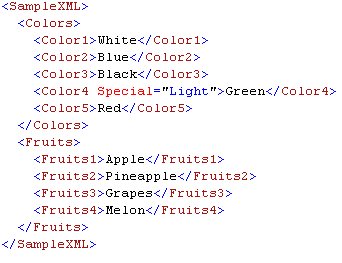
T-SQL Script to generate above XML:
SELECT ( SELECT 'White' AS Color1,
'Blue' AS Color2,
'Black' AS Color3,
'Light' AS 'Color4/@Special',
'Green' AS Color4,
'Red' AS Color5
FOR
XML PATH('Colors'),
TYPE
),
( SELECT 'Apple' AS Fruits1,
'Pineapple' AS Fruits2,
'Grapes' AS Fruits3,
'Melon' AS Fruits4
FOR
XML PATH('Fruits'),
TYPE
)
FOR XML PATH(''),
ROOT('SampleXML')
GO
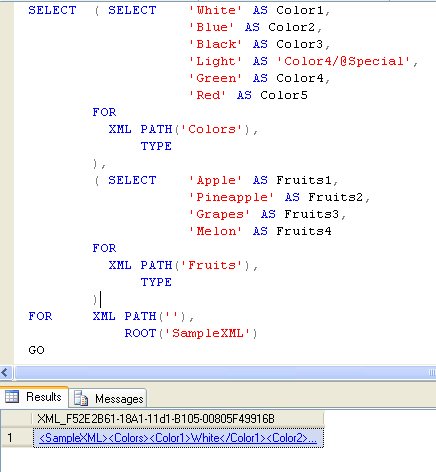
Every XML has two elements.
1) Attributes and 2) Value.
In my above example color4 has attribute along with value. Make sure to specify attribute before the value is defined otherwise it will give error. We will talk about this in other article.
Reference : Pinal Dave (http://blog.SQLAuthority.com)


Hello Sir,
i tried to run this Script but the foloowing error is generated.
Msg 102, Level 15, State 1, Line 1
Incorrect syntax near ‘‘’.
Thanks for the Article ,,,,,,,,,,,,,,,
But if we want to create an xml from Datatable den u can also use this one to create XML:::::
SELECT * FROM URTABLE FOR XML RAW
SELECT * FROM URTABLE FOR XML AUTO
select * from URTABLE for Xml RAW,elements,root(‘Sample’)
select * from test1 for Xml AUTO,elements,root(‘Sample’)
And if u want to export that XML Some where than use BCP option to Export XML data to file…
Thanks……
Dont just copy and paste that script in to Query Window….
u have to replace all the single quotes manually…..
this will remove ur error…………
[...] one of the previous article we have seen how we can create XML file using SELECT statement SQL SERVER – Simple Example of Creating XML File Using T-SQL. Today we will see how we can read the XML file using the SELECT [...]
Dear sir,
I am a biggner for the sql server. But you scrip healp me a lot. Realy you r great.
hello sir,
following xml query is valid sql statemant?
SELECT cast(((
SELECT *
FROM PatientDetails pd
WHERE pd.PatientDetailId = 1
FOR xml path,
root(‘PatientDetails’)
)+
isnull((SELECT *
FROM PatientEncounters pe
WHERE pe.PatientDetailId = 1
FOR xml path,root(‘PatientEncounters’)),(SELECT dbo.get_table_xml_structure1_fun
(‘PatientEncounters’,'dbo’) gtxsf) )) AS xml)
if valid pls coorect this
Hello Sir,
Your blog always helpful to me and hope also for all.
I got the XML using FOR XML concept. but i need to save it using Query in future also update
Hi Pinal,
The following query took 10 minutes to insert with 2M xml input. However, if we take the insert statement out it seems to run instantly. Also, if we change ‘elements’ to ‘attributes’ in the xml it executes within seconds.
Any suggestions??
declare @RTT_Out_Xml xml
declare @MyRTTOutput table (EntityID char(16), Binder_ID char(16), Acct_Number varchar(18), Amount float,
UnitCode varchar(64), UnitName varchar(256), SrcMultiplier float, SrcAmount float, SourceFields xml, Error xml)
set @RTT_Out_Xml = (select EntityID, Binder_ID, Acct_Number, Amount, UnitCode, UnitName SrcMultiplier, SrcAmount
from GSNRTTOutput
for xml path (‘Target’), type, root (‘TargetBalance’) )
insert into @MyRTTOutput (EntityID, Acct_Number, Amount, UnitCode, SrcMultiplier, SrcAmount)
select a.b.query(‘EntityID’).value(‘.’,'varchar(16)’) as EntityID,
a.b.query(‘Acct_Number’).value(‘.’,'varchar(18)’) as Acct_Number,
a.b.query(‘Amount’).value(‘.’,'float’) as Amount,
a.b.query(‘UnitCode’).value(‘.’,'varchar(64)’) as UnitCode,
a.b.query(‘SourceMultiplier’).value(‘.’,'float’) SrcMultiplier,
a.b.query(‘SrcAmount’).value(‘.’,'float’) as SrcAmount
from @RTT_Out_Xml.nodes (‘/TargetBalance/Target’) a(b)
select * from @MyRTTOutput
Understandable code.. and very useful to learn about creating XML by using SQL server.
This is not comment .. This is my problem .. If u r interested to solve..How to insert data from *.TAXT file to Database of Sql Server
Text File
99999 XXXXXXXXXX 99999.99
Database Structure
Code Numeric 5
Name Char 10
Amt money 8
Hi,
Text file can be imported using Import/Export wizard or SSIS package.
Regards,
Pinal Dave
Hi Pinal,
I need one help, i am geting data from sql server in XMl format but need to export those data in to XML files.
Can you help me to fix this.
Thanks in advance.
The problem with this type of XML Export is that you cannot open in Excel file, if you try to open you get failed to parse error. How do we resolve this?
hi pinal,
Excellent article, i just become fan of u.
u r a real ‘SQLGURU’
Hi Pinal,
I have an issue while trying to import data from DB2; the column is varchar
Eg
{1:F01SLHIUS3HAXXX4111157995}{2:O9100409080719CITIGB2LGCB220317896570807182309N}{3:{108:000822EB70358CSW}}{4:
:20:3823248701
:21:HAAB2K0162SLII2L
:25:10640417
:32A:080721CHF810000,
:52D:ORDER BANK: UBSWCHZH80A 
UBS AG 
RELATED REF: HAAB2K0162SLII2L
:56D:NO INFORMATION AVAILABLE
:72:NO FURTHER DETAILS
-}{5:{CHK:8186E6AB85DE}}
Now this column has encodeing in ISO-8859-1; I need to import this in SQL Server 2005. I tried the following when trying to im,port using the SQL server Import wizard:
1. Used target column in SQL server as “xml” datatype but it failed saying that the encoding was different; This failed.
2. Imported in target column “varbinary(max)” ; this was successful; but no clue about how to proceed next or convert that into ‘readable’ xml!
Its a huge table – 5 lakh rows!
Is there
How can i write a xml file from the table example Northwind database , categories table , i like to make a xml file to specific path like c:\ from this table in sql 2005
Hello Bernie,
To get the output of SELECT statment in XML format, use FOR XML clause.
To create a new file for each query the easiest method seems using SQLCMD. SQLCMD has options to save data in file and you can create new file using variable to define saperate name to each file.
Regards,
Pinal Dave
Hello Pinal,
I used your code. Its very useful for me to generate XML direct form Sqlserver 2005. I have a problem that how can I manage XML file? means how can I give appropriate name and appropriate path for XML file? Bcoz I need this file for online transection from Desktop application.
Thanks in advance. I am waiting for your reply.
Thanks.
Hello Vijay,
To store XML data, The better is create a table having a XML datatype column and store the xml data there.
Otherwise you can use OUT clause of SQLCMD uitlity to store a result in a file.
Regards,
Pinal Dave
Hello Pinal,
Thanks a lot. Your guidance is very helpful to me. Keep up dude. :)
Hi ,
I tried to import xml file to table.I wrote query and executed , it returend with empty rows.
My XML File
——————-
0101_0102_20100419_153045.xml
0101
0000
04192010 12:00:00 AM
Kayes
1005
Ahmed
Reza
May
Arrear Pay
4501
5009.50
1006
Karim
Uddin
July
Festival Bonus
4713
11050.60
0420
Asifur
Rahman Khan
January
Arrear Pay
1234
5999.99
SQL Query:
——————-
SELECT X.XMLTABLE.query(‘EMPLOYID’).value(‘.’, ‘VARCHAR(15)’),
X.XMLTABLE.query(‘FRSTNAME’).value(‘.’, ‘VARCHAR(15)’),
X.XMLTABLE.query(‘LASTNAME’).value(‘.’, ‘VARCHAR(21)’),
X.XMLTABLE.query(‘CW_MONTHOFSALARY’).value(‘.’, ‘VARCHAR(15)’),
X.XMLTABLE.query(‘CWSALARYTYPE’).value(‘.’, ‘varchar(15)’),
X.XMLTABLE.query(‘CW_SALARYCOMPONENT’).value(‘.’, ‘VARCHAR(15)’),
X.XMLTABLE.query(‘TOTAL’).value(‘.’, ‘money’)
FROM (
SELECT CAST(x AS XML)
FROM OPENROWSET(
BULK ‘C:\Calsoft\GPPayrollIntegration\ToGP\PayrollXMLOutput_org.xml’,
SINGLE_BLOB) AS T(x)
) AS T(x)
CROSS APPLY x.nodes(‘Tables/Table/Record’) AS X(XMLTABLE)
Thanks in advance.
I am waiting for your reply.
Regards,
Peter
Hi ,
I tried to import xml file to table.I wrote query and executed , it returend with empty rows.
My XML File
——————-
“{
0101_0102_20100419_153045.xml
0101
0000
04192010 12:00:00 AM
Kayes
1005
Ahmed
Reza
May
Arrear Pay
4501
5009.50
1006
Karim
Uddin
July
Festival Bonus
4713
11050.60
0420
Asifur
Rahman Khan
January
Arrear Pay
1234
5999.99
}”
SQL Query:
——————-
SELECT X.XMLTABLE.query(‘EMPLOYID’).value(‘.’, ‘VARCHAR(15)’),
X.XMLTABLE.query(‘FRSTNAME’).value(‘.’, ‘VARCHAR(15)’),
X.XMLTABLE.query(‘LASTNAME’).value(‘.’, ‘VARCHAR(21)’),
X.XMLTABLE.query(‘CW_MONTHOFSALARY’).value(‘.’, ‘VARCHAR(15)’),
X.XMLTABLE.query(‘CWSALARYTYPE’).value(‘.’, ‘varchar(15)’),
X.XMLTABLE.query(‘CW_SALARYCOMPONENT’).value(‘.’, ‘VARCHAR(15)’),
X.XMLTABLE.query(‘TOTAL’).value(‘.’, ‘money’)
FROM (
SELECT CAST(x AS XML)
FROM OPENROWSET(
BULK ‘C:\Calsoft\GPPayrollIntegration\ToGP\PayrollXMLOutput_org.xml’,
SINGLE_BLOB) AS T(x)
) AS T(x)
CROSS APPLY x.nodes(‘Tables/Table/Record’) AS X(XMLTABLE)
Thanks in advance.
I am waiting for your reply.
Regards,
Peter
Gr8 post Ashish ..
Coverting result set to XML was of gr8 Use to me
Hi,
I am using XML Datatype for one table, this table i have inserted the XML Data. I want to know whare is the Data stored in the File Format…? Then i am using select query it’s take 15 seconds how to improve the performance for this table.
Can you give the solution…
Thanks,
Maniraj
Hi,
I am using XML Datatype for one table, this table i have inserted the XML Data. I want to know whare is the Data stored in the File Format…? Then i am using select query it’s take 15 seconds how to improve the performance for this table.
Can you give the solution…
Thanks,
Maniraj
Hello Pinal Dave
I do not know if this is the right place to post this question??
I am having a problem the next code is not working and I can not figure out why.
————————————
$sql->query(“SELECT col1, col2, col3 FROM table WHERE col4=’a_value’ ORDER BY id “);
$xml = ”;
$xml .= ”;
while ($row=$sql->fetch_row()) {
$col1 = $row['col1'];
$col2 = $row['col2'];
$col3 = $row['col3'];
$col1 = htmlspecialchars($col1);
$col2 = htmlspecialchars($col2);
$xml .= ”;
$xml .= ” . $col1 . ”;
$xml .= ” . $col2 . ”;
$xml .= ” . $col3 . ”;
$xml .= ”;
}
$xml .= ”;
echo $xml;
————————————–
Without the WHERE statement it works fine but with the WHERE statement in the query
I get the next error from the feed validator (http://feedvalidator.org)
XML parsing error: :1:1: not well-formed (invalid token)
I am not well known to xml perhaps I find the answer on this page
With regards John J
Hello Pinal,
it is a great article but I have bit different requirement I need to generate xml in utf-8 format
there should a header like this
Windows Forms
728372837
How can I create such kind of xml
Thank YOu
Hi Pinal,
How to create phyical XML file from TSQL?
I had created one SP for generating XML, but not able to create physical XML file from it.
How can I create physcal XML file from SP?
Regards,
Yamraj Pandya
Hello,
could you please tell me how can I add arguments to the Root? I need it to be something like:
thanks!
hi,
i have a bulk xml data, i want to this data import in sql server 2005 using procedure.
pls tell me how to create procedure for this solution.
i am already create table and have a database in xml format
pls tell how can i create a procedure .
thnks
Hi Vinoth,
You can use SSIS to get these xml files into SQL SERVER 2005.
For reference: http://www.sqlyoga.com/2009/11/sql-server-ssis-foreach-loop-container.html
You can implement this and configure data flow process, to transfer data from xml to SQL SERVER.
Let me know if I can help you to design SSIS package.
Thanks,
Tejas
SQLYoga.com
Hi tejas,
i am not asking about ssis package,
i want know about procedure to import xml data in sql server
pls help out this problem
thnks
Hai, i have 6 tables in my database and i want generate the xml file with 7 main root elements.
plz let me know.
Hi,
I want to write the xml output in “C:\\Output.xml” file. How can i write my sql query. Is it possible in sql?
Regards,
V.M. Damodharan
Hello everyone!
I’m really desperate in getting my project done. :(
Can anyone help me here?
My problem is that I have to display the results of a “SELECT top 5 * FROM mytable order by mydate desc for xml auto” to an ASP.
Something like this printed out on a webpage:
Hello Pinal.
I’m trying to execute a query from an asp.net & C# application, using sql server as data base. I need to store the query result in a xml file.
could you help me please?
Than kyou and Regards!
This is really bad comment.
checking the comment functionality
hey,
take the result in a variable as an string and write that string to a file wherever your want, I don’t think there is any issue because you have the result in you hand
OR
you don’t know how to save the file from ASP.Net, then please search google for your help because it is a SQL related site and not the ASP.Net.
Pinal don’t know anything about the ASP.Net
Poor Guy
Hi Almond,
I am .NET Certified MCAD.
Thanks for your comment.
hi pinal,
i am using XML as datatype in my function but that function is taking too much time to return value..
is their any alternate way of XML datatype or can you help me to optimize my function performance and stored procedure performance..
many thanks in advance…
I have Code that generates the following XML file.
How do I parse that XML and insert into SQL Server 2005 database table
I tried your article from the following URL but it reads only one row data and your sample xml does not have schema.
http://blog.sqlauthority.com/2009/02/12/sql-server-simple-example-of-creating-xml-file-using-t-sql/
‘UWAKEON.EXE28672UWAKEON.EXE28672UWAKEON.EXE28672UWAKEON.EXE28672UWAKEON.EXE28672UWAKEON.EXE28672UWAKEON.EXE28672′
Thank you for your help
Your blog is great! It’s helped me out so many times!
Thanks!
How to export #table content to csv file.
Thanks
How to export #table content to csv file.
Great sample. I wasn’t getting it at first until I realized you have to click on the XML in the Results grid. Slick trick!
Is there any way to convert sql server database to XML in Query?
i want to retrive data from sql 2005 into xml file without inserting in xml formate
create table xml
(
id int identity(1,1) constraint pkid primary key,
name nvarchar(50),
img nvarchar(50),
content nvarchar(max),
won nvarchar(10)
)
how can we do that…?
pls help
thankx
And i want to retrive data in xml format
Hi Pinal,
Can you help me, below xml string i need to read using sql query.
– SQL Server 2008 execution – xquery
DECLARE @xml xml = ‘
Host=ms0001xp/Pid=1400
mani
Thanigaimani
‘
SELECT V.col.query(‘UserId’).value(‘.’, ‘VARCHAR(32)’) AS UserID,
V.col.query(‘UserName’).value(‘.’, ‘VARCHAR(32)’) AS UserName
FROM @XML.nodes(‘StudyDeleteExtendedInfo’) AS V(col);
Note : Userid tag having xmlns namespace.
I have to read userid data from above query.
Regards
Mani
Hi Pinal,
I need to read the colors data from below xml using sql query.
Note : colors having xmlns namespace .
DECLARE @MyXML XML
SET @MyXML = ‘
White
Blue
Black
Green
Red
‘
SELECT
a.b.value(‘Colors[1]/Color1[1]‘,’varchar(10)’) AS Color1
FROM @MyXML.nodes(‘SampleXML’) a(b)
Pls Help
Mani
How to produce the following XML?
White
Blue
Black
Green
Red
Apple
Pineapple
Grapes
Melon
@”
White
Blue
Black
Green
Red
Apple
Pineapple
Grapes
Melon
“
Excelent, thank you.
I was having problems extracting data from an SQL Database and writing into a formatted XML document, even after reading this. For anyone else with a similar question here was my query.
Select FirstName AS [First], LastName AS [Last]
From ResearchLibrary.dbo.Client
For XML PATH(‘Name’),
ROOT (‘Client’)
will produce this.
John
Doe
Jane
Doe
or rather…
Client
Name
First John /First
Last Doe/Last
/Name
Name
First Jane/First
Last Doe/Last
/Name
/Client
Forgot about the lt/gt tags :)
I want to Add the attribute inside the main nodes
my xml will be like
White
Blue
Black
Green
Red
Apple
Pineapple
Grapes
Melon
Please advice me …thanks in advance…
White
Blue
Black
Green
Red
Apple
Pineapple
Grapes
Melon
hi,
i have one table which contain id int,name varchar(256), and address xml.
suppose there is one record as following.
id = 1
name = Prem
address= jadibuti teku kalimati
i want to retrieve data in tabular format like
id name homeaddress officeaddress assistant address
1 prem jadibuti teku kalimati
how could this possible.
please help me.
Refer this post
http://beyondrelational.com/blogs/madhivanan/archive/2008/09/11/splitting-delimited-data-to-columns-set-based-approach.aspx
This XML creation code is exactly what I needed! Thanks so much. I have found many good solutions on this website.
Hi,
I am facing issue in generating xml where I need to get value of the field of a table in a nodes.
Example please, I have a table name customer having field called owner_name. Field Name ‘owner_name’ in table customer has got 5 records. I need to display the xml in the following format
@owner_name1
@owner_name2
@owner_name3
@owner_name4
@owner_name5
Please let me know,how can I generate the xml like this.
Thanks
Hi Pinal,
Your articles are always simple and to the point to understand. Thanks.
I have a question. In the following code, I get xml fragment with value that include insignificant zeros at the end. How can I get the value without these zeroes? Thanks for your help.
declare @v float = ’4.03′
select @v as Value from M_MaintenanceConfig for xml auto
I want to get:
document.getElementById(‘footer’).style.display = ‘none’;
FYI, the word “fruit” is already plural. There is no such thing as “fruits.”
Always good articals Pinal. Thanks.
Hi All,
I want to write the below code without using the Xml path, type or root. i.e. want to rewrite code using pure sql statements using xml functionalities. Will inserting just UNION ALL and removing XML path, type and root work for me.
Thanks in advance
SELECT ( SELECT ‘White’ AS Color1,
‘Blue’ AS Color2,
‘Black’ AS Color3,
‘Light’ AS ‘Color4/@Special’,
‘Green’ AS Color4,
‘Red’ AS Color5
FOR
XML PATH(‘Colors’),
TYPE
),
( SELECT ‘Apple’ AS Fruits1,
‘Pineapple’ AS Fruits2,
‘Grapes’ AS Fruits3,
‘Melon’ AS Fruits4
FOR
XML PATH(‘Fruits’),
TYPE
)
FOR XML PATH(”),
ROOT(‘SampleXML’)
GO
HI Pinal,
I want to create a XML of this type.
Tags Email1,Email2 are dynamic. Also, NumberOfLeads will change for each listing.
Can you help with this one?
Thanks!
Mari
Pinal Bhai You are the Best.
Sat
Hi
how i can insert in the xml result on the top from a sql server 2008 query this ?
thanks
[...] SQL Server Interview Questions and Answers ISBN: 1466405643 Page#137-139 SELECT * FROM XML Shredding XML Validate an XML document in TSQL using XSD Simple Example of Reading XML File Using T-SQL Simple Example of Creating XML File Using T-SQL [...]
Hello Pinal ,
I am using BCP command to create xml file on remote server.
on remote server xml is created successfully, but subnodes are getting brakes. please provide me soluation to resolve subnode brake problam.
Thanks
Sanjay
Hi,
I need help on creating a stored procedure which can fetch the data from database and write the output to an xml file.
Kindly help. Thanks in advance!
Also, I need to mention the database used in SQL 2008.
Its really helpful. Thank you!!
Will using this method properly encode any XML special characters?
Try this:
SELECT(SELECT ‘White’ AS Color FOR XML PATH(”), TYPE),
(SELECT ‘Blue’ AS Color FOR XML PATH(”), TYPE),
(SELECT ‘Black’ AS Color FOR XML PATH(”), TYPE),
(SELECT ‘Light’ AS ‘Color/@special’, ‘Green’ AS Color FOR XML PATH(”), TYPE),
(SELECT ‘Sun’ AS ‘Color/@subtype’, ‘Red’ AS Color FOR XML PATH(”), TYPE)
FOR XML PATH(”), ROOT(‘Colors’)
GO
–Generated XML:
–
– White
– Blue
– Black
– Green
– Red
–
I think this gives a better example of depth.
SELECT ( SELECT ‘White’ AS Color1,
(select ‘dark’ as shade1,’Light’ as shade2 for XML path (‘Blue’),TYPE ),
‘Blue’ AS Color2,
‘Black’ AS Color3,
‘Light’ AS ‘Color4/@Special’,
‘Green’ AS Color4,
‘Red’ AS Color5
FOR
XML PATH(‘Colors’),
TYPE
),
( SELECT ‘Apple’ AS Fruits1,
‘Pineapple’ AS Fruits2,
‘Grapes’ AS Fruits3,
‘Melon’ AS Fruits4
FOR
XML PATH(‘Fruits’),
TYPE
)
FOR XML PATH(”),
ROOT(‘SampleXML’)
GO
hii,
i have one table where the datas are
id value
1 50
2 60
and another table having datas like
value val
50 20
50 30
60 100
60 120
But i want the result like
50 20
60 100
plz help me
select value,min(val) as val from table
group by value
hi
this helped me achieve the following out put
ABBEY WAY
WILLESBOROUGH
FRIDAY
ABBOTT WAY
TENTERDEN
TUESDAY
SQL QUERY used
select X.id as ‘@id’
, X.Street AS ‘street’
, X.district as ‘district’
, X.collectionday as ‘collectionday’
FROM [ABC-Collections].[dbo].[IMPORT_XML] X
for XML PATH(‘location’), root(‘addresses’)
Hope that helps someone
Hey friends, this query is really appreciative once and its working fine but for example if a table consists of 30,000 records then this ” select * from test1 for Xml AUTO,elements,root(‘Sample’) ” query converts them ? please immediately respond
Great – helped me a lot – thanks
Hi Pinal Dave,
I have tried XML PATH functionality for convert my query output to xml data convertion. its working fine. I can able to create a xml files for my data. But i need one favor from you. if i open the xml file in notepad or some other editers, the data is coming in paragraph format. i need correct xml format.
if i open the xml file its showing correct format.
example:
my data is
Name Age Sex
Mano 29 M
Raji 23 F
after i convert my data to xml, it is coming like this
Mano 29 M and so on..
but i need
Mano
29
M
and
so
on…
like this.
is it possible? if you give solution it will be a great help to me.
thanks in advance.
Mano
Hi, Dave.
I have a requirement such that there should be no self closing tags in an XML result I have to serve to another system.
If, for example, I do a query like this:…
SELECT ‘Fuit Shop’ AS ShopName
,” AS Nada
,(SELECT ‘Apple’ AS Fruits1
,’Pineapple’ AS Fruits2
,” AS Fruits3
,’Melon’ AS Fruits4
FOR XML PATH(‘Fruits’), TYPE)
FOR XML PATH(”), ROOT(‘SampleXML’)
… the result will be:
Fuit Shop
Apple
Pineapple
Melon
Note that while element Nada has a separate closing tag, Fuit3 is self-closing.
How could I modify that query to meet my requirement and get a result as follows?:
Fuit Shop
Apple
Pineapple
Melon
Thank you, very much.
Hi, Dave.
I’m rewriting my question to (hopefully) include proper XML tags
I have a requirement such that there should be no self closing tags in an XML result I have to serve to another system.
If, for example, I do a query like this:…
SELECT ‘Fuit Shop’ AS ShopName
,” AS Nada
,(SELECT ‘Apple’ AS Fruits1
,’Pineapple’ AS Fruits2
,” AS Fruits3
,’Melon’ AS Fruits4
FOR XML PATH(‘Fruits’), TYPE)
FOR XML PATH(”), ROOT(‘SampleXML’)
… the result will be:
<SampleXML>
<ShopName>Fuit Shop</ShopName>
<Nada></Nada>
<Fruits>
<Fruits1>Apple</Fruits1>
<Fruits2>Pineapple</Fruits2>
<Fruits3 />
<Fruits4>Melon</Fruits4>
</Fruits>
</SampleXML>
Note that while element Nada has a separate closing tag, Fuit3 is self-closing.
How could I modify that query to meet my requirement and get a result as follows?:
<SampleXML>
<ShopName>Fuit Shop</ShopName>
<Nada></Nada>
<Fruits>
<Fruits1>Apple</Fruits1>
<Fruits2>Pineapple</Fruits2>
<Fruits3></Fruits3>
<Fruits4>Melon</Fruits4>
</Fruits>
</SampleXML>
Thank you, very much.
Hi Pinal Sir,
Ur RND is nice, but i cant understand how to execute it after creating XML link which shown above at last image.. so please tell me what is next procedure after creating XML link.. :)
Thanks and regards
Pradeep K
Great post! Is there a way to mimic this output with SQL?
Object Name
Property
Length of Title
Right Padded with Spaces
Length With Spaces
Chart Color
I have only been able to get it to look like this:
Object Namenot NameObject NameObject Name
how to get XML like below:
urn:epc:id:sgtin:1249612083.107346.
urn:epc:id:sgtin:1249612083.107346.550006729 urn:epc:id:sgtin:1249612083.107346.550006730 urn:epc:id:sgtin:1249612083.107346.550006731 urn:epc:id:sgtin:1249612083.107346.550006732 urn:epc:id:sgtin:1249612083.107346.550006733 urn:epc:id:sgtin:1249612083.107346.550006734 urn:epc:id:sgtin:1249612083.107346.550006735 urn:epc:id:sgtin:1249612083.107346.550006736 urn:epc:id:sgtin:1249612083.107346.550006737 urn:epc:id:sgtin:1249612083.107346.550006738
GREAT THANKS!!!
[...] Simple Example of Creating XML File Using T-SQL [...]