Just a day before I wrote about SQL SERVER – Find Collation of Database and Table Column Using T-SQL and I have received some good comments and one particular question was about how to change collation of database. It is quite simple do so.
Let us see following example.
USE AdventureWorks
GO
/* Create Test Table */
CREATE TABLE TestTable (FirstCol VARCHAR(10))
GO
/* Check Database Column Collation */
SELECT name, collation_name
FROM sys.columns
WHERE OBJECT_ID IN ( SELECT OBJECT_ID
FROM sys.objects
WHERE type = 'U'
AND name = 'TestTable')
GO
/* Change the database collation */
ALTER TABLE TestTable
ALTER COLUMN FirstCol VARCHAR(10)
COLLATE SQL_Latin1_General_CP1_CS_AS NULL
GO
/* Check Database Column Collation */
SELECT name, collation_name
FROM sys.columns
WHERE OBJECT_ID IN ( SELECT OBJECT_ID
FROM sys.objects
WHERE type = 'U'
AND name = 'TestTable')
GO
/* Database Cleanup */
DROP TABLE TestTable
GO
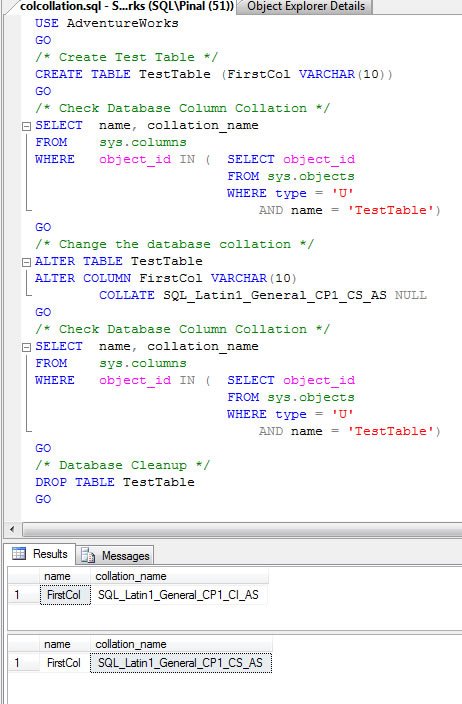
When ran above script will give two resultset. First resultset is before column’s collation is changed and it represents default collation of database. Second result set is after column’s collation is changed and it represents newly defined collation.
Let me know what are your ideas about collation and any problem if you have faced for the same. I am interested to share those with the SQL community.
Additionally, if you are looking for solution to SQL SERVER – Cannot resolve collation conflict for equal to operation visit here.
Reference : Pinal Dave (
http://www.SQLAuthority.com
)
Nice one Dave. You are doing a blog post everyday, it’s amazing. I have seen no one doing it, keep up the good work.
Hi sir,
How to compare the data in tow tables and also generating the Update Scripts Based on target table.
It’s very urgent please give me reply to this.
thanks
Hi Pinal,
Is there any way to change collation in one shot. We correct for one table and getting for another table after some time.
How can we change the collation of Server without reinstalling the SQL Server 2005? Can you please let me know the steps?
Also, I have found the following command on one of the blog
start /wait setup.exe /qb INSTANCENAME=MSSQLSERVER REINSTALL=SQL_Engine REBUILDDATABASE=1 SAPWD=test SQLCOLLATION=Latin1_General_CI_AS
thanks
Dave,
I just went through all this in a SQL2K to ’08 upgrade. Took the opportunity to get all our collations in synch. They were all over the place (we’re a multinational company and over the years, people go confused on which to use). Anyway, I’ve written a beautiful set of scripts for this purpose. Basically, the first script creates an object scriptor using DMO. The second script identifies all columns in a database who’s collation is not the desired value. DROP statements are generated on the fly. The second script generates the DDL for all the ALTER TABLE ALTER COLUMN statements. The third script uses the object scriptor (sp_scriptObject @db_name, @obj_type, @obj_name, @obj_subname) which generates all the DDL to re-create the objects dropped. So, you end up with three dynamically generated SQL scripts (DROP, ALTER, CREATE) to consolidate collation. If you’re interrested, let me know.
A little clarification on the above post…
The DROP statements are for collation dependent objects within the database.
They include indexes, primary and foreign keys, table functions, etc. If the object is tied to a column whose collation needs to be changed, it is identified and the DROP and CREATE statements are generated on the fly.
Also, CREATE objects script is generated in the reverse order as the DROP script in attempt to avoid dependency conflicts.
Dave, I would be tremendously interested in this script.
I have just run into a problem with regards to multiple systems we need to converge, and we have multiple collation values for different tables.
I need to migrate all to single collation.
Can you supply?
Clarification…interested in the script from “Brian”.
Brian, could you please please please provide the script?
Tim, Horm.
My posts to this keep getting discarded. Still trying to get you my contact details.
If this post shows up, execute the following. The results will be obvious.
SELECT CONVERT(VarChar(20), 0x427269616e277320656d61696c3a)
UNION ALL
SELECT CONVERT(VarChar(30), 0x6263696465726e20617420676d61696c20646f7420636f6d)
Hi Penal,
Can you please suggest how can we set collates for different languages. I am trying for Chinese, COLLATE Chinese_PRC_CI_AS NOT NULL, but it does not show data in Chinese.
Please suggest, how can we do this.
thanks,
Shyam
Hi Pinal,
I am new to MSSQL sever 2005, I am practising on Adventureworks Databse, whose collation is ‘Latin1_General_CS_AS’ and each column of tables say for eg.. ‘Person.Address’ is having ‘Latin1_General_CS_AS’ I tried to change its columns by the method u suggested , but of no use.. Can u please help me in this regard… Thanks in anticipation..
I am preparing for MS SQL Server 2005 70-431 exam, but not able to practice because due to the problem mentioned above the Queries are Case Sensitive and I am struck .. need ur help..
Brian,
I to would like to have a look at the scripts to create a level COLLATION database.
Could you please forward the script to me.
Much appreciated.
Mark
Mark,
My posts get discarded when they include contact info. Take note of the SELECT statement I posted in the comment to Tim and Horm.
Hi Brian,
I realise this thread is a bit old but I too would appreciate a copy of the scripts you mentioned. Our older clients have databases in SQL_Latin1_General_CP850_Bin and we are starting to get problems. I have been trying to change them to Latin1_General_CI_AS but there are so many columns and dependencies it is a hopeless task to attempt manually (plus my qualifications lie more in accounting than IT…).
Thank you for any help you can provide.
James
James…
I do not have any way of reaching you. If you provided an email address when you posted, it does NOT get published. And, I don’t work on the back side of this blog, so I don’t have access to and of the form field values.
Also, it seems that whenever I post contact information, the post gets discarded. So….
Please execute the following. The results will be painfully obvious.
SELECT CONVERT(VarChar(20), 0×427269616e277320656d61696c3a)
UNION ALL
SELECT CONVERT(VarChar(30), 0×6263696465726e20617420676d61696c20646f7420636f6d)
Hi Brian,
It is correct, that automatic settings discards the comments and move to spam.
If you have any good idea about this subject, I encourage you to write down good small post about the subject and I publish as blog post with due credit to you along with your contact info.
Kind Regards,
Pinal Dave
Hi Brian,
Thanks for the response. I have tried executing the code you posted but I just get a series of errors;
Msg 170, Level 15, State 1, Line 1
Line 1: Incorrect syntax near ‘×’.
Msg 168, Level 15, State 1, Line 1
The floating point value ’427269616e277320656′ is out of the range of computer representation (8 bytes).
Msg 170, Level 15, State 1, Line 1
Line 1: Incorrect syntax near ‘×’.
Msg 168, Level 15, State 1, Line 1
The floating point value ’6263696465726e20617420676′ is out of the range of computer representation (8 bytes).
I assume I’m doing something wrong..
Don’t know if this will get through but my handle is james.wishart and the domain is activa.com.au
Cheers,
James
Hi Brian,
I’ve actually managed to fix the problem. Our application has a built in ‘create database’ function which creates a copy of the existing database as a new one, including all the data in the tables. I changed the database collation to the correct one and when I ran the process it created a new database and assigned the default (correct) collation to all the columns.
Thanks for getting back to me though.
Cheers,
James
James,
I’m glad you got the issue sorted out. Incidentally, the code I posted above was only to reveal my email address. Nothing fancy, but it gets thru the spam filters, and I didn’t want any screen-scrapers to add me to their spam targets.
For all others, I will see if I can find the time to patch up the code and make it a bit more generic. Then I’ll write it up and pass it on to Pinal for posting, so that people can grab it a little easier. I don’t have a blog, so I’ll drop the scripts here.
Brian,
Really looking forward to your post. I think it will be great additional for readers for this blog. I will post it with due credit.
Kind Regards,
Pinal
Brian/Pinal – I’m really looking forward to that post, it will be most helpful. Thank you very much!
Definitely something worthy, in the mean time Brian if possible can you email me a copy of the script to, urgently needed
Hello again.
Apologies for this taking as much time as it did to prepare, but I now have all of the documentation ready. Note, this is not a click-bang-done task. It’s a series of scripts that generate DDL which must be executed against the target machines. It uses DMO via OLE, so make sure your instances are not disabling the sp_oaCreate, sp_oaMethod, etc SP’s.
Unfortunately, the documentation is only from my POV, and has NOT been beta tested against the masses.
I am emailing the article to Pinal Dave along with the scripts, but I have no control over when he has the time to review and publish.
For those of you that have urgent needs… you’ve got to realize, your email address is NOT posted, nor is mine. The back-end of Pinal’s blog filters out email address in posts. No way for me to know where to send. So, if time is of the essence, be a little diligent and refer to my posts on March 2nd and September 12th. My email address is obfuscated in the CONVERT() statement. Just copy and paste it in a Q/A window.
Finally…
Sorry it’s taken so long for me to get back around to this. But, good news… I finally did. I’ve an article that details the work, and you can also download all of the scripts.
There are a couple of edits you’ll probably need to make to the individual scripts, for example, the collation you intend to use. The scripts have Latin1_General_CI_AS hard-coded.
Read all the accompanying documentation. Hopefully it will answer any questions you have about how to implement these.
And of course, if you have additional questions, my email is posted in the article.
Here it is… Enjoy.
Brian
http://blog.sqlauthority.com/2009/10/19/sql-server-change-collation-of-database-column-t-sql-script-consolidating-collations-extention-script/
Hi,
Is it possible to set a collation sequence on a schema so all tables within that schema are case-sensitive, whereas rest of database is case-insensitive?
Cheers
Gordon
Hi
please i got a problem, i got 2 apps MS Dynamics CRM and MS Dynamics GP
but CRM is in Modern_Spanish_CI_AI
and GP in SQL_Latin1_General_CP1_CI_AS
i want to do a query like this
SELECT * FROM TABLE_IN_GP WHERE ID NOT IN ( SELECT ID FROM LINKEDSERVER.CRM_DB.dbo.TABLE_IN_CRM )
but i got this error
Cannot resolve the collation conflict between “Modern_Spanish_CI_AI” and “SQL_Latin1_General_CP1_CI_AS” in the equal to operation.
i even put at the end COLLATE SQL_Latin1_General_CP1_CI_AS
but i still got the same error
it’s not posible to change the collations of the DBs
could you help me please
thanks a lot
FAC,
Is the COLLATE statement inside or outside the parentheses? It should be inside.
If that doesn’t fix it, try troubleshooting by minimizing your select criteria. Try just a single column from the GP table.
Hi Brian
thanks for your response
i modified the query like this
SELECT ITEMNMBR
FROM IV00101
WHERE
ITEMNMBR NOT IN ( select productnumber from CRMLINKED.CRMDB.dbo.ProductBase where productnumber COLLATE SQL_Latin1_General_CP1_CI_AS )
but still got the error
Cannot resolve the collation conflict between “Modern_Spanish_CI_AI” and “SQL_Latin1_General_CP1_CI_AS” in the equal to operation.
any other ideas please
thanks a lot
FAC:
In the above query, are the fields ITEMNMBR and productnumber of a numeric type? The COLLATE clause will only work with character data types: char, nchar, varchar, nvarchar, text, ntext
If they are string based types, try the following:
SELECT ITEMNMBR
FROM IV00101 i
LEFT JOIN CRMLINKED.CRMDB.dbo.ProductBase p
ON p.productnumber COLLATE SQL_Latin1_General_CP1_CI_AS = i.ITEMNMBR
WHERE p.productnumber IS NULL
Great! that did it
both columns are character date type
Thanks a lot Brian!
Thanks, very very useful and It Works !
Thanks Pinal
If i change collation for entire database,it changed but table level collation not effected.Please suggest me to get the collation change in all tables in that database.
I tried collation change using
‘alter database testCollationChange
collate SQL_Latin1_General_CP1_CI_AS ‘
Is anyother script?
Kumar,
This is a very complex process that, depending on the size of your database, could be impossible to do manually. Here’s what needs to be done:
1. Identify all the columns which have incorrect collation values.
2. Identify all objects bound to above columns, including indexes, keys, checks and UDF’s,
3. Script out all of the above object DDL.
4. Drop all of the objects.
5. Update all the columns with the correct collation
6. Recreate all of the dropped objects using the DDL generated in step 3
Fortunately, I’ve written a set of scripts to do all this and have them documented and published here on the SQLAuthority site.
The following page should provide you with everything you need.
http://blog.sqlauthority.com/2009/10/19/sql-server-change-collation-of-database-column-t-sql-script-consolidating-collations-extention-script/
Hope this helps.
great, thanks and thanks google for showing this on top
Hi Brain ,
Data stored in Sql Server 2005
in a table the Column Consists Data in iscii Format how
Can i Show that data in specifeid Language
The Data was inserted using CDAC iplugin the Language Used is Telugu
Waiting..;
For Reply
Hi Brain ,
Data stored in Sql Server 2005
in a table the Column Consists Data in iscii Format how
Can i Show that data in specifeid Language
The Data was inserted using CDAC iplugin the Language Used is Telugu
Waiting..;
For Reply
Data is visible in this format
AnilKumar:
Collations do not translate data from one language to another. They specify sort-order definitions. If the plugin you mention is capable of language translations, then you will need to consult its documentation.
Sorry I cannot help you further.
Nice Articles.
Thank! Good articles
I want to have all languages in my tables in a database. Currently when i insert the arabic characters, it is getting inserted as “?”. Let me know what collation to be used for all languages , for all tables and its syntax.
Pingback: SQL SERVER – Effect of Collation on Resultset – SQL in Sixty Seconds #026 – Video « SQL Server Journey with SQL Authority
Pingback: SQL SERVER – Weekly Series – Memory Lane – #008 « SQL Server Journey with SQL Authority
hi sir this is gopi
while intalling sql server 2005 i did not install sql server profiler now i want that profiler it is possible sir reply me
how to restore the database with out mdf,and log files
Hi Pinal, nice post as always. I have personally made a little script to help me understanding which columns i have to change in order to maintain the correct collation on a Database.
Here’s the script if anyone needs something like this.
NOTE: it doesn’t do nothing, but just prints the T-Sql instructions that allow to change the collation, this because based on my experience, i prefer to double check a couple of times before messing up with DB Settings :)
DECLARE @collationType VARCHAR(100)
SELECT @collationType = ‘Latin1_General_CI_AS’
DECLARE collationToChangeColumns CURSOR
FOR
SELECT colonne.NAME ,
‘[' + SCHEMA_NAME(schema_id) + '].[' + tabelle.NAME + ']‘ ,
colonne.SYSTEM_type_id ,
colonne.max_length
FROM sys.columns colonne
JOIN sys.tables tabelle
ON colonne.OBJECT_ID = tabelle.OBJECT_ID
WHERE collation_name @collationType
AND tabelle.TYPE = ‘u’
DECLARE @tableName AS VARCHAR(100)
DECLARE @columnName AS VARCHAR(100)
DECLARE @typeID AS INT
DECLARE @maxLength AS INT
DECLARE @sqlString AS NVARCHAR(4000)
OPEN collationToChangeColumns
FETCH collationToChangeColumns INTO @columnName, @tableName, @typeID, @maxLength
WHILE @@FETCH_STATUS -1
BEGIN
IF @typeID NOT IN ( 35, 99 )
BEGIN
IF @maxLength > 0
BEGIN
SET @sqlString = ‘ALTER TABLE ‘ + @tableName
+ ‘ alter column [' + @columnName + '] ‘
+ CAST(TYPE_NAME(@typeID) AS VARCHAR(20)) + ‘(‘
+ CAST(@maxLength AS VARCHAR(10)) + ‘) collate ‘
+ @collationType + ‘;’
PRINT @sqlString
END
END
FETCH collationToChangeColumns INTO @columnName, @tableName, @typeID,
@maxLength
END
CLOSE collationToChangeColumns
DEALLOCATE collationToChangeColumns
eabidi syntax without CURSOR
DECLARE @OldCollation VARCHAR(100), @NewCollation VARCHAR(100)
SELECT @OldCollation = ‘SQL_Latin1_General_CP1_CI_AS’,
@NewCollation=’Estonian_ci_as’;
WITH XChange (XColumn,XTable,XType,XLen)
as(
SELECT c.NAME ,
‘[' + SCHEMA_NAME(schema_id) + '].[' + t.NAME + ']‘ ,
c.SYSTEM_type_id ,
c.max_length
FROM sys.columns c
JOIN sys.tables t ON c.OBJECT_ID = t.OBJECT_ID
WHERE
collation_name=@OldCollation
AND t.TYPE = ‘u’)
SELECT ‘ALTER TABLE ‘ + XTable
+ ‘ alter column [' + XColumn + '] ‘
+ CAST(TYPE_NAME(XType) AS VARCHAR(20)) + ‘(‘
+ CAST(XLen AS VARCHAR(10)) + ‘) collate ‘
+ @NewCollation + ‘;’
FROM XChange
where XType not in (35,99)
and XLen>0;