

To add column at specific position in SQL Server, you have three tested options, because ALTER TABLE always adds the column last. This post shows a SELECT list, a view for loads and reports, and a full table rebuild. It also explains what the rebuild costs.

SQL SERVER – SSMS Does NOT Print NULL Values
Here is a very interesting question asked on the blog by Karthik. I really liked the question and I would like to discuss this here about SSMS doe snot Print NULL values.
SQL SERVER – Cycle Clipboard Ring in SSMS – SQL in Sixty Seconds #045 – Video
Copy and paste only gives you the last item you copied. This SQL in Sixty Seconds video shows how the Cycle Clipboard Ring in SSMS pastes earlier items too.
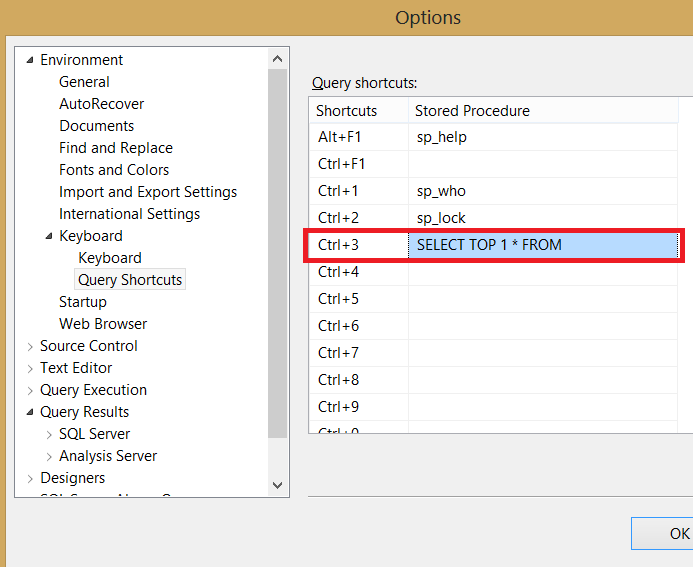
SQL SERVER – Shortcut to SELECT only 1 Row from Table
Developers often select only 1 row to peek at what a table holds, but typing SELECT TOP 1 again and again is slow. I share a quicker shortcut for it.

Restore a Database in SSMS: Step by Step
To restore a database in SSMS, right-click Databases, choose Restore Database, pick the backup file, name the destination and choose the recovery state. This post covers each page of the dialog, the tail-log error that stops overwrites, and the T-SQL for a full, differential and log restore chain.
SQL SERVER – Get SQL Server Version and Edition Information – SQL in Sixty Seconds #043 – Video
Here is a quick way to find the SQL Server version and edition in sixty seconds, plus how to read version numbers and map them to each release.
SQL SERVER – Generate Random Values – SQL in Sixty Seconds #042 – Video
There are many ways to generate random values in SQL Server. In this sixty second video I show a neat trick to get a random value between two numbers.