
A shortcut to SELECT a single row can make quick table inspection easier in SSMS. After my written explanation received questions from readers, I recorded this video to make the setup clearer.

Developers regularly want to inspect the columns and a sample of the values in a table. This lesson shows how to configure an SSMS query shortcut instead of repeatedly typing the same query. Use the correct database context and select the intended table name before invoking it.
Watch the Original Video
Set Up the Shortcut
In Management Studio, open Tools, Options, Environment, Keyboard and Query Shortcuts. Pick a free slot such as Ctrl+3 and type the start of a query. Leave out the table name.
SELECT TOP 1 * FROM
Now select a table name in the editor and press the shortcut. SSMS runs the shortcut text with your selection added at the end. The video shows the historical dialog. Settings and menu locations vary by release. Find Query Shortcuts in your installed version, and do not assume every dialog matches the recording.
One Row Does Not Mean a Specific Row
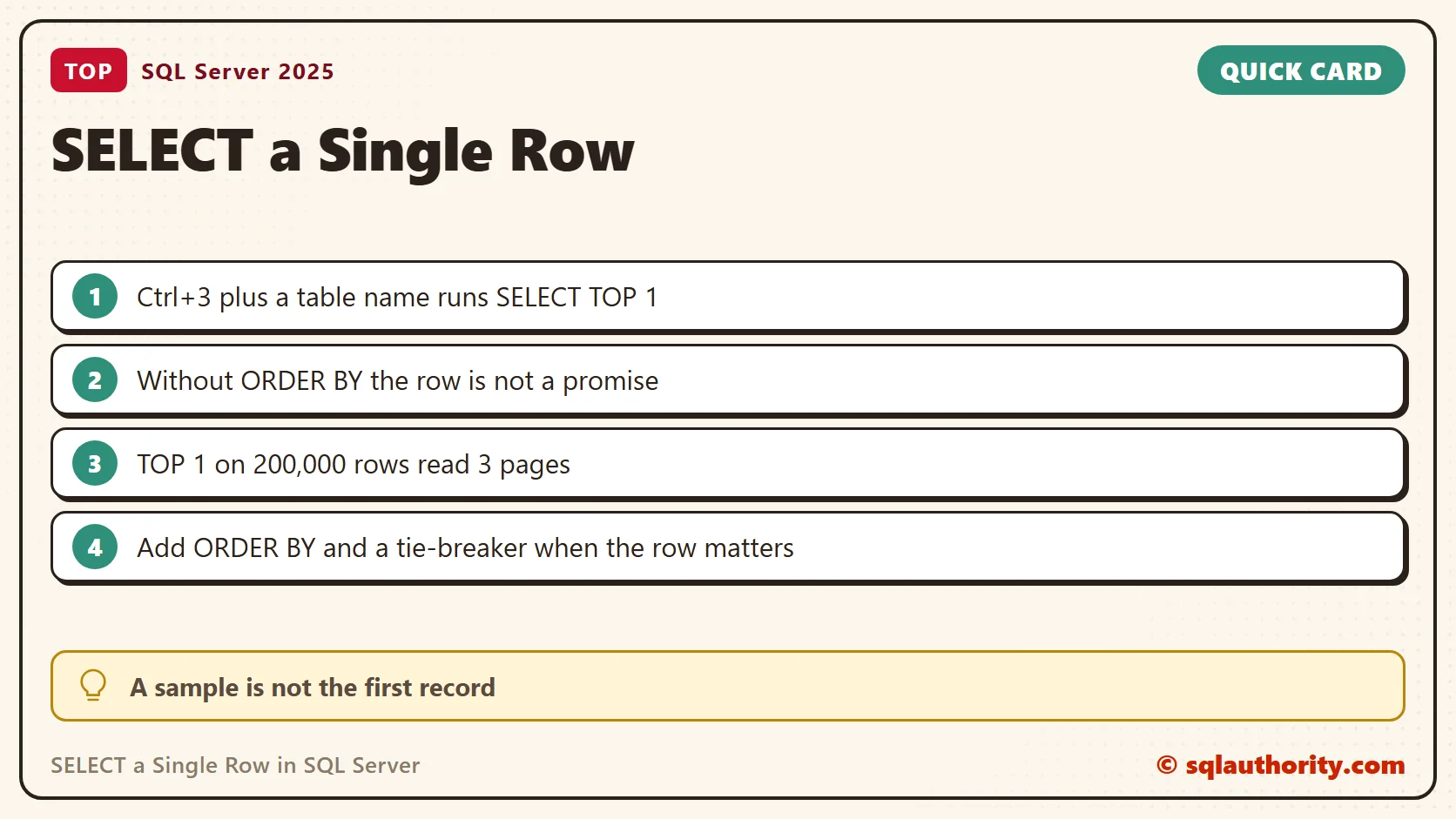
A query using TOP (1) without ORDER BY returns at most one row. It does not guarantee which row. It returns no row for an empty table. That is enough for a quick sample. It is not a reliable way to find the newest, oldest or otherwise specific record.
To see how the choice moves, I built a small table with a clustered key on TeaId. The rows went in as Sencha, Assam, Rooibos and Jasmine.
CREATE TABLE dbo.Teas (TeaId int NOT NULL PRIMARY KEY, TeaName varchar(30) NOT NULL, Price decimal(5,2) NOT NULL);
INSERT dbo.Teas VALUES (1, 'Sencha', 4.50), (2, 'Assam', 3.75), (3, 'Rooibos', 3.25), (4, 'Jasmine', 4.00);
SELECT TOP 1 * FROM dbo.Teas;
The shortcut query returned Sencha, the row with the lowest key. Then I added an index on TeaName. The same SELECT TOP 1 * still returned Sencha. But SELECT TOP 1 TeaName returned Assam. SQL Server read the narrower index. That index is sorted by name, so the first entry was Assam, and the scan stopped after one row. The word TOP promised one row, and the plan decided which.
CREATE INDEX IX_Teas_Name ON dbo.Teas (TeaName);
SELECT TOP 1 * FROM dbo.Teas;
SELECT TOP 1 TeaName FROM dbo.Teas;
A Heap Moves Rows Around
A table without a clustered index is a heap. Its first row is whatever sits first on the first page. I deleted the first row of a three-row heap and inserted a new one. The new row took the freed slot, so TOP 1 returned it. A plain SELECT listed the rows as 4, 2 and 3.
CREATE TABLE dbo.TeasHeap (TeaId int NOT NULL, TeaName varchar(30) NOT NULL);
INSERT dbo.TeasHeap VALUES (1, 'Sencha'), (2, 'Assam'), (3, 'Rooibos');
SELECT TOP 1 * FROM dbo.TeasHeap;
DELETE dbo.TeasHeap WHERE TeaId = 1;
INSERT dbo.TeasHeap VALUES (4, 'Jasmine');
SELECT TOP 1 * FROM dbo.TeasHeap;
When the Row Matters
When the row matters, write an explicit query with a suitable filter or ORDER BY. Add a unique tie-breaker when needed. Here the newest tea is the highest key, and the dearest tea breaks a tie by key.
SELECT TOP (1) TeaId, TeaName, Price FROM dbo.Teas ORDER BY TeaId DESC;
SELECT TOP (1) TeaId, TeaName, Price FROM dbo.Teas ORDER BY Price DESC, TeaId;
The first query returned Jasmine. The second returned Sencha at 4.50. A one-row result also does not prove that the whole table has the same values or the same data quality.
What the Shortcut Costs
The shortcut is cheap, and that is why it suits big tables. I filled a table with 200,000 rows on 3,136 pages. TOP 1 * read 3 pages. COUNT(*) read all 3,136. Adding ORDER BY on a column with no index also read 3,136. SQL Server had to look at every row to find the largest name.
CREATE TABLE dbo.Big (Id int NOT NULL PRIMARY KEY, Name varchar(30) NOT NULL, Filler char(100) NOT NULL DEFAULT 'x');
INSERT dbo.Big (Id, Name)
SELECT TOP (200000) ROW_NUMBER() OVER (ORDER BY (SELECT NULL)), CONCAT('Tea', ROW_NUMBER() OVER (ORDER BY (SELECT NULL)))
FROM sys.all_objects AS a CROSS JOIN sys.all_objects AS b;
SET STATISTICS IO ON;
SELECT TOP 1 * FROM dbo.Big;
SELECT COUNT(*) AS AllRows FROM dbo.Big;
SELECT TOP 1 * FROM dbo.Big ORDER BY Name DESC;
SET STATISTICS IO OFF;
A Row Is Not a Profile
One row tells you the column names and one example of each value. It does not show NULLs, ranges or duplicates in the rest of the table. A single aggregate query adds that picture at a low cost. For my four teas it returned 4 rows, 4 distinct names, and prices from 3.25 to 4.50.
SELECT COUNT(*) AS TotalRows, COUNT(DISTINCT TeaName) AS DistinctNames, MIN(Price) AS LowestPrice, MAX(Price) AS HighestPrice FROM dbo.Teas;
Select the Whole Name
The shortcut only appends what you selected. A table with a space in its name needs its brackets in the selection. dbo.[Tea Orders] worked. Selecting dbo.Tea Orders failed with Msg 208, invalid object name dbo.Tea.
CREATE TABLE dbo.[Tea Orders] (Id int);
INSERT dbo.[Tea Orders] VALUES (1);
SELECT TOP 1 * FROM dbo.[Tea Orders];
Related Tips
A single-row sample is not a guaranteed first record, it is a quick look at a table.
Published by Pinal Dave on SQLAuthority. More of my work at pinaldave.com.
Discover more from SQL Authority with Pinal Dave
Subscribe to get the latest posts sent to your email.



3 Comments. Leave new
Its very useful,
I am using this feature for 3 task
Ctrl+3 : SELECT TOP 1 * FROM (for single row)
Ctrl+4 : SELECT COUNT(*) COUNTS FROM (for count)
Ctrl+5 : SELECT * FROM (for all rows)
Is there any more task for which we can use this feature, plz share.
Thanks Pinal
Strangely this does not work, however the canned shortcuts (sp_who, sp_lock, sp_help) all work fine. ‘SELECT TOP 1 * FROM ‘ on SQL 2012. Any ideas?
Do you see any error or any message at the bottom of SSMS?