

I have always felt the social media has a bigger impact on the current generation. It can easily spoil their time on one side or it can be awesomely productive if utilized the right way. As there are two sides to the coin, social media also have a similar effect on people. I have personally wanted to see the bright side because it gets access to people easier now. The space for being private has decreased and we can easily be web searchable. Whenever I get time, I try to help on public forums and even on my Facebook page of SQLAuthority. Recently, one of the friendliest contacted me with below error while opening configuration manager over Facebook.

SQL SERVER – FIX: Error 1807 Could not obtain exclusive lock on database ‘model’. Retry the operation later – Part 2
I have always mentioned in the blogs that the most sought out blogs would be around troubleshooting or around specific error messages. These blogs are the biggest source of page views from various search engines. I love getting these error messages and an opportunity for me to learn something new. Here is my first blog written in the year 2010 and I still get questions around the blog via emails. FIX: Error: 1807 Could not obtain exclusive lock on database ‘model’. Retry the operation later. Let us learn to fix error 1807 in this blog post.

SQL SERVER – FIX: SQL Profiler Error – Cannot Retrieve Trace Definition for SQL Server Version
As soon as I opened profiler and clicked on “connect” button, I was welcomed with below the message box. This is one of the funniest error message which I have seen from long time. There is no message!!! Let us see how to fix SQL Profiler Error.
Hitting OK on above, came to below message.
The version shown in the message 13.0.900 is the version of my SQL instance (SQL Server 2016 CTP) on which I was connecting. Here is the text of the second error message.

SQL SERVER – Unable to Start SQL Server – TDSSNIClient Initialization Failed with error 0xd
As a part of my passion, I do visit the forums and try to help. I contacted him personally via email and found an interesting situation. So, sharing it via the blog. I saw below post in a public forum about TDSSNIClient Initialization Failed.
Hi Experts,
I am not able to start the SQL Server service. Getting below error while starting SQL via configuration manager.
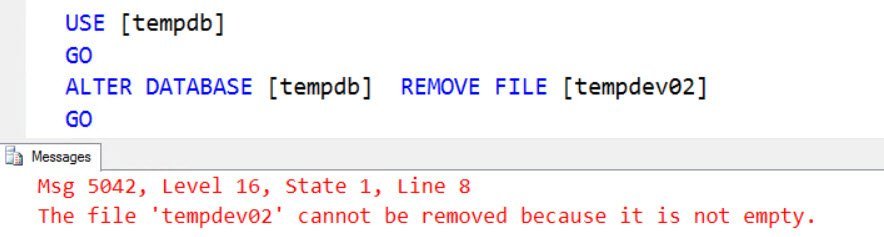
SQL SERVER – Error Msg 5042, Level 16 – The File ‘tempdev02’ Cannot be Removed Because it is Not Empty
As a SQL Server DBA you would know that sometimes it is possible to make mistakes with the database. Few of the time it can be corrected. Out of them, some are easy and some are difficult. I was running out of space on my VM and I started hunting for a bigger file on my machine. It was not difficult to find and recall that I added some files to the TempDB database while doing some testing. Here is the command to get details about the database file, which gave me Error Msg 5042.

SQL SERVER – FIX: Setup Was Not Able to Access Domain
One of my clients approached me to provide assistance in performance tuning – which is my bread and butter these days. Often once you get into an engagement, they try to maximize the time they get with me. While doing the tuning exercise, the DBA had a side question during the call. Let us learn about how setup is not able to access domain.

SQL SERVER – Unable to Open Maintenance Plan in Management Studio
The most queried topics in this blog have been around troubleshooting or which solve specific error messages. I always feel when I see something new as messages, I try to check if this is available here using the search page. If these are not there, then I go about documenting what were the steps I took to actually solve the given problem. Once I successfully solve the problem about Unable to Open Maintenance Plan in Management Studio. I go about documenting the same back into as a blog post so that I will be able to find the same in future reference.