

One of my recent interaction with a client was to assist in performing Upgrade the SQL Server 2008 R2 with service pack 2. As usual, I asked for setup logs from C:\Program Files\Microsoft SQL Server\100\Setup Bootstrap\Log\ folder. There were multiple folders so I asked the one which corresponds to the time of failure. Let us see exposure how we can solve error Error: 0x80070422.
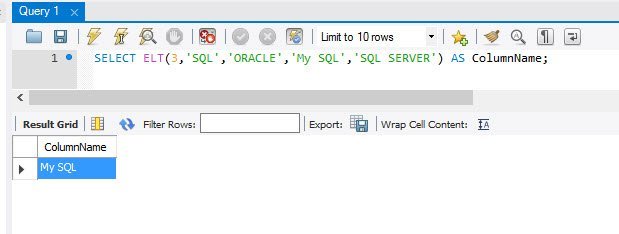
MySQL – ELT() and FILED() Functions to Extract Index Position From List
MySQL supports some functions that can be used to extract the index position or the actual value from a set of values arranged as an array. ELT() and FIELD() are example of such functions. Let us understand about them in details.

“I Don’t Know” – DBAs Should Learn to Use This Phrase – Notes from the Field #119
[Note from Pinal]: This is a 119th episode of Notes from the Field series. If you know Mike Walsh, he is an amazing person to meet and know. He is technical expert, but along with that he is a true life coach. I am fortunate to be his friend. Every single time I meet him, I learn something as a human. In this episode Mike explains one of the most important things any DBAs should learn, which is to say “I Don’t Know”.
In this episode of the Notes from the Field series database expert Mike Walsh gives a challenge to all of us. He explains to us why we should study our mistakes. He is indeed very right that every mistake gives us opportunity to correct ourselves.

SQL SERVER – Extended Events to watch for using ColumnStore Index
In the recent past, I have written a number of posts around ColumnStore Index and how they function. Some of the nuances of working with ColumnStore Indexes are available in this blog for reference. I have also written a few posts around Extended Events. One of my DBA friends pinged me to check if there were any way to use Profiler to see how ColumnStore Indexes worked. Obviously, there was nothing much of help I could offer because there were actually none in reality.



SQL SERVER – Introduction to SQL Azure Database Throttling
In standalone versions of SQL Server, if your SQL Server receives more concurrent requests than it can service simultaneously, it will queue the requests for later processing (subject to certain limits—generally available memory on the box). For example, if you have the max worker thread configuration option set to 100 and there are already 100 queries submitted to the server than any new requests are simply queued until one of the worker threads completes and can pick up the request. Except in fatal circumstances where DBA intervention is required this will allow all of the requests to eventually complete (or potentially timeout, if the client specified this setting). Let us understand about SQL Azure Database Throttling.