One of my clients had an interesting situation where none of the SQL Maintenance plans were working. The example what I am using here is a SQL Server backup maintenance plan failing. I also saw a behavior where all the individual jobs were working fine as expected.
SQL SERVER – Unable to Bring SQL Cluster Online – Reason: The Account is Disabled
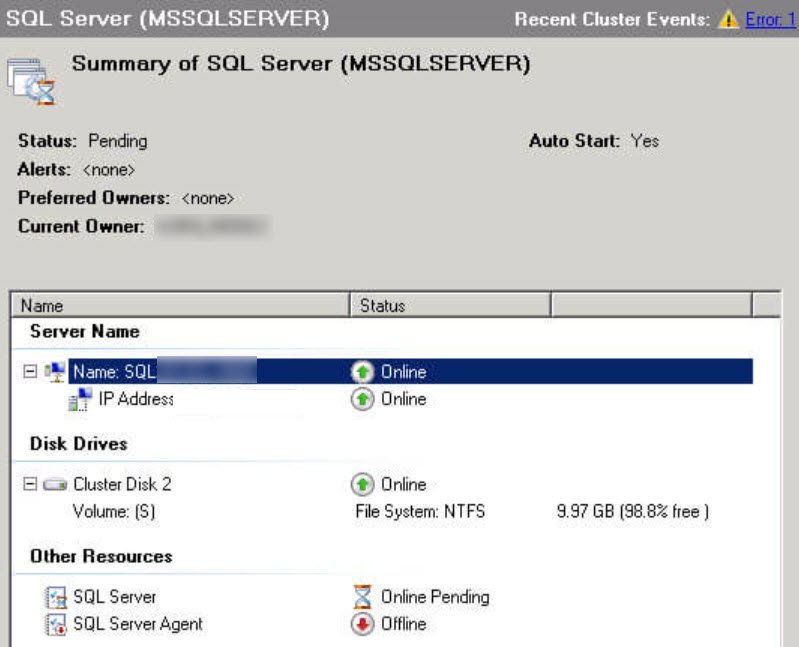
This was one of an interesting issue reported by my client. They informed that after some hardening by the security team, they are not able to bring SQL resource online in the cluster. In this blog, we would learn about how to fix the issue where SQL cluster is not coming online.
How to Generate Fibonacci Series for the First 1000 Values? – Interview Question of the Week #174
Question:Â How to Generate Fibonacci Series for the First 1000 Values?
SQL SERVER – SQL Server Cluster Resource Doesn’t Come Online Randomly
This was another interesting situation where client reported that their SQL Server Cluster resource, sometimes, fail to come online when they perform failover of SQL Server from one node to another. In this blog, we would learn how to fix ” SQL Server resource not coming to an online state ” issue.
SQL SERVER – Impact of Transaction on the Free Log Space
Earlier I wrote a blog post about SQL SERVER – How to Find Free Log Space in SQL Server? After reading this blog post, I received the following question from one of the users about the impact of the transaction on the free log space.
SQL SERVER – Reading Transaction Log to Identified Who Dropped a Table
The other day I received a distress email from a user who wanted to find out who has dropped a table or column from their database. During the On Demand (55 minutes) consultation, not only I was able to help them with restoring their lost data but also was able to find out which user had actually dropped their table “accidentally”. We were lucky enough that the user had a database in full recovery model, hence their transaction log recorded every detail needed.
SQL SERVER – Simple Script to Create a Login and User for a Specific Database with System Admin Rights
A very popular question I often receive about SQL Server security is what is the difference between SQL Server Login and SQL Server User. I really love this question as I bet only 5% of SQL Server professionals I met know the answer to this question. In this blog post, we are going to see a Simple Script to Create a Login and User for a Specific Database with System Admin Rights.
Pinal Dave is an SQL Server Performance Tuning Expert and independent consultant with over 22 years of hands-on experience. He holds a Masters of Science degree and numerous database certifications.
Pinal has authored 14 SQL Server database books and 104Â Pluralsight courses. To freely share his knowledge and help others build their expertise, Pinal has also written more than 5,800 database tech articles on his blog at https://blog.sqlauthority.com.
Pinal is an experienced and dedicated professional with a deep commitment to flawless customer service. If you need help with any SQL Server Performance Tuning Issues, please feel free to reach out at pinal@sqlauthority.com.
Pinal is also a CrossFit Level 1 Trainer (CF-L1) and CrossFit Level 2 Trainer (CF-L2).
Nupur Dave is a social media enthusiast and an independent consultant. She primarily focuses on the database domain, helping clients build short and long-term multi-channel campaigns to drive leads for their sales pipeline.
Is your SQL Server running slow and you want to speed it up without sharing server credentials? In my Comprehensive Database Performance Health Check, we can work together remotely and resolve your biggest performance troublemakers in less than 4 hours.
Once you learn my business secrets, you will fix the majority of problems in the future.
Have you ever opened any PowerPoint deck when you face SQL Server Performance Tuning emergencies? SQL Server Performance Tuning Practical Workshop is my MOST popular training with no PowerPoint presentations and 100% practical demonstrations.
Essentially I share my business secrets to optimize SQL Server performance.