
Question: Can I write a caught error to the SQL Server error log?

This came up during my SQL Server Performance Tuning Practical Workshop. We were looking at the server error log when someone asked, “Can my own T-SQL write a message there?” Yes. It’s a useful question, because the error shown to a client is not automatically a useful operational log entry.
Answer: Catch the error and raise it again with RAISERROR ... WITH LOG. Use a fixed %s format string and pass the caught message as a parameter. If you pass ERROR_MESSAGE() directly as the format string, a percent sign inside the message can be read as a formatting token.
BEGIN TRY
    SELECT 1 / 0 AS Result;
END TRY
BEGIN CATCH
    DECLARE @ErrorMessage nvarchar(2047) = ERROR_MESSAGE();
    RAISERROR(N'%s', 16, 1, @ErrorMessage) WITH LOG;
END CATCH;
Run this only on a test instance or in a controlled diagnostic exercise. WITH LOG writes a message to the SQL Server error log and the Windows Application log, so it’s an operational side effect. The option needs elevated permission. Ordinary application accounts should not be granted that permission just to make this sample work.
Read the entry back to confirm it arrived:
EXEC master.sys.xp_readerrorlog 0, 1, N'Divide by zero';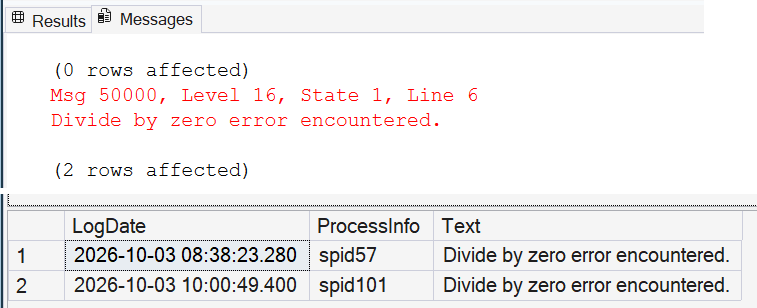
This RAISERROR call creates a user-defined error number, 50000; it doesn’t preserve the original divide-by-zero error number. Don’t increase the severity to force logging; severity 20 and above can end the connection. For new application error propagation, use THROW; keep RAISERROR ... WITH LOG for this specific logging behavior.
Would you put every application error in the SQL Server error log? I wouldn’t. Log deliberately, include enough context to investigate, and keep noisy routine failures out of the server’s operational record.

The error log is not an application log, it is the server’s diary, so write to it only on purpose.
Published by Pinal Dave on SQLAuthority. More of my work at pinaldave.com.
Discover more from SQL Authority with Pinal Dave
Subscribe to get the latest posts sent to your email.




1 Comment. Leave new
I have below code:
BEGIN TRY
DECLARE @INPUT DECIMAL
SET @INPUT = 51.21
DECLARE @VALUE NUMERIC(4,3)
SET @VALUE = CONVERT(NUMERIC,@INPUT)
PRINT @VALUE
END TRY
BEGIN CATCH
Print Error_Message() ;
THROW
END CATCH
— Now I want to print the value of the @INPUT variable in CATCH statement.
How can I get this?