
This month's discount Comprehensive Database Performance Health Check · Testimonials
SQLAuthority with Pinal Dave
Home
  • Consulting
    • Health Check
  • Free Videos
  • All Articles
    • AI
    • SQL Performance
    • SQL Tips and Tricks
    • Interview Questions and Answers
    • SQL Puzzle
    • SQL Video
    • SQLAuthority News
    • Personal
  • Books
  • Consulting
Two identical brass compasses on a workbench, one needle pulled aside by a nearby iron vise

Why One Query Has Two Cached Plans: SET Options and plan_attributes

November 8, 2008
Pinal Dave
SQL Performance
Execution Plan, Parameter Sniffing, SQL Cache, SQL DMV, SQL Server

Investigate two cached plans with plan_attributes, decode differing SET options, and match application settings before diagnosing skew.
Read More
SQL SERVER - Refresh Database Using T-SQL

SQL SERVER – Refresh Database Using T-SQL

November 7, 2008
Pinal Dave
SQL Performance
SQL Scripts, SQL Server DBCC, SQL Stored Procedure

Can you refresh database in Object Explorer using a T-SQL query? No. But if cached objects changed, DBCC commands can clear the cache for you.
Read More
SQLAuthority News - 5 Millions Visitors - 2 Anniversary - Authors Note on Economy Slow Down and Job Opportunity - SQL Server

SQLAuthority News – 5 Millions Visitors – 2 Anniversary – Authors Note on Economy Slow Down and Job Opportunity – SQL Server

November 6, 2008
Pinal Dave
Personal
Best Practices, Database, DBA, MVP

SQLAuthority.com crossed 5 million visitors and turned 2 years old. I also share my note on the economy slow down and job opportunity for SQL Server folks.
Read More
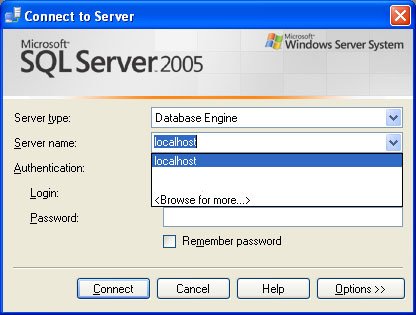
SQL Server 2005 connection window.

SQL SERVER – Clear Drop Down List of Recent Connection From SQL Server Management Studio

November 5, 2008
Pinal Dave
SQL Tips and Tricks
Best Practices, Database, DBA, SQL Scripts, Vista

Is the SSMS connect drop down list full of old server names? Delete the mru.dat file for SQL Server 2005 or 2008 to clear it and start fresh.

Read More
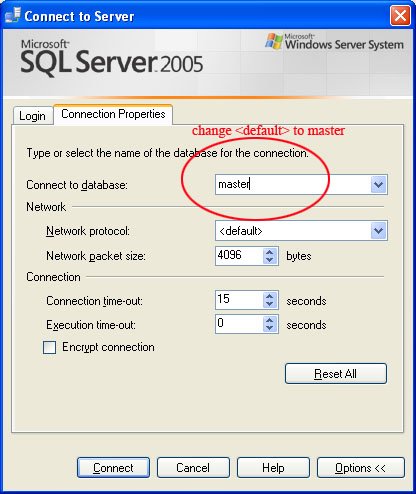
SQL Server master connection window.

SQL SERVER – Fix : Error: 4064 – Cannot open user default database. Login failed. Login failed for user

November 4, 2008
Pinal Dave
SQL Tips and Tricks
SQL Error Messages, SQL Scripts

Error 4064, cannot open user default database, shows up when a login’s default database was dropped. Connect to master first, then change the default.

Read More
A covered serving dish passes through a small kitchen hatch toward a hand reaching from a dark room.

Encrypting Connections to SQL Server

November 3, 2008
Pinal Dave
SQL Tips and Tricks
SQL Connection, SQL Server, SQL Server Configuration, SQL Server Encryption, SQL Server Security

Encrypting connections to SQL Server requires a trusted certificate, careful Force Encryption rollout, and tests with real drivers.
Read More
SQL SERVER - Fix : Error : Login failed for user 'UserName'. The user is not associated with a trusted SQL Server connection

SQL SERVER – Fix : Error : Login failed for user ‘UserName’. The user is not associated with a trusted SQL Server connection

November 2, 2008
Pinal Dave
SQL Tips and Tricks
SQL Error Messages, SQL Server, SQL Server Security

Login failed, not associated with a trusted SQL Server connection? I hit it between SQL Server 2008 and 2005 and fixed it with a matching Windows user.

Read More
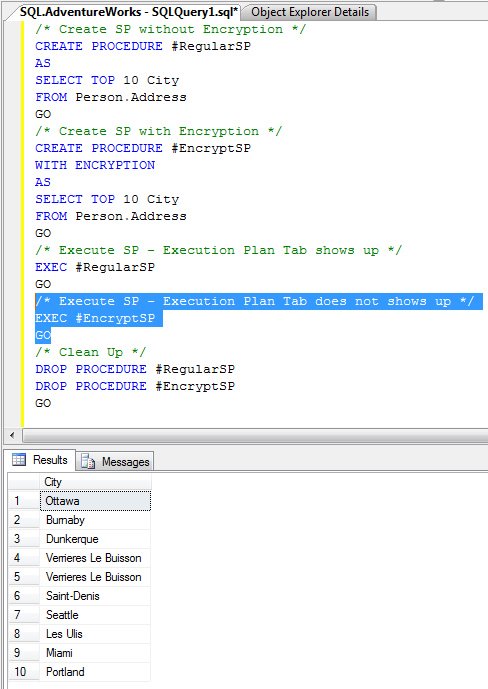
Execution plan table shows up.

SQL SERVER – Stored Procedure WITH ENCRYPTION and Execution Plan

November 1, 2008
Pinal Dave
SQL Tips and Tricks
SQL Scripts, SQL Server Security

Here is what I found about WITH ENCRYPTION and execution plan: an encrypted SP hides its actual execution plan too. Two sample SPs show it.
Read More
SQL SERVER - DECLARE Multiple Variables in One Statement

SQL SERVER – DECLARE Multiple Variables in One Statement

October 31, 2008
Pinal Dave
SQL Performance
Best Practices, SQL Scripts

Yes, you can DECLARE multiple variables in one statement in SQL Server. Compare both methods side by side: one statement per variable, or all in one line.

Read More
A wooden pigeon loft at dusk with a pigeon in every nesting box except one empty box with an open door.

Tracking Job Failures Across Servers

October 30, 2008
Pinal Dave
SQL Tips and Tricks
DBA, SQL Monitoring, SQL Scripts, SQL Server Agent

Tracking job failures across servers takes a daily msdb report, a central instance list, and notifications that reach someone who can act.

Read More
Previous 1 … 511 512 513 514 515 516 517 … 590 Next
  • Books
  • Testimonials
  • Privacy Policy

© 2006 – 2026 All rights reserved. pinal @ SQLAuthority.com